
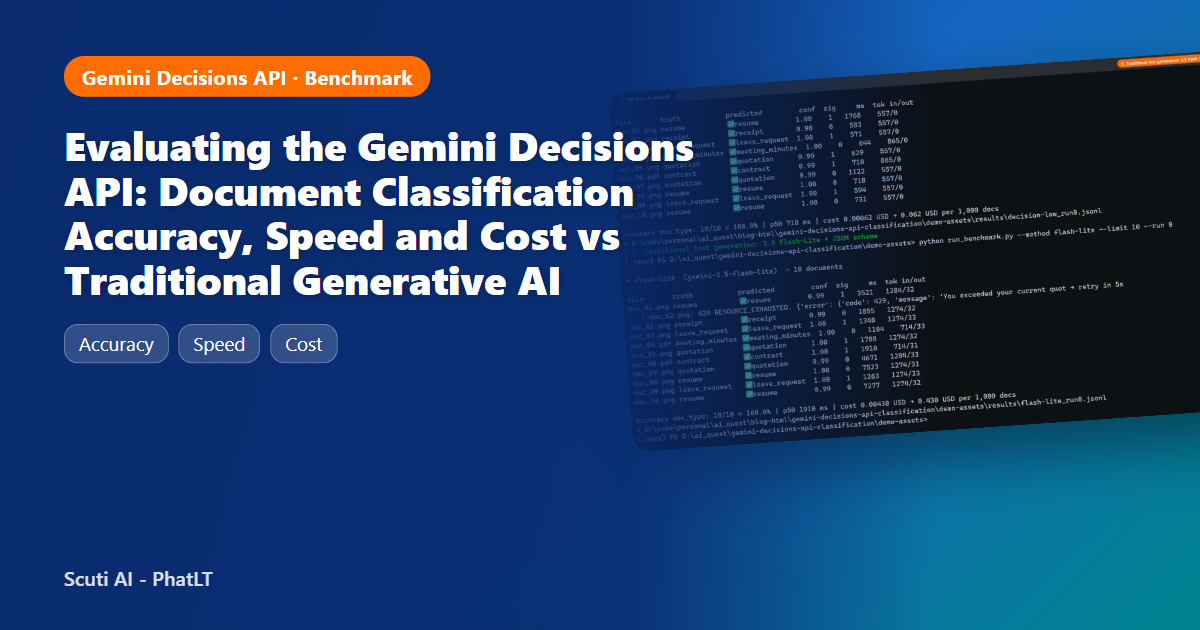
A hands-on benchmark of gemini-decision-1 against Gemini 3.5 Flash-Lite on invoices, quotations, contracts, CVs and more, in Vietnamese, English and Japanese, with every request timed and priced.
1. Why classification needs a different API
This post benchmarks the Gemini Decisions API against traditional text generation for document classification. Most “AI classification” code I have written or reviewed looks the same. We send a document to a chat model, ask it to “return JSON with a category”, parse the text, and hope the model did not add an extra field, change a label’s spelling, or think for eight seconds before answering. The model writes text so that our code can turn the text back into a decision.
Google’s new Gemini Decisions API (model gemini-decision-1, announced 11 November 2026) removes that round-trip. You send an input and a set of typed questions. The model scores the candidate answers in a single pass and returns probabilities, with zero output tokens. I wanted to know whether this is a real improvement or just a new wrapper, so I built a small but realistic benchmark and ran it end-to-end.
What this post tests: the same 40 documents, the same 8 labels and the same wording of the question, sent to (A) the Decisions API, (B) the Decisions API with resolution: “low”, and (C) the “traditional” approach, Gemini 3.5 Flash-Lite with a JSON response schema. Each method ran 3 times. All data is synthetic and fictional, and no customer or internal documents were used.
2. What the Gemini Decisions API actually returns
There is no prompt template and no “answer in JSON”. A request has two parts: a shared input (text, images, PDFs, audio or video, up to about 256K tokens) and a map of questions. Each question has one of three types:
| Type | Use it for | What comes back |
|---|---|---|
| choice | Pick one label out of 2–255 (my 8 document types) | Winning key + probability for every option + confidence |
| noul (yes/no) | Binary checks (“is there a signature?”) | Probability of “yes” (0.01–0.99) + confidence |
| score | Ordered rubric (“amount level 0–3”) | Probability-weighted score + per-level probabilities |
Pricing is the second half of the story. It costs $0.10 per 1M input tokens and $0 for output, and the shared input is billed once no matter how many questions you ask. For comparison, Gemini 3.5 Flash-Lite costs $0.30 per 1M input tokens and $2.50 per 1M output tokens (including thinking). Prices come from the AI Studio pricing page, checked 20 November 2026.
Practical note: the API itself worked on my free-tier key. The “Decisions API Playground” app in AI Studio, however, asked me to link a key with billing enabled, so I tested only through the Python SDK (google-genai 3.6.1, api_version=”v1beta”).
3. Test design: dataset, methods, metrics
Dataset
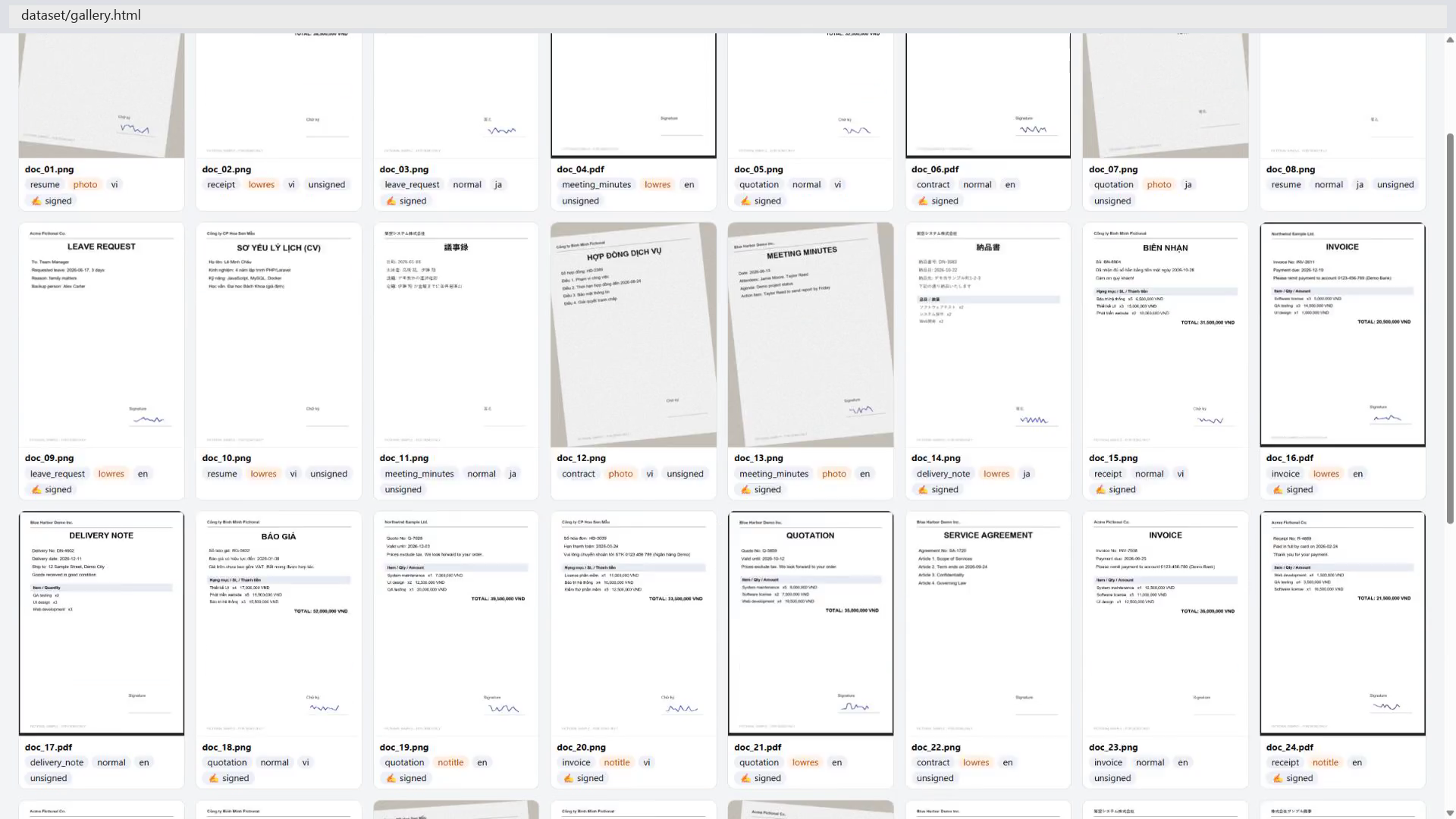
A script generates 40 fictional business documents: 8 types × 5 samples, in Vietnamese, English and Japanese. Each comes with a ground-truth label and a “has signature” flag. To keep it from being too easy, 24 of the 40 are deliberately hard:
| Difficulty | Count | What was done |
|---|---|---|
| normal | 16 | Clean rendering with a title |
| notitle | 8 | Title removed, so the type must be inferred from content (invoice vs quotation vs receipt is the classic trap) |
| photo | 8 | Rotated 4–7°, Gaussian blur and noise, like a phone photo |
| lowres | 8 | Downscaled to 1/3 and upscaled back |
Labels: invoice, quotation, receipt, contract, leave_request, resume, meeting_minutes, delivery_note. 8 files are PDFs and 32 are PNGs.
Methods
- A. Decisions API: one request per document with two questions, doc_type (choice, 8 options with one-line descriptions) and has_signature (noul).
- B. Decisions API, low resolution: same as A, with “resolution”: “low” on the image block.
- C. Text generation (baseline): gemini-3.5-flash-lite with the same descriptions in the prompt, response_mime_type=”application/json”, an enum schema and temperature=0. I also asked it for a self-reported confidence.
I also tried gemini-3.8-flash and gemini-3.6-flash as a stronger text-generation baseline. On image inputs, single calls did not return within 60 seconds in my environment, so I excluded them rather than report partial numbers.
Metrics
- Accuracy of doc_type against ground truth (mean of 3 runs), plus signature accuracy.
- Stability: share of documents that got the same label in all 3 runs.
- Latency: wall-clock time per request from my laptop in Vietnam (p50/p95), sequential calls. Retries after rate limits are not counted.
- Cost: computed from the actual token usage returned by each API, at list price.
4. Step-by-step implementation
Step 1: Environment
python -m venv .venv; .\.venv\Scripts\Activate.ps1
pip install google-genai pillow matplotlib python-dotenv
# .env (never committed, never printed):  GEMINI_API_KEY=...
Step 2: Generate the dataset
A short Pillow script renders each document from fictional templates (company, people, line items, totals), optionally draws a scribble on the signature line, then applies the “hard” transformations (remove title, rotate + blur + noise, downscale). It writes the ground truth to a CSV: file, doc_type, has_signature, lang, difficulty. Any similar set of your own non-confidential samples works the same way.
Step 3: The Decisions API call
The whole classifier is one call. Note that instructions is required for choice questions; the SDK rejects the request before sending if it is missing.
client = genai.Client(api_key=key, http_options={"api_version": "v1beta"})
r = client.decisions.create(
    model="gemini-decision-1",
    input=[{"type": "image", "data": b64, "mime_type": "image/png"}],   # "document" for PDFs
    questions={
        "doc_type": {"type": "choice", "instructions": Q_TYPE, "criteria": CLASSES},
        "has_signature": {"type": "noul", "instructions": Q_SIGN},
    })
label = r.answers["doc_type"].choice          # e.g. "quotation"
conf  = r.answers["doc_type"].confidence      # e.g. 0.97
probs = r.answers["doc_type"].probabilities   # all 8 options
tokens = r.usage.total_input_tokens           # output is always 0
Step 4: The traditional baseline
r = client.models.generate_content(
    model="gemini-3.5-flash-lite",
    contents=[types.Part.from_bytes(data=img, mime_type="image/png"), PROMPT],
    config=types.GenerateContentConfig(
        response_mime_type="application/json", response_schema=SCHEMA, temperature=0))
j = json.loads(r.text)    # {"doc_type": "...", "has_signature": true, "confidence": 0.99}
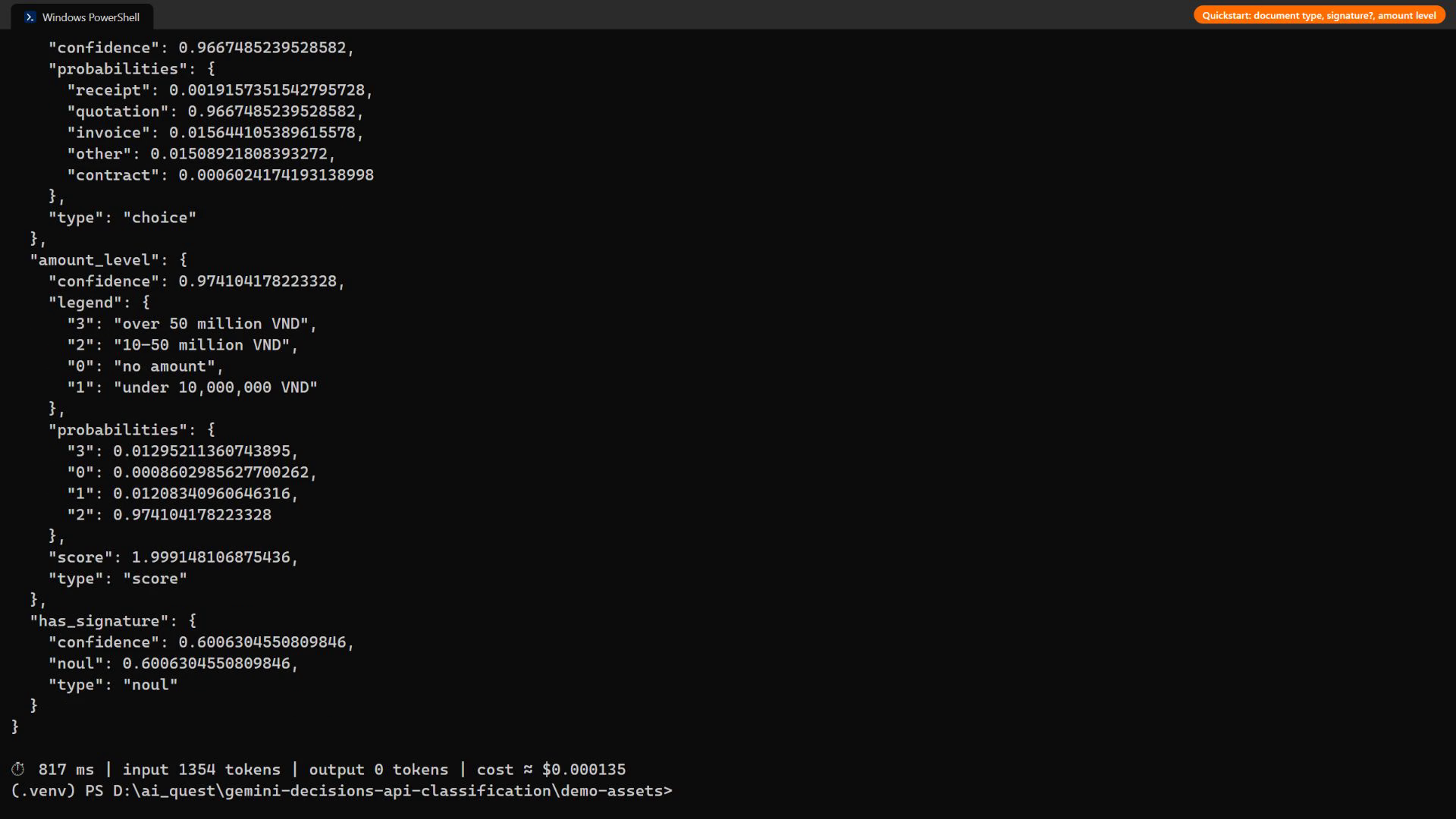
Step 5: One request, three question types
One request asks a choice, a yes/no and a score question about one quotation. It cost 1,354 input tokens and took about 1 second.
Step 6: Run the benchmark and build the report
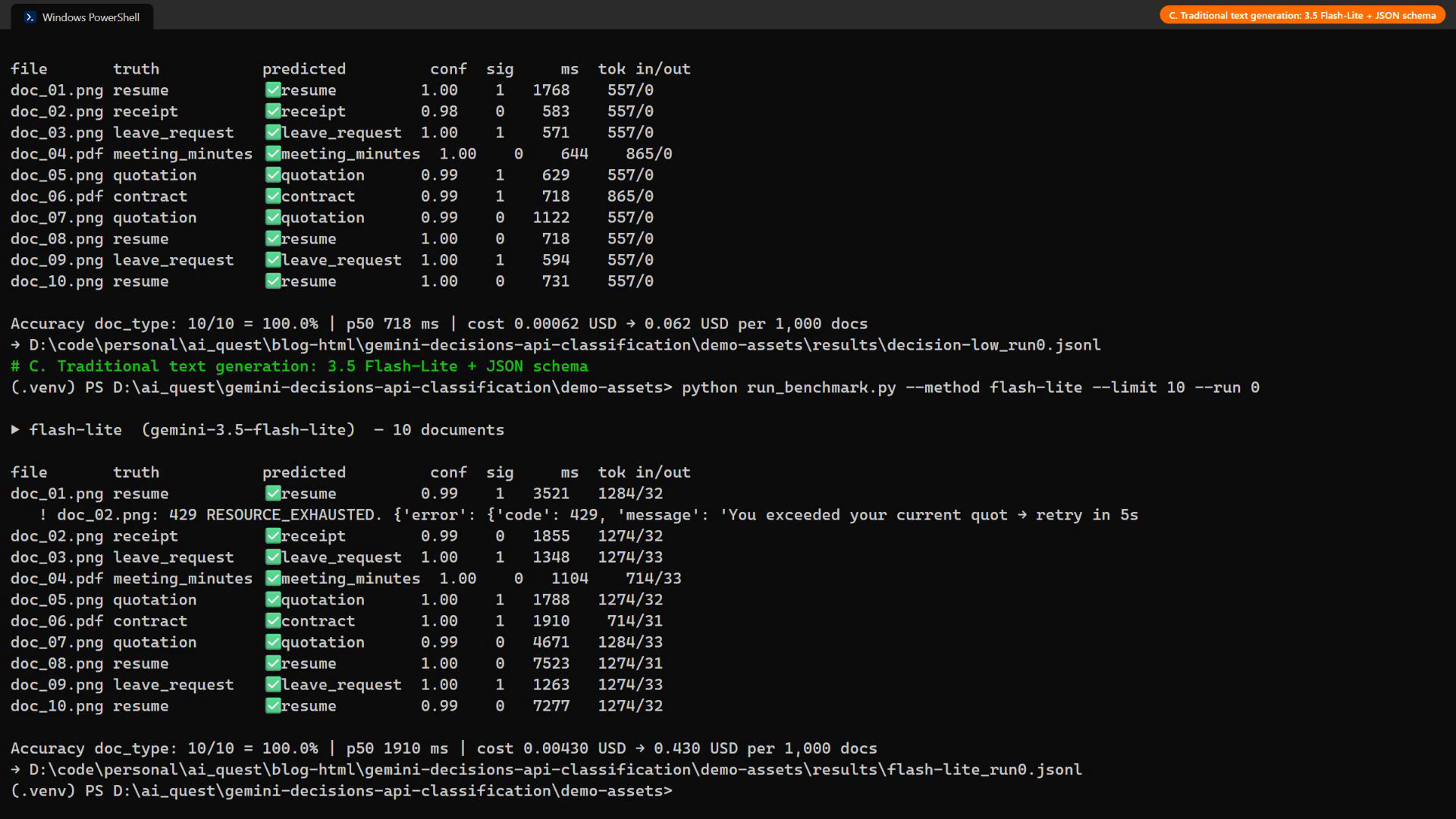
The benchmark loops over the 40 documents for each method, sends one request per document sequentially, measures wall-clock time around the call, reads token usage from the response (usage.total_input_tokens for Decisions; usage_metadata.prompt_token_count, candidates_token_count and thoughts_token_count for Flash-Lite), and multiplies by list prices. On a 429 it waits and retries, and the waiting time is not counted as latency. Each method ran 3 times, then the results were aggregated into the tables and charts below.
5. Demo video
The full run is recorded in the video below: reading the docs and pricing, setting up, generating the dataset, the quickstart call, the side-by-side benchmark, the report, and confidence routing. Terminal output and timings are real, and the API key is never shown.
6. Results: accuracy, speed, cost
40 documents × 3 runs × 3 methods = 360 requests.
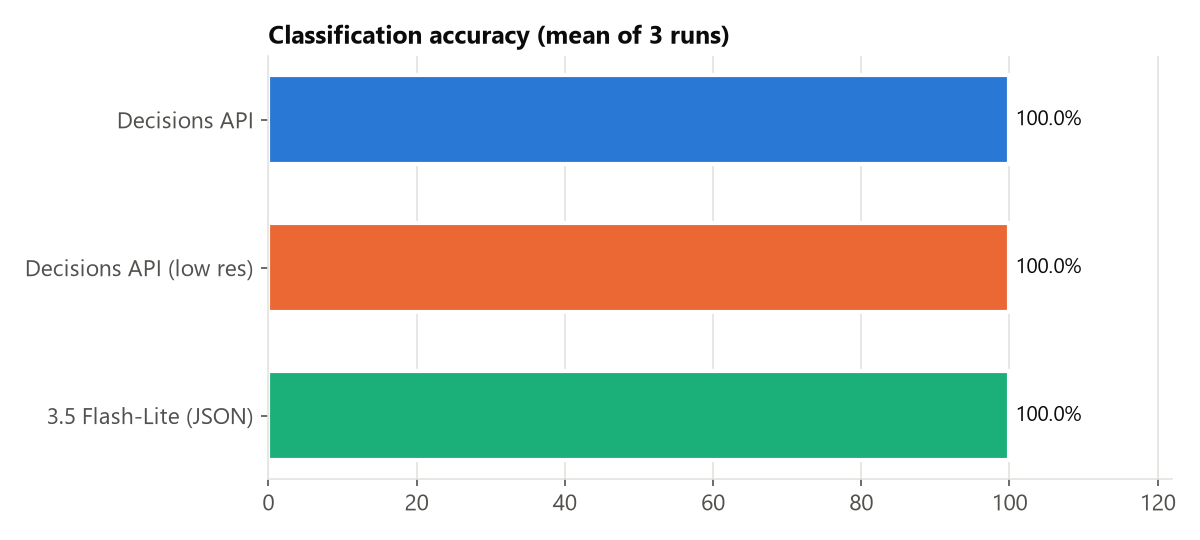
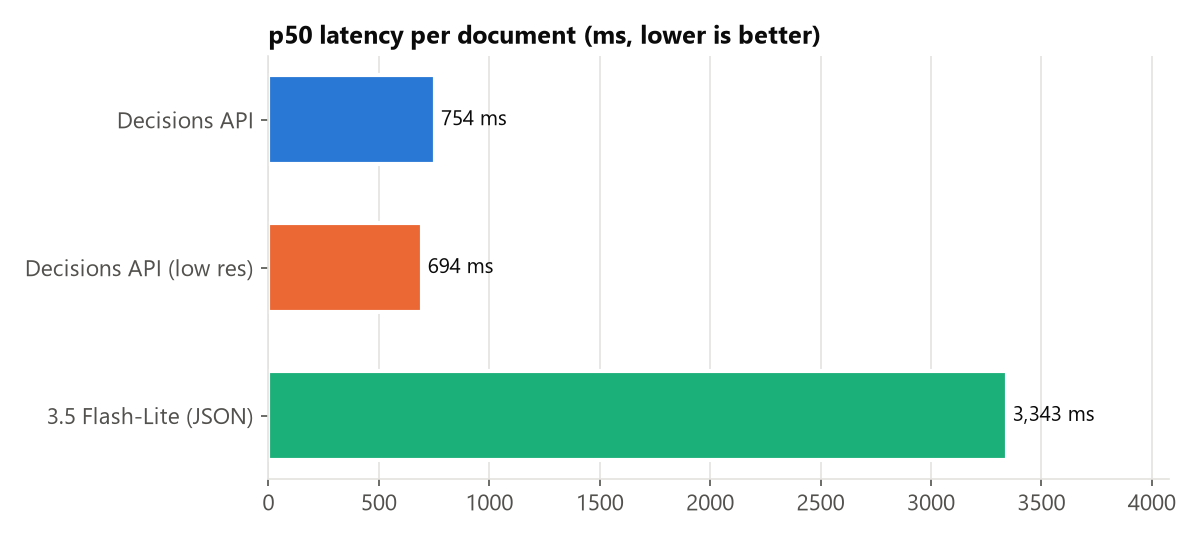
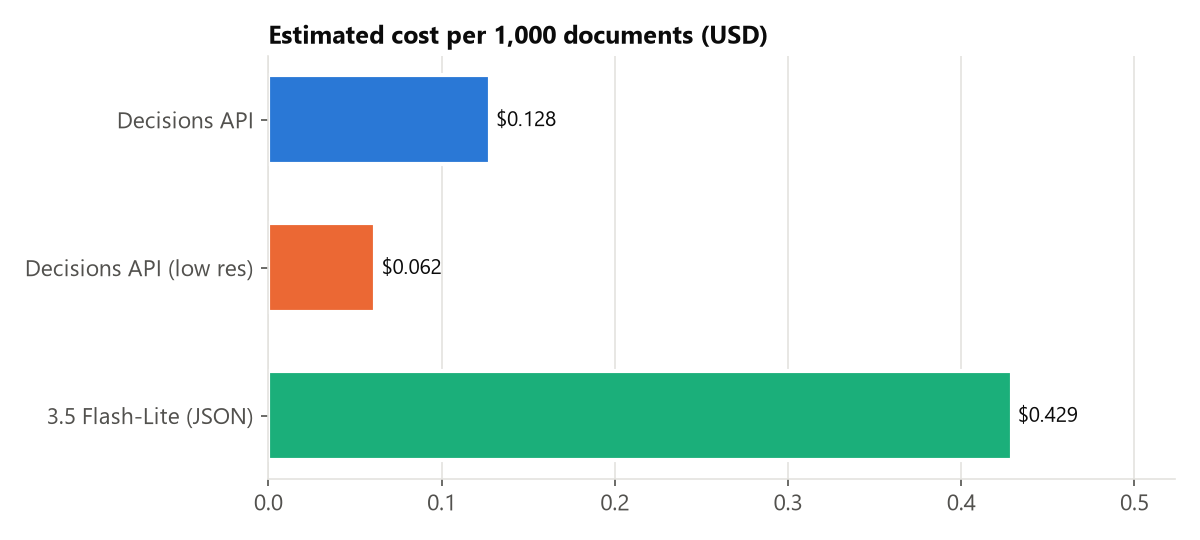
| Method | Type accuracy | Signature accuracy | Stable across runs | p50 latency | p95 latency | Tokens in / out | Cost per 1,000 docs |
|---|---|---|---|---|---|---|---|
| A. Decisions API | 100.0% | 80.0% | 100% | 754 ms | 1.77 s | 1,280 / 0 | $0.128 |
| B. Decisions API (low res) | 100.0% | 85.0% | 100% | 694 ms | 1.23 s | 619 / 0 | $0.062 |
| C. 3.5 Flash-Lite + JSON | 100.0% | 100.0% | 100% | 3.34 s | 9.47 s | 1,162 / 32 | $0.429 |
What the numbers say
- Accuracy is a tie on document type. On this dataset both approaches classified the 8 types correctly, even without titles, on rotated blurry photos and in Japanese. The task is not hard enough to separate them on accuracy alone, and that is a finding too: for a typical back-office set of document types, you do not need a generative model to get the label right.
- Speed is where the gap is. Decisions returns in about 754 ms at the median, against 3.34 s for Flash-Lite, roughly 4× faster. Flash-Lite spends the extra time producing about 32 output tokens of JSON, and the latency varies more (p95 9.47 s).
- Cost: 3.4× cheaper at the default resolution and 6.9× cheaper with resolution: “low”, which halved the image tokens without hurting type accuracy here. Input token counts are similar for both APIs; the saving comes from the lower input price and from paying nothing for output.
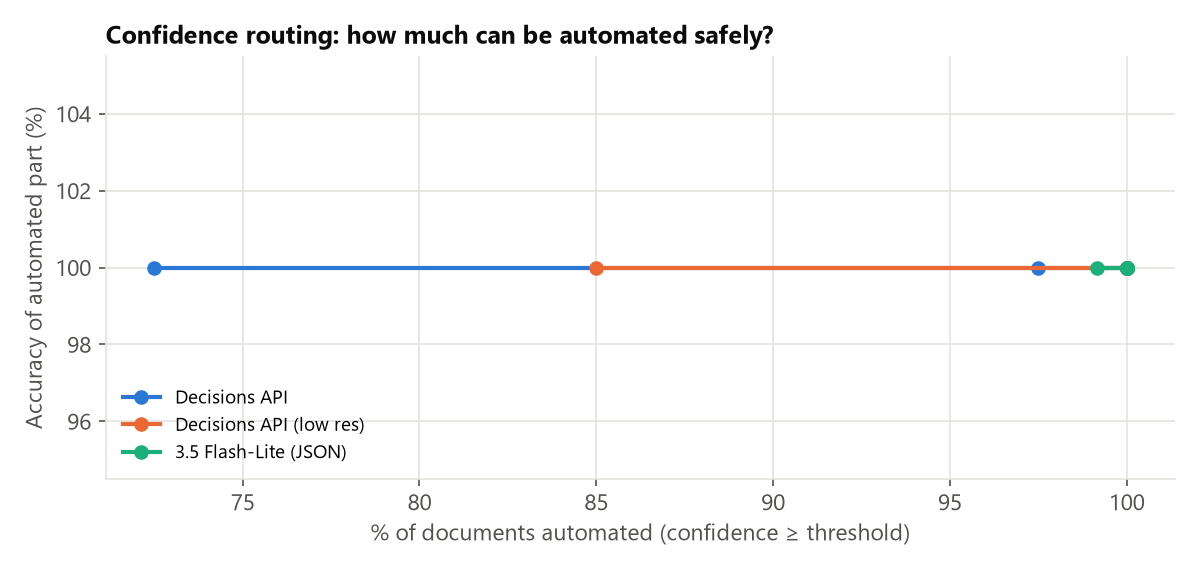
- Confidence is useful, not decorative. Flash-Lite’s self-reported confidence was 0.99–1.00 on almost every document, so it tells you nothing about which answers to double-check. The Decisions API’s probabilities dropped exactly where the model was unsure (see section 7), which is what you need for routing.
7. Where it breaks: the signature question
The most interesting result was not the headline number. On the yes/no question “Is there a handwritten signature on the signature line?”, the Decisions API reached only 80.0%, while Flash-Lite reached 100.0%.
Looking at all 3 runs, every miss (24 at default resolution, 18 at low) was a signed document that the API called unsigned, with confidence between 0.52 and 0.65. The API was not confidently wrong; it was close to a coin flip and said so. It was hesitant on this question in general: even among its correct signature answers, 81% had confidence below 0.9. My synthetic “signature” is a thin blue scribble that takes up a tiny area of the page, a small visual detail that the default image resolution may blur away. Two lessons:
- Always route on confidence. With a 0.9 threshold, none of the signature errors would have been automated. But most signature checks would also have gone to a person, so for this question the API is a safe filter, not an automation. Text generation got it right here, but gives no signal for the cases where it would not.
- Small visual details need care. For checks like stamps, signatures or tiny check marks, test higher resolution values or crop the region first. Do not assume the type-level accuracy carries over.
8. My take: when to use it, and when not to
Use the Decisions API when
- The answer is a closed set you can write down in advance: document type, ticket category, sentiment, policy pass/fail, “which tool should the agent call”, “which model should handle this request”.
- You need it inside a hot path: routing a chat message before the expensive model runs, gating an upload, pre-labelling items in a queue. About 1 second and a fraction of a cent per document is cheap enough to run on everything.
- You want several judgements over the same input. Twenty yes/no checks on one contract cost almost the same as one, because the input is billed once.
- You need a calibrated “I’m not sure” to decide what a human should look at.
Stay with text generation when
- You need to extract values (invoice number, amount, dates) or explain why. The Decisions API returns no text at all.
- The label set is open-ended or changes per request in ways you cannot enumerate.
- The decision depends on a tiny visual detail and you have not validated resolution or cropping yet (see section 7).
The pattern I would actually ship is a two-stage pipeline: the Decisions API classifies and scores everything cheaply, high-confidence items go straight through, and only low-confidence items or ones needing extraction go to a generative model or a human. It is still v1beta, Vertex AI support is “coming soon”, and the Playground needs billing, so for production I would wait for GA or keep a fallback path.
On standardisation
Typed question → probabilities is a cleaner contract than “prompt → text → regex”, and I expect other providers to converge on it. Today it is Gemini-specific, so I keep the question definitions (labels + descriptions) in one config file that both the Decisions call and the text-generation fallback read. Switching providers then means changing the call, not the taxonomy.
9. How I will use it in my daily work
I work at a software development company, writing technical content, preparing demos and supporting project teams. Concretely:
| Daily task today | With the Decisions API |
|---|---|
| Sorting inbound files from customers (specs, quotations, contracts, screenshots of bugs) into project folders by hand | A choice question on upload routes each file to the right folder; anything below 0.9 lands in a “check me” folder |
| Triaging bug reports and support emails (bug / feature request / question / urgent) | Choice + score (severity 0–3) in one call, used to set labels and priority automatically |
| Reviewing my own blog drafts against our quest checklist | One request with 6–8 yes/no questions (“states own opinion?”, “includes daily-work application?”, “no confidential data?”) over the draft before I submit |
| Choosing which LLM to call in internal tools | A cheap routing question (“simple FAQ / needs reasoning / needs code”) so expensive models only run when needed |
| Checking screenshots before publishing | A yes/no check for “contains an email address, API key or personal name” as a safety net, with a human looking at anything uncertain |
None of these need generated text, all of them run many times a day, and all of them benefit from knowing when the model is unsure. That is exactly the shape of problem this API is built for.
10. Conclusion
- On 40 multilingual, partly degraded business documents, the Decisions API matched a JSON-mode text-generation baseline on document-type accuracy while being about 4× faster and 3.4–6.9× cheaper.
- Its real advantage is the probability output: it lets you automate the confident cases and route the rest, which a self-reported “confidence” field from a generative model does not.
- It is not magic for small visual details. The signature check showed hesitant answers that must go to review, or be fixed with resolution or cropping.
- Treat it as the first stage of a pipeline: classify, score and route, and keep text generation for extraction and explanation.
All documents, names, companies and amounts in this test are fictional. Prices are list prices from the AI Studio pricing page as of 20 November 2026; latency was measured from a home network and will differ in your environment.