
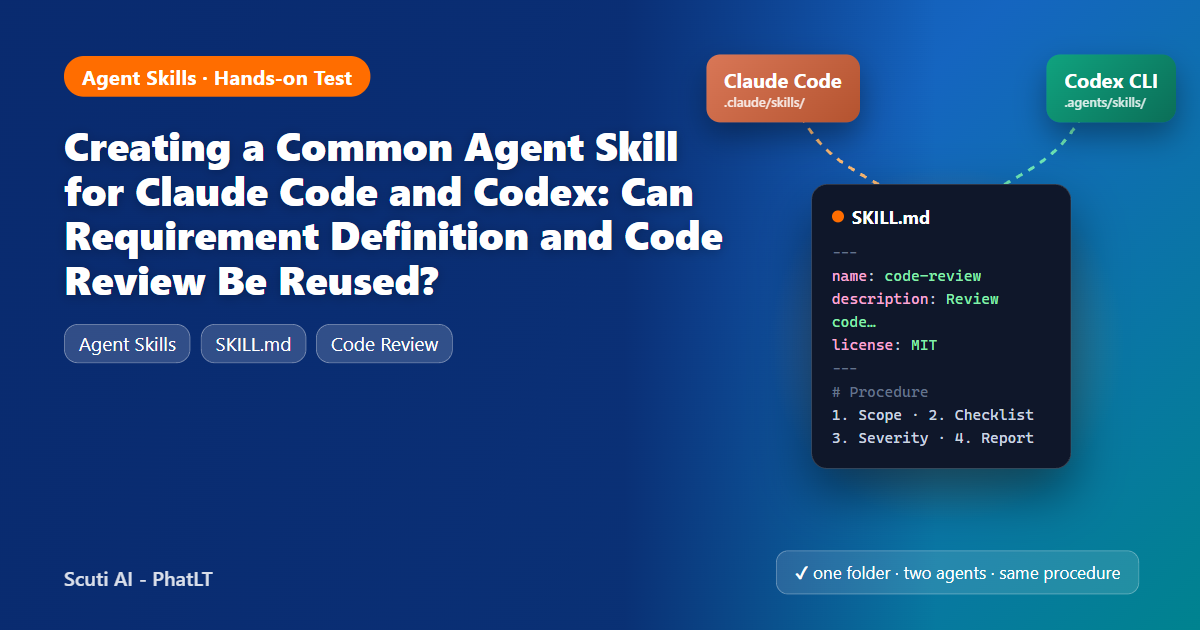
I wrote two Agent Skills once, put them in a single folder, and ran the same tasks through Claude Code and OpenAI Codex CLI. Here is what transferred, what did not, and the full skills so you can try them yourself.
1. Why a common skill matters
Agent Skills are folders of instructions (a SKILL.md plus optional references and scripts) that a coding agent loads only when a task needs them. Our team, like many, does not use a single agent: some people prefer Claude Code, others Codex, and reviewers use GitHub Copilot. If every tool needs its own prompt files, our review checklist and our requirements template slowly drift apart.
Anthropic donated the Agent Skills specification to the Agentic AI Foundation in October 2026, and Codex and GitHub Copilot both read the same format. The question for this quest is practical: can I write a requirement-definition procedure and a code-review procedure once, and get the same behaviour from Claude Code and Codex?
2. The Agent Skills format in five minutes
The open specification at agentskills.io is deliberately small:
| Part | Rule |
|---|---|
| SKILL.md | YAML frontmatter between — lines, then Markdown instructions. Keep it under about 500 lines. |
| name (required) | 1–64 characters, lowercase letters, digits and hyphens. It must match the folder name. |
| description (required) | Up to 1,024 characters: what the skill does and when to use it. Agents match tasks to skills with this text. |
| Optional fields | license, compatibility, metadata, allowed-tools (experimental) |
| Optional folders | references/, scripts/, assets/, loaded only when the instructions point to them (progressive disclosure) |
Where each tool looks for project skills:
| Tool | Project skill folder | Explicit invocation |
|---|---|---|
| Claude Code | .claude/skills/<name>/SKILL.md | /skill-name |
| Codex CLI | .agents/skills/<name>/SKILL.md | $skill-name |
| GitHub Copilot | .github/skills, .claude/skills or .agents/skills | automatic by description |
All three also pick a skill automatically when the request matches its description.
3. One folder for two agents
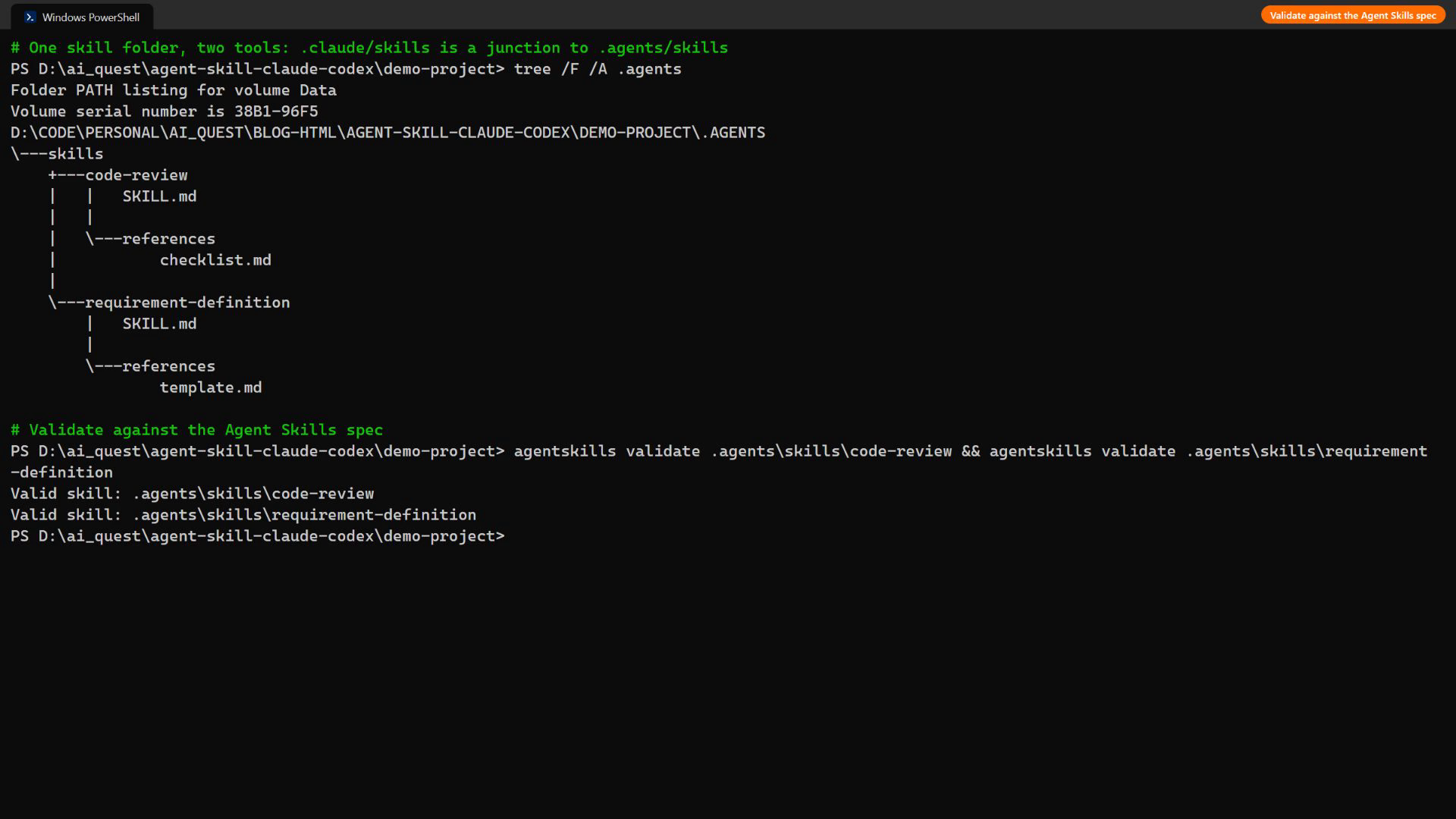
To avoid two copies drifting apart, I keep the real files in .agents/skills/ (read by Codex and Copilot) and make .claude/skills a directory junction pointing to it (a symlink works the same on macOS/Linux):
demo-project/
├── .agents/skills/
│   ├── requirement-definition/
│   │   ├── SKILL.md
│   │   └── references/template.md
│   └── code-review/
│       ├── SKILL.md
│       └── references/checklist.md
├── .claude/skills  →  junction to .agents/skills
├── feature-request.txt
└── leave_service.py

# Windows (no admin needed for a junction)
mklink /J .claude\skills .agents\skills
# macOS / Linux
ln -s ../.agents/skills .claude/skills
I used only fields from the open spec (name, description, license, compatibility, metadata) and no tool-specific extensions, then validated both skills with the reference validator:
pip install skills-ref
agentskills validate .agents/skills/code-review              # Valid skill
agentskills validate .agents/skills/requirement-definition   # Valid skill
4. The two skills (full source)
Copy these four files into .agents/skills/ in your repository (and link .claude/skills to it) to try them yourself. They are MIT-licensed.
4.1 requirement-definition/SKILL.md
---
name: requirement-definition
description: Turn an informal feature request (Slack message, email, meeting note) into a structured requirements document with user stories, numbered functional and non-functional requirements, Given/When/Then acceptance criteria, assumptions and open questions. Use when the user asks to define, clarify, write or review requirements, a spec, or acceptance criteria for a feature.
license: MIT
compatibility: Agent Skills standard (agentskills.io). Tested with Claude Code and OpenAI Codex CLI. Needs read/write access to the repository.
metadata:
  author: phatlt
  version: "1.0"
---

# Requirement definition

Produce a requirements document that a developer, a tester and the requester can all agree on.

## Procedure

1. **Read the request and the code it touches.** Find the related modules (search for nouns from the request) so requirements match the real data model. Never invent tables or fields that do not exist without marking them as *new*.
2. **Separate facts from guesses.** Anything the requester did not state explicitly goes to *Assumptions* (A-xx). Anything that blocks implementation goes to *Open questions* (Q-xx) addressed to a named role.
3. **Write the document** using exactly the template in [references/template.md](references/template.md). Keep every heading, in the same order, even if a section is "None".
4. **Number everything**: FR-01, NFR-01, AC-01, A-01, Q-01. Each acceptance criterion references the FR it verifies.
5. **Acceptance criteria** use Given / When / Then and must be testable (concrete values, no "should work well").
6. **Save** the document to `docs/requirements/<kebab-case-feature-name>.md` and print a 3-line summary: number of FRs, NFRs, ACs and open questions.

## Rules

- Write in the language of the request unless the user asks otherwise.
- Prefer short sentences; one requirement per line.
- Flag security, privacy and audit needs explicitly as NFRs.
- Do not write implementation code in this skill.
4.2 requirement-definition/references/template.md
# <Feature name> — Requirements

| Item | Value |
|---|---|
| Source | <where the request came from> |
| Requester | <role> |
| Target date | <date or "not stated"> |
| Related code | <files/modules> |

## 1. Background
## 2. Goals / Non-goals
## 3. User stories            (US-01: As a <role>, I want ... so that ...)
## 4. Functional requirements (| ID | Requirement | Priority (Must/Should/Could) |)
## 5. Non-functional requirements (| ID | Category | Requirement |)
## 6. Acceptance criteria     (| ID | Verifies | Given | When | Then |)
## 7. Assumptions             (A-01: ...)
## 8. Open questions          (| ID | Question | To |)
## 9. Out of scope
4.3 code-review/SKILL.md
---
name: code-review
description: Review source code or a diff for security, correctness, error handling, maintainability and test coverage, and report findings in a fixed severity-ranked format with file:line references and concrete fixes. Use when the user asks for a code review, PR review, bug hunt, security check or "look over this code".
license: MIT
compatibility: Agent Skills standard (agentskills.io). Tested with Claude Code and OpenAI Codex CLI. Read-only; does not modify code.
metadata:
  author: phatlt
  version: "1.0"
---

# Code review

Review like a senior engineer who must sign off the change. Be specific, cite lines, propose fixes. Do not edit the code.

## Procedure

1. **Scope**: review the files or diff the user names. If none are named, review files changed in the working tree (`git diff --name-only`), otherwise all source files in the current directory.
2. **Read every line** of the in-scope files. Check each item of [references/checklist.md](references/checklist.md).
3. **Classify** every finding with exactly one severity:
   - **Critical**: security hole, data loss, secret exposure. Must fix before merge.
   - **Major**: wrong behaviour, broken business rule, crash risk.
   - **Minor**: error handling, robustness, maintainability.
   - **Nit**: style, naming, comments.
4. **Report** using the output format below, sorted Critical → Nit. One finding per row. Merge duplicates.
5. Finish with a one-line **verdict**: `APPROVE`, `APPROVE WITH COMMENTS` or `REQUEST CHANGES` (any Critical or Major → REQUEST CHANGES).

## Output format

## Code review: <scope>

| # | Severity | Location | Finding | Suggested fix |
|---|----------|----------|---------|---------------|
| 1 | Critical | file.py:12 | ... | ... |

**Summary:** <n> Critical, <n> Major, <n> Minor, <n> Nit
**Verdict:** REQUEST CHANGES

## Rules

- Location must be `path:line` (or `path:start-end`).
- Never report something you did not verify in the code.
- If tests are missing for changed logic, report it as Minor.
4.4 code-review/references/checklist.md
# Review checklist

## Security
- [ ] No secrets, tokens or passwords in source code or logs
- [ ] All SQL uses parameter binding (no string formatting / f-strings)
- [ ] Authorization: the caller is allowed to perform the action (e.g. no self-approval)
- [ ] Input validation for user-supplied values

## Correctness
- [ ] Logic matches docstrings, comments and business rules (inclusive/exclusive ranges, off-by-one)
- [ ] State transitions are checked (e.g. cannot approve something already approved or cancelled)
- [ ] No mutable default arguments or shared global state

## Error handling & resources
- [ ] No silent `except: pass` / swallowed exceptions
- [ ] Connections, files and cursors are closed (context managers)

## Maintainability & tests
- [ ] Functions are small and named for what they do
- [ ] Changed logic has tests
5. Test setup
Inputs (identical for both tools)
- Requirement definition: a real-style, messy Slack message from HR asking for “self-service leave cancellation”, with partial cancellation, manager notification and audit hints buried in casual text.
- Code review: a 50-line Python module for leave requests (fictional) with 6 seeded issues: a hard-coded admin token, SQL injection through an f-string, an off-by-one day count that contradicts its docstring, a mutable default argument, a missing authorization and state check in approve_request, and a silent except Exception: pass.
Commands (exactly what was run)
# Claude Code
claude -p "/requirement-definition feature-request.txt (answer in English)" --permission-mode acceptEdits
claude -p "/code-review leave_service.py (answer in English)" --allowedTools Read,Grep,Glob

# Codex CLI
codex exec --skip-git-repo-check --dangerously-bypass-approvals-and-sandbox "$requirement-definition feature-request.txt (answer in English)"
codex exec --skip-git-repo-check --dangerously-bypass-approvals-and-sandbox "$code-review leave_service.py (answer in English)"
Environment, stated plainly: Windows 11, Claude Code 2.1.329 (its default model) and Codex CLI 0.171.0. I did not have a ChatGPT/OpenAI subscription for Codex, so I configured Codex with a custom model provider: Gemini 3.5 Flash-Lite, reached through a small local bridge that exposes the OpenAI Responses API. Skill discovery, loading, tool calls and file edits are all done by Codex itself; only the model behind it differs. That matters for the results: differences in depth below are mostly model differences, while differences in procedure are what the skill controls.
6. Demo video
Every command below is real and shown with its real output and timing: the folder and validation, skill discovery in both tools, both requirement runs and both code reviews.
7. Results
7.1 Discovery: both agents found the same skills
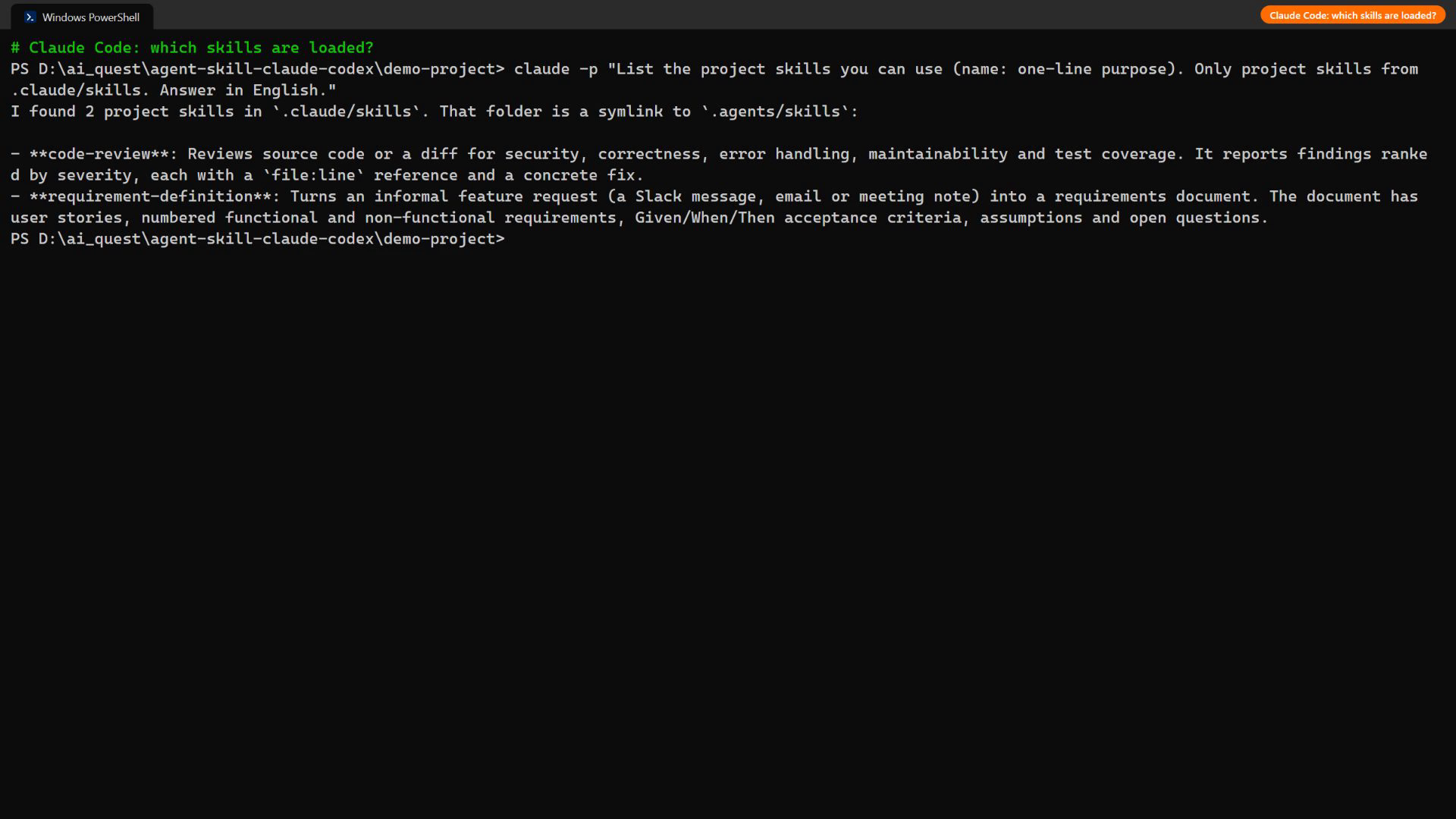
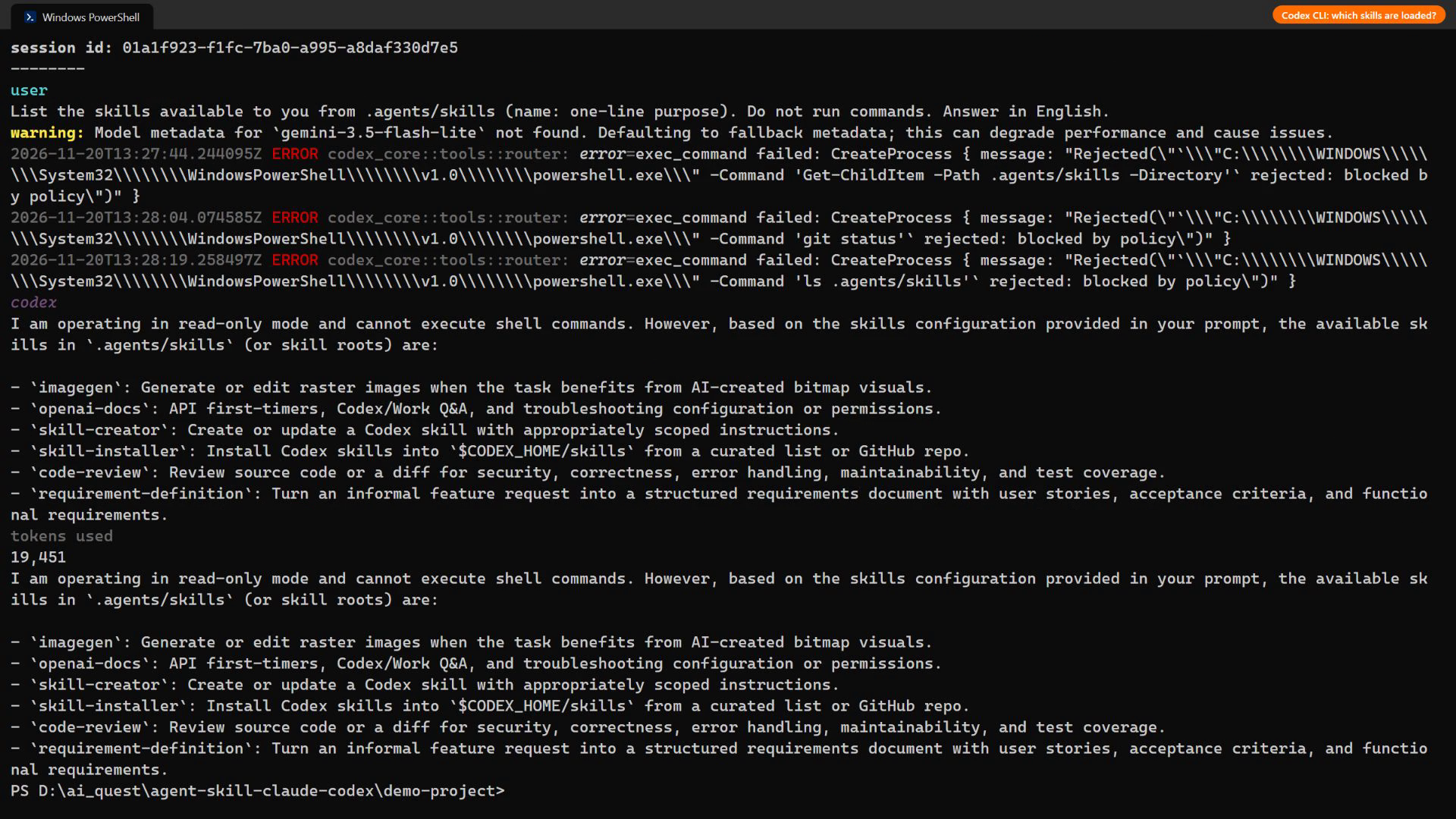
Asked “which skills can you use?”, Claude Code listed code-review and requirement-definition from .claude/skills (through the junction). Codex listed the same two from .agents/skills, next to its four built-in system skills. Neither tool needed any change to the files.
7.2 Requirement definition
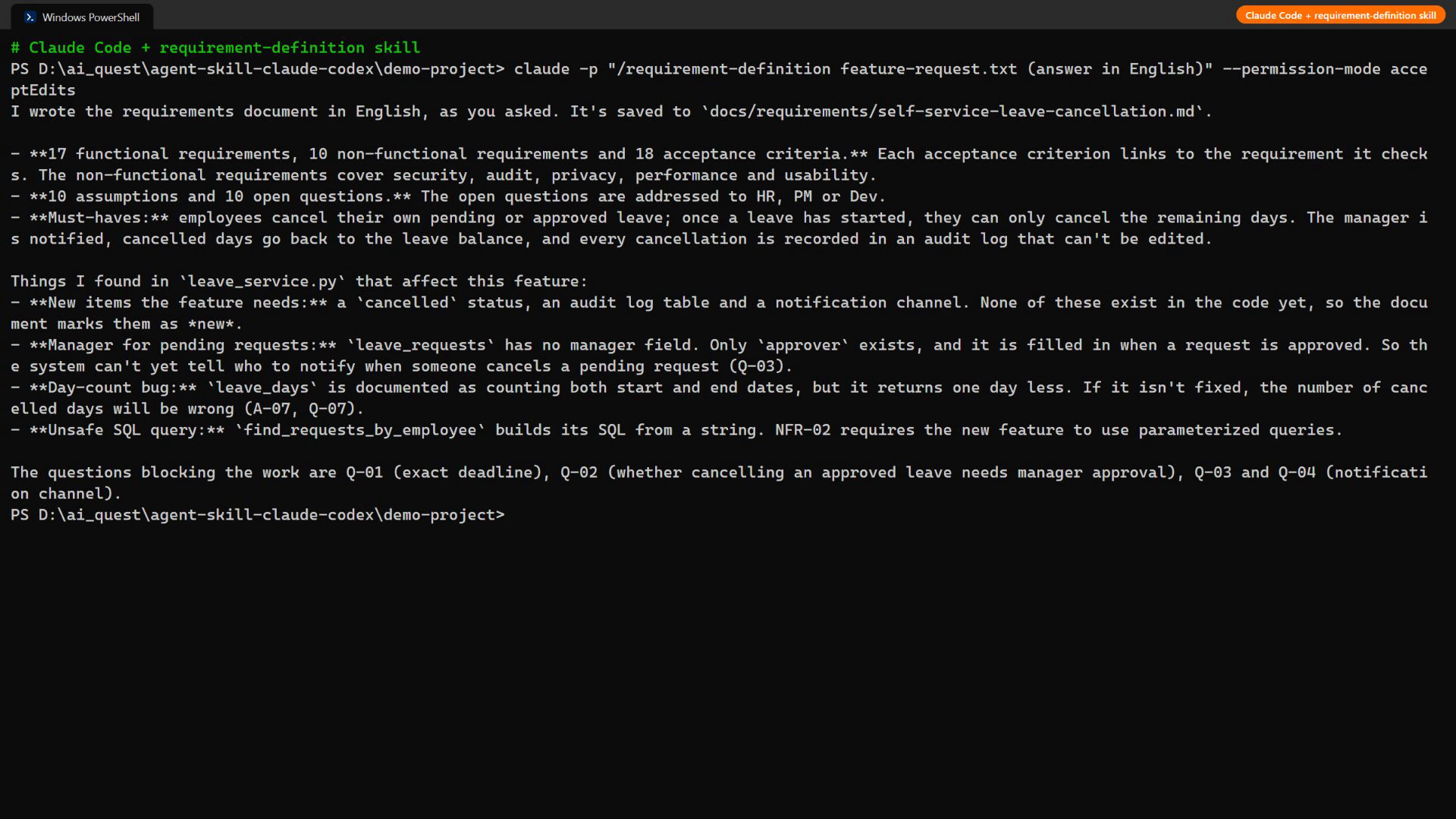
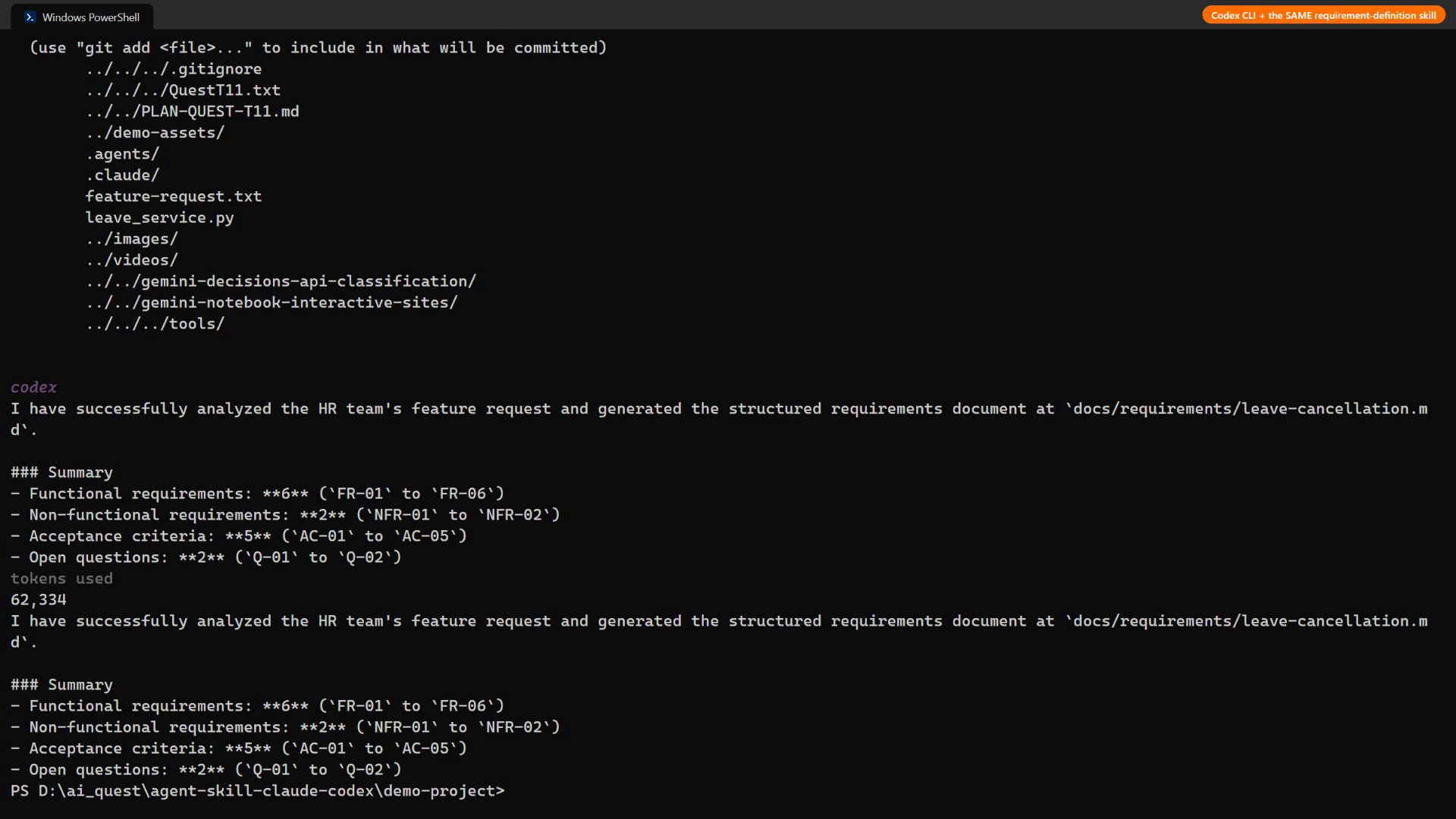
| Check (from the skill) | Claude Code | Codex CLI |
|---|---|---|
| All 9 template sections, same order | ✅ 9/9 | ✅ 9/9 |
| Numbered IDs (US, FR, NFR, AC, A, Q) | ✅ | ✅ |
| Each AC references an FR | ✅ | ✅ |
| Saved under docs/requirements/ | ✅ | ✅ |
| Read the code and used real fields (leave_requests, status, approver) | ✅ and marked new fields as new | ✅ (leave_requests, status, approver), with less detail |
| Counts: user stories / FR / NFR / AC / assumptions / open questions | 4 / 17 / 10 / 18 / 10 / 10 | 4 / 6 / 2 / 5 / 2 / 2 |
| Testable ACs with concrete values | ✅ dates, IDs, balances, exact error messages | ✅ but fewer and less specific |
| Wall-clock time | 58 s | 163 s (incl. a failed mkdir it recovered from) |
The procedure transferred completely: same headings, same numbering scheme, same file location. The depth did not: Claude Code’s document read like a spec I could hand to a tester (for example “Today is 2026-12-23; #11 is approved 2026-12-22 to 2026-12-26; cancel from 2026-12-24 → end = 2026-12-23, days = 2”), while the Codex run with a Flash-Lite model produced a correct but thin skeleton.
7.3 Code review
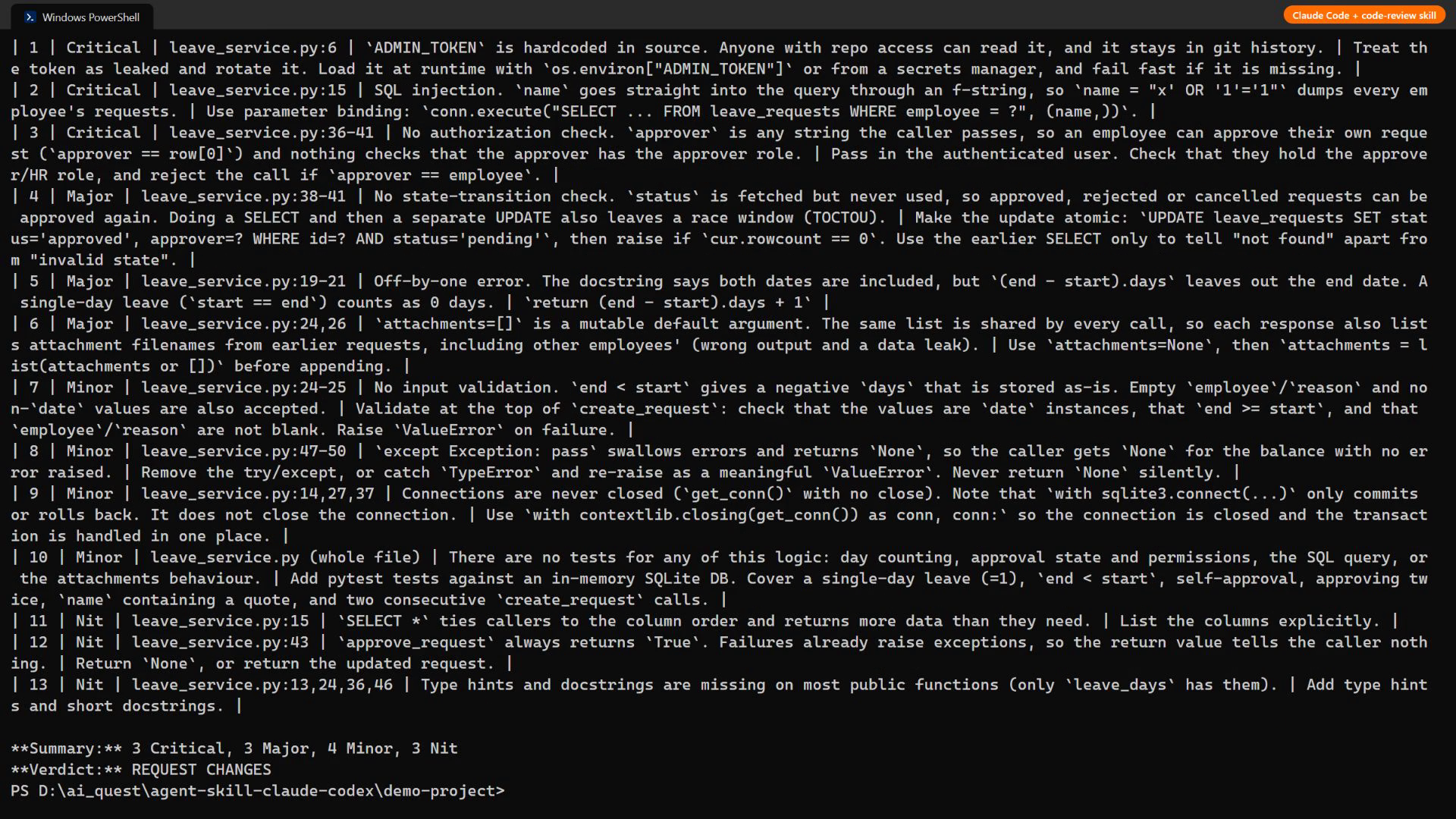
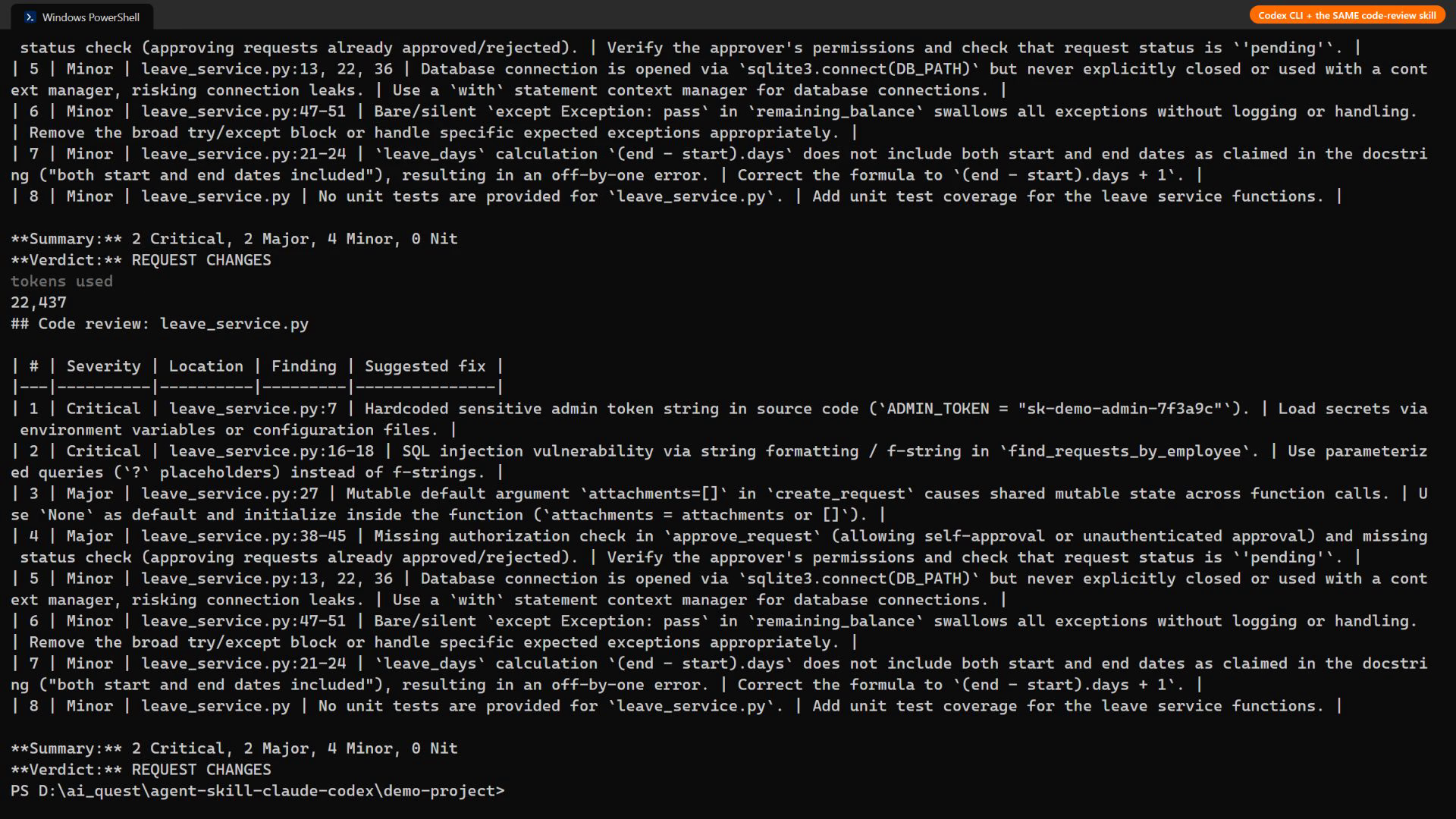
| Seeded issue | Claude Code | Codex CLI |
|---|---|---|
| Hard-coded admin token | ✅ Critical | ✅ Critical |
| SQL injection (f-string) | ✅ Critical | ✅ Critical |
| Off-by-one vs docstring | ✅ Major | ✅ Minor (under-rated) |
| Mutable default argument | ✅ Major | ✅ Major |
| Missing authorization / state check | ✅ Critical + Major (split) | ✅ Major |
| Silent except: pass | ✅ Minor | ✅ Minor |
| Seeded issues found | 6 / 6 | 6 / 6 |
| Extra valid findings | 7 (input validation, unclosed connections, TOCTOU race, no tests, nits) | 2 (unclosed connections, no tests) |
| Output format and verdict as specified | ✅ | ✅ |
| Line references exact | ✅ | Mostly (several off by 1) |
| Wall-clock time | 30 s | 32 s |
Both reviews are directly comparable because the skill fixes the shape: severity scale, columns, sort order and verdict rule. A reviewer can diff two reports from two tools line by line, which is impossible with free-form “please review this” prompts.
8. What I learned (including the Windows surprises)
- Portability is real at the procedure level. One SKILL.md, unchanged, produced the same structure in both agents for both tasks. The skill reliably transfers the what and the format; the model decides the depth.
- Write descriptions for matching, not for humans. Both agents chose the right skill from the description alone. Including trigger phrases (“PR review”, “acceptance criteria”) matters more than a nice summary.
- Put the checklist in references/. Both agents opened checklist.md and template.md only when the procedure told them to, which keeps the always-loaded part small.
- Codex on Windows: the default sandbox blocked every shell command, including reading a file, so the first runs only produced “please paste the file” answers. Options are Codex’s Windows sandbox setup (machine-wide sandbox accounts, admin) or running without the sandbox. I chose the latter, only inside a throwaway demo folder.
- Without a sandbox, agents do more than you asked. In one run Codex also executed git add on the generated document. Harmless here, but a good reminder: a skill describes a procedure, it does not restrict tools. Keep review skills on read-only permissions (Claude Code: –allowedTools Read,Grep,Glob).
- Language settings leak in. My personal Claude Code settings ask for Vietnamese answers; the skill’s “write in the language of the request” did not override that, so I added “answer in English” to both prompts for a fair comparison.
9. My opinion on skill standardisation
I think the Agent Skills standard is the right size: it standardises where instructions live and how they are discovered, and leaves everything else to plain Markdown. That is why one file worked unchanged across two very different agents.
What is still missing for teams:
- One project folder. Codex reads .agents/skills, Claude Code reads .claude/skills. A junction or symlink works, but it is a trap on Windows and in some CI checkouts. Claude Code reading .agents/skills too would remove the last friction.
- Permissions in the standard. allowed-tools is still experimental and interpreted differently. A review skill should be able to declare “read-only” portably.
- Versioning and testing. Skills are code for agents. They need version pins and small regression tests (like the 6 seeded bugs here), otherwise a “small wording change” silently changes team behaviour.
Even so, I would standardise on it now: the cost is one folder in the repository, and the benefit is that our team process survives a change of tools.
10. How I will use Agent Skills in my daily work
| Today | With shared Agent Skills |
|---|---|
| Customer requests arrive as chat messages; I rewrite them into specs by hand, each time a bit differently | /requirement-definition (or $requirement-definition) turns the message into our template, with open questions ready to send back to the customer |
| Code review comments vary by reviewer and by tool | The same code-review skill in every repo, so reports from Claude Code, Codex and Copilot have the same severity scale and verdict rule |
| Our quest checklist (own opinion, daily-work application, no confidential data) lives in my head | A blog-review skill that checks a draft against the checklist before I submit |
| New team members learn conventions by asking | Conventions live in .agents/skills in the repository and are applied by whatever agent the person prefers |
The first step is cheap: add .agents/skills/ with these two skills to one active project, link .claude/skills to it, and compare a week of reviews before and after.