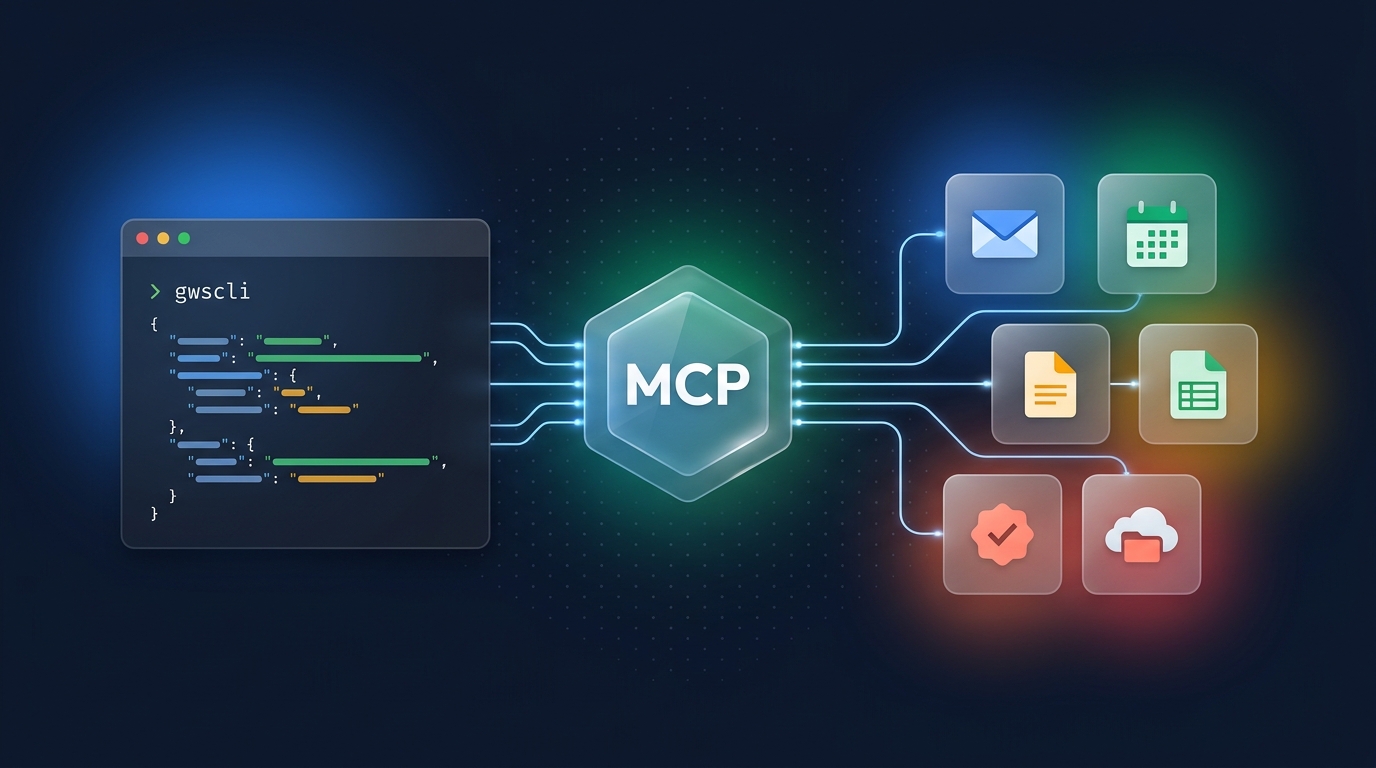
On November 24, 2026, Google announced general availability for its managed Workspace Model Context Protocol (MCP) servers, the official Google Workspace CLI (gwscli), and Google Cloud Agent Gateway. On November 26, 2026, I set up the new tooling on a Windows workstation to verify what Google actually shipped against the official documentation, observe how the remote MCP endpoints behave on the wire, and test how practical the stack is for day-to-day engineering workflows.
1. Why This Release Changes How AI Agents Touch Google Workspace
Until recently, connecting an AI agent to Gmail, Google Drive, or Google Calendar usually meant assembling a custom integration on top of Google’s REST APIs. A developer would create a Google Cloud project, enable individual product APIs, download a desktop OAuth client file, and wrap google-api-python-client or a community MCP server around those endpoints. That approach works for personal prototypes, but it becomes difficult to govern once an agent operates across shared team data.
According to Google’s November 24, 2026 announcement by Chandu Thota (VP of Engineering, Workspace) and Brad Calder (President, Google Cloud Platform & SRE), Workspace APIs already handle more than 2.8 trillion calls per month, with Drive API traffic exceeding 2.5 times its 2022 volume and generating over 18 billion reads per day. Those REST interfaces were designed for traditional software operating at human pace, where a valid OAuth token generally implied direct user intent.
1.1 Why Traditional Workspace Integrations Are Not Enough for AI Agents
Autonomous agents introduce three operational gaps that standard REST integrations do not solve on their own:
- Authentication: An agent needs to access Workspace data under a specific user’s identity rather than a shared service account, while still remaining distinguishable from a human user or a traditional web app in audit logs.
- Authorization: Holding a valid OAuth token does not mean an agent should be allowed to execute every action that token technically permits. Coarse scopes leave too much room for unintended edits or data exposure.
- Execution safety: An agent can read an email, inspect a document, and trigger follow-up actions across multiple services in seconds without a human reviewing intermediate steps.
Consider a routine workplace scenario: an agent receives an email asking for an update to a project specification, locates the matching file in Google Drive, checks the team’s Calendar for the next review meeting, and drafts a reply. If that agent holds unrestricted read, write, and sharing permissions without inline checks, a misinterpretation—or a hidden prompt-injection instruction embedded inside the incoming email—could cause it to modify the wrong document, alter sharing permissions, or send inaccurate information externally.
1.2 How Google’s Three Agent-Native Components Fit Together
To address these gaps, Google introduced three complementary components rather than a single tool:
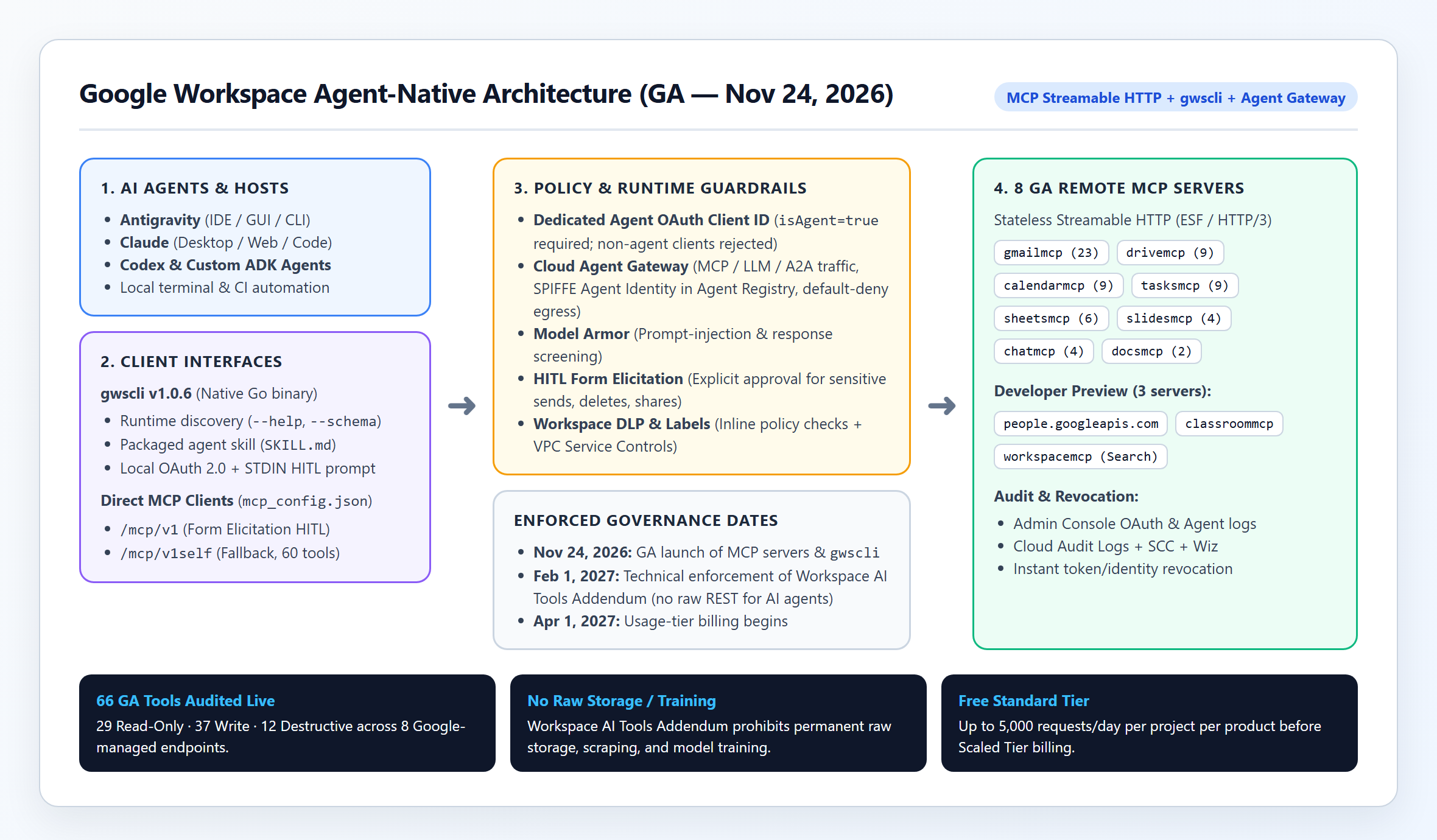
- Google Workspace MCP Servers: Google-hosted remote endpoints that expose standardized tools for Gmail, Drive, Docs, Sheets, Slides, Calendar, Chat, and Tasks over Streamable HTTP. They are built for AI hosts such as Antigravity, Claude, and cloud-hosted agent frameworks.
- Google Workspace CLI (
gwscli): A local native command-line binary built for terminal-based coding agents (such as Claude Code, Codex, and Antigravity CLI) and interactive shell workflows. It routes requests through the same*mcp.googleapis.combackend services while fitting naturally into shell pipelines and local file workflows. - Google Cloud Agent Gateway: An enterprise network and policy gateway on Google Cloud for LLM, MCP, and Agent2Agent (A2A) traffic. It validates cloud-side Agent Identities, enforces IAM and default-deny egress rules, and screens traffic with Model Armor.
Google needs both a CLI and remote MCP servers because AI agents run in two distinct environments. GUI-based and cloud-hosted agents connect directly to remote MCP endpoints with zero local binary management, whereas terminal-based coding agents operate inside a shell, work with local files on disk, and benefit from discovering commands on demand via --help and --schema. Alongside the launch, Google introduced the Workspace AI Tools Addendum, requiring AI agents to transition from raw Workspace REST APIs to Workspace MCP servers or gwscli, with technical enforcement scheduled for February 1, 2027.
2. Official Release Specifications: Workspace CLI, MCP Servers, and Enterprise Security
Before running local tests, I reviewed Google’s official developer guides and security announcement to establish the baseline specification for each layer of the stack.
2.1 Google Workspace CLI (gwscli) Specifications
The official Google Workspace CLI (gwscli) is distributed as a prebuilt native binary from https://dl.google.com/workspace-cli/ for Linux (x86_64, ARM64), macOS (Apple silicon, Intel), and Windows (x86_64, ARM64). Unlike traditional CLIs with a fixed set of hardcoded subcommands, gwscli relies on dynamic runtime command discovery. When a user or agent invokes gwscli <service> --help, --show-scopes, or --schema, the binary queries the backend for current parameters, OAuth scope requirements, and JSON output definitions. Google explicitly notes that this dynamic surface may change without backward compatibility, so static scripts should not hardcode rigid command signatures.
Output formatting is tailored for automated consumption. Query and mutation commands emit structured JSON to stdout, which allows AI coding agents and shell tools like jq to parse IDs, timestamps, and metadata reliably without brittle regex parsing. Document-reading commands such as drive read_file_content return plain-text or Markdown content (or JSON wrapping a fileContent field) so agents can read documents directly without traversing low-level DOM structures.
The CLI separates read operations (such as listing events, searching threads, or inspecting file metadata, grouped under --bundle=readonly) from write or mutating operations (such as creating drafts, updating spreadsheets, or deleting tasks). For sensitive mutations—such as sending Chat messages or deleting items—gwscli enforces built-in human-in-the-loop (HITL) verification by pausing, printing an approval prompt to stderr, and waiting for an explicit decision (ALLOW_ONCE, ALLOW_TOOL_ALWAYS, or DENY_ONCE) on stdin. Persistent ALLOW_TOOL_ALWAYS options are disabled over non-TTY pipes so an unattended agent cannot silently grant permanent approval.
In practice, an AI coding agent using gwscli follows a six-step execution loop:
- Discover the command: Run
gwscli <service> --helpandgwscli <service> <action> --helpto inspect flags. - Inspect required scopes: Check
--show-scopesorgwscli auth login --print-scope-onlyto confirm minimal OAuth requirements. - Authenticate: Verify cached credentials with
gwscli auth status(or pause and ask the human to rungwscli auth logininteractively). - Execute the command: Invoke the target action with validated flags.
- Validate output: Parse the returned JSON or text payload and handle any error envelopes.
- Request human approval: If the CLI pauses on
stderrfor a sensitive action, present the prompt to the user and pass their explicit choice tostdin.
Authentication supports both Built-in-Auth (registering a local OAuth 2.0 Desktop client JSON via gwscli auth setup with incremental browser logins on http://127.0.0.1:<port>/) and Self-Managed-Auth (passing an externally managed access token via --oauth_token). Note that usage telemetry is enabled by default in gwscli—recording command names, flag names (never flag values, tokens, queries, or content), OS/architecture, and error types—and can be disabled via gwscli logging off or GWSCLI_TELEMETRY_ENABLED=0.
2.2 Officially Managed Remote Google Workspace MCP Servers
Google hosts dedicated remote MCP servers for eight generally available Workspace products, plus three additional servers available through the Google Workspace Developer Preview Program. Each product has its own dedicated endpoint rather than a single monolithic URL so administrators and MCP hosts can enable, authenticate, and scope individual products independently.
| Workspace Product | Status | Remote MCP Endpoint (Primary) | Fallback Endpoint | Required GCP APIs |
|---|---|---|---|---|
| Gmail | GA | https://gmailmcp.googleapis.com/mcp/v1 |
.../mcp/v1self |
gmail.googleapis.com, gmailmcp.googleapis.com |
| Google Drive | GA | https://drivemcp.googleapis.com/mcp/v1 |
.../mcp/v1self |
drive.googleapis.com, drivemcp.googleapis.com |
| Google Docs | GA | https://docsmcp.googleapis.com/mcp/v1 |
.../mcp/v1self |
docs.googleapis.com, docsmcp.googleapis.com |
| Google Sheets | GA | https://sheetsmcp.googleapis.com/mcp/v1 |
.../mcp/v1self |
sheets.googleapis.com, sheetsmcp.googleapis.com |
| Google Slides | GA | https://slidesmcp.googleapis.com/mcp/v1 |
.../mcp/v1self |
slides.googleapis.com, slidesmcp.googleapis.com |
| Google Calendar | GA | https://calendarmcp.googleapis.com/mcp/v1 |
.../mcp/v1self |
calendar-json.googleapis.com, calendarmcp.googleapis.com |
| Google Chat | GA | https://chatmcp.googleapis.com/mcp/v1 |
.../mcp/v1self |
chat.googleapis.com, chatmcp.googleapis.com (+ Chat App for writes) |
| Google Tasks | GA | https://tasksmcp.googleapis.com/mcp/v1 |
.../mcp/v1self |
tasksmcp.googleapis.com (no separate product API required for MCP) |
| People API | Developer Preview | https://people.googleapis.com/mcp/v1 |
None | people.googleapis.com (DPP enrollment required) |
| Google Classroom | Developer Preview | https://classroommcp.googleapis.com/mcp/v1 |
None | classroommcp.googleapis.com (DPP enrollment required) |
| Universal Search | Developer Preview | https://workspacemcp.googleapis.com/mcp/v1 |
None | workspacemcp.googleapis.com (DPP enrollment required) |
Streamable HTTP vs Local MCP Servers
Earlier MCP integrations typically ran as local processes (over stdio) on a developer’s laptop, requiring users to install Node or Python packages, manage runtime updates, and store credentials locally. Google’s managed Workspace MCP servers run remotely on Google’s infrastructure and communicate over Streamable HTTP. Clients send JSON-RPC 2.0 requests via HTTP POST with OAuth 2.0 bearer tokens, and Google’s edge infrastructure returns standard JSON or streamed event responses while enforcing DLP, audit logging, and approval policies server-side.
Understanding /mcp/v1 and /mcp/v1self
Google exposes two endpoint paths for the eight GA servers depending on whether an MCP host supports MCP form elicitation (a server-driven prompt allowing the remote server to pause a sensitive tool call and request explicit user confirmation):
| Criteria | /mcp/v1 |
/mcp/v1self |
|---|---|---|
| Form elicitation | Supported (recommended primary endpoint) | Not used (fallback for hosts without elicitation) |
| Sensitive tool handling | Exposes all tools; sensitive calls trigger elicitation | Hides a subset of tools that require elicitation under default policy |
| Human approval | Server-driven confirmation prompts | Depends on admin policy, target resource, and client settings |
| Security scope | Requires least-privilege OAuth scopes and org policies | Still requires least-privilege OAuth scopes; not a read-only mode |
It is important to distinguish endpoint-level tool filtering from actual authorization. The /mcp/v1self endpoint changes which tools are exposed under Google’s default elicitation policy, but it should not be treated as a read-only security mode. OAuth scopes, Workspace permissions, administrator policies, and application-level approval mechanisms remain necessary to constrain what an agent can access or modify.
Per Google’s documentation, every 3-legged user-delegated OAuth 2.0 client calling these endpoints must have Use this client for an AI-powered agent enabled in Google Auth Platform. Requests count toward Google Cloud project usage tiers: the free Standard Tier provides up to 5,000 requests per day, per project, per product without immediate billing setup, while the billed Scaled Tier is scheduled to begin billing on April 1, 2027.
2.3 Enterprise Agent Security, Governance, and Cloud Agent Gateway
Google’s security architecture spans two distinct layers—Workspace-layer controls and Google Cloud-layer controls—built around six core pillars:
- Workspace-layer identity, DLP, and HITL: Agents connecting to Workspace must use dedicated agent-flagged OAuth client IDs paired with least-privilege scopes and quotas. Every request is checked inline against Workspace permissions, Data Loss Prevention (DLP) rules, and classification labels. High-impact actions trigger HITL approvals configurable by admins under Agents → Settings → User review for external agents. Under the Workspace AI Tools Addendum, AI tools are prohibited from permanent raw data storage, model training on Workspace data, extended retention of derived data, and API scraping.
- Google Cloud-layer identity, gateway, and runtime screening: On Google Cloud, agents receive cryptographically attested SPIFFE-based Agent Identities in the Agent Registry instead of long-lived service account keys, bounded by IAM policies and quotas. Google Cloud Agent Gateway sits in front of LLM, MCP, and A2A traffic to verify Agent Identities, enforce IAM and default-deny outbound rules, and screen prompts and responses through Model Armor against prompt injection. Sensitive workloads are further isolated using VPC Service Controls, Principal Access Boundaries, Context-Aware Access, and customer-managed encryption keys (CMEK/EKM), with monitoring surfaced in Admin Console OAuth logs, Cloud Audit Logs, Security Command Center, Agent Observability, and Wiz.
3. Two Different CLIs: The Community gws Package vs Official GA gwscli
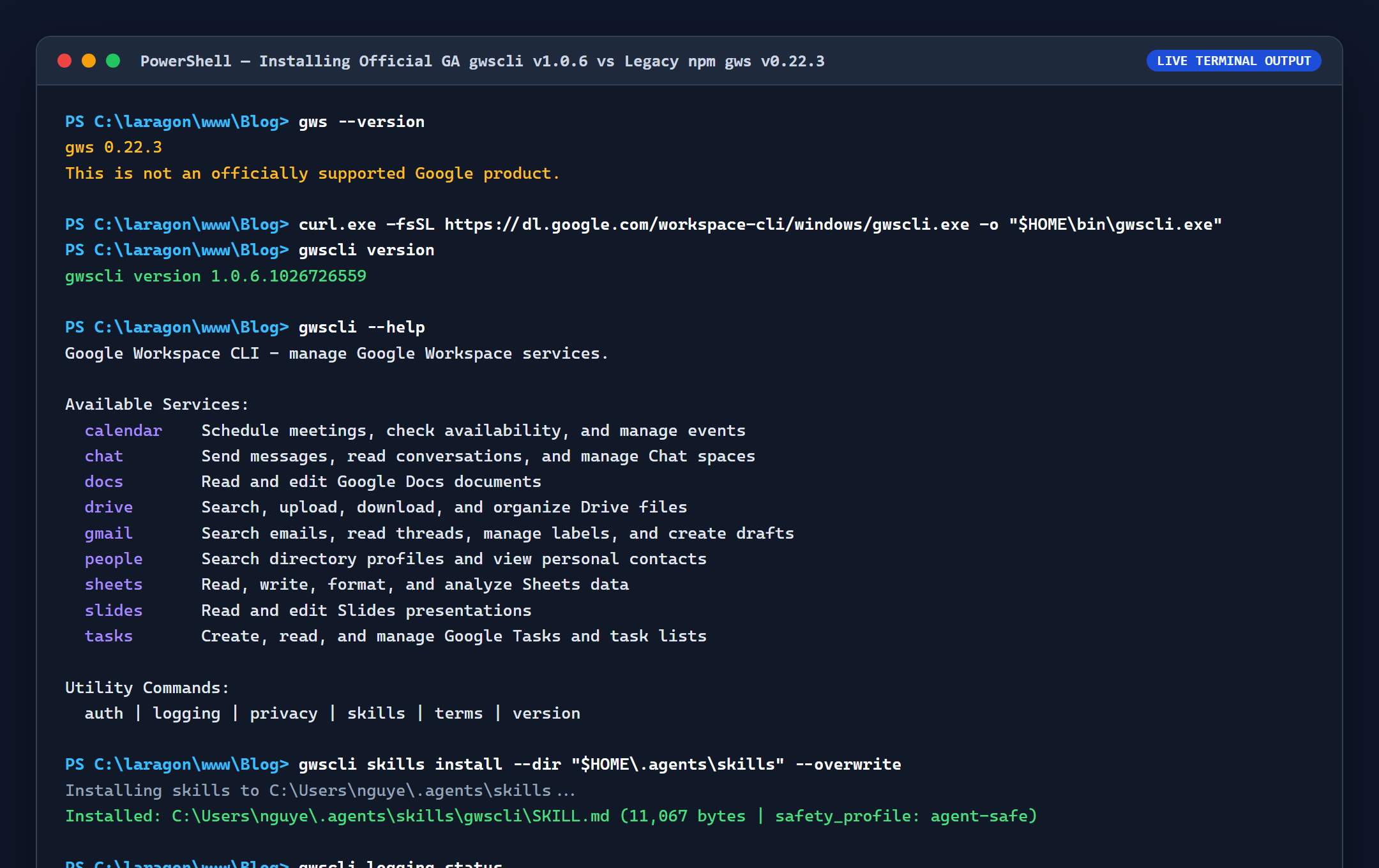
While checking my Windows environment before starting setup, I noticed that gws was already installed on my PATH from an earlier npm install of @googleworkspace/cli. Running gws --version returned:
PS C:\laragon\www\Blog> gws --version
gws 0.22.3
This is not an officially supported Google product.
It is important to distinguish between these two tools: gws (@googleworkspace/cli, version 0.22.3 installed locally and 0.22.5 published on npm as of November 26, 2026) and gwscli (version 1.0.6.1026726559 as of November 26, 2026) are two separate products, not an older and newer version of the same binary.
| Dimension | gws (@googleworkspace/cli) |
gwscli (Official GA Binary) |
|---|---|---|
| Support Status | Open-source / community tool (prints “This is not an officially supported Google product”). | Officially supported GA Google Workspace CLI documented on developers.google.com. |
| Distribution | npm (@googleworkspace/cli), Homebrew, Cargo. |
Prebuilt native Go binary from dl.google.com/workspace-cli/. |
| Backend Protocol | Calls Workspace REST APIs directly via Google Discovery Service. | Calls Google’s *mcp.googleapis.com services with MCP-aligned action names. |
| Scope & Safety | 18+ REST APIs; no native server-driven MCP HITL flow. | 9 agent-curated services; native STDIN/STDERR HITL prompts, embedded SKILL.md, mandatory isAgent=true OAuth client. |
| Feb 1, 2027 AI Policy | Uses legacy REST endpoints; not the sanctioned AI agent path under the AI Tools Addendum. | Officially sanctioned CLI path alongside Workspace MCP servers. |
3.1 Which CLI Should Developers Use?
- Developers maintaining existing
gwsshell scripts: If you rely on non-agent administrative scripts targeting REST APIs not yet covered bygwscli(such as Admin Reports, Forms, or Apps Script), keep them isolated as traditional scripts while auditing whether any AI agent invokes them. - Developers building new AI agents: Start directly with
gwscli(or remote Workspace MCP servers) so your OAuth client, HITL handling, and DLP controls align with Google’s GA stack from day one. - Teams planning migration from
gwstogwscli: Follow a structured six-step cutover before February 1, 2027: (1) inventory everygwscommand currently called by agents, (2) identify any REST API dependencies missing fromgwscli, (3) map supported operations togwscli <service> <action>equivalents, (4) re-scope OAuth credentials on an agent-flagged client, (5) validate JSON/Markdown output compatibility in downstream parsers, and (6) run staging tests before switching production workflows.
4. Hands-On Environment Setup: Installing gwscli, Packaged Skills, and Personal Mode OAuth
I tested the complete setup on Windows 11 (PowerShell, Node v24.18.0, Python 3.10.6, Google Cloud SDK installed). Below are the verified steps and the key concepts needed to reproduce the setup reliably.
4.1 Downloading and Installing the Official gwscli Binary
Before downloading, confirm your Windows CPU architecture so you fetch the right binary (AMD64 maps to Windows x86_64; ARM64 maps to windows_arm64):
$env:PROCESSOR_ARCHITECTURE
# Expected on standard Windows PCs: AMD64
Google provides a quick-install PowerShell script (install.ps1) that downloads the binary into $HOME\bin and updates your User PATH automatically, as well as a manual download option using curl.exe. The manual approach takes two extra commands but avoids piping a remote script directly into Invoke-Expression:
New-Item -ItemType Directory -Force -Path "$HOME\bin", "$HOME\.gwscli" | Out-Null
curl.exe -fsSL https://dl.google.com/workspace-cli/windows/gwscli.exe -o "$HOME\bin\gwscli.exe"
curl.exe -fsSL https://dl.google.com/workspace-cli/README.md -o "$HOME\.gwscli\README.md"
curl.exe -fsSL https://dl.google.com/workspace-cli/NOTICES.txt -o "$HOME\.gwscli\NOTICES.txt"

# Ensure $HOME\bin is in your User PATH, then open a new PowerShell window:
$userPath = [Environment]::GetEnvironmentVariable("Path", "User")
if ($userPath -notlike "*$HOME\bin*") {
    [Environment]::SetEnvironmentVariable("Path", "$userPath;$HOME\bin", "User")
}

gwscli version
# Output: gwscli version 1.0.6.1026726559

gwscli logging status
# Output: Telemetry logging is enabled.
If Windows does not recognize gwscli immediately after updating PATH, open a fresh terminal session or invoke & "$HOME\bin\gwscli.exe" version directly. Common installation issues break down cleanly:
| Issue | Possible Cause | Suggested Solution |
|---|---|---|
gwscli is not recognized |
$HOME\bin missing from User PATH or shell not restarted |
Verify User PATH via [Environment]::GetEnvironmentVariable("Path","User") and open a new PowerShell window |
| Binary cannot execute | Wrong CPU architecture or truncated download | Check $env:PROCESSOR_ARCHITECTURE and re-download the matching windows or windows_arm64 binary with curl.exe -fsSL |
| Authentication failure | OAuth client not registered or missing agent flag | Run gwscli auth setup with an agent-flagged OAuth client JSON, then verify with gwscli auth status |
4.2 Installing and Inspecting the Packaged Agent Skill
An Agent Skill is a structured Markdown instruction bundle (SKILL.md) discovered by coding agent harnesses (such as Antigravity or Claude Code) at startup. Unlike a general system prompt that defines an assistant’s broad persona, a skill injects tool-specific operational rules only when the agent works with that domain—preventing common CLI failure modes without bloating every unrelated conversation.
gwscli skills install --dir "$HOME\.agents\skills" --overwrite
# Installed: C:\Users\nguye\.agents\skills\gwscli\SKILL.md (11,067 bytes)
Inspecting the unpacked 318-line SKILL.md revealed YAML frontmatter (safety_profile: agent-safe, min_cli_version: 0.2.0) and strict execution rules. Two rules are particularly important for headless coding agents: first, an agent must never run gwscli auth login in the background because the browser OAuth flow will block indefinitely; second, when a mutating command triggers HITL confirmation, the process pauses and writes the prompt to stderr. For example, if an agent invokes gwscli chat send_message, it must detect the stderr prompt (“Allow this app to use send_message?”), surface that exact question to the human user, and only write ALLOW_ONCE\n or DENY_ONCE\n to the process’s stdin after receiving explicit approval.
gws 0.22.3 against the installed GA gwscli 1.0.6.1026726559 binary, packaged skill installation, and default telemetry status.4.3 Personal Mode OAuth 2.0 Setup and Granular Read-Only Consent
Before creating credentials, it helps to distinguish the two OAuth client types Google uses across its CLI and MCP guides:
| Criteria | Desktop App Client | Web Application Client |
|---|---|---|
| Primary use case | Local CLI (gwscli) running on a developer workstation |
Remote MCP hosts (Antigravity, Claude Desktop/Web) |
| Redirect URI | Ephemeral localhost callback (http://127.0.0.1:<port>/) |
Fixed host callback URI (e.g., https://antigravity.google/oauth-callback) |
| Client Secret handling | Registered locally via gwscli auth setup |
Stored securely in host MCP configuration / server side |
| Token lifecycle | CLI caches and refreshes 1-hour access tokens automatically | Defaults to online access unless access_type=offline or offline_access is requested |
For single-user testing without full OAuth app verification, Google provides a Personal Mode onboarding URL that pre-selects core Workspace APIs, Desktop app type, and isAgent=true:
https://console.cloud.google.com/auth/overview/personal?apis=ws,wsmcp,tasksmcp&clientType=desktop&isAgent=true
After creating the client on personal-mode project 475298809416 and downloading the JSON file, I registered it and authenticated using least-privilege OAuth. An OAuth scope defines the exact boundary of data and actions a token can access; granting full read/write scopes upfront exposes your entire mailbox and Drive unnecessarily. Starting with --bundle=readonly limits the agent to read operations, and you can later grant individual write scopes incrementally (for example, gwscli auth login gmail create_draft) only when a workflow requires them. Never commit downloaded client_secret.json files, refresh tokens, or cached credential directories to Git or share them in chat logs.
gwscli auth setup --oauth_client_file="$HOME\Downloads\client_secret_475298809416-....json"
gwscli auth login --bundle=readonly
gwscli auth status
# Output: 17 read-only scopes granted across Calendar, Chat, Contacts, Directory, Docs, Drive, Gmail, Slides, Sheets, Tasks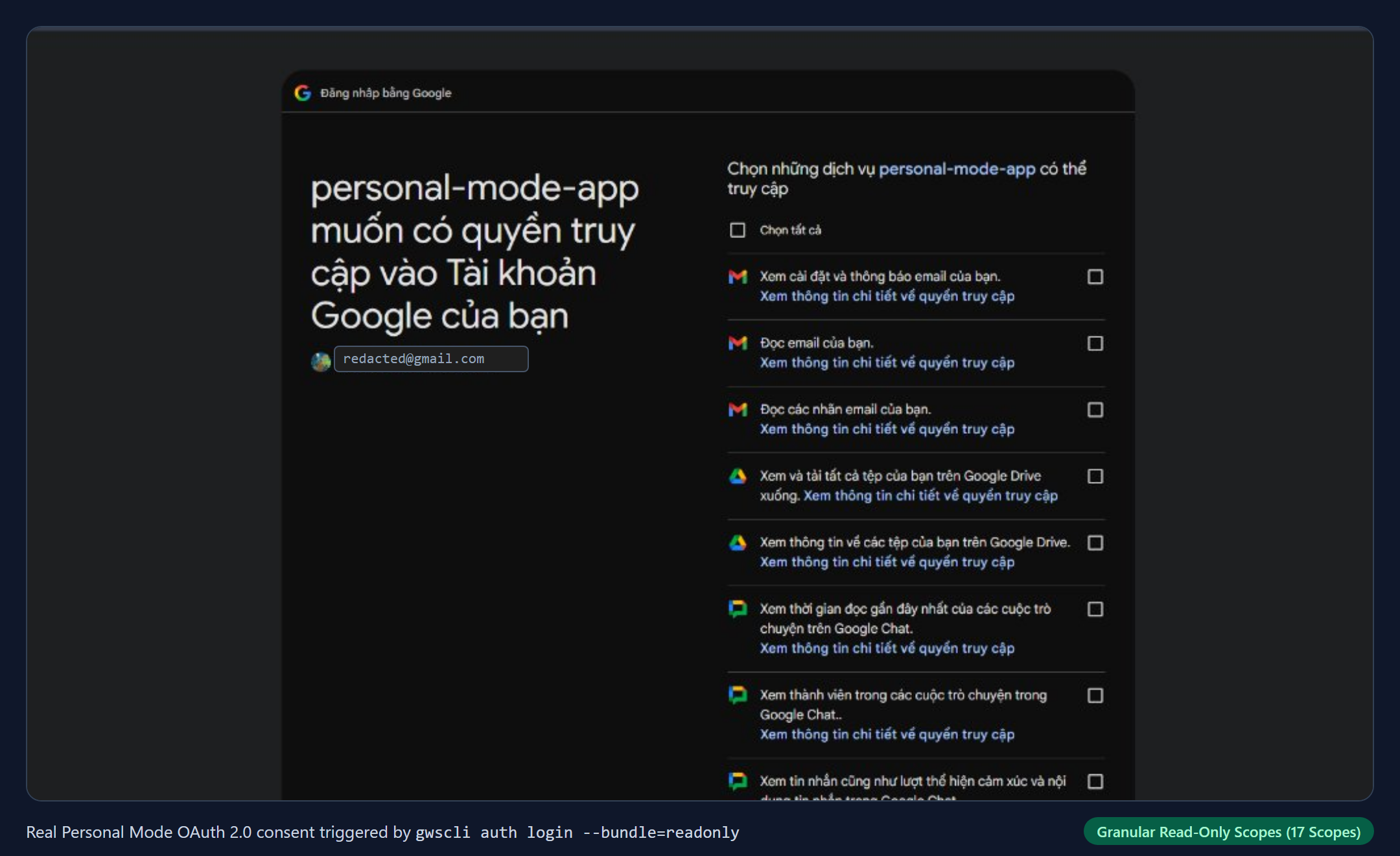
gwscli auth login --bundle=readonly (personal email redacted), showing granular read-only checkboxes.4.4 Configuring Remote MCP Servers for Antigravity and Claude
Connecting remote MCP servers to an AI host such as Antigravity (IDE, GUI, or CLI) or Claude requires a Web application OAuth client with Use this client for an AI-powered agent enabled and the host’s exact callback URI registered in Google Auth Platform (https://antigravity.google/oauth-callback for Antigravity, or https://claude.ai/api/mcp/auth_callback for Claude, per Google’s November 26, 2026 guide). In Antigravity, each desired Workspace service is added to ~/.gemini/config/mcp_config.json:
{
  "mcpServers": {
    "gmail": {
      "serverUrl": "https://gmailmcp.googleapis.com/mcp/v1",
      "oauth": {
        "clientId": "YOUR_AGENT_OAUTH_CLIENT_ID",
        "clientSecret": "YOUR_AGENT_OAUTH_CLIENT_SECRET"
      }
    },
    "drive": {
      "serverUrl": "https://drivemcp.googleapis.com/mcp/v1",
      "oauth": {
        "clientId": "YOUR_AGENT_OAUTH_CLIENT_ID",
        "clientSecret": "YOUR_AGENT_OAUTH_CLIENT_SECRET"
      }
    }
  }
}
Each block defines three required fields: serverUrl (the product’s remote Streamable HTTP endpoint), clientId, and clientSecret. After saving the file, you authenticate each server individually—via Settings → Customizations → Installed MCP Servers → Authenticate in Antigravity GUI, or via the /mcp panel in Antigravity CLI, where connected servers display an Authed status. If authentication fails immediately with redirect_uri_mismatch, verify the callback URI matches character-for-character (including trailing slashes). If you are prompted to re-authenticate every hour, confirm the client requests offline access (access_type=offline or the offline_access scope) and re-consent with prompt=consent if an earlier login lacked a refresh token.
5. Live Authenticated Testing and Three Day-1 Observations
With 17 read-only scopes active in gwscli auth status, I tested live commands across Drive, Calendar, Tasks, Gmail, and Chat, along with one deliberate write command (gwscli tasks create_task) to verify local scope enforcement. Running these commands on November 26, 2026 produced three concrete observations.
5.1 Observation #1: Local Least-Privilege Enforcement and a Drive Scope-Matching Quirk
When I tested a write action while holding only read-only scopes, gwscli blocked the request locally before sending network traffic:
PS> gwscli tasks create_task --title="Scope boundary test"
Error: failed to obtain token source: no valid cached token found.
Run `gwscli auth login tasks create_task` before rerunning this command
However, running gwscli drive list_recent_files --pageSize=5 and gwscli drive search_files --query="trashed = false" --pageSize=3 returned the exact same local token error, even though gwscli auth status confirmed that both drive.readonly and drive.metadata.readonly were already granted. This appears to be a scope-matching issue in the current CLI implementation. The read-only bundle does not include drive.file, while the command’s recommended minimal scope list (via --show-scopes) does. As a result, the local token validation rejects the request even though the token contains other relevant read-only Drive scopes. Developers encountering this behavior should inspect the required scopes for the specific command and authorize only the additional permissions needed.
What Developers Should Do
- Run
gwscli <service> <action> --show-scopeson any command that fails locally. - Compare the output against your granted scopes in
gwscli auth status. - Identify the exact missing scope causing the mismatch (such as
drive.file). - Grant only the specific command needed (for example,
gwscli auth login drive list_recent_files) rather than authorizing all services. - Re-run a harmless read-only command to confirm the token cache resolves cleanly.
5.2 Observation #2: Live MCP Backend Envelopes and Developer Preview Gating on Our Test Project
When I ran read-only commands against Calendar, Tasks, and Gmail (calendar list_calendars, calendar list_events, tasks list_task_lists, tasks list_tasks, gmail list_labels, gmail search_threads, and gmail list_drafts), all of them passed local OAuth checks and returned an MCP JSON envelope directly from Google’s backend:
PS> gwscli gmail search_threads --query="in:inbox" --pageSize=3
{
  "content": [
    {
      "text": "Access to this tool requires that your Google Cloud project (475298809416) is enrolled in the Google Workspace Developer Preview Program. Please see https://developers.google.com/workspace/preview",
      "type": "text"
    }
  ],
  "isError": true,
  "resultType": "complete"
}
Two points are worth separating carefully here. First, the response structure (content, isError, resultType) confirms directly that gwscli communicates with Google’s MCP backend rather than legacy REST endpoints. Second, in my November 26, 2026 test, the Personal Mode project (475298809416) I created through Google’s GA onboarding flow still received a Developer Preview Program enrollment error when attempting to execute certain tools. This suggests that project-level access restrictions or rollout inconsistencies may still exist, despite the services being listed as generally available. Other projects may behave differently, so developers should verify access using their own Google Cloud projects before planning production deployments.
How to Diagnose MCP Backend Access Errors
- OAuth authentication failure: HTTP
401or genericinvalid tokentypically means missing credentials, an expired token, or an OAuth client missing the Use this client for an AI-powered agent flag. - API or service not enabled: Messages stating that a specific MCP API is disabled mean either the product API or its companion
*mcp.googleapis.comservice was not enabled in the issuing GCP project. - Project eligibility or access restriction: Developer Preview Program errors or admin-block messages point to project-level allowlists or Workspace Admin Console OAuth/Agent restrictions.
- Missing permissions: Local
no valid cached token foundor HTTP403insufficient-scope errors indicate that the granted OAuth token lacks the scope required by that tool. - MCP tool execution error: A structured
"isError": trueenvelope with a domain error (such as an invalid file ID or malformed query) indicates auth and project access succeeded, and the issue is in the tool arguments.
5.3 Observation #3: Chat MCP Requires Explicit Service Enablement
The Chat MCP test (gwscli chat search_conversations) returned a separate service-enablement error ("Chat MCP access is not enabled for this project."), indicating that the project was not yet authorized to access the Chat MCP endpoint. This should be distinguished from Chat App configuration: according to Google’s documentation, read-only operations such as searching conversations do not require a configured Chat app, while write operations such as sending messages (chat send_message) require both a configured Chat app and, per Google’s CLI troubleshooting guide, a Google Workspace account rather than a personal Google Account. Developers should verify service enablement (chat.googleapis.com and chatmcp.googleapis.com), Chat app configuration, and account eligibility separately when troubleshooting Chat MCP access.
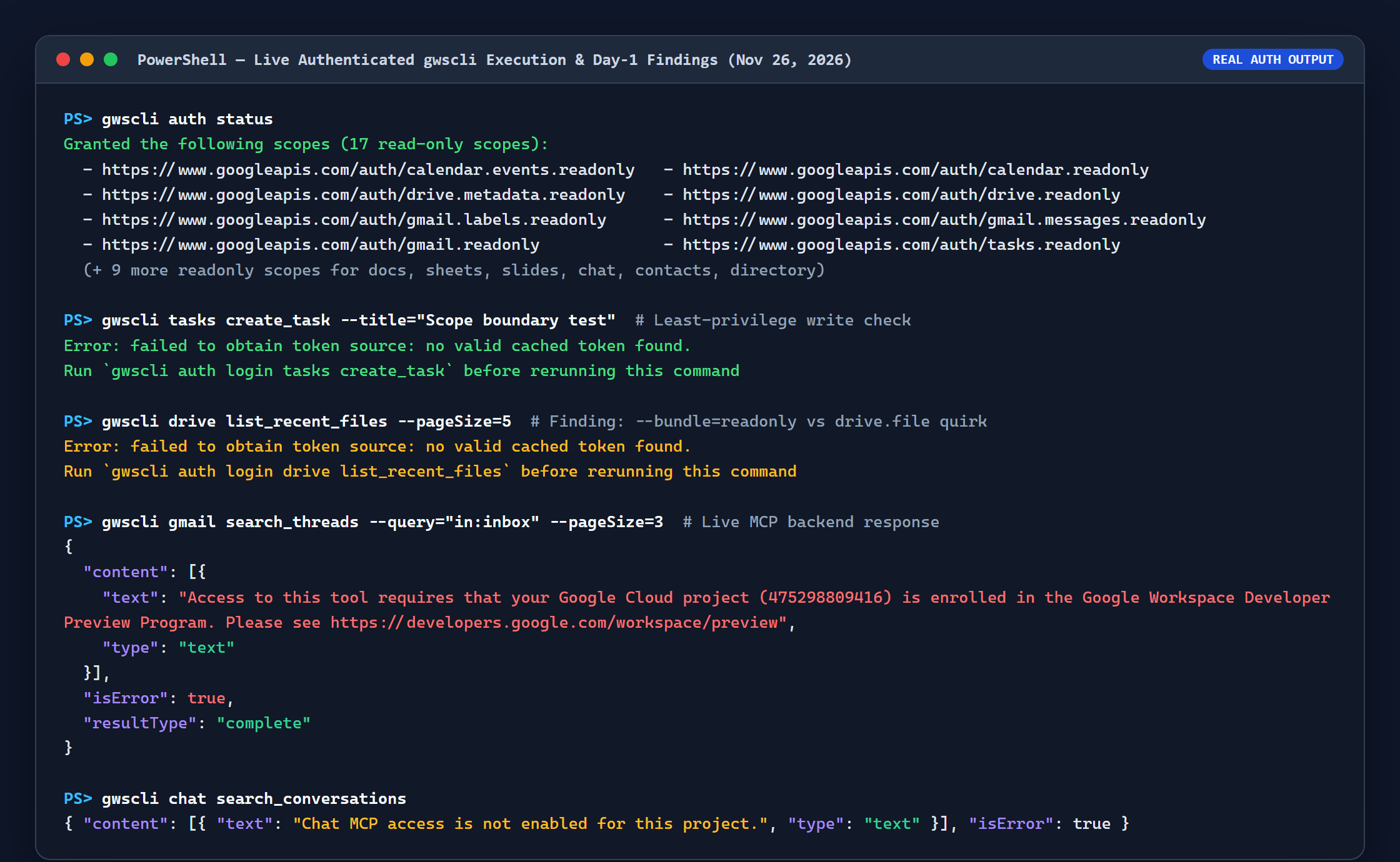
tasks create_task, the Drive scope mismatch, and live MCP backend responses on November 26, 2026.6. Practical Task 1: Live Streamable HTTP Audit Across All 8 GA Remote MCP Servers
To verify how Google’s eight GA remote MCP servers behave directly on the wire, I wrote a standalone Python script (workspace_mcp_inspector.py) that speaks raw JSON-RPC 2.0 over Streamable HTTP without external SDKs.
6.1 Wire-Level Protocol Behavior Observed Live
Sending an HTTP GET request to https://gmailmcp.googleapis.com/mcp/v1 and https://drivemcp.googleapis.com/mcp/v1 returned HTTP 405 Method Not Allowed from Server: ESF (Google’s Extensible Service Frontend), which matches Streamable HTTP’s expectation that MCP JSON-RPC calls arrive over HTTP POST. Sending a standard JSON-RPC 2.0 initialize handshake over POST with protocolVersion: "2025-03-26" succeeded immediately with HTTP 200 OK:
// POST https://drivemcp.googleapis.com/mcp/v1 (HTTP 200 OK, 374.7 ms)
{
  "id": 1,
  "jsonrpc": "2.0",
  "result": {
    "capabilities": {
      "resources": { "listChanged": false, "subscribe": false },
      "tools": { "listChanged": false }
    },
    "protocolVersion": "2025-03-26",
    "serverInfo": { "name": "StatelessServer", "version": "ESF" }
  }
}
In the MCP specification, initialize negotiates the wire contract before any tool discovery occurs: protocolVersion confirms the shared protocol revision, capabilities.tools advertises callable tools, and capabilities.resources advertises readable resource URIs (observed only on drivemcp.googleapis.com among the eight GA servers). Stateless server behavior: All eight endpoints returned serverInfo identifying the implementation as StatelessServer during initialization. The tested requests also completed without requiring a persistent Mcp-Session-Id header. These observations are consistent with a stateless MCP interaction model, although they do not reveal every aspect of Google’s internal backend session management.
6.2 Live Tool and Safety Annotation Audit Across All 8 GA Servers
Querying tools/list on both /mcp/v1 and /mcp/v1self across all eight GA servers produced the verified inventory below (all counts calculated directly from the captured JSON responses):
| Service | /mcp/v1 |
/mcp/v1self |
Read-Only | Write (Total) | Destructive Hint | Removed on v1self |
Destructive Still on v1self |
|---|---|---|---|---|---|---|---|
| Gmail | 23 | 21 | 6 | 17 | 8 | 2 (apply_sensitive_*) |
6 |
| Drive | 9 | 8 | 6 | 3 | 1 | 1 (upload_file_revision) |
0 |
| Docs | 2 | 2 | 1 | 1 | 0 | 0 | 0 |
| Sheets | 6 | 6 | 2 | 4 | 0 | 0 | 0 |
| Slides | 4 | 4 | 3 | 1 | 1 | 0 | 1 |
| Calendar | 9 | 8 | 5 | 4 | 1 | 1 (delete_event) |
0 |
| Chat | 4 | 3 | 3 | 1 | 0 | 1 (send_message) |
0 |
| Tasks | 9 | 8 | 3 | 6 | 1 | 1 (delete_task) |
0 |
| TOTAL | 66 | 60 | 29 | 37 | 12 | 6 (5 D + 1 non-D) | 7 |
Notice how the categories relate without overlap: the 66 tools on /mcp/v1 split into 29 read-only tools and 37 write tools. Within those 37 write tools, 12 carry destructiveHint: true and 25 carry destructiveHint: false. On /mcp/v1self, Google excludes 6 tools total: 5 destructive tools (gmail.apply_sensitive_message_label, gmail.apply_sensitive_thread_label, drive.upload_file_revision, calendar.delete_event, and tasks.delete_task) plus 1 non-destructive write tool (chat.send_message, which carries destructiveHint: false yet still requires form elicitation under default policy). That leaves 7 of the 12 destructive-hint tools still listed on /mcp/v1self.
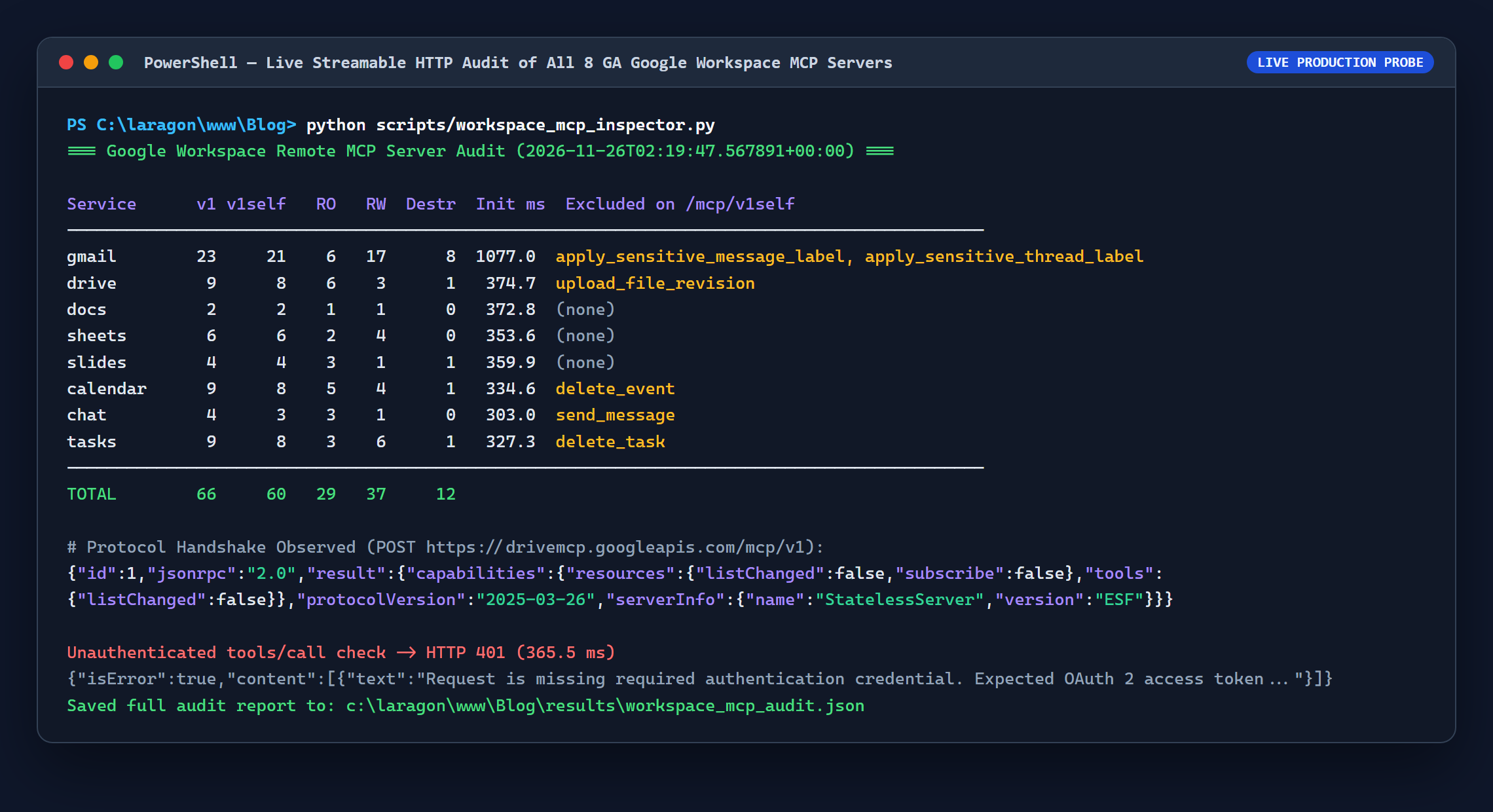
tools/call.Audit Finding: /mcp/v1self Should Not Be Treated as a Security Boundary
Across the eight GA servers, 12 tools carry the destructiveHint: true annotation. Five of these destructive tools are excluded from /mcp/v1self, while seven remain available through the fallback endpoint: six Gmail tools (trash_message, trash_thread, mark_message_spam, mark_thread_spam, unlabel_message, unlabel_thread) and one Slides tool (update_presentation). This distinction is important because the six-tool reduction in the overall inventory also includes one non-destructive write tool (chat.send_message, whose destructiveHint is false). Meanwhile, gmail.send_message is not exposed at all (only create_draft). Endpoint selection is a host-compatibility mechanism for form elicitation—not a substitute for least-privilege OAuth scopes or admin policy.
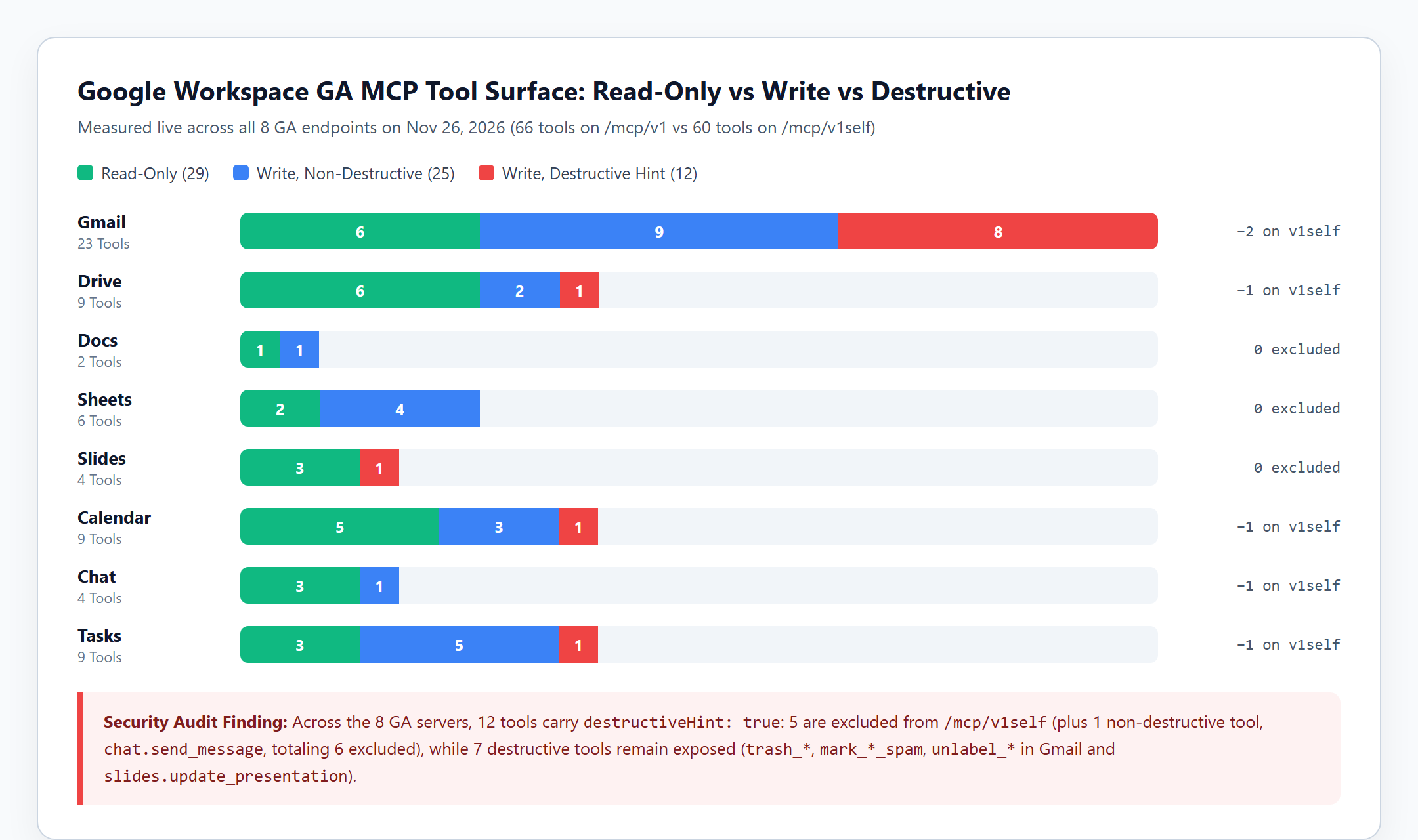
/mcp/v1self.Understanding MCP Tool Annotations
Each tool returned by Google’s MCP servers carries four standard MCP annotations: readOnlyHint (whether the tool only reads state), destructiveHint (whether a write may overwrite, trash, or delete data), idempotentHint (whether repeating the call produces the same result), and openWorldHint (whether the tool interacts with external entities or broad repositories). These fields are safety hints to guide client UIs and agent reasoning—not an independent authorization layer. Finally, sending an unauthenticated tools/call for drive.list_recent_files returned HTTP 401 Unauthorized in 365.5 ms, confirming that tool discovery is public while execution strictly requires OAuth 2.0.
7. Practical Task 2: Automating Least-Privilege OAuth Manifests with gwscli Runtime Discovery
Because gwscli auth login --print-scope-only <service> <action> and gwscli <service> <action> --schema run without an active user session, developers can script pre-deployment OAuth scope planning before granting an agent access to Workspace data.
7.1 Why OAuth Scope Planning Matters
Consider a typical morning triage workflow: search Gmail threads, read selected threads, list today’s Calendar events, find open meeting slots, list open Google Tasks, search Drive documents, read document content, and create a draft email. Granting broad Workspace access gives the agent far more authority than those eight steps require. Computing the union of minimal scopes per step limits the agent’s OAuth authorization to only the scopes required by those commands—and makes it immediately visible when a read command also pulls in a file-level write scope such as drive.file.
7.2 Scope Planner Workflow and Live Output
I wrote a Python helper (gwscli_scope_planner.py) that calls gwscli for each workflow step, collects the minimal scope list, measures the raw byte size of each command’s JSON output schema, deduplicates the scopes into a single manifest, and generates an exact least-privilege gwscli auth login command:
| Step | Command (service.action) |
Minimal Scope(s) from gwscli v1.0.6 |
Access Type | Schema Size (Bytes) |
|---|---|---|---|---|
| 1 | gmail.search_threads |
gmail.messages.readonly |
Read | 11,369 |
| 2 | gmail.get_thread |
gmail.messages.readonly |
Read | 7,201 |
| 3 | calendar.list_events |
calendar.events.readonly |
Read | 19,450 |
| 4 | calendar.suggest_time |
calendar.readonly |
Read | 1,997 |
| 5 | tasks.list_tasks |
tasks.readonly |
Read | 11,959 |
| 6 | drive.search_files |
drive.file, drive.metadata.readonly, drive.readonly |
Read operations; OAuth scope also permits file-level writes | 17,015 |
| 7 | drive.read_file_content |
drive.file, drive.readonly |
Read operations; OAuth scope also permits file-level writes | 2,922 |
| 8 | gmail.create_draft |
gmail.compose |
Write | 2,154 |
Deduplicating across all eight steps produced a manifest of eight unique scopes (compared to 17+ in broad read-only bundles or full write logins). Although the workflow only calls read operations on Drive, the required drive.file scope also permits creating or modifying files that the user has opened or shared with the application. Therefore, the manifest should not be described as strictly read-only apart from gmail.compose. This distinction matters when evaluating the agent’s actual authorization boundary.
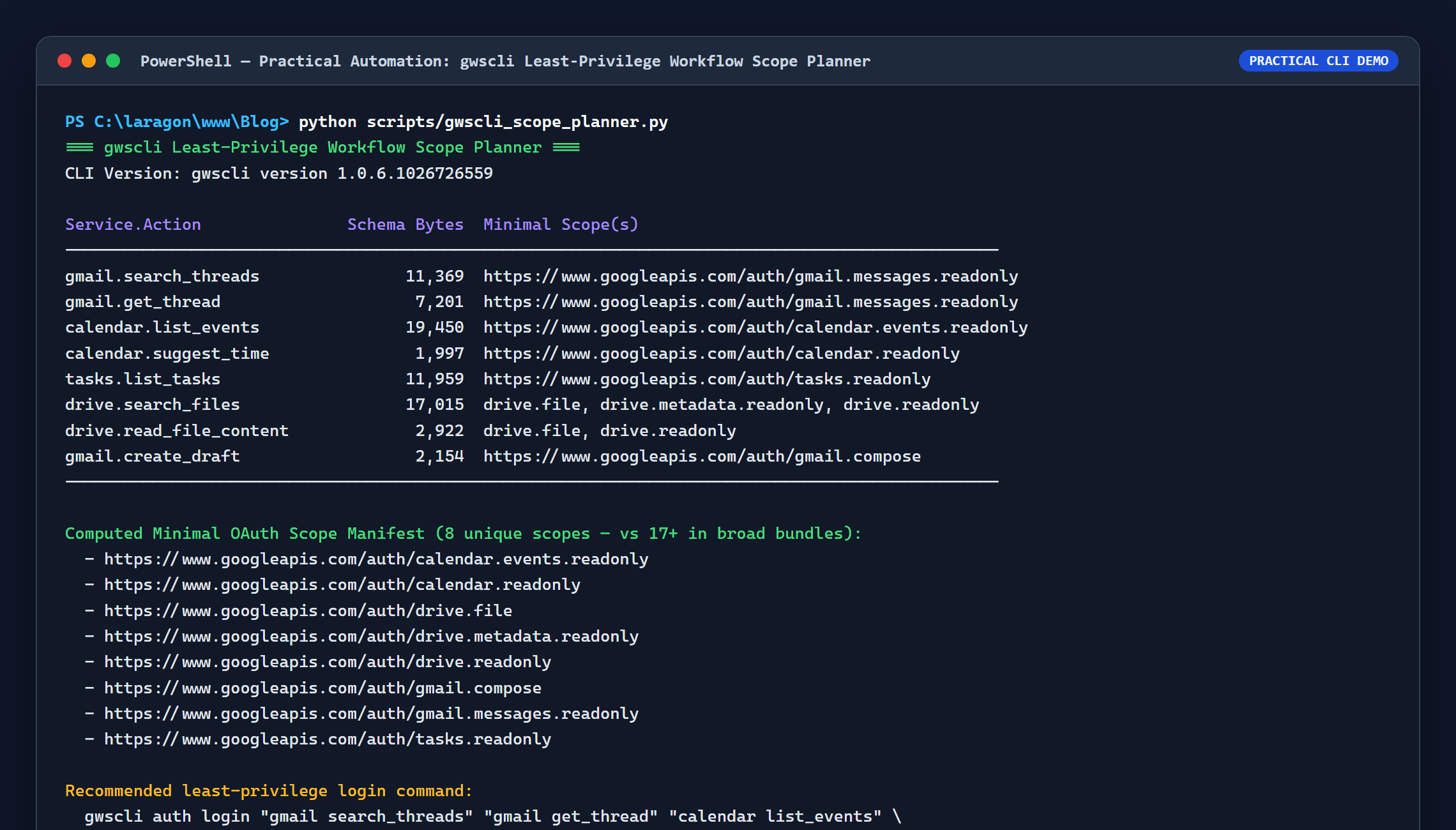
gwscli v1.0.6.7.3 Understanding JSON Schema Context Cost and Practical Improvements
Across the eight commands, the combined JSON schemas total 74,067 bytes (with calendar.list_events alone at 19,450 bytes). This represents a substantial amount of potential context overhead if all schemas are loaded into an agent prompt. The actual token count will vary depending on the model’s tokenizer and the structure of the JSON content, so the byte size should be treated as a useful indicator rather than an exact token measurement. Discovering schemas on demand via gwscli --schema helps keep baseline prompts smaller while limiting the agent’s authorized capabilities to the planned scopes. In a team setting, this planner can be extended to export a versioned JSON manifest, automatically flag write or destructive scopes for security review, and generate a human-readable approval checklist for pull requests.
8. My Take: Where Workspace CLI and MCP Actually Improve Daily Engineering Work
In my own engineering workflow, the main friction with Workspace tools is context switching: code, logs, and Git history stay in the terminal and IDE, while bug reports, design approvals, sprint trackers, and schedules live across browser tabs. Based on the official tool surface and my local setup, here are five practical areas where gwscli and remote MCP servers fit well—along with where caution is still needed.
8.1 Morning Engineering Triage
A practical morning triage flow follows seven steps: (1) retrieve unread emails, (2) filter relevant project or alert threads, (3) check today’s Calendar events, (4) list open Google Tasks, (5) search Drive for referenced documents, (6) synthesize a concise morning summary, and (7) create draft replies for human review. Steps 1–6 are strictly read operations; step 7 uses gmail.compose to save drafts without sending email automatically, keeping outbound communication under human control.
8.2 Incident Postmortems and Design-Doc Synthesis
Assembling an incident timeline typically requires gathering excerpts from Gmail threads, Chat discussions, Calendar incident bridges, and Drive runbooks. Tools like chat.list_messages and drive.read_file_content make it straightforward for an agent to collect raw text into a single draft. However, engineers should still verify every timestamp and root-cause claim against primary logs—agents can easily infer causal links or fill timeline gaps when source messages are incomplete.
8.3 Living Release Checklists and Spreadsheet Metrics
Teams that track release readiness or QA matrices in Google Sheets can pair local CI/CD test outputs with sheets.update_values or sheets.update_formulas. This requires write scope (spreadsheets), so a safer pattern is to have the agent print the exact target range and cell diff for human confirmation before writing, preventing accidental overwrites of formula columns or adjacent rows.
8.4 Meeting Prep and Scheduling Assistance
For meeting preparation, an agent can (1) retrieve upcoming Calendar events, (2) inspect attendee lists, (3) call calendar.suggest_time with working-hour constraints to propose open slots, (4) locate related project documents in Drive, and (5) compile brief prep notes. While suggest_time offloads time-zone arithmetic to Google’s backend, teams should test edge cases—such as external attendees, recurring holds, and cross-domain free/busy visibility—before relying on it for complex scheduling.
8.5 CLI vs Remote MCP: When to Pick Which?
| Criteria | gwscli |
Remote MCP Servers |
|---|---|---|
| Execution | Local native CLI binary | Google-hosted remote HTTPS endpoints |
| Best suited for | Terminal-based coding agents and shell pipelines | GUI AI hosts (Antigravity, Claude) and cloud agents |
| Setup | Download binary + Desktop OAuth client | MCP JSON config + Web App OAuth client |
| Output handling | JSON / Markdown on stdout (pipeable to jq) |
Structured MCP tool responses inside host |
| Local file interaction | Direct disk upload/download (--filePath) |
Depends on MCP host capabilities |
| Schema discovery | On demand (--help, --schema) |
Tool discovery via MCP tools/list |
| HITL | Terminal stderr / stdin confirmation flow |
Server-driven MCP form elicitation (/mcp/v1) |
| Maintenance | Manual binary and skill updates locally | Google manages server infrastructure |
In short: choose gwscli when your workflow lives inside a terminal coding agent, needs local file transfers, or benefits from on-demand schema loading; choose remote MCP servers when working inside GUI hosts or deploying multi-user cloud agents behind Google Cloud Agent Gateway.
9. Limitations, Rough Edges, and Security Considerations Worth Watching
Rather than repeating earlier test outputs, this section summarizes the operational impact and practical mitigations for the limitations and security risks that matter most during rollout.
9.1 Practical Limitations and Mitigations
- Developer Preview gating (personal observation): What happens: A newly created Personal Mode project hit a DPP enrollment error on Day 1. Why it matters: Rollout timing or account-type eligibility can block demos unexpectedly. Workaround: Validate tool execution on your target GCP project early, and prefer a Workspace domain project for team pilots.
- Drive scope-matching quirk (personal observation): What happens:
--bundle=readonlyomitteddrive.file, causing local rejection on Drive list/search commands. Why it matters: Read-only setups may fail unexpectedly. Workaround: Inspect--show-scopesand authorize specific Drive commands incrementally. - Dynamic runtime surface (Google-documented): What happens: Commands and output schemas can change without backward compatibility. Why it matters: Brittle cron jobs or static ETL pipelines can break silently. Workaround: Reserve
gwsclifor adaptive AI agents and interactive work; use versioned REST APIs for traditional non-agent backend integrations. - Headless and SSH OAuth friction (Google-documented): What happens: Interactive login requires a browser reaching
127.0.0.1:<port>. Why it matters: Remote devboxes and containers cannot complete consent directly. Workaround: Forward the dynamic port over SSH or use externally managed short-lived tokens. - MCP host and attribution gaps (Google-documented Known Issues): What happens: Non-agent OAuth clients return a generic
invalid tokenerror; UI attribution badges occasionally show the user instead of the agent (while Admin logs remain accurate); Chat MCP ignores admin attribution settings; some approval prompts are English-only; and saved approvals expire after 90 days without a user self-service revocation UI yet. Workaround: Rely on Admin Console OAuth audit logs for governance and verifyisAgent=truefirst when debugging auth errors. - Quotas and April 2027 billing (Google-documented): What happens: The free Standard Tier caps projects at 5,000 requests/day per product, with Scaled Tier billing starting April 1, 2027. Why it matters: Unbounded polling loops can exhaust daily quotas or create unexpected costs. Workaround: Cache read responses, avoid tight polling loops, and monitor GCP quota metrics ahead of Q2 2027.
9.2 Security Considerations
Indirect Prompt Injection
Indirect prompt injection remains the primary practical threat when an agent reads untrusted external data. A realistic attack chain looks like this:
- An attacker sends an email containing hidden instructions.
- The AI agent reads and interprets the email body.
- The agent attempts to retrieve sensitive files from Google Drive.
- If the agent also holds shell access or external network tools, it may try to transfer that data outside Workspace.
- Data can leave the intended security boundary if downstream egress controls are missing.
Mitigating this requires defense in depth: enable Model Armor project-level screening, restrict OAuth scopes strictly to what the task needs, enforce outbound network egress controls (via Cloud Agent Gateway or local sandboxing), and require human approval for external actions.
Do Not Over-Trust /mcp/v1self
As verified in Section 6, 7 of the 12 tools marked destructiveHint: true remain exposed on /mcp/v1self. Always treat least-privilege OAuth scopes and Workspace Admin policies—not endpoint selection—as your primary safety boundary.
Guard Against Token and Secret Leakage
Passing raw bearer tokens via --oauth_token risks exposing credentials in command-line arguments, shell history, OS process listings (ps / /proc), agent transcripts, and debug log files. Prefer gwscli‘s local encrypted/cached OAuth flow on workstations, store client secrets outside Git repositories, and use SPIFFE Agent Identities behind Cloud Agent Gateway for cloud workloads.
Audit Telemetry and Admin Review Policies
Per Google’s documentation, gwscli telemetry is enabled by default and collects command names, flag names, CLI version, OS/CPU architecture, HTTP status codes, and crash/error diagnostics—while excluding flag values, OAuth tokens, search queries, document IDs, email addresses, and file content. Organizations with strict diagnostic policies should standardize gwscli logging off or GWSCLI_TELEMETRY_ENABLED=0, and Workspace admins should review Agents → Settings → User review for external agents before February 1, 2027.
9.3 Recommended Deployment Checklist
- Verify every agent OAuth client has Use this client for an AI-powered agent enabled.
- Compute and review minimal OAuth scopes before onboarding users.
- Enable only the specific product APIs and
*mcp.googleapis.comservices required. - Test read-only workflows end-to-end before authorizing any write scopes.
- Audit all write and destructive tools exposed to each agent host.
- Configure HITL approval policies in Workspace Admin Console (decide whether to disallow sticky
ALLOW_TOOL_ALWAYS). - Restrict outbound network egress for agents that combine Workspace access with shell execution.
- Protect OAuth client secrets and refresh tokens from Git, logs, and agent transcripts.
- Confirm
gwsclitelemetry settings match internal compliance policies. - Set up monitoring on GCP API quotas ahead of April 1, 2027 billing.
- Test token expiration, scope-mismatch errors, and revocation recovery procedures.
9.4 A Suggested Three-Phase Rollout Strategy
- Phase 1 — Individual developer testing: Set up a single Personal Mode or sandbox GCP project, install
gwscliand its packaged skill, and validate read-only workflows plus scope planning before touching shared data. - Phase 2 — Internal team pilot: Move to a dedicated Workspace domain GCP project, enable Model Armor floor settings, review Admin Console OAuth audit logs, and pilot low-risk write tasks (such as Gmail drafts and Tasks) with a small engineering group.
- Phase 3 — Controlled production deployment: Register cloud agents in Agent Registry behind Google Cloud Agent Gateway with default-deny egress, enforce organization-wide DLP and user-review policies, and complete migration off legacy REST agent integrations before February 1, 2027.
Closing Verdict
Google’s GA release of gwscli, eight remote Workspace MCP servers, and Cloud Agent Gateway gives developers a standardized, policy-aware path for connecting AI agents to Workspace data without maintaining custom REST wrappers. Inline DLP checks, dedicated agent OAuth clients, and server-driven HITL approvals address the core governance gaps that previously made teams hesitant to connect agents to corporate mail and files.
At the same time, practical rough edges remain—including Day-1 project eligibility checks on Personal Mode projects, the Drive read-only scope mismatch, non-backward-compatible CLI schemas, and seven destructive-hint tools still exposed on /mcp/v1self. Use gwscli for terminal-based coding agents and local file workflows, and use remote MCP servers for GUI hosts or managed cloud agents. The most practical next step is to start a small read-only pilot today, audit your minimal OAuth scopes, and plan any REST-to-MCP migrations well ahead of the February 1, 2027 enforcement date.
References
- Chandu Thota (VP of Engineering, Google Workspace) — GA Announcement on X (Nov 25, 2026): https://x.com/ChanduThota/status/2125275496355348799
- Chandu Thota & Brad Calder — Google Cloud Blog (November 24, 2026): Built for trust and control: Powering the next wave of AI agents across Google Workspace and Google Cloud
- Google Developers Guide (updated Nov 26, 2026 UTC): Configure the Google Workspace MCP servers
- Google Developers Guide (updated Nov 25, 2026 UTC): Use the Google Workspace command-line interface (CLI)