What Google actually shipped on November 24–25, 2026 (gwscli GA, remote Workspace MCP servers and a new security model for enterprise agents), installed on a Windows laptop and driven by Claude Code against a company Google Workspace account.
Introduction
I work as a developer and AI engineer at a small software company in Vietnam. Like most teams of our size, we live in Google Workspace: specifications and reports in Drive, customer threads in Gmail, sprint reviews in Calendar, follow-ups in Tasks. In the last year our coding agents (Claude Code, Codex) became very good at the “code” half of the work, but every time a task touched Workspace, a human still had to copy a document into the chat, paste a summary back into an email, or create the meeting by hand. The glue work stayed manual.
On November 24, 2026 Google announced the general availability of the Google Workspace CLI (gwscli), and one day later the Google Cloud blog presented the Google Workspace MCP servers together with a new set of enterprise agent security controls. Both are aimed exactly at that glue work: they let an agent read and write Workspace data through interfaces designed for agents, under policies designed for agents. This post has two goals. First, to verify what was officially released, by reading the specification pages rather than repeating the announcement. Second, to install and use the tools myself and report what actually happens, including the parts that did not match the documentation.
The hands-on part was done on my own Windows 11 laptop with a company Google Workspace account. All files, events, tasks and drafts used in the demo were created by me for this test. No customer or internal business data was involved, and client IDs, secrets and tokens are masked in every screenshot and command output.
Where each requirement is answered
| Quest requirement | Section in this post | What you will find there |
|---|---|---|
| 1. Summarize the official release specifications and key features of Google Workspace CLI, MCP servers and enterprise agent security | Section 1 | Release table, CLI design, install, authentication, command surface, MCP endpoints and scopes, CLI vs MCP, security controls, and discrepancies found in the docs |
| 2. Set up and configure the CLI and MCP server in your own environment, with screenshots or command outputs | Section 2 | Windows install, personal-mode project and agent-flagged OAuth client, CLI sign-in, Claude Code connected to remote Workspace MCP servers |
| 3. Execute at least one practical task with the CLI or an MCP-connected agent | Section 3 | Drive upload, search and read, Calendar event, Tasks item, Gmail draft with human confirmation, agent tasks through skills and through MCP, demo video |
| 4. Your own opinion on daily-work use, limitations and security considerations | Section 4 | Concrete workflows for a small dev team, how I choose between CLI and MCP, limitations, and a security checklist |
1. Requirement 1: Official release specifications and key features of Google Workspace CLI, MCP servers and enterprise agent security
1.1 Why Google shipped a CLI and MCP servers for agents, and why now
For more than a decade the contract between Google Workspace and third-party software was simple: an app asks the user for an OAuth token once, and from then on every REST call carrying that token is treated as something the user wanted. That assumption held while software moved at human speed. It breaks when an AI agent can read a thousand emails, rewrite a spreadsheet and share a folder in the time it takes a person to finish a coffee. Google’s own numbers show the scale: the Cloud blog published on November 25, 2026 says Workspace APIs handle more than 2.8 trillion calls a month, and more than 18 billion Drive reads per day come from API callers.
Google’s answer is two new front doors built specifically for agents, plus a policy that eventually makes them the only doors:
- Google Workspace CLI (gwscli), a single binary that local agents such as Claude Code, Codex or Antigravity can shell out to. It went generally available on November 24, 2026.
- Google Workspace MCP servers, remote Model Context Protocol endpoints hosted by Google (one per product) that any MCP-capable client can connect to.
- A security layer around both: agent-flagged OAuth clients, per-request policy checks, human confirmation for risky actions, Model Armor screening, and a new contractual document, the Workspace AI Tools Addendum, with technical enforcement starting February 1, 2027.
This first half of the post is the research part. I read the official documentation and the announcement, and I try to explain what was actually released, how the pieces fit together, and where the documents disagree with each other. A hands-on part follows, where we install the CLI and connect the MCP servers to a real agent.
1.2 Release specifications at a glance
| Component | Status / date | Distribution | Auth model | Supported services | Client support |
|---|---|---|---|---|---|
| Google Workspace CLI (gwscli) | GA, November 24, 2026 (release notes). Local binary reports gwscli version 1.0.6.1026726559 | Single native binary from dl.google.com for Linux, macOS and Windows on x86_64 and ARM64; install scripts for bash and PowerShell | OAuth 2.0 desktop client flagged “for an AI-powered agent”; personal mode or manual setup; or a pre-minted token via –oauth_token | Calendar, Chat, Docs, Drive, Gmail, Sheets, Slides, Tasks; People (Developer Preview) | Any agent that can run shell commands (Claude Code, Codex, Antigravity named); ships embedded agent skills |
| Workspace MCP servers | GA per Cloud blog (November 25, 2026); the developer pages still carry a “Developer Preview” banner | Google-hosted remote endpoints, Streamable HTTP transport, https://<product>mcp.googleapis.com/mcp/v1 | OAuth 2.0 client (usually Web application type) flagged for an AI-powered agent; domain-wide delegation service accounts also accepted | Gmail, Drive, Docs, Sheets, Slides, Calendar, Chat, People, Classroom, Universal Search (blog also lists Tasks) | Antigravity, Claude (Pro/Max/Team/Enterprise custom connectors), any generic MCP client |
| Model Armor for MCP | Documented on a Developer Preview page | Google Cloud API modelarmor.googleapis.com, configured as a project “floor setting” | Google Cloud IAM on the project | Screens prompts and responses of Google MCP servers | Transparent to the MCP client |
| Agent Gateway / Agent Registry (Google Cloud) | Announced November 25, 2026, no GA date stated | Google Cloud managed services | Agent Identity per agent, IAM policies, no shared long-lived keys | LLM, MCP and Agent2Agent (A2A) traffic | Agents running on Google Cloud |
The table already shows the main design idea: the CLI and the MCP servers are not two separate products but two clients of the same backend. When you enable a service for the CLI you enable both the classic API (for example drive.googleapis.com) and its MCP companion (drivemcp.googleapis.com). The CLI is, in effect, a local MCP client in a binary, which is why the command names in the CLI and the tool names in the MCP reference are almost identical.
1.3 Google Workspace CLI
1.3.1 Design: built to be read by a machine
The syntax is uniform: gwscli <service> <action> [flags]. Three design choices make it agent-friendly rather than just another admin tool:
- Runtime discovery instead of memorised signatures. The documentation openly warns that command interfaces and output schemas can change without backward compatibility. Instead of promising stability, Google gives the agent a way to learn the interface at run time: gwscli –help, gwscli drive –help, gwscli drive list_recent_files –help.
- Schemas on demand. –schema prints the full JSON output schema of a command without executing it, and –show-scopes prints the minimal OAuth scopes it needs. An agent can plan a call, check permissions and know the shape of the answer before touching any data.
- JSON on stdout. List, file and event results are valid JSON, so they pipe into jq. Readers that return document bodies return them inside JSON too, for example drive read_file_content returns a fileContent string in plain text or Markdown.
gwscli drive search_files --schema
gwscli drive search_files --query="title contains 'Quarterly'" | jq '.files[] | {id: .id, title: .title}'
gwscli drive read_file_content --fileId="FILE_ID" | jq -r '.fileContent'
My reading: this is a deliberate trade. Google keeps the freedom to evolve the tool surface quickly (the same thing MCP servers do through tools/list), and in return asks script authors to stop hard-coding. For a human writing a bash script this is mildly annoying; for an LLM agent that re-reads help text every session it costs almost nothing.
1.3.2 Installation per operating system
| OS | Quick install | Default location | Manual binary URL |
|---|---|---|---|
| Linux / macOS | curl -fsSL https://dl.google.com/workspace-cli/install.sh | bash | ~/.local/bin (override with GWSCLI_INSTALL_DIR) | …/linux/gwscli, …/linux_arm64/gwscli, …/macos_silicon/gwscli, …/macos_intel/gwscli |
| Windows (PowerShell) | iex ((New-Object Net.WebClient).DownloadString(‘https://dl.google.com/workspace-cli/install.ps1’)) | $HOME\bin, added to user PATH | …/windows/gwscli.exe, …/windows_arm64/gwscli.exe |
Small practical details from the docs: on macOS a manually downloaded binary needs xattr -d com.apple.quarantine; on Windows you should call curl.exe explicitly because curl is an alias of Invoke-WebRequest in PowerShell. There is also an INSTALL_PROMPT.md file (https://dl.google.com/workspace-cli/INSTALL_PROMPT.md) meant to be handed to an agent so it can install the CLI itself, with the explicit caveat that credential setup and sign-in must be done by the human in a local terminal. Verification is gwscli version. The CLI does not auto-update; you compare the version against the release notes and re-run the installer.
1.3.3 Authentication model
Authentication is the most interesting part of the CLI, because it is where Google’s new “agents are a separate kind of client” policy becomes concrete.
| Mode | Who it is for | How it works | Trade-off |
|---|---|---|---|
| Personal mode | One developer, one Google Account | Console link https://console.cloud.google.com/auth/overview/personal?apis=ws,wsmcp,tasksmcp&clientType=desktop&isAgent=true creates a single-user desktop client, enables core APIs, skips consent screen and app verification. Then gwscli auth setup. | Fastest path; client only works for your own account |
| Manual setup | Existing projects, teams, multi-user | Enable each API plus its *mcp companion, configure the consent screen (add test users if External), create a Desktop app client with “Use this client for an AI-powered agent” ticked, then gwscli auth setup –oauth_client_file=… | More steps, but works for a whole organisation |
| Existing token | CI, containers, headless jobs | Global flag –oauth_token=”$ACCESS_TOKEN” on any command; token must come from an agent-flagged client or a domain-wide-delegation service account | No consent prompts, no refresh; token can leak via shell history or process lists |
Four details are worth highlighting:
- Agent-flagged clients. The checkbox “Use this client for an AI-powered agent” is not cosmetic. Both the CLI and MCP troubleshooting sections say requests from user-delegated clients without it are rejected. If an existing client also serves a normal (non-agent) app, Google recommends creating a separate one. This is how Google can tell agent traffic from human-app traffic.
- Incremental scopes and bundles. Sign-in is additive: gwscli auth login –bundle=readonly grants read-only scopes for everything, gwscli auth login gmail search_threads grants just what one action needs, and later logins merge new scopes into the existing grant. –print-scope-only prints the minimal scope list without logging in.
- Token lifetime. Access tokens typically last about one hour and are refreshed automatically from the cached refresh token. gwscli auth status, auth refresh, auth logout (revokes tokens) and auth reset (also removes the registered client) manage the session.
- Localhost redirect. Interactive login starts a temporary listener on http://127.0.0.1:/. Over SSH, in Cloud Shell or in a container you must forward that port, or fall back to –oauth_token. Login commands block forever without input, so they must never be run by an unattended agent.
1.3.4 Command surface per service
| Service | Read actions (in readonly bundle) | Write actions |
|---|---|---|
| Calendar | list_calendars, list_events, get_event, search_events, suggest_time | create_event, update_event, respond_to_event, delete_event |
| Chat | search_conversations, list_messages, search_messages | send_message (Workspace account + configured Chat app) |
| Docs | read_doc | update_doc (batch updates) |
| Drive | search_files, list_recent_files, get_file_metadata, get_file_permissions, read_file_content, download_file_content | create_file, upload_file_revision, copy_file |
| Gmail | search_threads, get_thread, get_message, list_drafts, get_draft, list_labels | create_draft, label/unlabel thread and message, trash/untrash, mark/unmark spam, apply_sensitive_*_label |
| People (Developer Preview) | get_user_profile, search_contacts, search_directory_people | none |
| Sheets | get_spreadsheet, get_values | update_values, update_formulas, insert_dimension, update_spreadsheet |
| Slides | read_presentation, read_slide_page, read_slide_page_thumbnail | update_presentation (batch updates) |
| Tasks | list_task_lists, list_tasks, get_task | create_task, update_task, complete_task, uncomplete_task, delete_task, undelete_task |
What is missing is as telling as what is present. There is no “send email” in Gmail, only create_draft, so an agent can prepare a reply but a human presses Send. There is no Drive permission change command and no hard delete for files. Gmail deletions go through trash, which is reversible. The surface is clearly designed so that the most damaging actions either do not exist or are recoverable.
1.3.5 Agent skills, human-in-the-loop and telemetry
Agent skills are embedded in the binary. gwscli skills list shows them and gwscli skills install –dir ~/.claude/skills (or ~/.agents/skills for a shared folder) writes them where the agent harness can find them. Because they live inside the binary, every CLI update should be followed by skills install –overwrite and an agent restart.
Human-in-the-loop is enforced on the server side, not by the CLI. For sensitive actions (sending messages, external sharing, trashing, deleting) the CLI pauses, writes a prompt such as “Allow this app to use send_message?” to stderr and reads one of ALLOW_ONCE, ALLOW_TOOL_ALWAYS or DENY_ONCE from stdin. ALLOW_TOOL_ALWAYS only appears in an interactive terminal and only if policy allows it. The docs explicitly say the agent must get the user’s confirmation before writing that answer. This is the honest weak spot: an agent that has stdin access could technically answer for the user, so the protection depends on the agent harness respecting the rule.
Telemetry is on by default. It records command metadata (service, action, flag names), environment (version, OS, CPU) and diagnostics (status, duration, HTTP and error codes, crash traces). It does not record flag values, tokens, queries, document IDs, emails or content. It can be turned off with gwscli logging off or GWSCLI_TELEMETRY_ENABLED=0.
1.3.6 Limitations
- No backward-compatibility guarantee for commands or output schemas, even after GA.
- Interactive login needs a browser that can reach localhost on the same machine.
- Chat send_message does not work with personal Gmail accounts.
- People commands need Developer Preview enrolment.
- No auto-update; skills must be refreshed manually.
- No separate charge, but requests count toward the project’s Workspace usage tier and quotas.
1.4 Google Workspace MCP servers
1.4.1 Endpoints and tools
All servers are remote, hosted by Google, use the Streamable HTTP transport and OAuth 2.0. Tool names below come from each product’s MCP reference page.
| Product | Endpoint | Tools |
|---|---|---|
| Gmail | https://gmailmcp.googleapis.com/mcp/v1 | search_threads, get_thread, get_message, list_drafts, list_labels, create_draft, label_thread, label_message, unlabel_thread, unlabel_message |
| Drive | https://drivemcp.googleapis.com/mcp/v1 | search_files, list_recent_files, get_file_metadata, get_file_permissions, read_file_content, download_file_content, create_file, copy_file |
| Docs | https://docsmcp.googleapis.com/mcp/v1 | read_doc, update_doc |
| Sheets | https://sheetsmcp.googleapis.com/mcp/v1 | get_spreadsheet, get_values, update_values, update_formulas, insert_dimension, update_spreadsheet |
| Slides | https://slidesmcp.googleapis.com/mcp/v1 | read_presentation, read_slide_page, read_slide_page_thumbnail, update_presentation |
| Calendar | https://calendarmcp.googleapis.com/mcp/v1 | list_calendars, list_events, get_event, search_events, suggest_time, create_event, update_event, delete_event, respond_to_event |
| Chat | https://chatmcp.googleapis.com/mcp/v1 | search_conversations, list_messages, search_messages, send_message, list_memberships, mark_as_read, mark_as_unread, get_notification_settings, update_notification_settings |
| People | https://people.googleapis.com/mcp/v1 | get_user_profile, search_contacts, search_directory_people |
| Classroom | https://classroommcp.googleapis.com/mcp/v1 | e.g. list_courses, create_announcement |
| Universal Search | https://workspacemcp.googleapis.com/mcp/v1 | search_corpus (Gmail, Drive, Calendar, Chat in one query) |
Two oddities: People is served directly on people.googleapis.com rather than a separate *mcp host, and the Docs, Sheets and Slides references list a second path, /mcp/v1self (“self-mode”), with the same tools, which the setup guide never explains.
1.4.2 OAuth scopes
| Server | Scopes (prefix https://www.googleapis.com/auth/) |
|---|---|
| Gmail | gmail.readonly, gmail.compose, gmail.modify |
| Drive | drive.readonly, drive.file |
| Docs / Sheets / Slides | drive.readonly, drive.file plus documents(.readonly), spreadsheets(.readonly), presentations(.readonly) |
| Calendar | calendar.calendarlist.readonly, calendar.events.freebusy, calendar.events.readonly, calendar.events |
| Chat | chat.spaces.readonly, chat.memberships.readonly, chat.messages.readonly, chat.messages.create, chat.users.readstate, chat.users.spacesettings |
| People | directory.readonly, userinfo.profile, contacts.readonly |
| Classroom | classroom.courses.readonly, classroom.announcements, classroom.rosters.readonly, classroom.topics, and five more |
| Universal Search | gmail.readonly, drive.readonly, calendar.readonly, chat.messages.readonly, chat.spaces.readonly, chat.memberships.readonly (all optional) |
Note that Drive write access uses drive.file, which only covers files the app created or the user opened with it, not the full drive scope. That is least privilege baked into the defaults.
1.4.3 Client configuration
- Quick setup (personal mode). The console preselects a Web application client. You add the callback URI of your MCP client, keep the agent checkbox ticked, and copy the client ID and secret. Classroom is not enabled by quick setup.
- Antigravity. Callback https://antigravity.google/oauth-callback. Servers go into ~/.gemini/config/mcp_config.json under mcpServers, each entry with serverUrl and an oauth object (clientId, clientSecret). Authentication is done in Settings > Customizations > Installed MCP Servers, or in the CLI via agy then /mcp.
- Claude (claude.ai / Claude Desktop). Pro, Max, Team or Enterprise plan. Callback https://claude.ai/api/mcp/auth_callback. Add each server as a custom connector in Settings > Connectors with the OAuth client ID and secret under Advanced settings.
- Generic clients. Server name googleworkspace, Streamable HTTP, OAuth 2.0 with an agent-flagged client. Web clients must request access_type=offline (or offline_access) to get a refresh token.
{
  "mcpServers": {
    "drive": {
      "serverUrl": "https://drivemcp.googleapis.com/mcp/v1",
      "oauth": { "clientId": "CLIENT_ID", "clientSecret": "CLIENT_SECRET" }
    }
  }
}
1.4.4 Universal Search, Classroom and troubleshooting
Universal Search is the most agent-native server: one tool, search_corpus, across Gmail, Drive, Calendar and Chat. It only searches products whose scopes the user granted; without the Chat spaces and memberships scopes, Chat results are treated as externally shared and may be filtered or require confirmation. Classroom needs classroom.googleapis.com and classroommcp.googleapis.com enabled manually and a test class; create_announcement only drafts, a teacher posts.
Troubleshooting notes worth remembering: hourly re-login means you have no refresh token (request offline access or add prompt=consent); service accounts with domain-wide delegation cannot be agent-flagged but still trigger elicitation prompts for sensitive calls; the default Apps Script OAuth client cannot be agent-flagged, so you need your own client and the apps-script-oauth2 library.
1.5 CLI vs MCP: when to use which
| Criterion | Workspace CLI | Workspace MCP servers |
|---|---|---|
| Where it runs | Local process next to the agent | Remote, hosted by Google |
| Best client | Coding agents with shell access (Claude Code, Codex, Antigravity terminal) | Chat-style clients and hosted agents (claude.ai connectors, Antigravity, ADK, Gemini Enterprise) |
| OAuth client type | Desktop app | Usually Web application (callback URI per client) |
| Output | JSON on stdout, pipeable to jq, files saved to disk | MCP tool results returned into model context |
| Local files | Upload/download real files (create_file –filePath, download_file_content –destinationPath) | No local filesystem |
| Token cost to the model | Low: agent can filter with jq before reading | Higher: full result lands in context |
| Human confirmation | stdin prompt (ALLOW_ONCE etc.) | MCP form elicitation in the client UI |
| Extra services | Tasks; more Gmail write actions (trash, spam) | Classroom, Universal Search, extra Chat tools |
| Headless/CI | Yes, with –oauth_token | Depends on the MCP client |
| Updates | Manual binary + skills update | Server-side, automatic |
My analysis: they are not competitors. Use the CLI when the agent already lives in a terminal and needs to combine Workspace data with local work, for example “read the spec in Drive, generate code, upload the report back”. Shell pipelines let the agent shrink a 500-row result to the five rows it needs before the model ever sees them, which saves tokens and reduces the attack surface for prompt injection. Use MCP when there is no shell (a chat UI, a hosted agent), when non-developers are the users, or when you want Universal Search. Since both hit the same backend with the same policy checks, a team can mix them without creating two security models.
1.6 Enterprise agent security, control by control
The Cloud blog’s core sentence is that “a valid token is no longer enough”: policy checks, data boundaries and human confirmation must live in the request path. Here is each control, what it means, and what it means for a small dev company like ours.
| Control | What it is | Status | What it means for a small dev team |
|---|---|---|---|
| Policy checks on every request | Each agent call is checked against Workspace permissions, DLP rules and classification labels | Live with MCP/CLI | Your DLP rules protect you from your own agents; worth configuring even basic ones |
| Workspace AI Tools Addendum | Agents must use MCP servers or the CLI, not the classic REST APIs; no permanent raw storage, model training, extended retention of derived data or scraping | Technical enforcement from February 1, 2027 | Any in-house script or bot that calls Gmail/Drive REST APIs “as an agent” needs migrating before Feb 2027 |
| Agent identities / agent-flagged clients | Dedicated OAuth client IDs for agents; Google Cloud agents get an Agent Identity in Agent Registry with no shared long-lived keys | Live (Workspace); announced (Cloud) | Create a separate client per agent; do not reuse your web app’s client |
| Least privilege scopes | Agents request only needed scopes; CLI bundles and –show-scopes help | Live | Start with –bundle=readonly, add write scopes per action |
| Time-limited approvals | Grants that expire | “Coming soon”, no date | Until then, revoke manually after experiments |
| Usage quotas and billing | Agent traffic is metered against project quotas | Billing begins April 1, 2027 | Free now, but budget it; a runaway agent loop will cost money after April 2027 |
| Human sign-off | Drafts and summaries run freely; sending email, changing Drive sharing, bulk edits need explicit user confirmation | Live in MCP and CLI | Never let an agent auto-answer the confirmation prompt |
| Admin visibility and revocation | Admins view, audit and revoke agents in the Admin console; users will “soon” see agent activity and revoke access | Admin: live; user view: soon | Whoever is Workspace admin should review connected agents monthly |
| DLP / client-side encryption for agents | AI access restrictions let admins and users block agents from Gmail messages and specific Drive files/folders | “Coming soon” | Plan which folders (contracts, HR, customer data) should be agent-blocked |
| Model Armor | Google Cloud service that screens MCP prompts and responses; enabled as a project floor setting with integrated service GOOGLE_MCP_SERVER and INSPECT_AND_BLOCK | Documented (page marked Developer Preview) | Cheap insurance against prompt injection hidden in incoming email or shared docs; mind that logging stores full payloads |
| Agent Gateway / Agent Registry | Protocol-native gateway for LLM, MCP and A2A traffic: verifies agent identity, enforces IAM and default-deny egress, routes to Model Armor and Service Extensions | Announced, no GA date | Probably overkill for a small team today; relevant once agents run on Cloud Run/GKE in production |
The security guide configures Model Armor for MCP as a floor setting on the Google Cloud project, using gcloud or the console. In plain words, you turn on floor-setting enforcement, add Google MCP servers (integrated service GOOGLE_MCP_SERVER) to the services it protects, choose the enforcement type (INSPECT_AND_BLOCK to block flagged traffic, or inspect only), and optionally enable Cloud Logging for MCP traffic plus filters such as malicious URL detection and responsible-AI categories with a confidence threshold. I deliberately do not reproduce the command here: the flags of this preview feature are still changing, so copy the current version from the official security page rather than from a blog post.
Taken together, the model is layered: identity (who is the agent), scope (what it may touch), policy and DLP (what the organisation allows), content screening (is the input poisoned), confirmation (does a human agree), and audit/revocation (can we stop it). For a company of our size, the first, second and fifth layers are free and immediate; the deadline that actually matters is February 1, 2027, after which agent access through the old REST APIs is expected to be blocked.
1.7 Open questions and discrepancies I found in the docs
- GA vs Developer Preview. The Cloud blog (November 25, 2026) calls the Workspace MCP servers generally available, but the MCP setup page, the security page, Universal Search and every per-product tool reference I checked still show a Developer Preview banner and list program membership as a prerequisite. Probably a documentation lag, but it matters for anyone who needs GA terms.
- Tasks MCP endpoint is missing. The blog lists Tasks among the MCP servers, and the CLI requires tasksmcp.googleapis.com (personal-mode link even passes apis=ws,wsmcp,tasksmcp), yet the MCP configuration page has no Tasks row, no endpoint URL and no scope list.
- Release notes have no version number. The single entry (November 24, 2026) states GA but no version; the binary reports gwscli version 1.0.6.1026726559, so readers cannot match versions to changes.
- CLI and MCP tool sets differ. The CLI has Gmail get_draft, trash/untrash and spam actions and Drive upload_file_revision that the MCP references do not list; the Chat MCP server has list_memberships, mark_as_read/unread and notification settings that the CLI lacks. It is unclear whether the CLI calls extra endpoints or the reference pages are incomplete.
- Undocumented /mcp/v1self path on Docs, Sheets and Slides.
- “GA” CLI with no stability guarantee. GA usually implies a compatibility promise; here schemas may change without backward compatibility.
- Undated “coming soon” items: time-limited approvals, user-facing agent activity/revocation and DLP/CSE for agents have no dates, while enforcement (February 1, 2027) and billing (April 1, 2027) do. Controls may arrive after enforcement.
- Quota pricing from April 1, 2027 is announced without a price table or free tier figure in the sources I read.
2. Requirement 2: Setting up the Google Workspace CLI and MCP servers in my environment
This section documents the setup exactly as I did it. The order follows the official guide: install the binary, create an agent-flagged OAuth client in a Google Cloud project, sign the CLI in, and then connect an MCP client to the remote servers using the same project.
2.1 Test environment
| Item | Value |
|---|---|
| Machine / OS | Windows 11 laptop, Windows PowerShell 5.1 and Git Bash |
| Google account | Company Google Workspace account (my own user, no admin actions) |
| Google Cloud project | ai-quest-gwscli-demo, created through personal-mode onboarding |
| OAuth client | gwscli-mcp-agent, type Desktop app, flagged “Use this client for an AI-powered agent” |
| CLI | gwscli version 1.0.6.1026726559 |
| Agent | Claude Code (terminal) for both the skills-based and the MCP-based tests |
| Demo data | A self-written fictional weekly report, plus a planned test event, task and draft (the write actions were blocked, see 3.2) |
2.2 Step 1: Install gwscli on Windows
The guide offers a one-line PowerShell installer that downloads install.ps1 and runs it with iex. That works, but I prefer not to pipe a remote script into my shell on a work laptop, so I used the manual path: download the single binary with curl.exe, put it in a folder on my PATH and check the version. Note the explicit curl.exe: in Windows PowerShell, plain curl is an alias for Invoke-WebRequest and takes different arguments.
New-Item -ItemType Directory -Force "$HOME\bin" | Out-Null
curl.exe -fL -o "$HOME\bin\gwscli.exe" https://dl.google.com/workspace-cli/windows/gwscli.exe

# add $HOME\bin to the user PATH (once), then open a new terminal
[Environment]::SetEnvironmentVariable("Path", [Environment]::GetEnvironmentVariable("Path","User") + ";$HOME\bin", "User")

gwscli version
gwscli version 1.0.6.1026726559
Two observations already at this step. First, the version string is the only version information I could find: the release notes page has a single dated entry (November 24, 2026) and no version number, so there is no way to map “1.0.6.1026726559” to a changelog. Second, there is no self-update command. To upgrade you download the binary again, and because agent skills are embedded in the binary, you also re-install the skills afterwards (see 3.3).
2.3 Step 2: Personal-mode project and an agent-flagged OAuth client
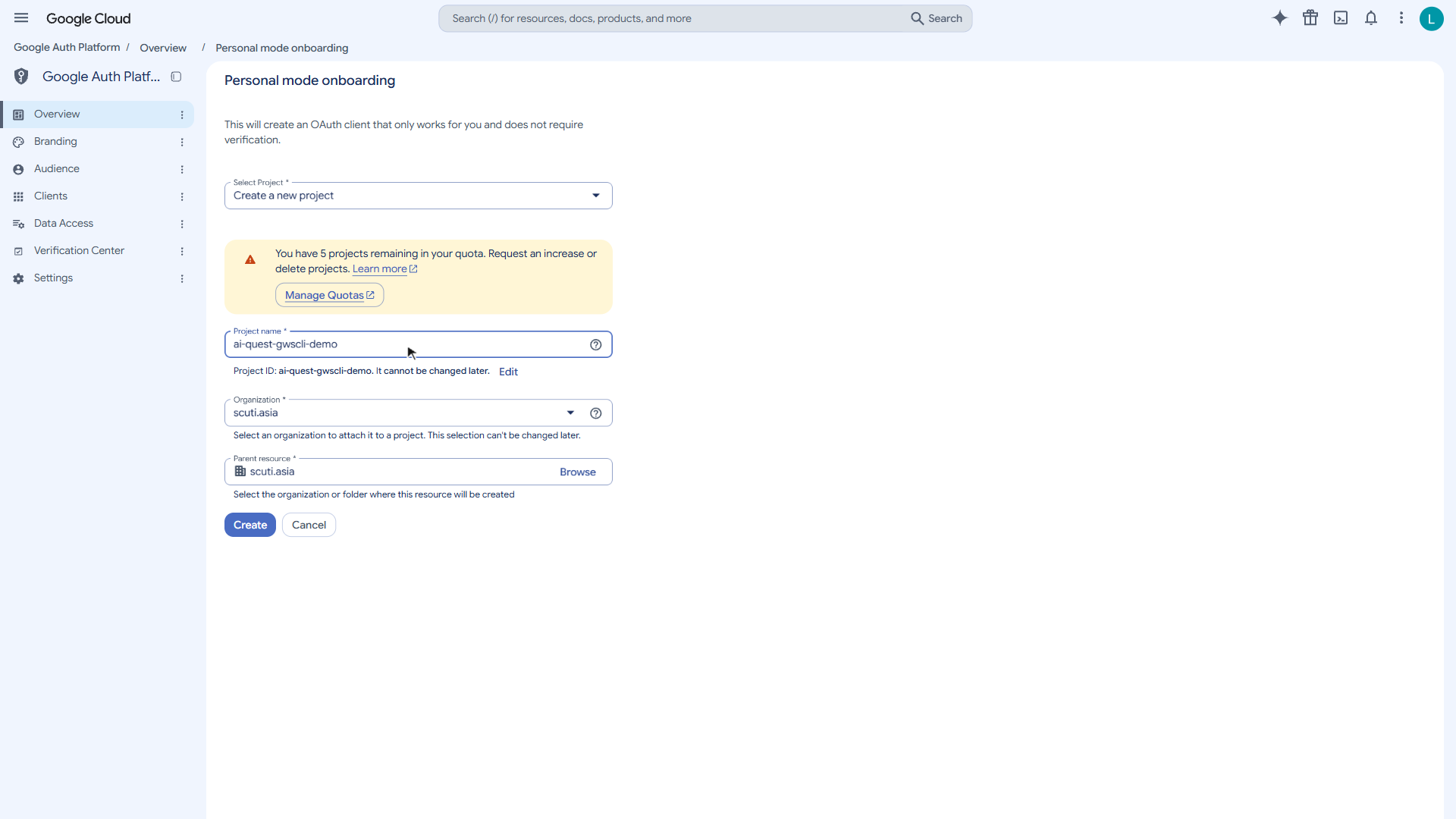
For a single developer the fastest path is personal mode. The CLI guide links to a Cloud console page (auth/overview/personal with the parameters apis=ws,wsmcp,tasksmcp, clientType=desktop and isAgent=true). In one form it creates a new project, enables the Workspace APIs together with their MCP companions, and creates an OAuth client that only works for my own account, so no consent-screen configuration and no app verification are needed.
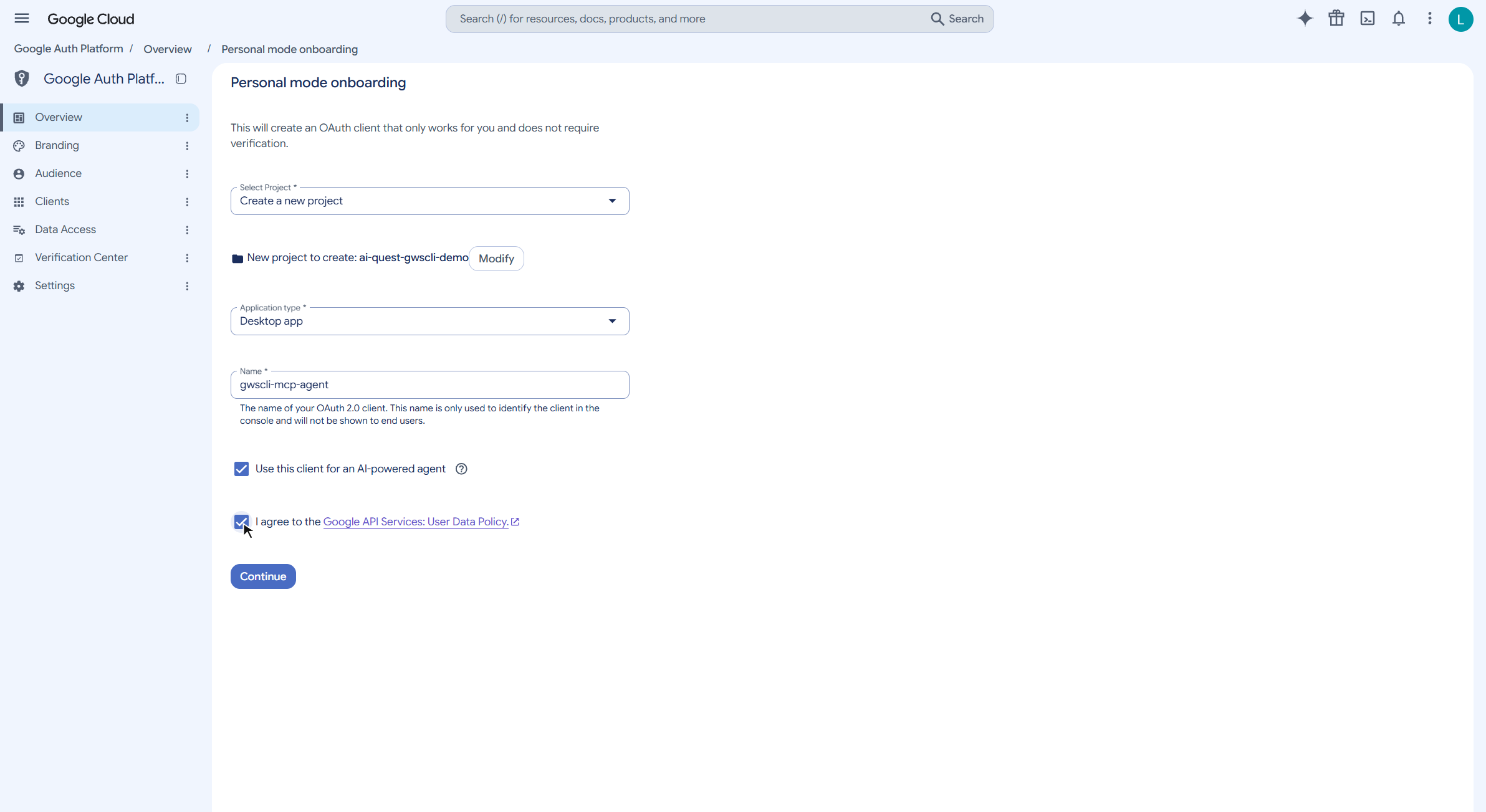
I filled in the project name ai-quest-gwscli-demo, chose Desktop app as the application type, named the client gwscli-mcp-agent and ticked Use this client for an AI-powered agent. That checkbox is the important part: according to both the CLI and the MCP troubleshooting pages, user-delegated requests coming from a client without this flag are rejected by the Workspace agent endpoints.
After Continue, the console created the project, enabled the Workspace APIs and their MCP companions, and showed the new client once with a Download JSON button. The secret cannot be displayed again after the dialog is closed, so I saved the JSON straight into a git-ignored folder.
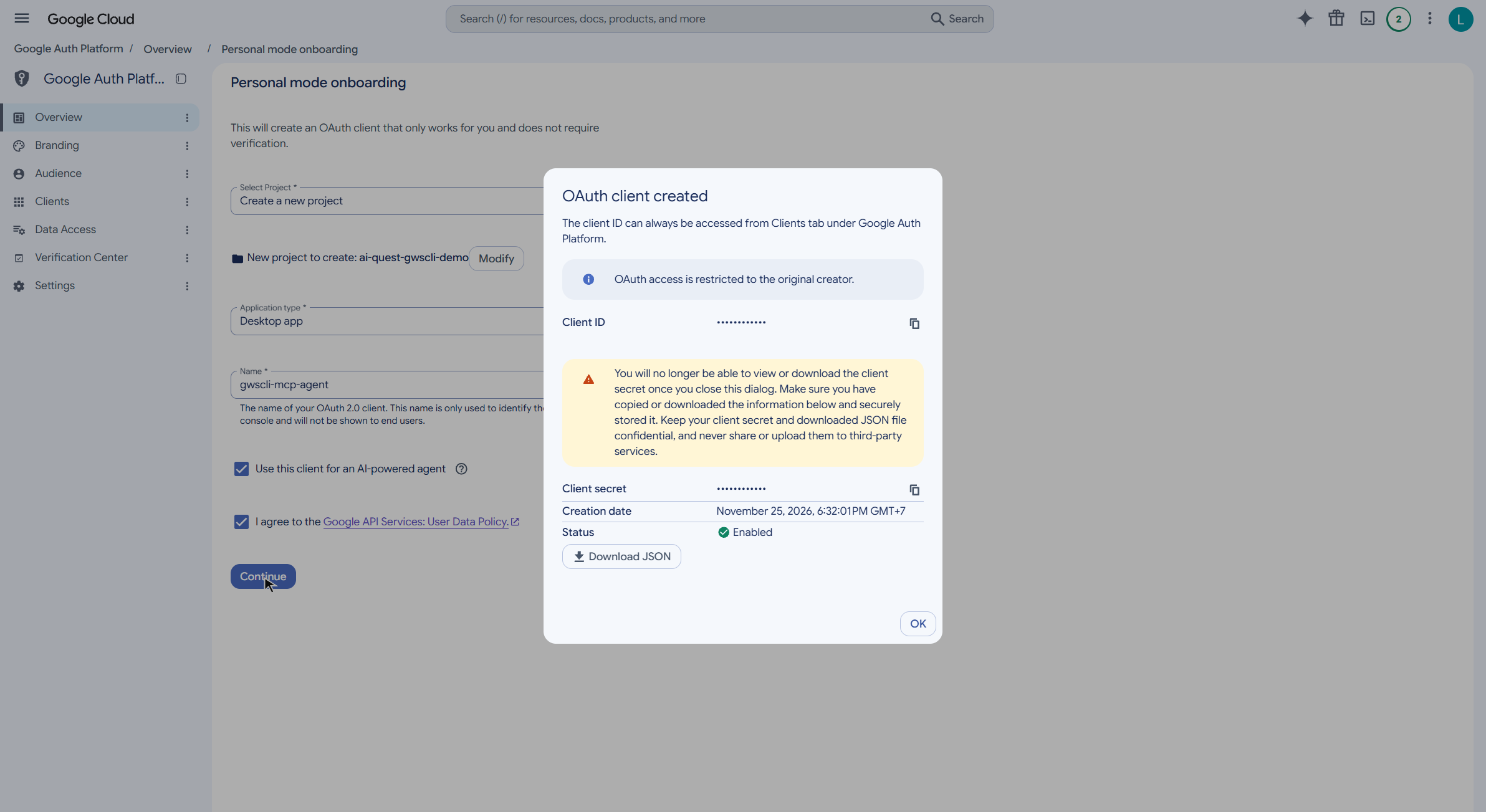
Personal mode is ideal for a test like this, but it is deliberately limited: the client works only for the Google Account that created it. For a team you would use the manual setup (enable each API and its *mcp companion, configure the consent screen, create a client per agent) and, ideally, have the Workspace admin review it.
2.4 Step 3: Register the client and sign the CLI in (incremental scopes)
The CLI keeps two things locally: the registered OAuth client (from gwscli auth setup) and the user grant with its refresh token (from gwscli auth login). On Windows both live in %AppData%\gwscli (client_credentials.json and token.json). Instead of the read-only bundle I asked only for what my scenario needed: the Drive, Calendar and Tasks services plus the single Gmail action create_draft.
PS> echo Y | gwscli auth setup --oauth_client_file=client_secret.json
Configuring your OAuth Client will first remove your existing stored OAuth tokens (logout), are you sure you want to proceed? Y, N.
Already logged out (no cached token found).
Successfully configured OAuth client credentials (client_id: ****).

PS> gwscli auth login drive calendar tasks "gmail create_draft"
Please open the following URL in your browser to log in:
[Open this URL in your browser to sign in]
Waiting for authorization code on localhost:61118...
Successfully authorized the following scopes:
  - https://www.googleapis.com/auth/calendar
  - https://www.googleapis.com/auth/calendar.events.readonly
  - https://www.googleapis.com/auth/calendar.readonly
  - https://www.googleapis.com/auth/drive.file
  - https://www.googleapis.com/auth/drive.metadata.readonly
  - https://www.googleapis.com/auth/drive.readonly
  - https://www.googleapis.com/auth/gmail.compose
  - https://www.googleapis.com/auth/tasks
  - https://www.googleapis.com/auth/tasks.readonly
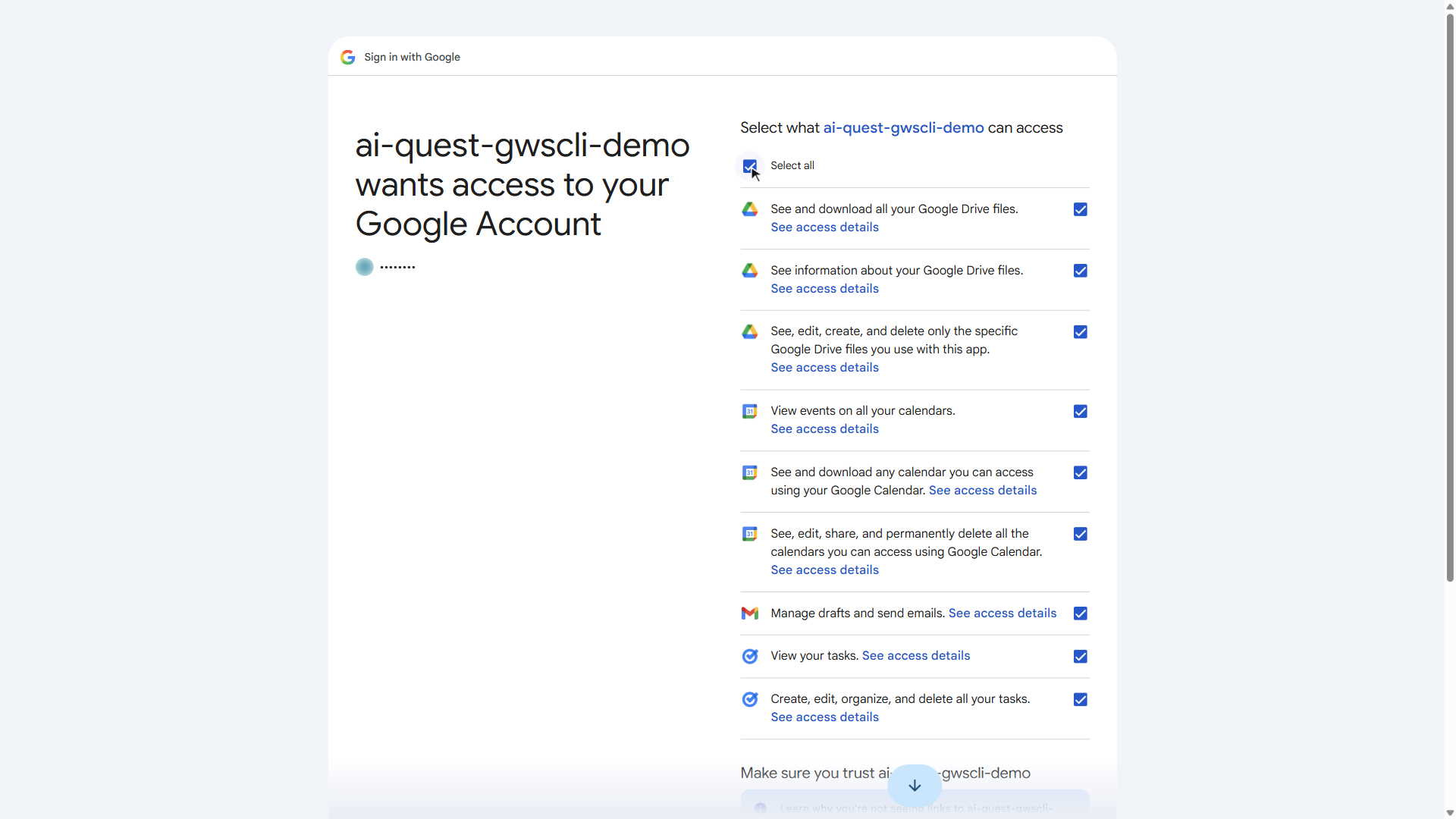
The whole sign-in took about 37 seconds including the browser consent. Three things I noticed:
- “Service” means broad scopes. Asking for the calendar service granted the full https://www.googleapis.com/auth/calendar scope, which the consent screen describes as “See, edit, share, and permanently delete all the calendars you can access”. If you only need one action, name the action (for example “calendar list_events”), not the service.
- gmail.compose is more than drafts. I asked for create_draft only, and the consent screen said “Manage drafts and send emails”. The CLI has no send command, but the token itself would allow sending if it leaked. This is exactly why the token file must be treated as a secret.
- The login listener cannot be driven by an agent. The CLI prints a URL and waits on a random localhost port; a human has to complete the consent in a browser on the same machine. In my demo I opened the URL in a dedicated Chrome profile.
2.5 Step 4: The remote MCP servers: protocol check and Claude Code registration
The MCP servers are Google-hosted endpoints, so “installing” them means pointing an MCP client at the URL with an OAuth token from an agent-flagged client. I verified them in two ways.
(a) A raw MCP client. To see the protocol without any agent in between, I wrote a 60-line Python script (mcp_probe.py) that speaks MCP over Streamable HTTP: it sends initialize, tools/list and optionally tools/call as JSON-RPC, using the access token that gwscli had obtained (the token is read from the cache and never printed). This is the real output against the Drive, Calendar and Tasks servers:
> POST https://drivemcp.googleapis.com/mcp/v1  initialize
  HTTP 200 in 495 ms  server={"name": "StatelessServer", "version": "ESF"}  protocol=2025-06-18
> tools/list
  HTTP 200 in 496 ms  9 tools:
   - copy_file                    [write]
   - create_file                  [write]
   - download_file_content        [read-only]
   - get_file_metadata            [read-only]
   - get_file_permissions         [read-only]
   - list_recent_files            [read-only]
   - read_file_content            [read-only]
   - search_files                 [read-only]
   - upload_file_revision         [DESTRUCTIVE]

> POST https://calendarmcp.googleapis.com/mcp/v1  initialize
  HTTP 200 in 477 ms  9 tools: list_events, get_event, list_calendars, suggest_time [read-only],
  create_event, update_event, respond_to_event [write], delete_event [DESTRUCTIVE], search_events [read-only]

> POST https://tasksmcp.googleapis.com/mcp/v1  initialize
  HTTP 200 in 915 ms  9 tools: list_task_lists, list_tasks, get_task [read-only],
  create_task, update_task, undelete_task, complete_task, uncomplete_task [write], delete_task [DESTRUCTIVE]
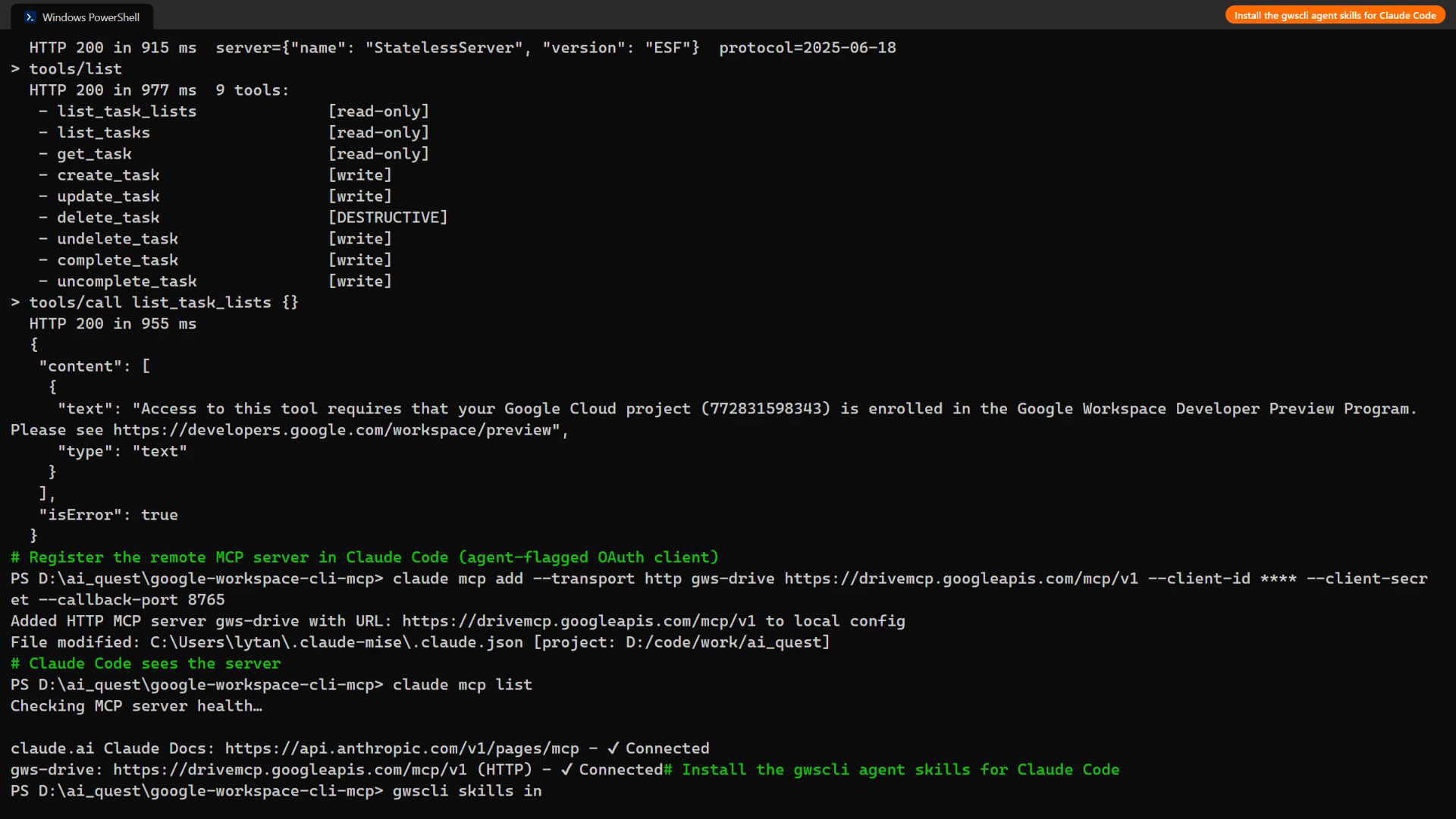
Useful facts from this check: the servers are stateless (serverInfo “StatelessServer”, no session id needed), they speak MCP protocol version 2025-06-18, a round trip takes roughly 0.45–1 second from Vietnam, and every tool carries MCP annotations (readOnlyHint / destructiveHint). Those annotations are what an MCP client uses to decide which tools may run without asking. The tool lists match the CLI command lists one-to-one for Drive, Calendar and Tasks, which confirms that the CLI is a thin client over the same backend. The Tasks endpoint (tasksmcp.googleapis.com), which is missing from the MCP configuration page, does exist and answers.
(b) Registering the server in Claude Code. Claude Code accepts a remote HTTP MCP server with a pre-registered OAuth client. The secret is taken from the MCP_CLIENT_SECRET environment variable (or prompted), so it never appears on the command line:
PS> claude mcp add --transport http gws-drive https://drivemcp.googleapis.com/mcp/v1 --client-id **** --client-secret --callback-port 8765
Added HTTP MCP server gws-drive with URL: https://drivemcp.googleapis.com/mcp/v1 to local config

PS> claude mcp list
Checking MCP server health...
gws-drive: https://drivemcp.googleapis.com/mcp/v1 (HTTP) - Connected
A Desktop-type client accepts loopback redirect URIs on any port, so the fixed callback port 8765 works without registering a redirect URI in the console. The user OAuth consent for the server is then completed inside Claude Code with /mcp.
3. Requirement 3: Practical tasks with the CLI and an MCP-connected agent
To test the tools on something close to real work, I used one small scenario that I actually do every week: prepare a weekly report, store it, schedule the review, track the follow-up and ask a colleague to review it. The report is a short demo file I wrote myself for this post. The scenario touches five services (Drive, Calendar, Tasks, Gmail, and Drive again for reading), mixes read and write actions, and includes one action that should require a human decision.
Upload report (Drive)
→
Search + read back
→
Review meeting (Calendar)
→
Follow-up (Tasks)
→
Draft email (Gmail, HITL)
3.1 Discovering commands at run time
Because the CLI does not promise stable signatures, the first thing I (and later the agent) did was ask the binary itself: –help for flags, –schema for the JSON output and –show-scopes for the minimal scopes of an action. For example:
PS> gwscli drive create_file --help --show-scopes
OAuth Scopes:
  All Supported Scopes:
    - https://www.googleapis.com/auth/drive
    - https://www.googleapis.com/auth/drive.appdata
    - https://www.googleapis.com/auth/drive.file
  Recommended Minimal Scopes:
    - https://www.googleapis.com/auth/drive.file
The help texts are written for a model, not for a human: create_event explains that times must be passed without a UTC offset unless the user named one, create_task contains a full set of rules about deadlines versus scheduled dates and what to tell the user when a deadline is dropped, and search_files documents its whole query grammar. In other words the “prompt engineering” for each tool ships inside the binary.
3.2 Practical tasks with the CLI: what really happened
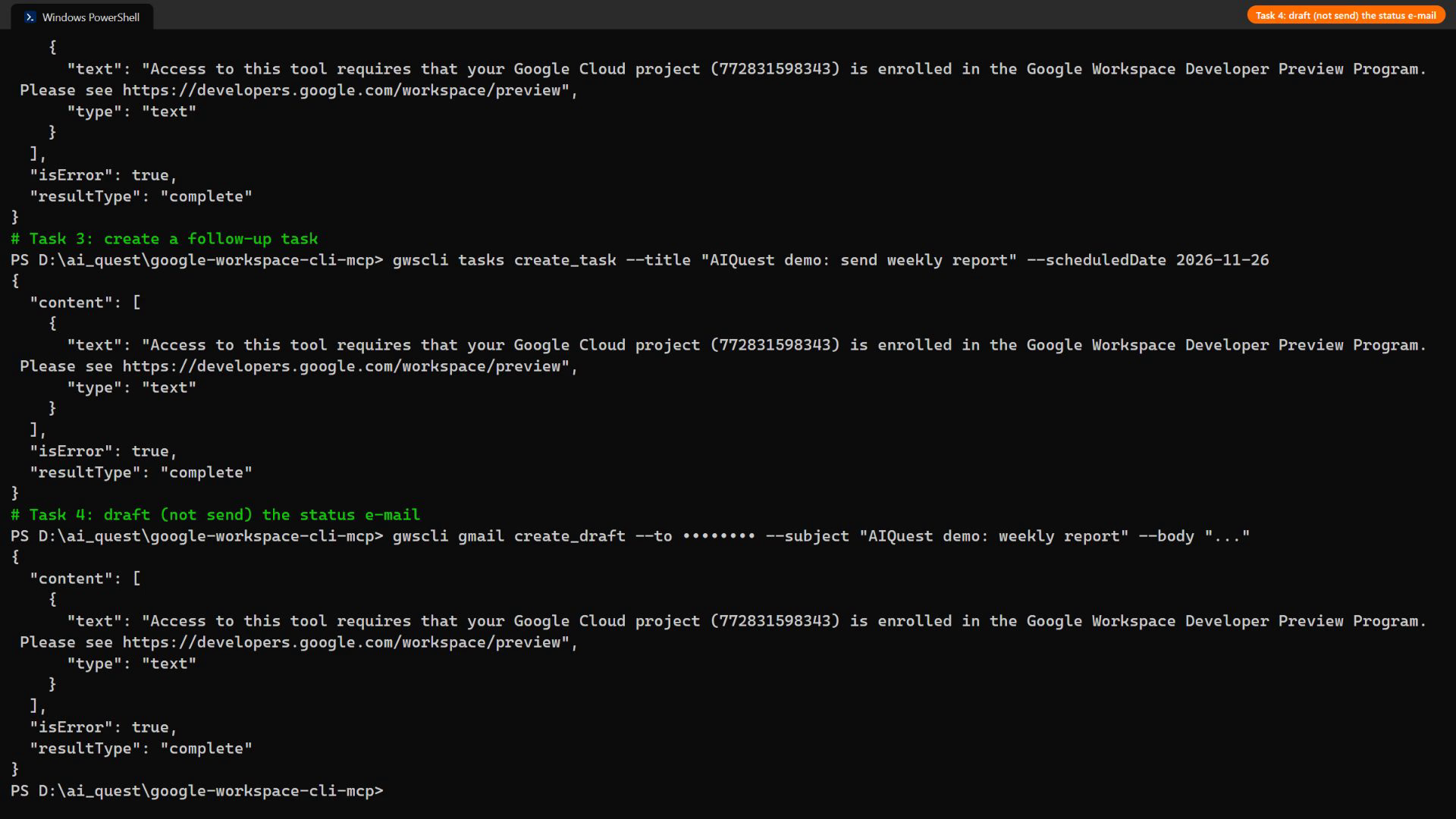
I ran the planned scenario (upload a fictional weekly report, find it, schedule a review, create a follow-up task, draft the e-mail) with real commands. Every command reached Google and returned a structured answer, but none of the Workspace actions were allowed to run:
| # | Command (shortened) | Time | Result |
|---|---|---|---|
| 1 | drive create_file –title “AIQuest gwscli demo – weekly report” –filePath data/aiquest-gwscli-demo-report.md –contentMimeType text/markdown | 1.4 s | HTTP 403 PERMISSION_DENIED “The caller does not have permission” (upload initiation) |
| 2 | drive search_files –query “title contains ‘AIQuest gwscli demo'” –excludeContentSnippets | 1.6 s | isError: “The caller does not have permission” |
| 3 | calendar create_event –summary “AIQuest demo: review gwscli report” –startTime 2026-11-26T10:00:00 –endTime 2026-11-26T10:30:00 | 1.2 s | isError: project must be enrolled in the Developer Preview Program |
| 4 | calendar list_events –fullText “AIQuest demo” | 1.5 s | same Developer Preview error |
| 5 | tasks create_task –title “AIQuest demo: send weekly report” –scheduledDate 2026-11-26 | 2.7 s | same Developer Preview error |
| 6 | gmail create_draft –to [email protected] –subject “AIQuest demo: weekly report” –body “…” | 4.1 s | same Developer Preview error |
The exact message for Calendar, Tasks and Gmail was:
{
  "content": [
    {
      "text": "Access to this tool requires that your Google Cloud project (7728xxxxxxxx) is enrolled in the Google Workspace Developer Preview Program. Please see https://developers.google.com/workspace/preview",
      "type": "text"
    }
  ],
  "isError": true,
  "resultType": "complete"
}
Before concluding anything I ruled out the obvious causes. The APIs were enabled: the project’s “Enabled APIs & services” page listed the Drive, Calendar, Tasks, Gmail, Docs, Sheets, Slides, Chat and Workspace MCP APIs together with the classic APIs, and the Drive/Calendar/Tasks MCP APIs already showed my requests (with errors) in their traffic graphs. The scopes were granted (see 2.4). The client carried the agent flag. And the error text is explicit: the gate is the project’s enrolment in the Developer Preview Program, not my token. Drive returns a less helpful generic “caller does not have permission”, but it fails at the same stage, both through the CLI and through raw MCP (below).
Note also what the output format tells us: the CLI result is literally an MCP tool result (content array, isError, resultType). That confirms what the documentation implies: gwscli is an MCP client of the same Google-hosted servers, with a command-line front end and local file handling. There was no human-in-the-loop prompt for create_draft, because the request was rejected before the server got that far.
3.3 The same calls through raw MCP
To be sure the CLI was not the problem, I made the same kind of call directly against the MCP endpoints with mcp_probe.py. The handshake and tools/list succeed (section 2.5), and tools/call fails with the same messages:
> tools/call search_files {"query": "title contains 'AIQuest'"}
  HTTP 200 in 533 ms
  { "content": [ { "text": "The caller does not have permission", "type": "text" } ], "isError": true }

> tools/call list_calendars {}            (calendarmcp)
  HTTP 200 in 445 ms   "Access to this tool requires that your Google Cloud project (...) is enrolled in the Google Workspace Developer Preview Program."

> tools/call list_task_lists {}           (tasksmcp)
  HTTP 200 in 955 ms   same Developer Preview message
Two protocol details are worth noting for anyone writing an MCP client: tool failures come back as HTTP 200 with isError: true inside the result, not as HTTP errors or JSON-RPC errors, so a client must check the flag; and discovery (initialize and tools/list) is not gated, only execution is. In other words, an agent can see every tool, plan with them, and only learns at call time that it is not allowed to use them.
3.4 An agent task: Claude Code with the gwscli skill
The CLI ships its own agent skill. Installing it is a single command that writes a SKILL.md file:
PS> gwscli skills install --dir .claude/skills
Installing skills to .claude/skills...
PS> tree /F .claude
\---skills
    \---gwscli
            SKILL.md
Then I gave Claude Code a task in natural language, without command names, and allowed it to run only gwscli commands (plus reading files and using skills):
claude -p "Use the gwscli skill: find my Drive files whose title contains AIQuest, then list my Google Tasks lists. Report exactly what happened, including any error text. Do not try to change any settings." --allowedTools "Bash(gwscli:*)" Read Skill
The run took 26 seconds. What the agent did (its answer, translated from the Vietnamese it replied in because of my global settings):
- It first checked the CLI version, as the skill instructs (the skill requires at least version 0.2.0); my local version 1.0.6 passed.
- It built the correct structured query on its own: gwscli drive search_files –query=”title contains ‘AIQuest'”, and reported exit code 1 with “The caller does not have permission”. It explicitly said this is a permission error, not “no matching files”.
- It ran gwscli tasks list_task_lists and quoted the Developer Preview message, including the project number.
- It proposed next steps for me (enrol the project, or re-authorise the Drive action) and did not attempt any setting change, as instructed. It also noticed that the gws-drive MCP server was available in the session and offered to try that path instead.
So even with the backend closed, the practical test answered the question “how does it operate in practice”: the skill gave the agent enough guidance to choose the right commands and syntax on the first try, the structured MCP errors were easy for the agent to interpret and report honestly, and the permission boundary (only gwscli allowed, no settings changes) was respected. When the project is enrolled, the same prompt should return results without any change on my side.
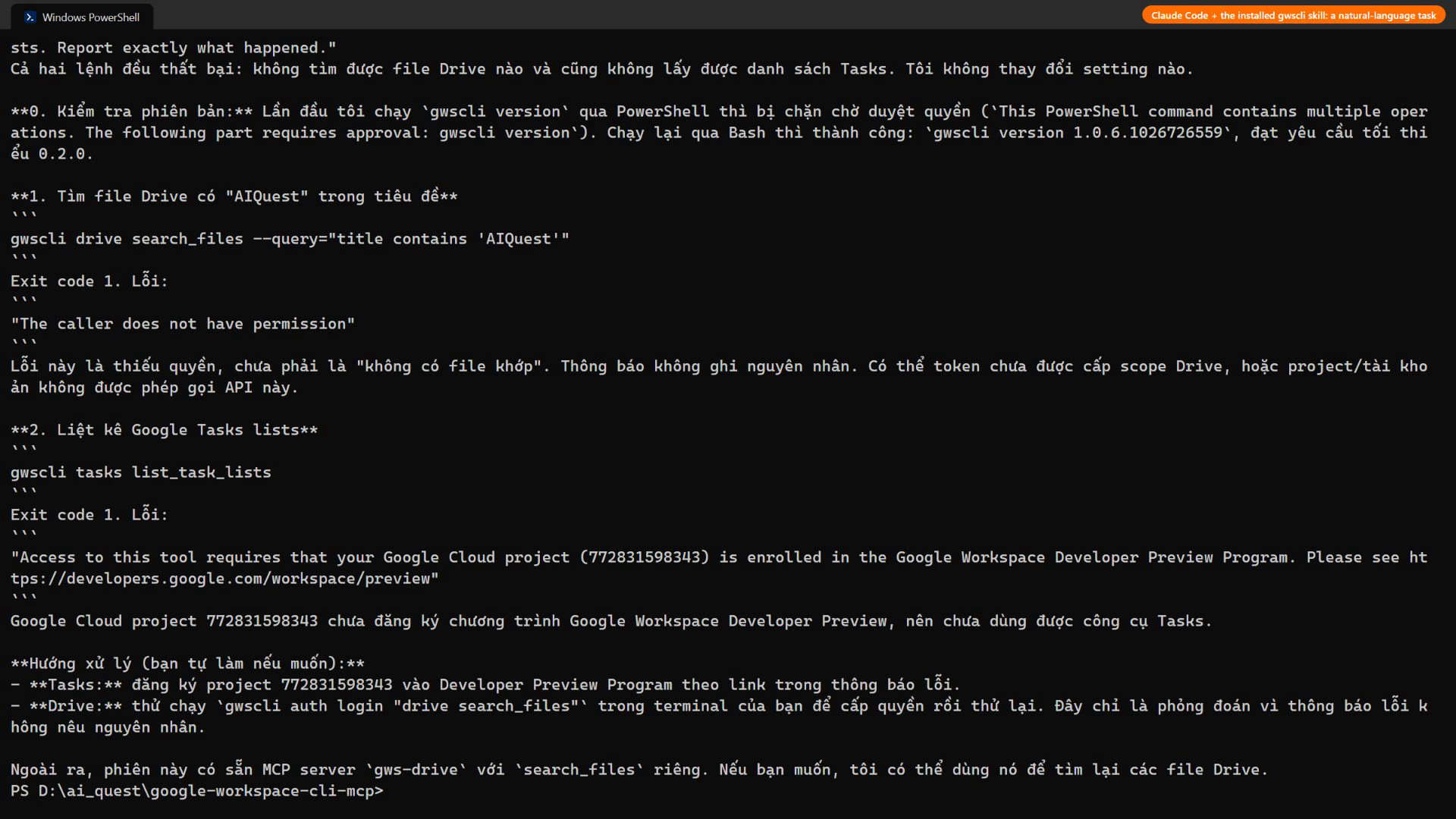
Status of the write tasks. Enrolment in the Developer Preview Program is a request reviewed by Google, so it could not be completed within the time of this test. The scenario commands are kept in demo-assets/film_gws.py so the same run can be repeated after approval, and I will update this post with the results.
3.5 Demo video
The video below shows the whole flow: installing the CLI, the personal-mode console steps, signing in, the CLI tasks, Claude Code using the installed skills, and Claude Code working through the remote MCP servers. All data is demo data, and client secrets, tokens and email addresses are masked.
4. Requirement 4: My opinion on using Google Workspace CLI and MCP servers in daily work
After reading the specifications and running the tools, my overall opinion is positive but careful. The tools are clearly designed by people who thought about agents first: discoverable commands, JSON output, missing “dangerous” actions, server-side confirmations. At the same time this is version one of a new contract between Google and AI agents, and a small company should adopt it the way it adopts any access to production data: slowly, with narrow permissions, and with a person who owns it.
4.1 Where it can improve or automate my daily work
These are the workflows I would actually build at our company, ordered from “safe to try tomorrow” to “needs a policy first”.
| Daily task today | With gwscli / MCP and an agent | Access needed |
|---|---|---|
| Meeting preparation. Before a sprint review or customer call I open the event, find the related spec and last week’s notes, and skim the latest email thread. | The agent reads tomorrow’s events, searches Drive and Gmail for the project name, and writes a one-page brief with open questions. Universal Search (search_corpus) is a good fit here. | Read-only |
| Report generation. Weekly progress reports are assembled from Git, the issue tracker and a Sheets plan, then uploaded and shared. | Claude Code already has Git and the issue tracker; with the CLI it also reads the plan in Sheets, generates the report locally, uploads it with create_file and creates a draft email. A human checks and sends. | Read + drive.file + gmail.compose |
| Drive housekeeping. Finding outdated copies, files with unclear names and documents shared too widely. | The agent lists recent files and their permissions (get_file_permissions) and produces a report of suspicious sharing. Changes are made by a human, which the CLI enforces anyway because there is no permission-change command. | Read-only |
| Task sync. Action items from meetings live in notes and get lost. | After a meeting, the agent reads the notes document and creates Tasks with due dates, or adds follow-up events to the calendar. | Read + tasks + calendar.events |
| Agent-driven coding workflows. Specs are in Docs, test evidence goes back into Drive. | The coding agent reads the spec from Drive at the start of a task and uploads the test report or screenshots at the end, so the human reviewer finds everything in the usual place. | Read + drive.file |
| Inbox triage. Many customer emails need a label and a first reply draft. | The agent labels threads and prepares reply drafts; nobody sends anything automatically. This is the most sensitive case because email is the main prompt-injection vector. | gmail.modify + gmail.compose, only after a policy is agreed |
What these have in common: the agent does the searching, reading, summarising and preparing, which is where most of the time goes, and a human does the final irreversible step. That split is not just my preference; it is how the tool surface is built (create_draft but no send, no permission changes, trash instead of delete), and I think that is the right design for the next year or two.
4.2 How I choose between the CLI and the MCP servers
- CLI when the agent lives in a terminal. For Claude Code or Codex working in a repository, the CLI is my default. It moves real files between disk and Drive, its JSON can be filtered with jq before the model sees it, and the same commands can be put in a script or a scheduled job later. Lower token cost and less untrusted text in the context are real advantages, not just convenience.
- MCP when there is no shell or the user is not a developer. For colleagues using Claude in the browser or another chat client, MCP connectors are the only practical option, and Universal Search exists only on the MCP side. Updates happen on Google’s side, so there is no binary to keep up to date on every laptop.
- One security model either way. Because both paths use the same backend, the same agent-flagged client type and the same server-side confirmations, I do not see a reason to standardise on one. A team can let developers use the CLI and non-developers use MCP, under one set of rules.
4.3 Limitations I see
- Stability. A GA product that explicitly does not guarantee backward compatibility of commands or output schemas means that any script I write must be treated as fragile. Agents cope with this by reading help each time; cron jobs and CI scripts do not.
- Preview labels and documentation gaps. The MCP pages still say Developer Preview, Tasks has no documented MCP endpoint, and the release notes carry no version numbers. For a customer project that needs GA terms, I would wait for the documentation to catch up.
- Interactive sign-in. Login needs a browser on the same machine. Headless use is possible only with –oauth_token, which moves the problem of minting and protecting tokens to us.
- Feature gaps between CLI and MCP. Some actions exist only on one side (Tasks, Gmail trash/spam on the CLI; Universal Search, Classroom and extra Chat tools on MCP), so a workflow may not port cleanly from one to the other.
- Upcoming costs and deadlines. Usage counts toward project quotas, billing starts April 1, 2027 without a published price table yet, and from February 1, 2027 agents are expected to use only these interfaces. Any internal bot that calls the classic REST APIs on behalf of an agent needs a migration plan now.
- Token cost of MCP. Large results land directly in the model context. For “read this 40-page document” that is fine; for “check 500 files” the CLI with jq filtering is clearly cheaper.
What the hands-on test taught me
- “Generally available” did not mean “open to every project” on day one. The CLI binary, the OAuth client type, the sign-in and the MCP discovery all worked on a brand-new project, but tool execution on Calendar, Tasks and Gmail still required Developer Preview enrolment, and Drive was refused with a generic permission error. The MCP pages still carry the Developer Preview banner, and in practice they were the more accurate description.
- Error quality differs between services. Calendar, Tasks and Gmail return a precise, actionable message; Drive returns only “The caller does not have permission”, which an agent (and a human) can mistake for a missing scope.
- Scopes are broader than the action. Granting create_draft produced a token that can also send mail, and granting the calendar service produced full read-write-delete access to calendars. Name specific actions at login.
- Discovery is open, execution is gated. Agents can list and plan with all tools before learning they may not call them. Prompts and skills should tell the agent to stop and report on isError, which Claude Code did when asked to report exactly what happened.
- Fast round trips. MCP calls from Vietnam took about 0.45–1 second; CLI commands including process start took 1.2–4.1 seconds. Speed is not a reason to prefer one path over the other.
4.4 Security considerations
The Cloud blog’s phrase “a valid token is no longer enough” is the right mental model. Before I would let these tools near real company data, I would put the following rules in place. Most of them cost nothing.
| Area | What I would do | Why |
|---|---|---|
| Agent-flagged clients | One OAuth client per agent or use case, always with “Use this client for an AI-powered agent” ticked; never reuse the client of a normal web app | Lets Google and the admin tell agent traffic apart, apply agent policies and revoke one agent without breaking others |
| Least-privilege scopes | Start with –bundle=readonly; add write scopes per action with incremental login; check –show-scopes / –print-scope-only before granting | A compromised or confused agent can only do what its scopes allow; drive.file instead of full drive limits writes to files the app created or opened |
| Human in the loop | Treat ALLOW_ONCE / ALLOW_TOOL_ALWAYS / DENY_ONCE as a human-only decision; configure the agent harness so it cannot answer that prompt on its own; avoid ALLOW_TOOL_ALWAYS for sending and sharing | The server asks, but the CLI reads the answer from stdin, so the protection is only as strong as the harness that owns stdin |
| Token handling | Never paste client secrets or access tokens into prompts, files in the repository or shell history; prefer interactive secret input; run auth logout or auth reset after experiments; revoke unused grants in the Google Account settings | A refresh token is long-lived access to a mailbox and a drive; –oauth_token values can leak through process lists and logs |
| Prompt injection | Assume every email and shared document can contain instructions aimed at the agent; keep write and send actions behind confirmation; consider Model Armor screening when MCP is used with external content | The agent reads untrusted text with your permissions; the confirmation step is the last line of defence |
| Telemetry | Know that CLI telemetry is on by default; decide as a company whether to turn it off with gwscli logging off or GWSCLI_TELEMETRY_ENABLED=0 | It does not send content, IDs or tokens, but command metadata leaving company machines should be a conscious decision |
| Company data policy | Agree which data an agent may touch (for example: internal docs yes, customer contracts and HR data no) and which AI tools may receive Workspace content; mark restricted folders and apply the upcoming agent access restrictions and DLP rules when available | Our contracts with customers often restrict where their data may be processed; an agent forwarding a spec into a third-party model is still data processing |
| Audit and revocation | The Workspace admin reviews connected agents and their scopes monthly in the Admin console and removes test clients like this one after the experiment | Visibility and fast revocation matter more than perfect prevention for a small team |
One honest remark about the human-in-the-loop design. It is a good design, and it is enforced on the server, which is much better than a client-side check. But in the CLI the decision travels back through standard input, and the documentation itself has to ask the agent to get the user’s confirmation before answering. A well-behaved harness like Claude Code shows the prompt and asks me; a careless home-made script that pipes “ALLOW_ONCE” into every command would quietly remove the protection. That is why I see HITL as a shared responsibility: Google provides the checkpoint, and the team must make sure nobody automates it away.
4.5 My recommendation for a small company
- Start now with read-only use cases (meeting prep, Drive housekeeping reports) on personal-mode clients, so people learn the tools without risk.
- Write a one-page agent policy: allowed data, allowed scopes, who may approve write scopes, telemetry setting, and how to revoke.
- Move to manual setup with one agent-flagged client per use case and let the Workspace admin own the list.
- Inventory any internal scripts or bots that call Workspace REST APIs on behalf of an AI and migrate them to the CLI or MCP before February 1, 2027.
- Estimate usage before April 1, 2027, when quota billing starts.
5. FAQ
Is gwscli just a wrapper around the classic REST APIs?
Not exactly. Setting up a service for the CLI enables both the classic API and its MCP companion (for example drive.googleapis.com and drivemcp.googleapis.com), and the CLI action names mirror the MCP tool names almost one to one. In practice the CLI behaves like a local MCP client packaged as a binary, with the same agent-flagged authentication and the same server-side confirmations. Scripts that call the REST APIs directly with an ordinary OAuth client are a different path, and under the Workspace AI Tools Addendum agent traffic is expected to move to the CLI or the MCP servers.
Do I need a paid Google Workspace account?
Setup works with any Google Account in personal mode, but in my test on November 25, 2026 the tools themselves still required the Cloud project to be enrolled in the Workspace Developer Preview Program, even on a company Workspace account. Chat send_message needs a Workspace account and a configured Chat app, and People commands need Developer Preview enrolment. In a company domain, the admin’s policies decide which apps and scopes are allowed.
Is it free?
There is no separate charge for the CLI or the MCP servers today, but requests count toward the Cloud project’s Workspace usage quotas, and billing for agent usage is announced to start on April 1, 2027.
Can the agent send email or share files on its own?
The CLI and the Gmail MCP server only create drafts; a human sends. There is no command to change Drive sharing. Sensitive actions that do exist (sending Chat messages, trashing) trigger a server-side confirmation that a human must answer.
Can I use the same OAuth client for the CLI and for MCP?
In my test I used one agent-flagged Desktop client for both the CLI and a raw MCP client, and registered the same client in Claude Code with a fixed loopback callback port. The guides recommend a Desktop client for the CLI and usually a Web application client for MCP clients that need a registered callback URL. In any case the client must be agent-flagged, and it is better to keep agent clients separate from clients used by normal applications.
Does it work in CI or on a server?
Yes, with the global –oauth_token flag and a token from an agent-flagged client or a domain-wide-delegation service account. You then own token minting, rotation and protection, and confirmations for sensitive actions still apply.
6. Conclusion
- What was released: gwscli went GA on November 24, 2026 as a single binary for Linux, macOS and Windows, with JSON output, runtime discovery and embedded agent skills; Google-hosted MCP servers cover Gmail, Drive, Docs, Sheets, Slides, Calendar, Chat, People, Classroom and Universal Search; and a security model built around agent-flagged clients, per-request policy checks, human confirmation and admin control, with enforcement from February 1, 2027 and billing from April 1, 2027.
- What the documents do not yet agree on: GA versus Developer Preview labels, a Tasks MCP endpoint, version numbers in the release notes, and some tools that exist on only one side.
- What I did: installed gwscli 1.0.6 on Windows, created a personal-mode project with an agent-flagged Desktop client, signed in with incremental scopes, verified the Drive, Calendar and Tasks MCP servers with a raw MCP client, registered the Drive MCP server in Claude Code, and ran a weekly-report scenario both by hand and through Claude Code with the gwscli skill.
- What I found: installation, sign-in, MCP handshake and tool discovery work on a new project; tool execution did not, because Calendar, Tasks and Gmail still require Developer Preview enrolment and Drive refused with a generic permission error. The errors are structured MCP results, and the agent interpreted and reported them correctly without trying to work around them.
- My view: CLI for agents in a terminal, MCP for chat clients and non-developers, one security model for both. The biggest wins for a small dev team are in the read-and-prepare part of daily work; the irreversible last step should stay with a human, which is exactly how Google designed it.
All files, events, tasks and drafts shown in this post were created by the author for testing. No customer or confidential company data was used. Client IDs, secrets, tokens and email addresses are masked. Specifications were checked against the official pages on November 25, 2026 and may change.
References
- Google Workspace CLI guide
- Google Workspace CLI release notes
- Configure Google Workspace MCP servers
- Configure security for Google Workspace MCP servers (Model Armor)
- Universal Search MCP
- Gmail MCP reference
- Drive MCP reference
- Docs MCP reference
- Sheets MCP reference
- Slides MCP reference
- Calendar MCP reference
- Chat MCP reference
- People MCP reference
- Google Cloud blog: Built for trust and control: Powering the next wave of AI agents across Google Workspace and Google Cloud (November 25, 2026)
- Claude Code documentation: connecting MCP servers