
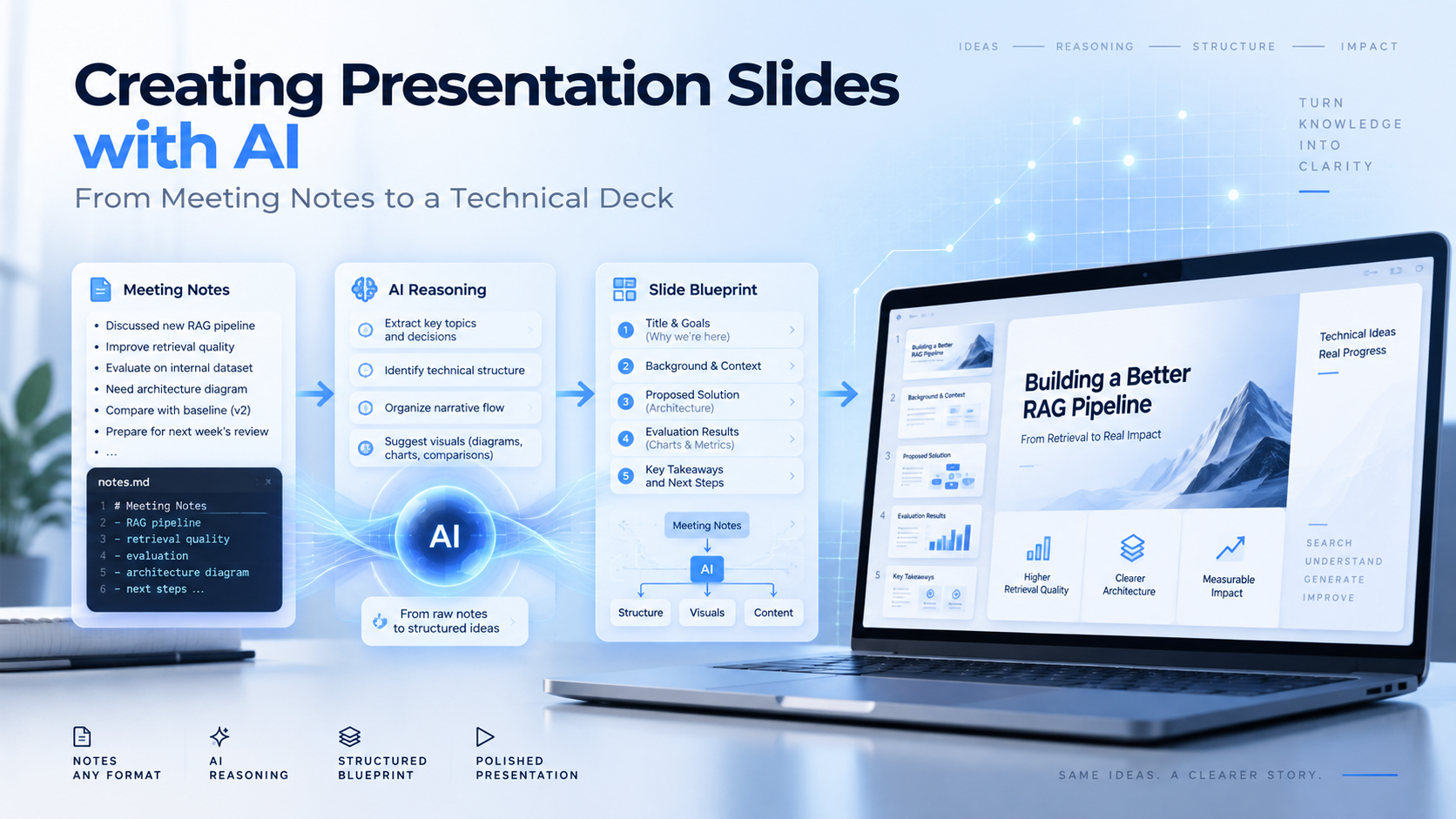
Meta Description: I tested an AI-assisted presentation workflow using Codex to turn raw meeting notes into structured technical slides for an AI CCTV project.
Link: https://note.com/uchita_success/n/na5babdc58b0e
Introduction
Creating slides after a technical meeting can take a lot of time, especially when the information is still unstructured.
I followed Uchita’s AI-assisted presentation method, which focuses on defining the message and storyline first, then selecting the right visual pattern, generating the slides, and validating the final result.
For this experiment, I tested the AI-assisted presentation method introduced by Uchita and used Codex to turn raw meeting notes into a complete technical presentation.
The demo topic was:
AI CCTV Employee Attendance System
The goal was to see whether AI could help transform technical discussion into a clear presentation without immediately jumping into slide design.
The Workflow
Uchita’s method separates slide creation into five steps instead of asking AI to generate a full presentation in one shot.
1. Define one clear message for each slide
The first step is to decide what each slide should actually communicate.
A slide should not only have a topic such as:
“System Architecture“
It should express a conclusion.
In my demo, I asked Codex to define the message first. For example, the opening slide was not simply titled “POC Overview.” Instead, it communicated a specific conclusion:
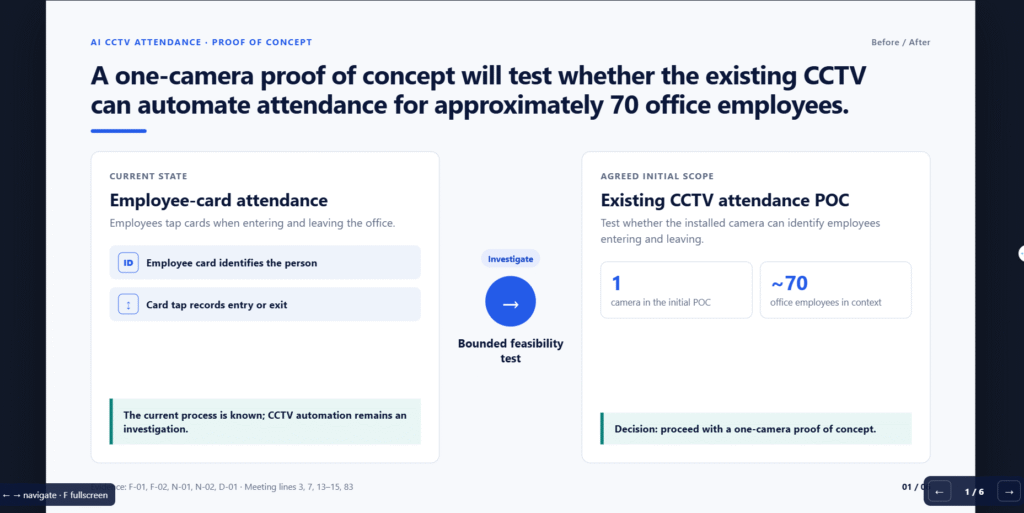
“A one-camera proof of concept will test whether the existing CCTV can automate attendance for approximately 70 office employees.”
The same principle was applied to all six slides, so each slide had one clear purpose.
2. Build a logical storyline
After defining the messages, the next step is to check whether the slides form one continuous argument.
In my demo, the six-slide storyline became:
Current attendance process
        ↓
Proposed AI CCTV pipeline
        ↓
How an attendance event is created
        ↓
Main technical feasibility risk
        ↓
Open design decisions
        ↓
POC implementation roadmap
I reviewed only the headlines first. If the storyline was not clear at this stage, I revised the blueprint before generating any slides.
3. Select a visual pattern based on the message
Once the message was clear, Codex selected a visual pattern that matched the communication purpose.
In my demo, the six slides used different patterns:
- Slide 1 — Before / After
to compare the existing card-based attendance process with the proposed CCTV POC. - Slide 2 — Process Flow
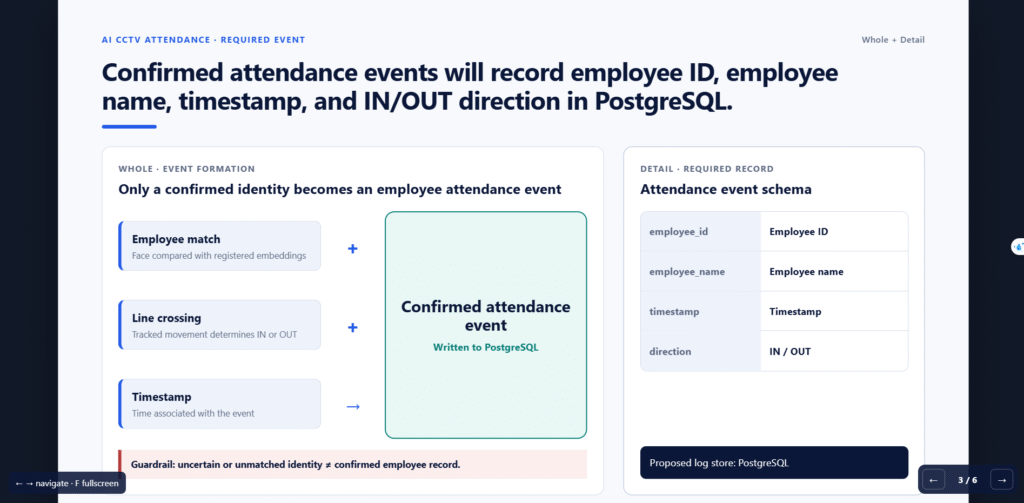
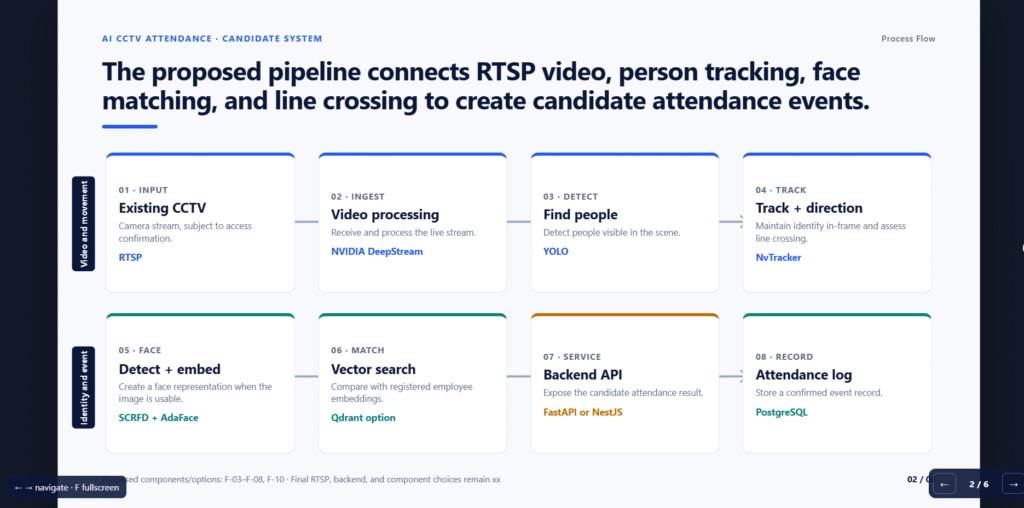
to explain the AI pipeline from CCTV input to attendance logging. - Slide 3 — Whole + Detail
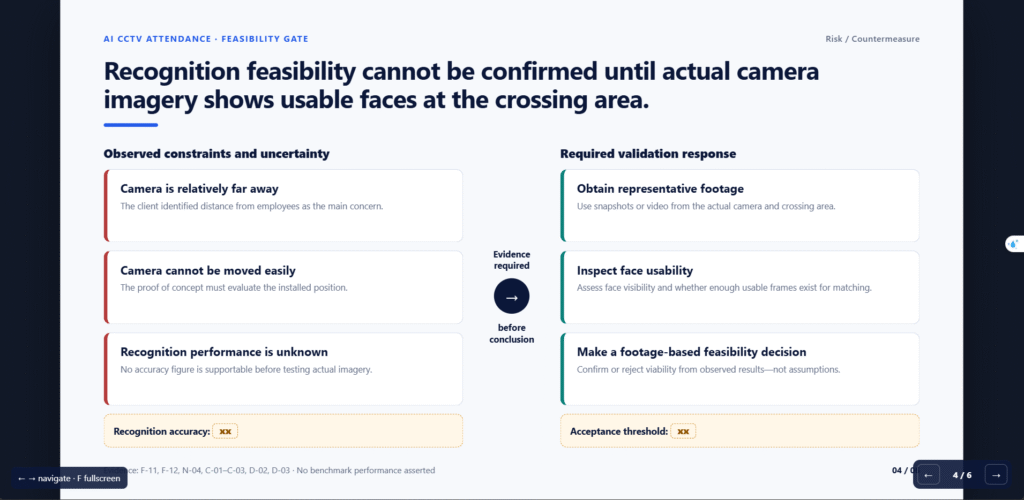
to show both how an attendance event is formed and what information is stored. - Slide 4 — Risk / Countermeasure
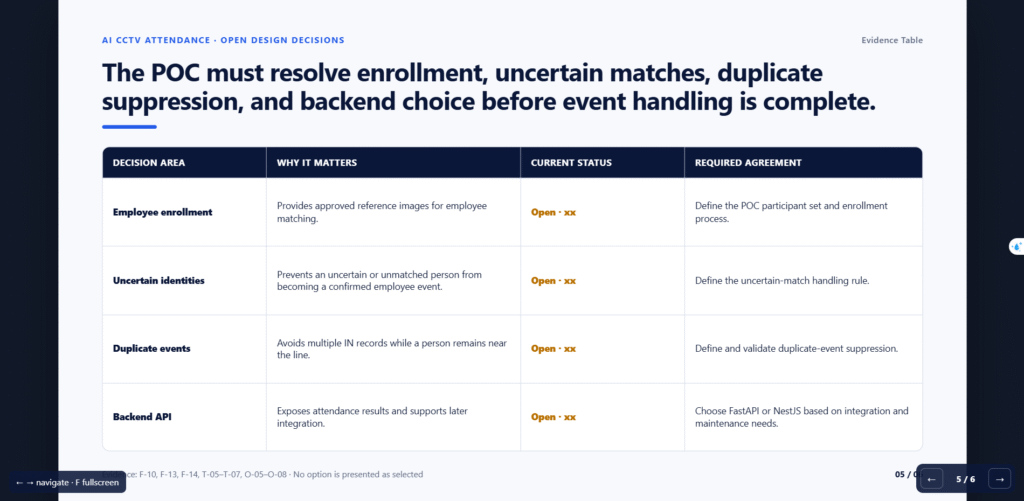
to explain why camera distance is the main feasibility risk and what needs to be validated. - Slide 5 — Evidence Table
to organize unresolved technical decisions such as employee enrollment and backend selection. - Slide 6 — Roadmap
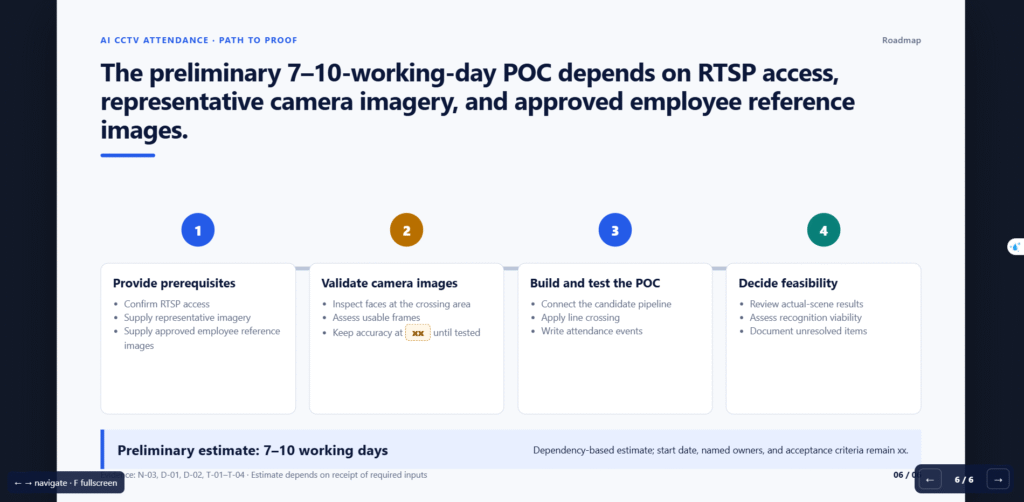
to show the steps required to complete the proof of concept.
This made the visual structure follow the message instead of using the same layout for every slide.
4. Generate the slides using consistent design rules
Only after the storyline and visual patterns were defined did Codex generate the HTML presentation.
All six slides followed the same design system:
- 16:9 canvas
- consistent typography
- shared color palette
- common headline structure
- consistent spacing
- the same footer and page-number style
- reusable cards and diagram styles
In my demo, this helped the slides look like one presentation even though each slide used a different visual pattern.
5. Render and validate the final output
The final step was to review the generated presentation instead of assuming the first result was correct.
In my demo, I found two concrete problems.
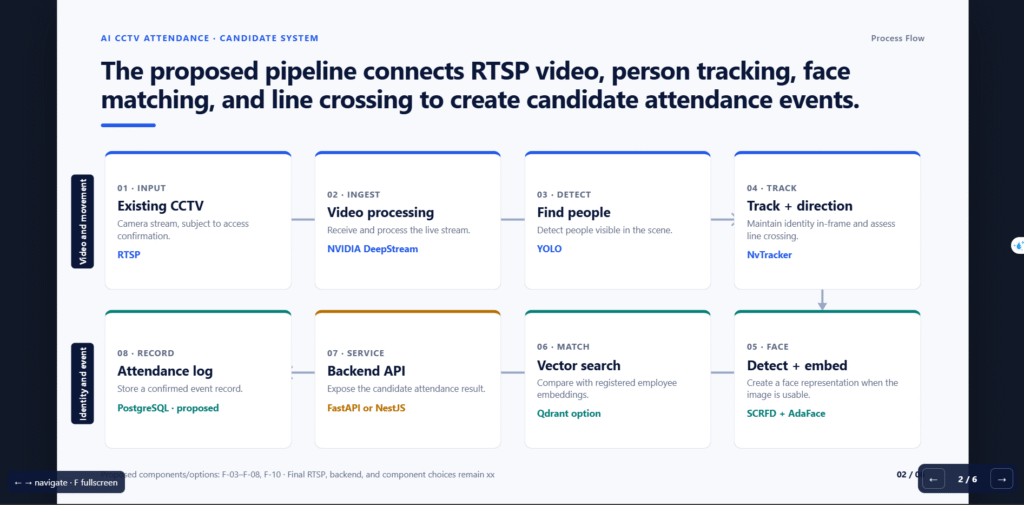
First, Slide 2 had a disconnected process flow. The first row ended at “Track + direction,” while the second row started with “Detect + embed,” but there was no visual connector between them.
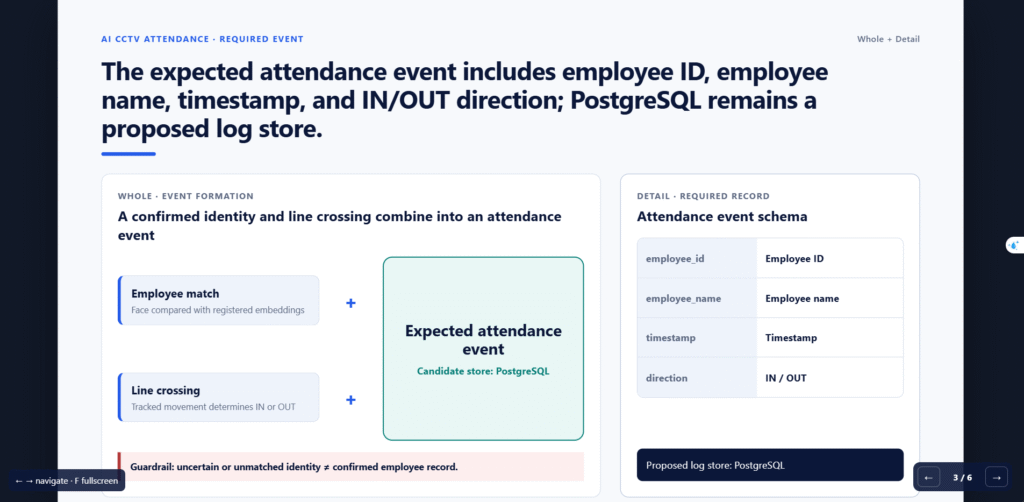
Second, Slide 3 made PostgreSQL look like a confirmed decision in the headline, while the slide content still described it as a proposed log store.
These issues showed that validation must include not only layout problems, but also:
Visual consistency
+
Logical consistency
+
Factual consistency
For me, this was an important part of the experiment because the AI could generate a strong first draft, but the final presentation still required engineering review.
My Demo Setup
I created a small Codex workspace:
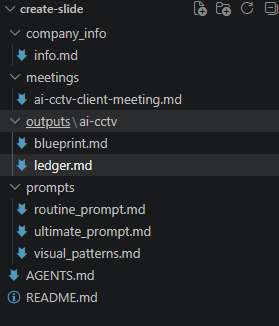
The input was a simulated client meeting about an AI CCTV attendance system.
The discussion included:
- one camera for the first POC;
- around 70 employees;
- DeepStream;
- YOLO;
- NvTracker;
- SCRFD;
- AdaFace;
- Qdrant;
- PostgreSQL;
- face-recognition accuracy as an unresolved technical risk.
Step 1: Extract Facts Before Creating Slides
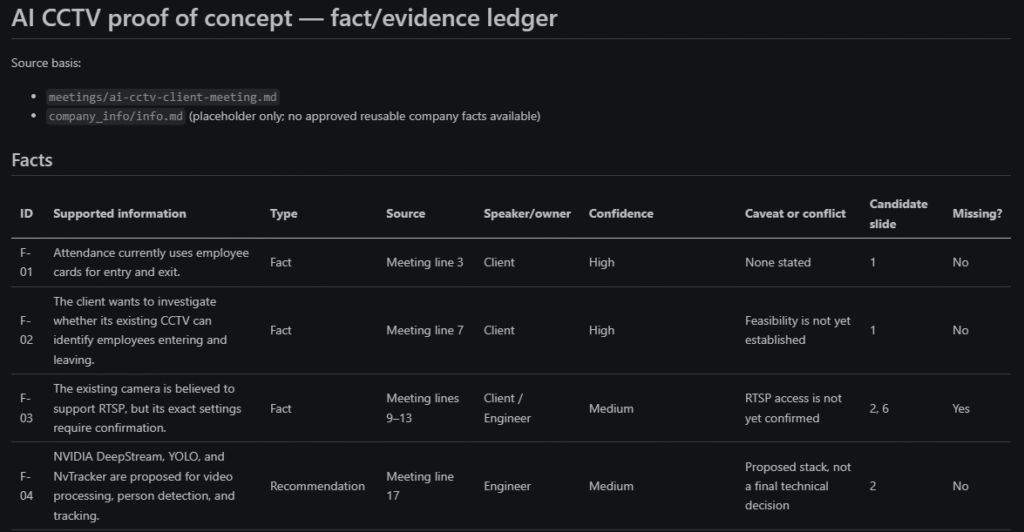
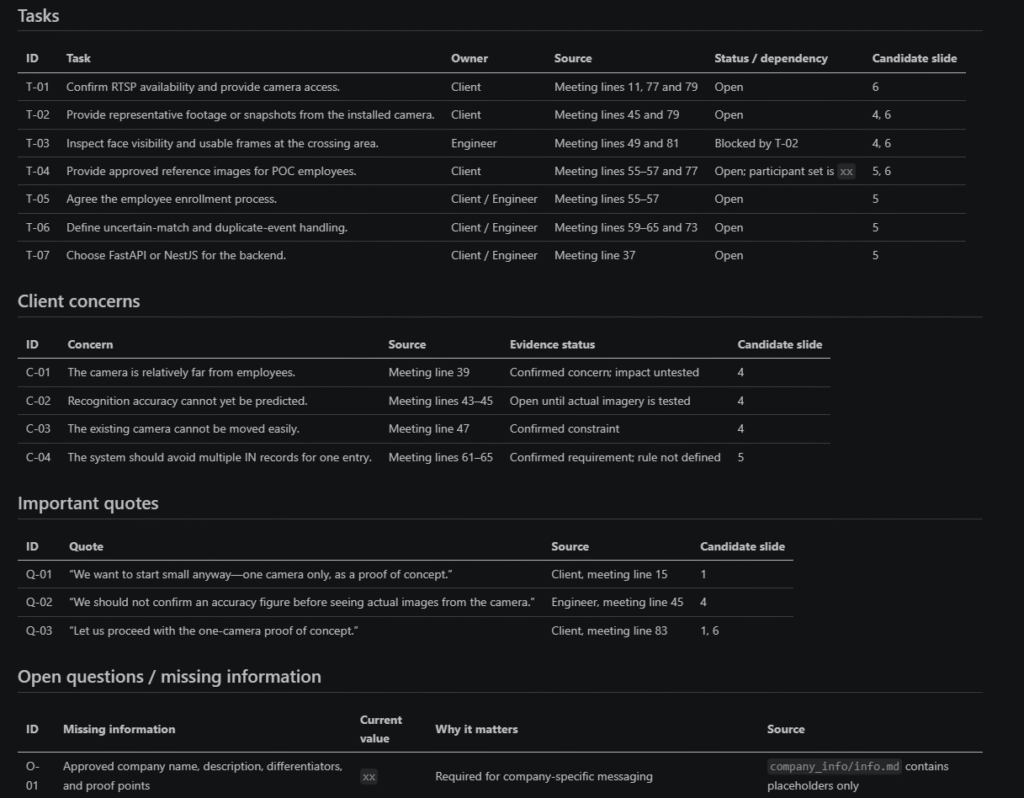
Codex first generated an evidence ledger instead of slides.
For example:
| Type | Information |
|---|---|
| Fact | Client currently uses employee cards |
| Decision | Start with one camera |
| Concern | Camera is relatively far away |
| Unknown | Face-recognition accuracy |
| Task | Collect images from the real camera |
Unknown values were kept as: xx instead of being invented.
Step 2: Create the Slide Blueprint
Next, Codex generated the storyline and visual plan.
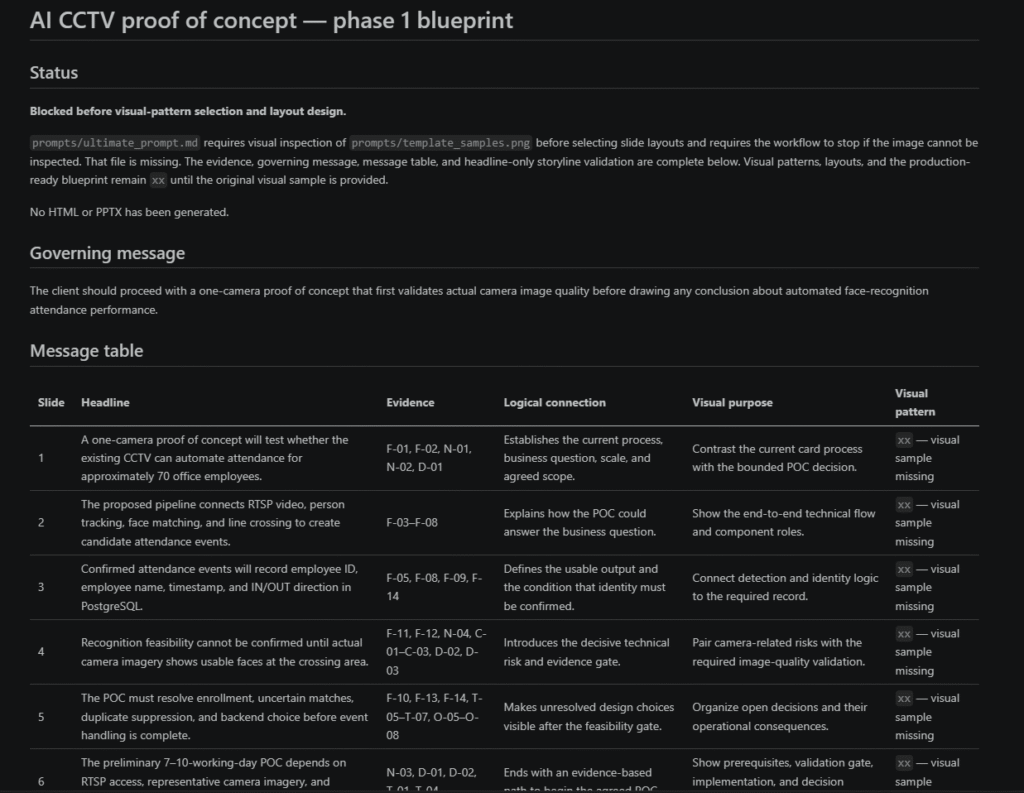
This was one of the most useful parts of the method because I could evaluate the entire presentation logic without looking at the final design.
Step 3: Generate and Validate the Slides
After approving the blueprint, Codex generated an HTML presentation using HTML, CSS, and SVG.
The slides were then rendered and checked for:
- text overflow;
- overlapping elements;
- objects outside the slide;
- small fonts;
- broken layout.
Slide 1 – Before / After
Compares the current employee-card attendance process with the proposed one-camera CCTV proof of concept for approximately 70 employees.
Slide 2 – Process Flow
Presents the candidate AI pipeline: Existing CCTV → DeepStream → YOLO → NvTracker → SCRFD + AdaFace → Qdrant → Backend API → PostgreSQL.
Slide 3 – Whole + Detail
Explains how employee matching, line crossing, and timestamp information are combined into a confirmed attendance event containing employee_id, employee_name, timestamp, and IN / OUT direction.
Slide 4: Risk / Countermeasure
Focuses on the main feasibility risk: the camera is relatively far from employees, so recognition accuracy cannot be confirmed until representative footage from the real installation is tested. Unknown values remain marked as xx
Slide 5: Evidence Table
Lists several unresolved design decisions, including employee enrollment, uncertain identity handling, duplicate-event suppression, and backend selection.
Slide 6: Roadmap
Defines the POC path: prepare the required inputs, validate the real camera images, build and test the pipeline, and finally decide whether the solution is feasible. The preliminary estimate shown is 7–10 working days.
Problems I Found in the Generated Version
Issue 1: Slide 3 treats a proposed database as a confirmed decision
The headline says:
“Confirmed attendance events will record employee ID, employee name, timestamp, and IN/OUT direction in PostgreSQL.”
This wording suggests that PostgreSQL has already been confirmed as the storage solution. However, the same slide later says:
“Proposed log store: PostgreSQL.”
Issue 2: On Slide 2, the pipeline is displayed in two rows of four blocks. Horizontal arrows connect steps 1→2→3→4 and separately 5→6→7→8, but there is no connector from Step 4, “Track + direction,” to Step 5, “Detect + embed.” The arrow definitions also only create six horizontal connectors, confirming that the transition between the two rows is missing
My Evaluation
The most useful part of this method was not automatic PowerPoint generation.
It was the process:
Raw meeting notes
        ↓
Evidence
        ↓
Message
        ↓
Storyline
        ↓
Visual structure
        ↓
Slides
Codex was especially useful for creating the first draft and organizing information.
However, human review was still necessary for:
- technical architecture;
- assumptions;
- benchmark values;
- project estimates;
- final visual quality.
AI should not invent performance numbers such as FPS, accuracy, or GPU usage when real measurements are unavailable.
How I Can Use This in My Daily Work
As an AI Developer, I can apply the same workflow to several tasks.
For client meetings:
Meeting transcript
→ Requirements
→ Technical proposal
→ Presentation
For model benchmarking:
Benchmark results
→ Comparison
→ Recommendation
→ Technical slides
For AI POCs:
Requirements + Results + Issues
→ POC report
→ Presentation
It could also be used for weekly engineering reports and architecture presentations.
Conclusion
After trying the method, my main takeaway is that AI presentation generation should not start with design.
It should start with:
What do we know, what do we want to say, and what evidence supports it?
Codex can significantly reduce the work required to turn raw engineering information into a reviewable presentation draft.
However, technical decisions and final validation still require an engineer.
For me, the real value is not:
AI replaces presentation creation.
It is:
AI shortens the path from raw technical information to a structured first draft.
References
- Uchita on X:
https://x.com/uchita_success/status/2097277814605246515 - Uchita’s detailed workflow:
https://note.com/uchita_success/n/na5babdc58b0e