With Google’s Workspace Model Context Protocol (MCP) servers, native Workspace CLI (gwscli), and Google Cloud Agent Gateway reaching general availability on November 24, 2026—and technical enforcement of the Workspace AI Tools Addendum starting February 1, 2027—engineering teams have roughly two months to re-architect how AI agents interact with Gmail, Drive, Docs, Sheets, Slides, Calendar, Chat, and Tasks. Here is a full specification audit, reproducible lab setup, three live protocol and CLI experiments run on November 29, 2026, and a practical migration roadmap.
Key Findings From Live Verification (November 29, 2026)
- Dynamic catalog growth is real: Without updating the local
gwscli 1.0.6.1026726559binary, Google’s eight GA remote MCP endpoints exposed 87 tools on/mcp/v1(and 76 tools on/mcp/v1self) during my November 29 probe—including newly visiblegmailsend/reply/forward tools and expandedsheetsanddriveactions. - Context payload overhead is substantial: Fetching
tools/listacross all eight GA servers returns 647.6 KB of JSON on/mcp/v1(574.1 KBon/mcp/v1self). Connecting every Workspace MCP server blindly to a single agent session wastes context budget before the first user turn. - Live authenticated CLI execution works cleanly with automatic token refresh: Running a privacy-safe aggregate audit script via
gwsclisucceeded with exit code0acrossgmailmcp,tasksmcp, andcalendarmcp, automatically refreshing an expired 1-hour access token on the fly. - Negative-path MCP responses are not uniformly JSON-RPC: While malformed JSON returned standard JSON-RPC error
-32700, unsupported methods such asprompts/listreturned HTTP404HTML pages from Google’s edge frontend rather than JSON-RPC-32601—a detail custom MCP client authors need to handle explicitly.
1. The 2027 Cutover: Why Google Built a Separate Control Plane for AI Agents
For platform and security engineers, the most consequential line in Google’s November 24, 2026 announcement is not a new API method—it is a calendar date. Under the new Workspace AI Tools Addendum, AI agents interacting with Google Workspace data are expected to move off legacy Workspace REST APIs onto either Google’s managed Workspace MCP servers or the official Google Workspace CLI (gwscli), with technical enforcement scheduled to begin on February 1, 2027. Two months later, on April 1, 2027, usage-tier billing begins for projects exceeding Google’s free Standard Tier daily quotas.
Understanding why Google drew that line requires looking at the scale and threat model of Workspace today. In their joint Google Cloud Blog post, Chandu Thota (VP of Engineering, Workspace) and Brad Calder (President, Google Cloud Platform & SRE) noted that Google protects 4 billion users and 13 million organizations, while Workspace APIs already serve more than 2.8 trillion calls per month. Public Google Drive API traffic alone exceeds 2.5 times its 2022 volume and drives over 18 billion reads from Drive every day.
Traditional REST APIs were engineered around three assumptions that hold reasonably well for human-driven SaaS integrations: requests occur at human cadence, a valid OAuth 2.0 bearer token implies a human clicked a button, and access control can be approximated by static scopes granted once during onboarding. Autonomous AI agents violate all three assumptions simultaneously:
- Machine-speed fan-out across products: An agent tasked with preparing a quarterly business review can search dozens of Gmail threads, download ten Drive files, query three Sheets workbooks, and draft external replies in seconds—multiplying the blast radius of a single mistaken instruction.
- Indirect control-plane hijacking: Unlike deterministic microservices, language models mix untrusted data (an incoming email body or shared document comment) with executable instructions in the same context window. A token that allows both reading external mail and modifying Drive permissions becomes an exfiltration bridge when an attacker plants hidden instructions inside an attachment.
- Identity attribution blind spots: When an internal script uses a generic desktop OAuth client or a shared service account, Workspace administrators cannot tell from audit logs whether a human employee, a scheduled report, or an autonomous AI agent read a confidential folder.
Google’s response keeps traditional web and mobile applications running on existing REST APIs while carving out an agent-native request path where Data Loss Prevention (DLP), classification labels, prompt-injection screening, dedicated agent identities, and human-in-the-loop (HITL) confirmations run inline on every call. Rather than asking every development team to hand-roll those guardrails inside brittle Python wrappers, Google moved the control plane into its managed MCP endpoints, the gwscli binary, and Google Cloud Agent Gateway.
2. Specification Deep-Dive: Two Security Layers, Eight GA MCP Servers, and gwscli
When evaluating the release documentation across Google Cloud and Google Developers, it helps to separate the specifications into two governance layers—Workspace-layer controls and Google Cloud-layer controls—and two developer interfaces: remote MCP servers and the local gwscli binary.
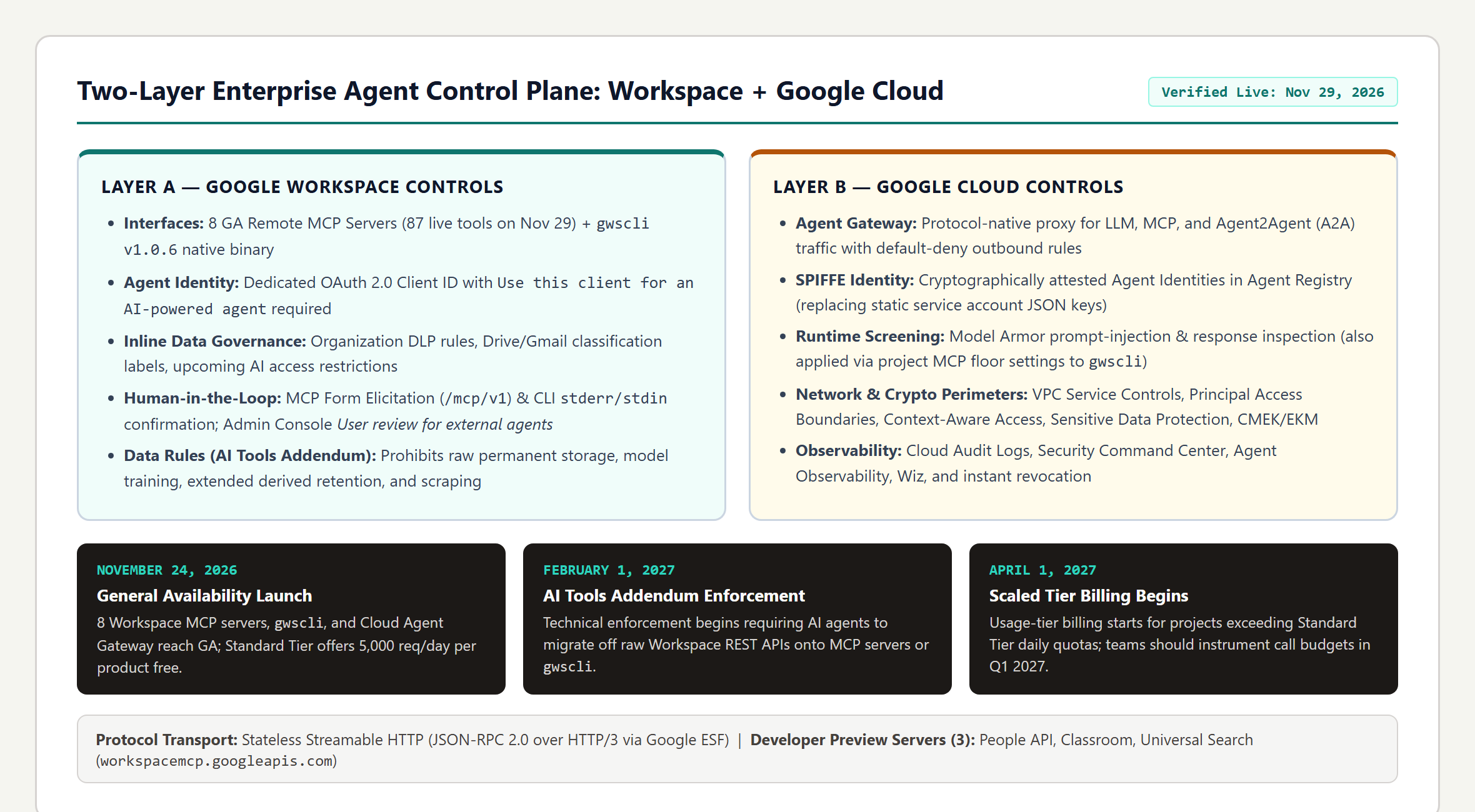
2.1 Two-Layer Enterprise Security Model
Many organizations evaluate Workspace tools and Google Cloud IAM separately, which leads to gaps at the boundary between office data and cloud workloads. Google’s November 24, 2026 specification aligns both sides around six interlocking controls:
| Control Pillar | Workspace-Layer Implementation | Google Cloud-Layer Implementation |
|---|---|---|
| Dedicated Agent Identity | User-delegated OAuth 2.0 Client IDs must enable Use this client for an AI-powered agent; non-agent clients are rejected. Time-limited approvals are slated as coming soon. | Cryptographically attested SPIFFE-based Agent Identities registered in Agent Registry—eliminating shared or long-lived service account JSON keys. |
| Inline Policy Enforcement | Every MCP and gwscli call is evaluated against Workspace permissions, DLP rules, and classification labels before returning or mutating data. |
Google Cloud Agent Gateway inspects LLM, MCP, and Agent2Agent (A2A) traffic, enforcing IAM policies, default-deny outbound rules, and custom checks via Service Extensions (e.g., Identity-Aware Proxy). |
| Prompt-Injection Defense | Project-level MCP security floor settings (including Model Armor) apply to both remote MCP servers and gwscli requests. |
Model Armor sits directly in front of agents and MCP gateways to screen live prompts and tool responses for prompt injection and harmful payloads. |
| Human-in-the-Loop (HITL) | Server-driven MCP form elicitation (/mcp/v1) and CLI stderr/stdin prompts gate high-impact actions; admins configure rules under Agents → Settings → User review for external agents. |
Policies can require MFA or explicit human sign-off before agents read sensitive Cloud Storage buckets, alter IAM bindings, or modify production infrastructure. |
| Data Perimeters & Post-Access Rules | The Workspace AI Tools Addendum forbids permanent raw storage, model training on Workspace data, extended retention of derived data, and API scraping. Upcoming AI access restrictions extend DLP and client-side encryption to block agents from specific Gmail threads or Drive folders. | VPC Service Controls, Principal Access Boundaries, Context-Aware Access, Sensitive Data Protection masking, and customer-managed or external encryption keys (CMEK/EKM) for instant cut-off of cloud agent memory stores. |
| Observability & Revocation | Admin Console OAuth activity logs and connected-agent revocation (with user self-service activity views coming soon). | Cloud Audit Logs, Security Command Center, Agent Observability, Wiz integration, and immediate revocation via Agent Identity or OAuth grant invalidation. |
2.2 Google-Managed Remote Workspace MCP Servers
Instead of shipping open-source stdio servers that each developer must compile and patch locally, Google hosts one dedicated remote MCP server per Workspace product over Streamable HTTP. Splitting endpoints by product is a deliberate operational choice: security teams can enable Drive MCP without exposing Gmail MCP, and MCP hosts can limit which tool catalogs enter an agent’s context window.
| Product | Release Tier | Primary Endpoint (Form Elicitation) | Fallback Endpoint | GCP Services Required |
|---|---|---|---|---|
| Gmail | GA | https://gmailmcp.googleapis.com/mcp/v1 |
/mcp/v1self |
gmail.googleapis.com, gmailmcp.googleapis.com |
| Google Drive | GA | https://drivemcp.googleapis.com/mcp/v1 |
/mcp/v1self |
drive.googleapis.com, drivemcp.googleapis.com |
| Google Docs | GA | https://docsmcp.googleapis.com/mcp/v1 |
/mcp/v1self |
docs.googleapis.com, docsmcp.googleapis.com |
| Google Sheets | GA | https://sheetsmcp.googleapis.com/mcp/v1 |
/mcp/v1self |
sheets.googleapis.com, sheetsmcp.googleapis.com |
| Google Slides | GA | https://slidesmcp.googleapis.com/mcp/v1 |
/mcp/v1self |
slides.googleapis.com, slidesmcp.googleapis.com |
| Google Calendar | GA | https://calendarmcp.googleapis.com/mcp/v1 |
/mcp/v1self |
calendar-json.googleapis.com, calendarmcp.googleapis.com |
| Google Chat | GA | https://chatmcp.googleapis.com/mcp/v1 |
/mcp/v1self |
chat.googleapis.com, chatmcp.googleapis.com (+ Chat App for writes) |
| Google Tasks | GA | https://tasksmcp.googleapis.com/mcp/v1 |
/mcp/v1self |
tasksmcp.googleapis.com (no separate product API required for MCP) |
| People API | Developer Preview | https://people.googleapis.com/mcp/v1 |
None | people.googleapis.com (DPP enrollment required) |
| Classroom | Developer Preview | https://classroommcp.googleapis.com/mcp/v1 |
None | classroommcp.googleapis.com (DPP enrollment required) |
| Universal Search | Developer Preview | https://workspacemcp.googleapis.com/mcp/v1 |
None | workspacemcp.googleapis.com (DPP enrollment required) |
Google’s MCP guide also points builders to the Developer Knowledge MCP server (exposing search_documents, get_documents, and answer_query against live Google developer documentation), which pairs cleanly with Workspace MCP servers so coding agents can look up current OAuth scopes and parameters rather than guessing from stale training data.
A crucial protocol detail governs endpoint choice between /mcp/v1 and /mcp/v1self. The primary /mcp/v1 path uses MCP form elicitation: when an agent invokes a sensitive action, Google’s server pauses execution and sends a structured approval form back to the MCP host for the human user to approve or reject. Hosts that do not yet implement form elicitation can fall back to /mcp/v1self, which hides tools that require elicitation under Google’s default policy. However, endpoint-level filtering is not an authorization boundary and does not turn an MCP server into a read-only mode—OAuth scopes, Workspace permissions, and administrator policies remain essential on both paths.
On cost and quotas, Google charges no separate license fee for the MCP servers or gwscli. Usage counts against the issuing GCP project’s Workspace tier: the free Standard Tier covers up to 5,000 requests per day, per project, per product without requiring immediate billing setup, while higher-volume workloads transition to the Scaled Tier once billing begins on April 1, 2027. Note one subtle edge case for Google Apps Script builders: default Apps Script tokens from ScriptApp.getOAuthToken() cannot toggle the agent OAuth client flag, so Apps Script callers must use the OAuth2 for Apps Script library paired with a dedicated agent-flagged OAuth client.
2.3 Official Workspace CLI (gwscli) vs Community gws
Alongside the hosted MCP servers, Google ships gwscli—a standalone native Go binary distributed from https://dl.google.com/workspace-cli/ for Linux, macOS, and Windows (x86_64 and ARM64). Unlike static CLIs whose flags are frozen at compile time, gwscli performs dynamic runtime discovery against Google’s *mcp.googleapis.com backends. Running --help, --show-scopes, or --schema pulls live flag definitions, minimal OAuth scopes, and JSON output schemas directly from Google.
Teams auditing developer laptops should verify one naming distinction early: the open-source npm package @googleworkspace/cli installs a binary named gws (explicitly labeled “This is not an officially supported Google product”) that calls legacy Workspace REST APIs via Discovery Service. By contrast, gwscli is Google’s official GA binary routing through *mcp.googleapis.com, complete with embedded agent skills (gwscli skills install), incremental per-command OAuth sign-in, and terminal stderr/stdin HITL confirmation prompts (ALLOW_ONCE, ALLOW_TOOL_ALWAYS, DENY_ONCE, with sticky *_ALWAYS choices automatically disabled over non-TTY pipes). Because gwscli discovers commands dynamically, Google explicitly advises against embedding it in rigid, unattended shell scripts that assume permanent backward compatibility.
3. Lab Provisioning: Installing gwscli, Hardening Telemetry, and Wiring Remote MCP Hosts
To verify the setup guide end-to-end rather than taking documentation at face value, I provisioned both gwscli and remote MCP configurations on a Windows 11 x86_64 workstation (PowerShell, Python 3.10.6, Google Cloud SDK installed). Here is the exact operational runbook, including telemetry hardening and multi-host configuration checks.
3.1 Binary Installation, Integrity Verification, and Telemetry Hardening
First, verify CPU architecture ($env:PROCESSOR_ARCHITECTURE returns AMD64 on standard x86_64 Windows hosts) and download the prebuilt binary alongside Google’s README.md and NOTICES.txt assets. While Google offers an interactive install.ps1 script, fetching the executable explicitly with curl.exe -fsSL avoids piping remote code into Invoke-Expression:
# 1. Confirm CPU architecture and create target directories
$env:PROCESSOR_ARCHITECTURE
New-Item -ItemType Directory -Force -Path "$HOME\bin", "$HOME\.gwscli" | Out-Null

# 2. Download official GA Windows x86_64 binary and documentation assets
curl.exe -fsSL https://dl.google.com/workspace-cli/windows/gwscli.exe -o "$HOME\bin\gwscli.exe"
curl.exe -fsSL https://dl.google.com/workspace-cli/README.md -o "$HOME\.gwscli\README.md"
curl.exe -fsSL https://dl.google.com/workspace-cli/NOTICES.txt -o "$HOME\.gwscli\NOTICES.txt"

# 3. Verify version, legal links, and telemetry controls
gwscli version
# gwscli version 1.0.6.1026726559

gwscli logging status
# Telemetry logging is enabled.

$env:GWSCLI_TELEMETRY_ENABLED="0"; gwscli logging status
# Telemetry logging is disabled (overridden by GWSCLI_TELEMETRY_ENABLED="0").
Testing the telemetry override confirmed two practical details for enterprise workstation baselines. By default, gwscli enables diagnostic telemetry—sending command names, flag names, CLI version, OS/CPU architecture, HTTP status codes, and Go error/crash metadata to Google (never flag values, tokens, search queries, document IDs, emails, or content). For per-session or CI hardening without modifying %AppData%\gwscli\config.json, setting GWSCLI_TELEMETRY_ENABLED=0 disables telemetry immediately; for permanent opt-out on developer machines, run gwscli logging off.
Next, I unpacked the embedded agent skill via gwscli skills install --dir "$HOME\.agents\skills" --overwrite, producing an 11,067-byte SKILL.md (safety_profile: agent-safe, min_cli_version: 0.2.0). That file instructs coding agents never to invoke gwscli auth login inside background shells (preventing infinite browser-callback deadlocks), explains how to relay stderr HITL confirmations to the user before writing ALLOW_ONCE\n or DENY_ONCE\n to stdin, and warns agents not to pipe Markdown-returning commands into jq.
Running gwscli docs --help, gwscli sheets --help, and gwscli slides --help on November 29, 2026 also demonstrated dynamic runtime discovery firsthand: gwscli sheets exposed 9 commands (including append_values, batch_clear_values, and copy_sheet_to_another_spreadsheet), up from 6 commands listed in early GA snapshots—all discovered live without touching the local 1.0.6.1026726559 binary.
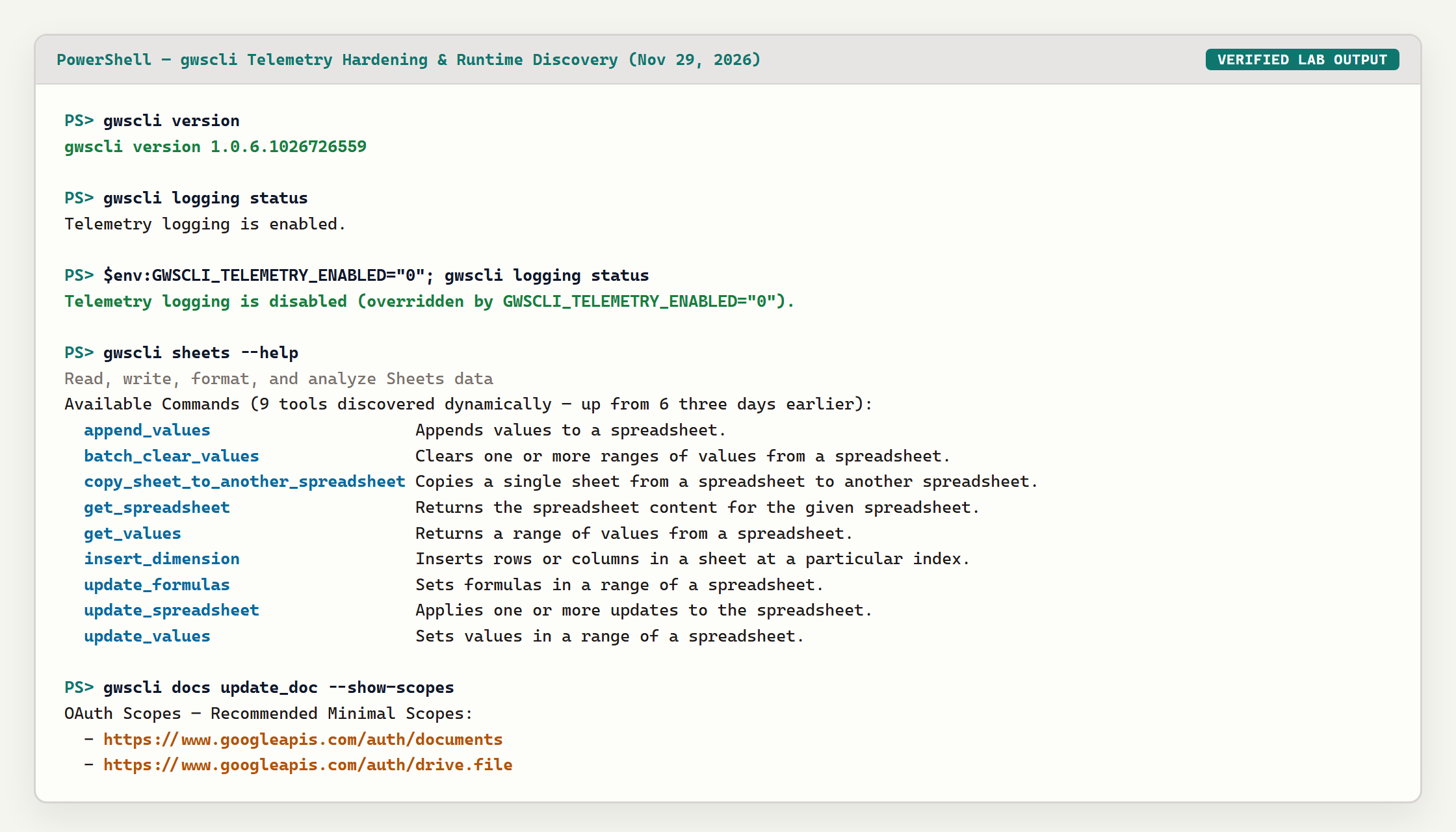
gwscli 1.0.6.1026726559 telemetry hardening, live runtime discovery of 9 Google Sheets commands, and --show-scopes inspection on docs.update_doc.3.2 Authentication Setup: Personal Mode vs Multi-User GCP Projects
For individual developer testing, Google’s Personal Mode onboarding eliminates OAuth consent-screen verification overhead by creating a single-user OAuth 2.0 client tied strictly to your Google Account, automatically enabling core Workspace APIs and MCP services, and checking Use this client for an AI-powered agent. For team or multi-user deployments, platform engineers should instead use manual GCP setup: enable each required product API plus its companion *mcp.googleapis.com service via gcloud services enable, configure an Internal OAuth consent screen in Google Auth Platform (or add explicit test users if External), and create separate agent-flagged OAuth clients for local CLIs (Desktop app type) versus hosted MCP clients (Web application type).
In my lab, I registered the downloaded Personal Mode Desktop client secret via gwscli auth setup --oauth_client_file=... and ran gwscli auth login --bundle=readonly. Because interactive sign-in starts an ephemeral listener on http://127.0.0.1:<port>/, headless Linux hosts and SSH sessions require forwarding that dynamic port back to a local browser (or passing short-lived tokens via --oauth_token, which disables automatic refresh). After browser consent, gwscli auth status confirmed 17 read-only scopes cached locally.
3.3 Wiring Remote MCP Servers Into Antigravity and Claude
Connecting GUI AI applications to Google’s managed remote MCP endpoints requires a Web application OAuth 2.0 client (with Use this client for an AI-powered agent checked) and the exact redirect URI required by each host:
- Antigravity (2.0, IDE, CLI): Register
https://antigravity.google/oauth-callback, add desired servers to~/.gemini/config/mcp_config.json, and authenticate either in Settings → Customizations → Installed MCP Servers or inside the Antigravity CLI TUI via/mcp(verified servers displayAuthed). - Claude (Pro, Max, Team, Enterprise on Claude.ai or Claude Desktop): Register
https://claude.ai/api/mcp/auth_callback, navigate to Settings → Connectors → Add custom connector, paste each product’s remote MCP server URL (e.g.,https://gmailmcp.googleapis.com/mcp/v1), and enter the OAuth Client ID and Secret under Advanced settings.
{
  "mcpServers": {
    "docs": {
      "serverUrl": "https://docsmcp.googleapis.com/mcp/v1",
      "oauth": {
        "clientId": "YOUR_WEB_AGENT_CLIENT_ID",
        "clientSecret": "YOUR_WEB_AGENT_CLIENT_SECRET"
      }
    },
    "sheets": {
      "serverUrl": "https://sheetsmcp.googleapis.com/mcp/v1",
      "oauth": {
        "clientId": "YOUR_WEB_AGENT_CLIENT_ID",
        "clientSecret": "YOUR_WEB_AGENT_CLIENT_SECRET"
      }
    }
  }
}
Two operational caveats apply when configuring Web application clients for custom MCP hosts: first, Web clients default to online access (unlike Desktop clients), so unless your MCP client explicitly requests access_type=offline or the OIDC offline_access scope, users will face hourly re-login prompts. Second, if a host supports /mcp/v1 form elicitation, Google recommends setting local host-side tool confirmation prompts to Always allow for Workspace MCP servers so users are not hit with duplicate approval popups on every sensitive call.
4. Live Practical Demo #1: Authenticated Workspace Health Digest via gwscli
To validate real, end-to-end authenticated operation across multiple Workspace services without exposing private email bodies or confidential calendar details, I built and ran tools/inbox_health_digest.py on November 29, 2026. The script invokes four strictly read-only gwscli commands—gmail list_labels, tasks list_task_lists, tasks list_tasks, and calendar list_calendars—aggregates mailbox health metrics and backlog counts in Python, redacts account identifiers, and writes a structured JSON digest to reports/live_health_digest.json.
Because my cached OAuth access token had expired since the initial login three days earlier, this run also tested token lifecycle automation in practice. On the very first call, gwscli printed Refreshing expired OAuth token... on stderr, exchanged the cached refresh token transparently, and returned clean JSON on stdout across all three services with exit code 0:
=== Live Authenticated Workspace Health Digest (2026-11-29T03:14:51.493035+00:00) ===

[1] Gmail Aggregate Health (live via gmailmcp.googleapis.com)
    Total labels discovered : 15 (14 system, 1 user)
    INBOX threads           : 32,186 total | 27,881 unread (86.6%)
    IMPORTANT threads       : 1,650 total | 826 unread
    SENT / DRAFT / SPAM     : 62 sent | 2 drafts | 51 spam | 631 trash
    Category breakdown:
      - CATEGORY_UPDATES     13,140 threads (11,421 unread)
      - CATEGORY_PROMOTIONS  11,061 threads (10,381 unread)
      - CATEGORY_SOCIAL       5,633 threads ( 4,211 unread)
      - CATEGORY_PERSONAL     2,083 threads ( 1,494 unread)
      - CATEGORY_FORUMS       1,401 threads ( 1,380 unread)

[2] Google Tasks Backlog (live via tasksmcp.googleapis.com)
    HTTP/CLI exit codes     : list_task_lists=0, list_tasks=0
    Task lists found        : 1
    Uncompleted tasks found : 0

[3] Google Calendar Subscriptions (live via calendarmcp.googleapis.com)
    CLI exit code           : 0
    Total calendars visible : 2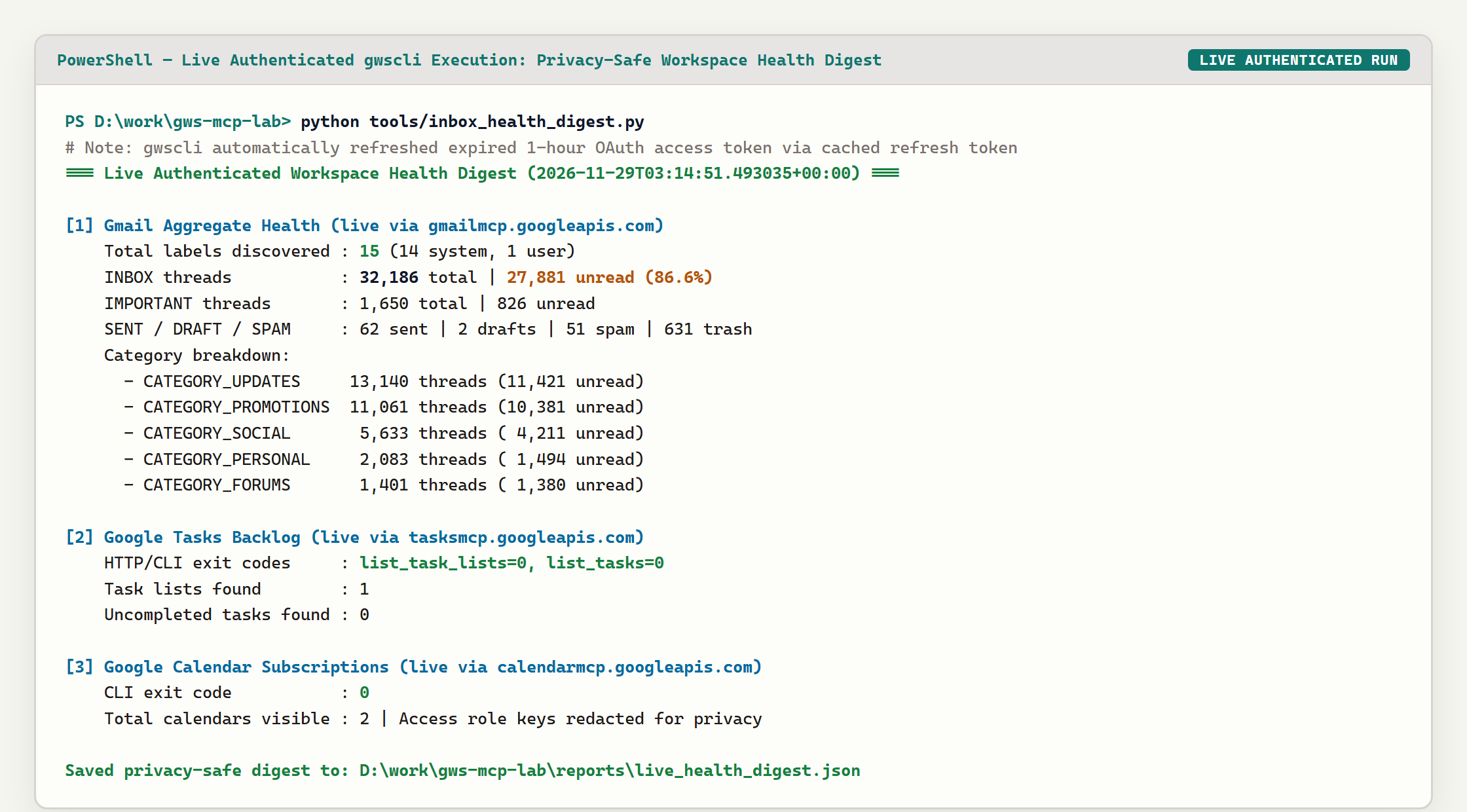
tools/inbox_health_digest.py on November 29, 2026, verifying transparent OAuth token refresh and exit code 0 across gmailmcp, tasksmcp, and calendarmcp.
Three practical engineering takeaways stood out from this live run. First, separating diagnostic notices (Refreshing expired OAuth token... on stderr) from JSON payloads (stdout) allowed Python’s json.loads(proc.stdout) to parse every response cleanly without brittle string stripping. Second, the Personal Mode project that had encountered initial Day-1 Developer Preview gating on November 26 executed all three services cleanly by November 29 without changing the local OAuth client—confirming that GA backend propagation resolved on its own within days of launch. Third, aggregate label-level analytics demonstrate a practical privacy-preserving agent pattern: an agent can quantify inbox overload (86.6% unread across 32,186 threads, dominated by CATEGORY_UPDATES and CATEGORY_PROMOTIONS) and recommend filter hygiene without ever pulling raw email bodies into an LLM context window.
5. Live Practical Demo #2: Streamable HTTP Latency, Payload Overhead, and Negative-Path Protocol Harness
To evaluate Google’s eight managed remote MCP endpoints from an infrastructure and client-engineering perspective, I wrote a standalone zero-dependency Python benchmark (tools/mcp_streamable_bench.py). Over three consecutive trials per endpoint on November 29, 2026, the script measured median initialize and tools/list round-trip latency, exact JSON response payload sizes in kilobytes on both /mcp/v1 and /mcp/v1self, capability advertisements, and six negative-path error probes.
5.1 Latency, Tool Catalog Expansion, and Payload Budget
Running the harness across all eight GA endpoints revealed two critical operational metrics that directly affect MCP host design: how fast the catalog evolves server-side, and how large the raw tool-definition payload actually is.
| Endpoint | Init Median | tools/list Median |
/mcp/v1 Tools |
/mcp/v1self Tools |
/mcp/v1 Payload |
/mcp/v1self Payload |
resources Cap? |
|---|---|---|---|---|---|---|---|
| Gmail | 1,148.0 ms | 576.0 ms | 30 | 25 | 146.2 KB | 114.7 KB | No |
| Drive | 438.3 ms | 419.3 ms | 15 | 12 | 113.6 KB | 105.7 KB | Yes |
| Docs | 298.8 ms | 356.5 ms | 2 | 2 | 42.0 KB | 42.0 KB | No |
| Sheets | 332.2 ms | 369.6 ms | 9 | 9 | 37.7 KB | 37.7 KB | No |
| Slides | 307.0 ms | 364.5 ms | 4 | 4 | 37.1 KB | 37.1 KB | No |
| Calendar | 289.1 ms | 413.7 ms | 9 | 8 | 116.4 KB | 103.2 KB | No |
| Chat | 290.5 ms | 348.8 ms | 9 | 8 | 55.4 KB | 44.0 KB | No |
| Tasks | 341.3 ms | 406.6 ms | 9 | 8 | 99.2 KB | 89.8 KB | No |
| TOTAL | 289–1,148 ms | 349–576 ms | 87 | 76 | 647.6 KB | 574.1 KB | 1 of 8 |
Look closely at those numbers. First, across all eight endpoints, /mcp/v1 exposed 87 tools and /mcp/v1self exposed 76 tools—a difference of 11 elicitation-gated tools:
- Gmail (5 excluded on
/mcp/v1self):apply_sensitive_message_label,apply_sensitive_thread_label,forward,reply, andsend_message. - Drive (3 excluded):
list_shared_drives,request_access, andupload_file_revision. - Calendar (1 excluded):
delete_event. - Chat (1 excluded):
send_message. - Tasks (1 excluded):
delete_task.
Second, look at the payload overhead: the combined raw JSON returned by tools/list across all eight GA servers reaches 647.6 KB on /mcp/v1 (574.1 KB on /mcp/v1self). Three servers alone—Gmail (146.2 KB), Calendar (116.4 KB), and Drive (113.6 KB)—account for 58% of that entire metadata footprint. Although raw byte size does not map to LLM tokens via a single fixed ratio (tokenization depends on the model family and JSON punctuation density), preloading 647.6 KB of tool schemas into every prompt turn introduces substantial context overhead and degrades tool-selection accuracy. In production, platform teams should scope each agent role to only the two or three Workspace MCP servers it actually uses—or rely on gwscli lazy discovery.
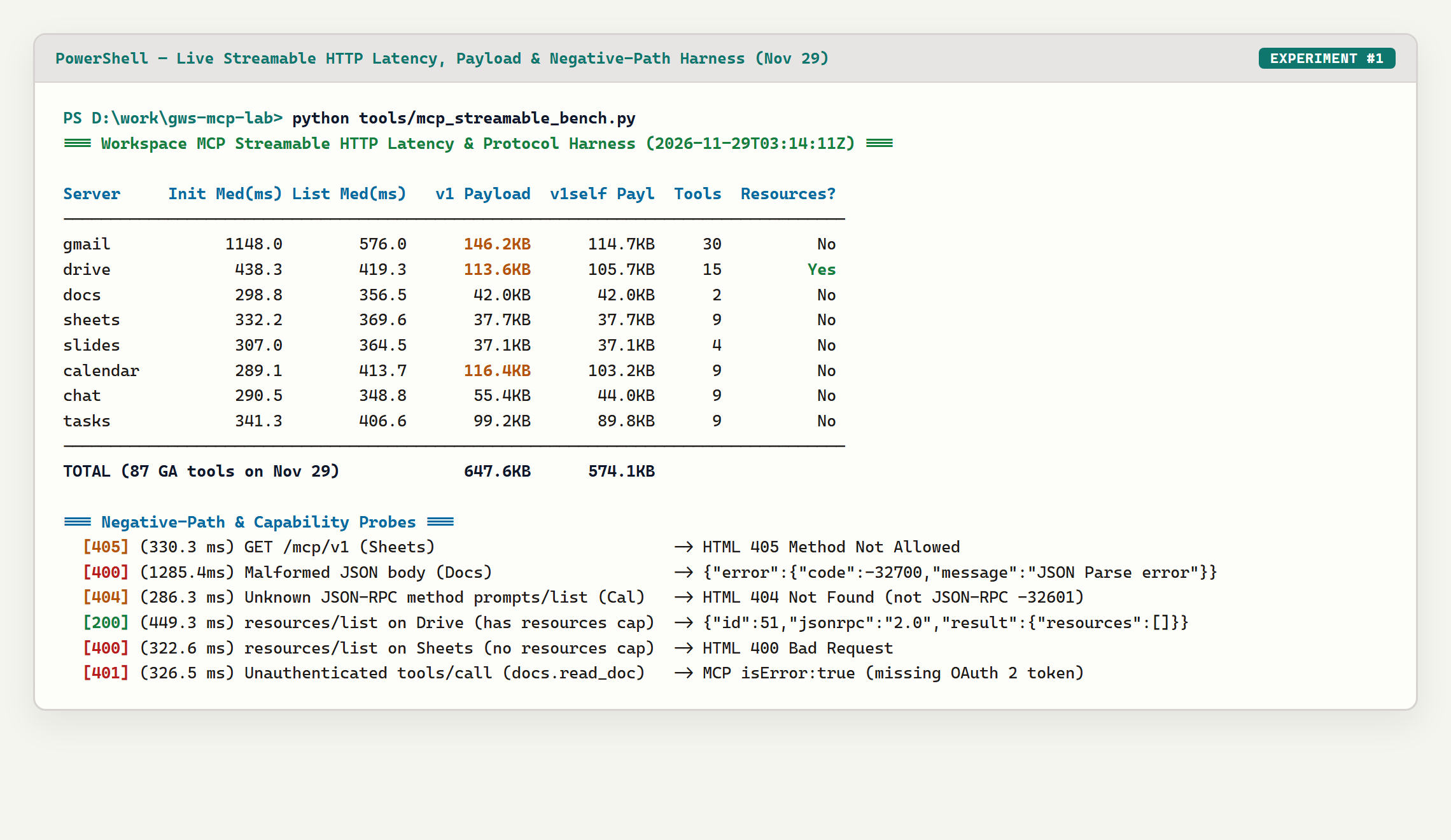
tools/mcp_streamable_bench.py across all eight GA Workspace MCP endpoints on November 29, 2026.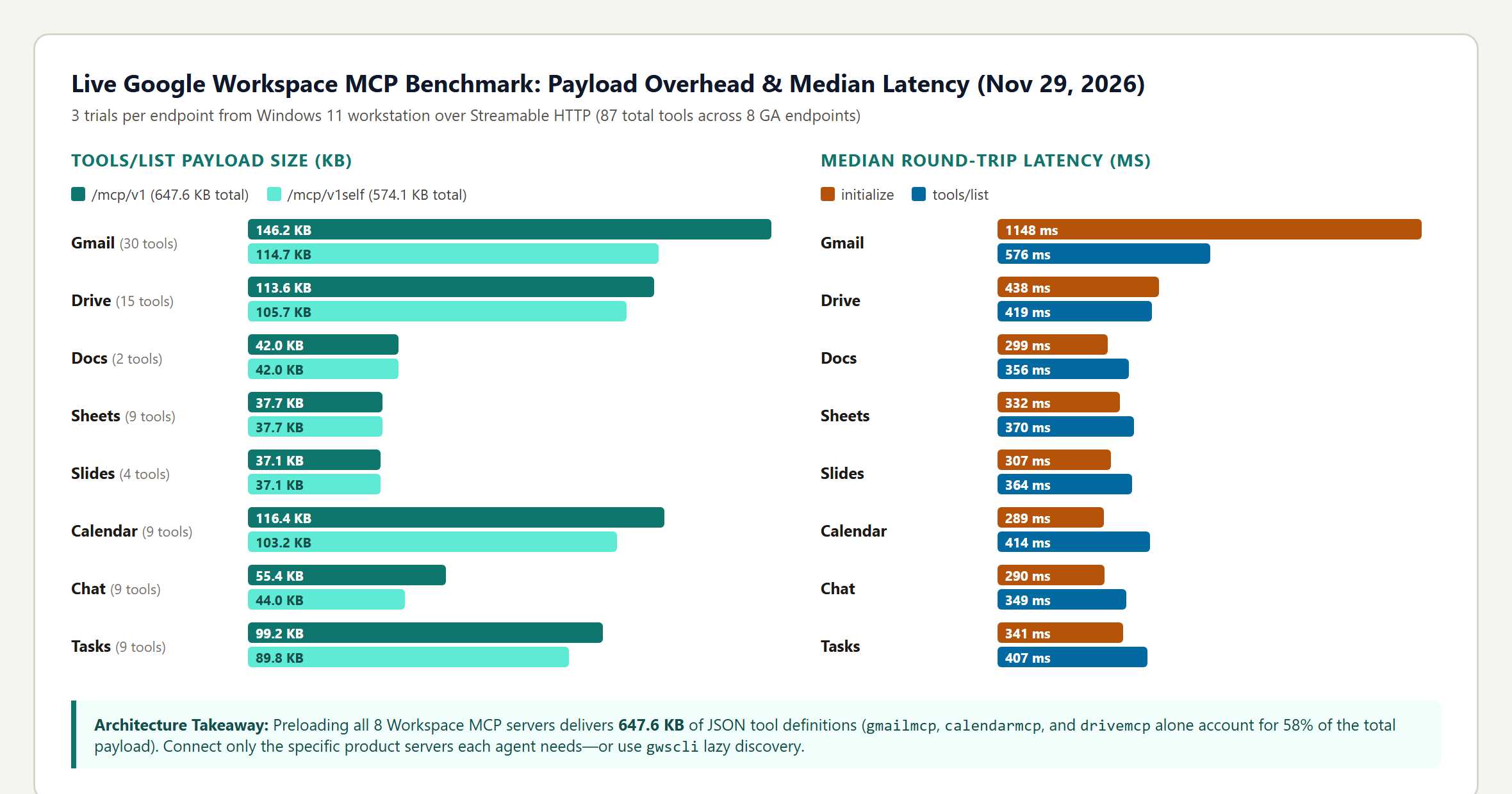
tools/list payload size (647.6 KB on /mcp/v1 vs 574.1 KB on /mcp/v1self) and 3-trial median latency across all eight GA servers.5.2 Negative-Path Protocol Probes: What Custom MCP Clients Must Handle
Happy-path handshakes rarely reveal how a remote MCP server behaves when an agent or proxy sends an unexpected request. Running six deliberate negative-path probes against Google’s edge infrastructure uncovered an important implementation quirk:
| Probe Sent | HTTP Status | Latency | Observed Response Format |
|---|---|---|---|
GET https://sheetsmcp.googleapis.com/mcp/v1 |
405 |
330.3 ms | HTML 405 Method Not Allowed error page (ESF) |
POST malformed JSON to Docs MCP |
400 |
1,285.4 ms | Valid JSON-RPC 2.0 error: {"error":{"code":-32700,"message":"JSON Parse error"}} |
POST unsupported method prompts/list to Calendar MCP |
404 |
286.3 ms | HTML 404 Not Found page (not JSON-RPC -32601) |
POST resources/list to Drive MCP (advertises resources) |
200 |
449.3 ms | Valid JSON-RPC 2.0: {"id":51,"jsonrpc":"2.0","result":{"resources":[]}} |
POST resources/list to Sheets MCP (no resources cap) |
400 |
322.6 ms | HTML 400 Bad Request page |
Unauthenticated tools/call (docs.read_doc) |
401 |
326.5 ms | JSON-RPC 2.0 MCP error envelope ("isError": true, missing OAuth 2 token) |
Client-Engineering Takeaway: Inspect Content-Type Before Calling json.loads()
Notice that Google’s edge frontend returns HTML error pages—not JSON-RPC 2.0 envelopes—for HTTP 405, unknown methods like prompts/list (404), and unsupported capability calls like resources/list on non-resource servers (400). Custom Streamable HTTP MCP clients and gateway adapters must check the initialize capabilities object before calling optional MCP methods and must check Content-Type: application/json before parsing non-200 bodies.
6. Live Practical Demo #3: Pre-Flight Policy Gate for Release Docs & Support Operations
Many organizations want to let coding agents assist with release operations—reading engineering specs in Google Docs, pulling QA matrices from Google Sheets, inspecting customer slides, appending release notes, updating build trackers, creating verification tasks, and scheduling retrospectives—without handing out blanket Workspace permissions. To test whether gwscli can serve as the foundation for an automated governance check, I built and executed tools/preflight_policy_gate.py.
Before an agent runs a single live Workspace command, the policy gate executes four deterministic checks using gwscli:
- Binary & Telemetry Posture Check: Confirms
gwscli versionmeets the minimum baseline (1.0.6.1026726559) and verifies that settingGWSCLI_TELEMETRY_ENABLED=0disables diagnostic telemetry cleanly. - Cached OAuth Inventory: Parses
gwscli auth statusto enumerate the exact scopes currently cached on the workstation (17 read-only scopes in my lab). - Runtime Scope & Schema Discovery: Invokes
gwscli auth login --print-scope-only <service> <action>andgwscli <service> <action> --schemafor all eight proposed release-ops actions. - Policy Evaluation: Flags any action that requires write/elevated scopes or scopes missing from the local cache, blocks prohibited wildcard scopes (such as
mail.google.comor fulldrive), and emits a machine-readable JSON verdict (PASS,REVIEW_REQUIRED, orBLOCK).
| Workflow Action | Purpose | Schema Size | Gate Status | Write / Missing Scopes Flagged |
|---|---|---|---|---|
docs.read_doc |
Read release specification | 252 B | PASS | None (satisfied by cached read-only scopes) |
sheets.get_values |
Pull QA pass/fail matrix | 761 B | PASS | None (satisfied by cached read-only scopes) |
slides.read_presentation |
Inspect customer deck structure | 347 B | PASS | None (satisfied by cached read-only scopes) |
slides.read_slide_page_thumbnail |
Fetch slide preview thumbnail | 508 B | PASS | None (satisfied by cached read-only scopes) |
docs.update_doc |
Append changelog entries | 2,855 B | REVIEW | documents, drive.file |
sheets.update_values |
Write build SHA and release timestamp | 404 B | REVIEW | drive.file, spreadsheets |
tasks.create_task |
Create post-release verification task | 11,240 B | REVIEW | tasks |
calendar.create_event |
Schedule post-release retrospective | 16,969 B | REVIEW | calendar |
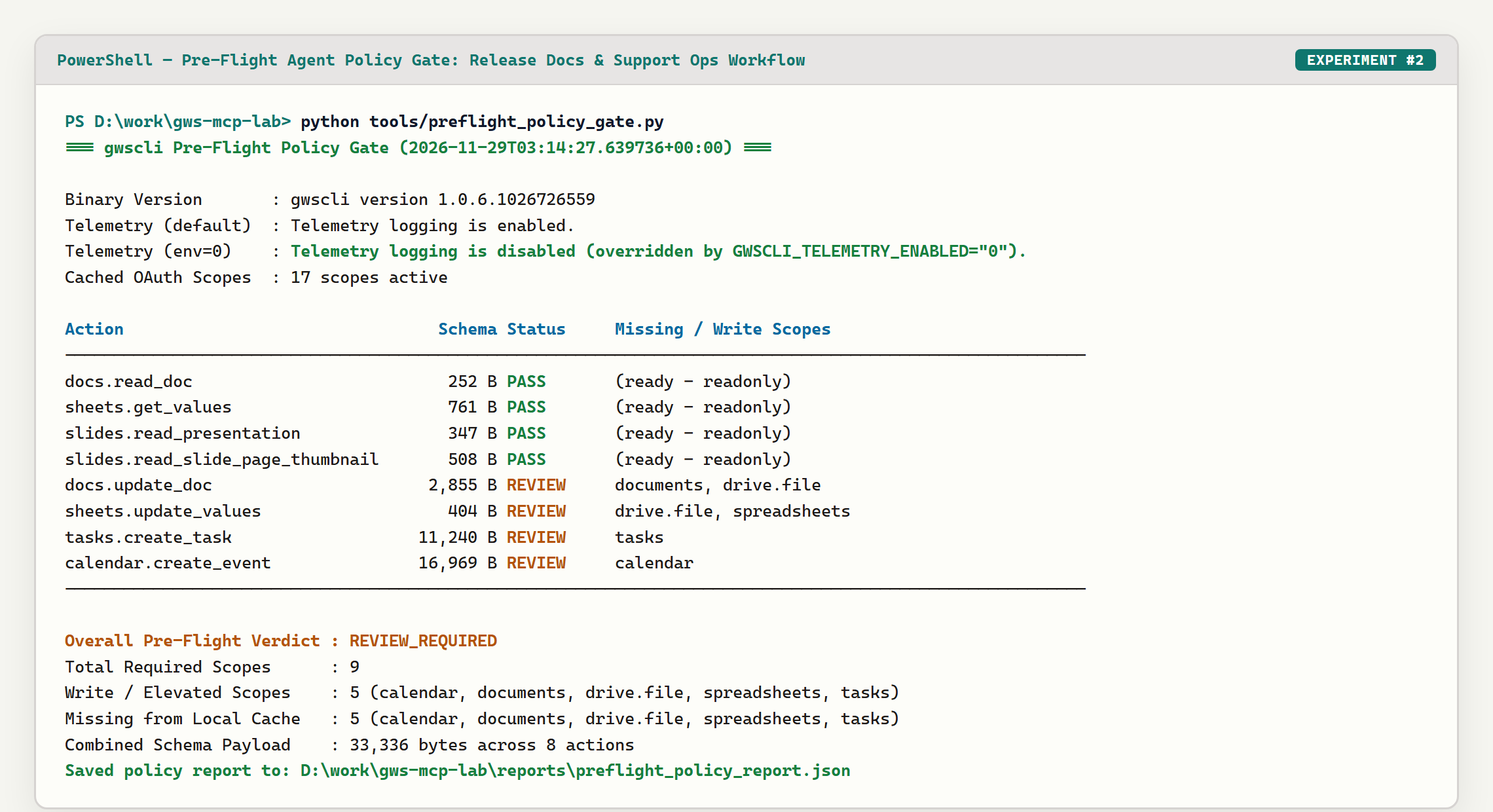
tools/preflight_policy_gate.py returning REVIEW_REQUIRED after separating four ready read-only actions from four write actions requiring five elevated scopes.
Running this gate surfaced two details that matter directly during security reviews. First, across all eight release-ops actions, the combined schema payload is only 33,336 bytes—less than one-nineteenth of the 647.6 KB catalog returned by preloading all eight remote MCP servers, showing how dramatically lazy CLI discovery shrinks prompt overhead for focused workflows. Second, both docs.update_doc and sheets.update_values pull in drive.file alongside documents and spreadsheets. Because drive.file permits creating or modifying files that the user has opened or shared with the application, automated policy gates must treat drive.file explicitly as a file-level write scope—never as a passive read-only permission.
7. Engineering Perspective: Practical Workflows, Trade-Offs, Threat Model, and 2027 Roadmap
After auditing the specs, running live authenticated commands, benchmarking all eight remote endpoints, and building a pre-flight policy gate, I see clear places where Google’s agent stack earns its keep—and several areas where teams should stay cautious.
7.1 Four Daily Workflows Where Workspace CLI & MCP Deliver Real Value
- Release Operations & Changelog Synchronization: Release engineers typically update the same build metadata across Git tags, a Google Doc release brief, a Google Sheets QA sign-off tracker, and a Google Tasks verification list. Pairing a terminal coding agent with
gwscli docs,sheets, andtaskslets the agent read local test logs and propose exact cell ranges and changelog diffs for human approval before writing—eliminating manual copy-paste errors while keeping every edit tied to the engineer’s Workspace audit trail. - Customer Support Escalation Synthesis: When a high-priority bug escalates from a customer email into engineering, context is usually split across Gmail threads, a Google Chat room, and a shared reproduction doc in Drive. Using read-only scopes via remote MCP servers inside Antigravity or Claude allows an engineer to pull those threads into a structured root-cause brief in under a minute. Because engineers still verify primary application logs before concluding root cause, the agent handles retrieval and formatting without inventing technical claims.
- Design-Review and Slide Deck QA: Product and architecture reviews often suffer from drift between a design doc in Google Docs and an executive deck in Google Slides. Tools like
docs.read_doc,slides.read_presentation, andslides.read_slide_page_thumbnailmake it practical to cross-check slide metrics against a source spreadsheet or specification document before a review meeting—using strictly read-only scopes. - Periodic Access & Inbox Hygiene Audits: As demonstrated in Chapter 4, read-only metadata tools (
gmail.list_labels,drive.get_file_permissions,tasks.list_tasks) let individuals and operations leads audit unread backlog distribution, stale open tasks, or overly broad Drive file permissions programmatically without exposing sensitive document contents or email bodies to external systems.
7.2 Choosing the Right Interface: gwscli vs Remote MCP vs Legacy REST
| Scenario | Recommended Path | Why |
|---|---|---|
| Terminal coding agents (Antigravity CLI, Claude Code, Codex) & local disk uploads/downloads | gwscli |
Native binary, direct --filePath transfers, pipeable JSON/Markdown, on-demand schema discovery avoids 647.6 KB context bloat. |
| GUI AI hosts (Antigravity 2.0/IDE, Claude Desktop/Web) & cloud-hosted enterprise agents | Remote MCP Servers (+ Cloud Agent Gateway) | Zero local binary maintenance, server-driven /mcp/v1 form elicitation UI, SPIFFE Agent Identity and default-deny egress via Agent Gateway. |
| Deterministic backend cron jobs, ETL syncs, and non-AI SaaS apps | Existing Workspace REST APIs | Versioned, backward-compatible contracts; Google’s AI Tools Addendum targets AI agents, while traditional apps remain on REST. |
7.3 Operational Trade-Offs and Limitations Observed
- Rapidly shifting dynamic catalog (verified live): Between November 26 and November 29, 2026 alone, Google’s GA MCP surface expanded dynamically—including newly exposed tools in Gmail (30 tools), Drive (15 tools), Sheets (9 tools), and Chat (9 tools)—without any binary update to
gwscli 1.0.6.1026726559. While great for adaptive agents that read--helpdynamically, this confirms Google’s warning that static scripts depending on fixed CLI signatures or tool counts will break over time. - 647.6 KB catalog footprint on naive MCP configurations: Loading all eight GA MCP servers at once injects 647.6 KB of JSON tool definitions into an MCP host. Teams need role-based MCP profiles (for example, a “Docs & Sheets” profile vs a “Calendar & Tasks” profile) rather than wiring all eight servers into every workspace.
- Inconsistent error content types on unsupported MCP methods: As observed in Chapter 5.2, sending
prompts/listorresources/listto endpoints that do not support them returns HTML 404/400 pages from ESF rather than JSON-RPC error objects. Custom MCP clients must parse capabilities carefully and handle HTML error responses gracefully. - Headless and container OAuth ergonomics: Interactive
gwscli auth loginexpects a local browser able to reachhttp://127.0.0.1:<port>/. Developers working over remote SSH or inside containers need SSH port forwarding or externally minted short-lived tokens (which forfeit automatic refresh). - Documented GA Known Issues: Google’s current MCP guide lists four gaps worth planning around: (a) non-agent OAuth clients fail with a generic
invalid tokenerror rather than explaining the missing agent flag; (b) UI attribution badges occasionally display the human user instead of the agent (while Admin audit logs remain accurate); (c) Chat MCP currently attributes actions to the agent regardless of admin attribution settings; and (d) some approval prompts are English-only, while saved tool approvals expire after 90 days with no user self-service revocation view yet. - Quota discipline before April 1, 2027 billing: The free Standard Tier’s 5,000 requests/day per project per product is ample for interactive developer use, but automated agents that paginate large Drive folders or poll Gmail repeatedly can breach daily limits quickly. Teams should instrument request counts and cache read outputs during Q1 2027.
7.4 Threat Model & Non-Negotiable Security Guardrails
Core Threat: Cross-Boundary Indirect Prompt Injection
Even when Workspace DLP and HITL form elicitation protect actions inside Google Workspace, a local coding agent that holds both read access to untrusted Gmail/Drive content and arbitrary local shell execution creates a cross-boundary exfiltration path: (1) an attacker mails or shares a file containing hidden instructions, (2) the agent reads that untrusted content, (3) the agent pulls a sensitive internal spreadsheet from Drive, and (4) the agent exfiltrates the data via a local network command (such as curl) outside Workspace’s perimeter.
Defending against that failure mode requires layering four controls rather than relying on any single switch:
- Treat OAuth scopes—not
/mcp/v1self—as your primary boundary: Even though/mcp/v1selfhides 11 high-impact tools (includinggmail.send_message,calendar.delete_event, andchat.send_message), it still exposes dozens of write and soft-destructive actions across Gmail, Drive, Docs, Sheets, Slides, and Tasks. Always pair endpoint selection with minimal OAuth scopes and explicit pre-flight review of write scopes likedrive.file. - Enable Model Armor and default-deny egress: Turn on project-level MCP security floor settings (Model Armor prompt-injection screening) so both remote MCP and
gwsclitraffic are screened, and place cloud-hosted agents behind Google Cloud Agent Gateway with default-deny outbound rules. On developer workstations, avoid feeding untrusted external mail into agents that simultaneously hold unrestricted shell network access. - Eliminate raw token handling on the command line: Avoid passing
--oauth_tokenliterals where process tables (ps//proc), shell history, log files, and LLM agent transcripts can capture them. Usegwscli‘s managed credential store locally and SPIFFE Agent Identities in Google Cloud Agent Registry for server-side agents. - Standardize telemetry and Admin Console HITL policies: Decide explicitly whether workstation baselines should set
gwscli logging off/GWSCLI_TELEMETRY_ENABLED=0, and configure Google Admin console → Agents → Settings → User review for external agents—including whether to uncheck Except when user always allows for sensitive organizational units.
7.5 Phased Migration Roadmap to February & April 2027
| Phase | Target Window | Concrete Engineering Actions | Exit Criteria |
|---|---|---|---|
| Phase 1: Discovery & Sandbox | Dec 2026 | Inventory all internal AI agents currently hitting Workspace REST APIs (including community gws scripts); test gwscli and role-scoped remote MCP configs in a sandbox GCP project with read-only scopes; add pre-flight scope gating to CI. |
Complete inventory of REST-based AI agents; verified read-only workflows and telemetry baseline. |
| Phase 2: Controlled Workspace Pilot | Jan 2027 | Provision dedicated Workspace-domain GCP projects with agent-flagged OAuth clients; enable Model Armor floor settings; configure Admin Console user-review policies and verify OAuth audit log attribution; pilot low-risk write workflows (drafts, tasks, QA sheets). | Zero AI agents remaining on raw Workspace REST APIs before February 1, 2027 enforcement. |
| Phase 3: Production Scale & Cost Control | Feb–Mar 2027 | Front cloud-hosted agents with Google Cloud Agent Gateway, SPIFFE Agent Identities, and VPC Service Controls; measure per-product daily request volume against the 5,000 req/day Standard Tier cap; optimize caching and role-scoped MCP catalogs. | Predictable quota posture and approved budget prior to April 1, 2027 Scaled Tier billing. |
Closing Summary
Google’s GA release of Workspace MCP servers, gwscli, and Cloud Agent Gateway moves enterprise agent governance out of ad-hoc wrapper code and into a standardized, inspectable control plane. Live testing on November 29, 2026 confirmed that authenticated gwscli workflows execute cleanly with automatic token refresh, that the managed MCP catalog is already expanding dynamically (87 tools across eight endpoints), and that practical pre-flight policy gating can be built directly on top of gwscli‘s runtime discovery commands.
At the same time, real operational constraints—647.6 KB of combined MCP tool metadata, non-JSON error responses on unsupported MCP methods, dynamic CLI surface drift, and cross-boundary prompt-injection risks—mean teams should adopt the stack deliberately. Start with read-only pilots, scope each agent tightly to only the servers and OAuth permissions it genuinely needs, and complete your REST-to-MCP cutover cleanly ahead of February 1, 2027.
References
- Chandu Thota & Brad Calder — Google Cloud Blog (November 24, 2026): Built for trust and control: Powering the next wave of AI agents across Google Workspace and Google Cloud
- Chandu Thota (VP of Engineering, Google Workspace) — GA Announcement on X (November 25, 2026): https://x.com/ChanduThota/status/2125275496355348799
- Google Developers Guide (last updated November 26, 2026 UTC): Configure the Google Workspace MCP servers
- Google Developers Guide (last updated November 25, 2026 UTC): Use the Google Workspace command-line interface (CLI)