Google Workspace CLI brings documents, email, and calendars into terminal workflows and AI agents. This guide installs ‘gwscli’ on Linux, configures an agent OAuth client, explores Drive tools, and checks a remote MCP connection using actual command output.
Test environment: Linux x86_64, ‘gwscli 1.0.6.1026726559’, November 25, 2026. Terminal screenshots come from a dedicated demo viewport displaying live command results with account identifiers removed. OAuth and MCP initialization succeeded; Drive data queries were denied permission in the test account. The final steps explain that result and what to investigate next.
How the CLI, MCP, and enterprise controls fit together
Google’s November 24 announcement states that Workspace CLI and Workspace MCP are generally available. The CLI serves terminal workflows and local agents. Remote MCP servers expose Workspace tools to compatible agent hosts, with organizational permissions and governance still applying.
| Component | Purpose | Key characteristics |
|---|---|---|
| ‘gwscli’ | Invoke tools from a terminal | Runtime discovery, schemas, structured output, packaged agent skills |
| Workspace MCP | Connect agents to Workspace tools | Google-hosted endpoints, Streamable HTTP, OAuth 2.0 |
| Enterprise controls | Govern agent activity | Permissions, DLP, human confirmation, auditing, revocation |
The tested CLI lists Calendar, Chat, Docs, Drive, Gmail, People, Sheets, Slides, and Tasks. MCP documentation also lists Classroom and Universal Search; the two product lists are not interchangeable. People remains marked Developer Preview in the CLI guide. Universal Search covers Gmail, Drive, Calendar, and Chat. Consult the current CLI guide and MCP guide for availability.
Before you start
Use a Linux x86_64 machine with ‘curl’, a browser, a Google account, and permission to create or select a Google Cloud project. Organizational accounts may require administrator review of agent access. For Windows, macOS, or ARM64, choose the matching binary from Google’s installation instructions.
Run the examples in a dedicated working directory. Keep credentials, access tokens, and refresh tokens out of Git, published articles, and recordings.
Step 1 — Install the CLI and verify the version
Download the official binary into a writable directory:
mkdir -p tools private
chmod 700 private
curl -fL https://dl.google.com/workspace-cli/linux/gwscli -o tools/gwscli
chmod +x tools/gwscli
./tools/gwscli version
./tools/gwscli --help
To run ‘gwscli’ from any directory, install the binary into your personal executable directory:
install -Dm755 ./tools/gwscli "$HOME/.local/bin/gwscli"
export PATH="$HOME/.local/bin:$PATH"
command -v gwscli
gwscli version
A fresh shell on the demo machine now resolves the binary in ‘~/.local/bin’ and returns the version below. If a new terminal does not include this directory in ‘PATH’, add ‘export PATH=”$HOME/.local/bin:$PATH”‘ to ‘~/.bashrc’ and reopen the terminal. ‘Command ‘gwscli’ not found’ concerns executable discovery, not OAuth. Do not install the unrelated Ceph ‘gwcli’ suggested by Ubuntu. The ‘./tools/gwscli’ commands below remain valid from the demo directory.
Actual version output:
gwscli version 1.0.6.1026726559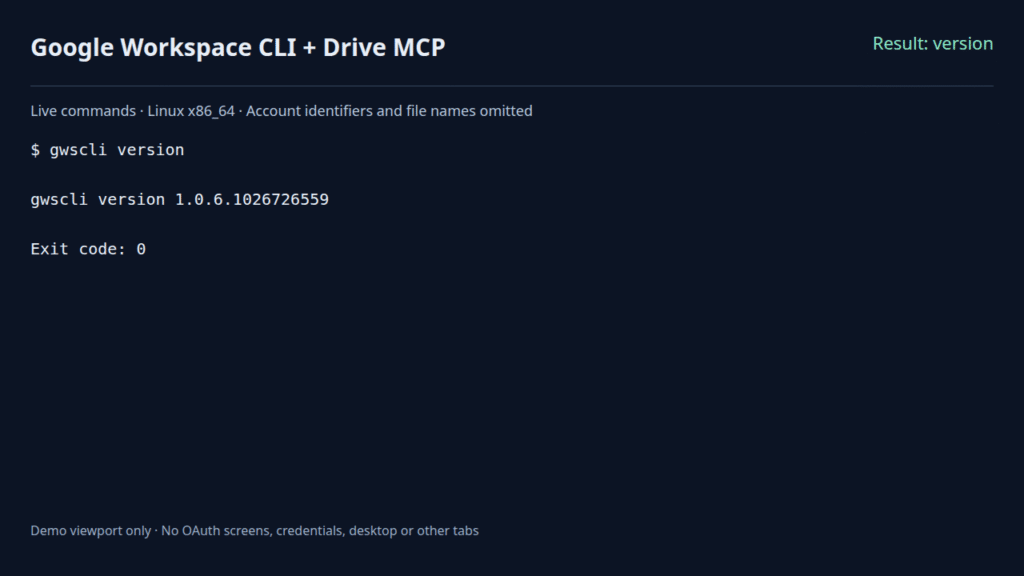
Figure 1. The installed binary runs successfully and exits with code 0.
To extract the packaged agent guidance:
./tools/gwscli skills install --dir ./tools/agent-skillsUse your agent host’s actual skill discovery directory if you want automatic loading. The directory above was used to inspect the instructions. Review changes before overwriting existing skills. The official README explains command discovery, output types, and interactive authentication requirements.
Step 2 — Create a project and an agent OAuth client
Open Personal mode onboarding, then:
- Select a project or create a dedicated test project.
- Choose Desktop app for the CLI.
- Use a recognizable name such as ‘workspace-cli-mcp-demo’.
- Confirm Use this client for an AI-powered agent is selected.
- Complete onboarding and download the credential JSON into a private directory.
Personal mode creates a client for your account and enables core Workspace services. For manual Drive setup, verify that both ‘drive.googleapis.com’ and ‘drivemcp.googleapis.com’ appear under APIs & Services → Enabled APIs & services. With an authenticated Google Cloud CLI, the manual equivalent is:
gcloud services enable drive.googleapis.com drivemcp.googleapis.com \
  --project=YOUR_PROJECT_ID
That command is an alternative setup instruction; this walkthrough used Cloud console onboarding.
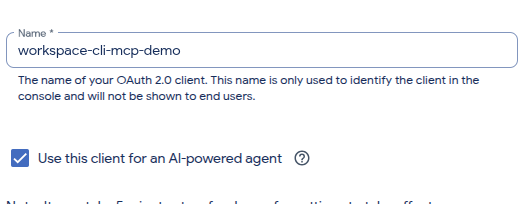
Figure 2. A cropped screenshot of the real client configuration, excluding the credential panel.

Figure 3. Drive MCP API appears in the enabled services list.
A Desktop client for the CLI differs from a Web application client used by a host with a web callback. Match the client type and redirect URI to the application you are configuring.
Step 3 — Complete OAuth in your terminal
Assuming the downloaded file is stored as ‘private/client_secret.json’:
chmod 600 private/client_secret.json
./tools/gwscli auth setup --oauth_client_file=./private/client_secret.json
Setup asks for confirmation because it clears previously stored tokens. In a fresh test environment, enter ‘Y’, then authorize the intended Drive command:
./tools/gwscli auth login drive list_recent_filesOpen the printed URL, select your account, review the requested permissions, and complete consent. The browser must reach the localhost callback on the machine running the CLI. For SSH sessions, arrange appropriate port forwarding or perform sign-in locally.
Verify the resulting session:
./tools/gwscli auth status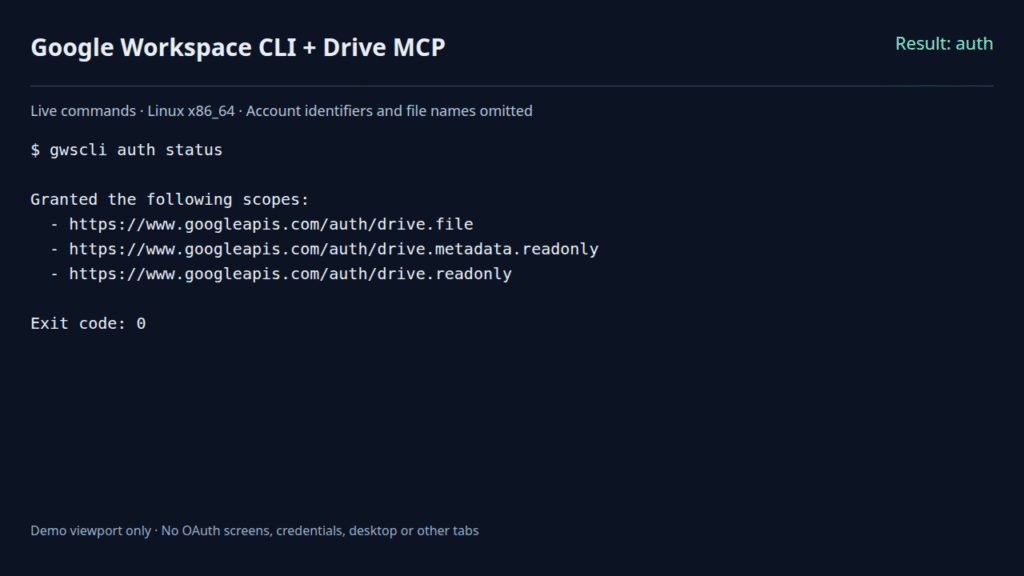
Figure 4. The CLI reports ‘drive.file’, ‘drive.metadata.readonly’, and ‘drive.readonly’.
Do not describe this grant as entirely read-only: ‘drive.file’ can authorize writes to files within the application’s scope. This walkthrough only executes read operations. Inspect command scopes and ‘auth login –help’, including the readonly bundle, when choosing permissions for another workflow.
During setup, a sandbox and the network-enabled terminal did not share the same visible configuration. Completing setup and login in the same environment avoided repeating an interactive flow in different contexts. Do not record credential entry or the OAuth sign-in screens.
Step 4 — Discover the current command and response schema
Inspect the runtime interface before building automation:
./tools/gwscli drive list_recent_files --help --show-scopes
./tools/gwscli drive list_recent_files --schema
The tested command exposes ‘–pageSize’, ‘–pageToken’, ‘–orderBy’, and ‘–excludeContentSnippets’. Its response schema is an object with ‘files’ and ‘nextPageToken’ properties.
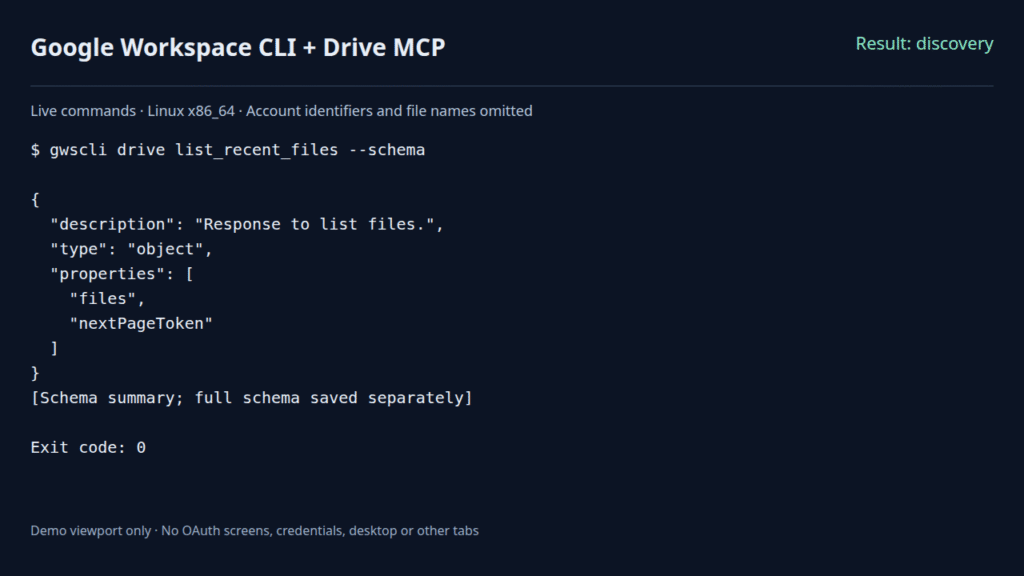
Figure 5. A field summary extracted from the live schema. The complete schema is saved separately.
Service-specific help can require network access because discovery happens at runtime. Avoid guessing field names or assuming permanent command compatibility. Some commands return Markdown or plain text; inspect Output Format before piping a result into ‘jq’.
Step 5 — Check the remote MCP endpoint
Drive MCP is hosted by Google, so there is no local Drive server to deploy. This walkthrough uses:
https://drivemcp.googleapis.com/mcp/v1Create ‘config/mcp-initialize.json’:
{
  "jsonrpc": "2.0",
  "id": 1,
  "method": "initialize",
  "params": {
    "protocolVersion": "2025-03-26",
    "capabilities": {},
    "clientInfo": {"name": "quest-workspace-evidence", "version": "1.0.0"}
  }
}
Send the connection probe:
curl --silent --show-error --max-time 45 \
  -H 'Content-Type: application/json' \
  -H 'Accept: application/json, text/event-stream' \
  --data-binary @config/mcp-initialize.json \
  https://drivemcp.googleapis.com/mcp/v1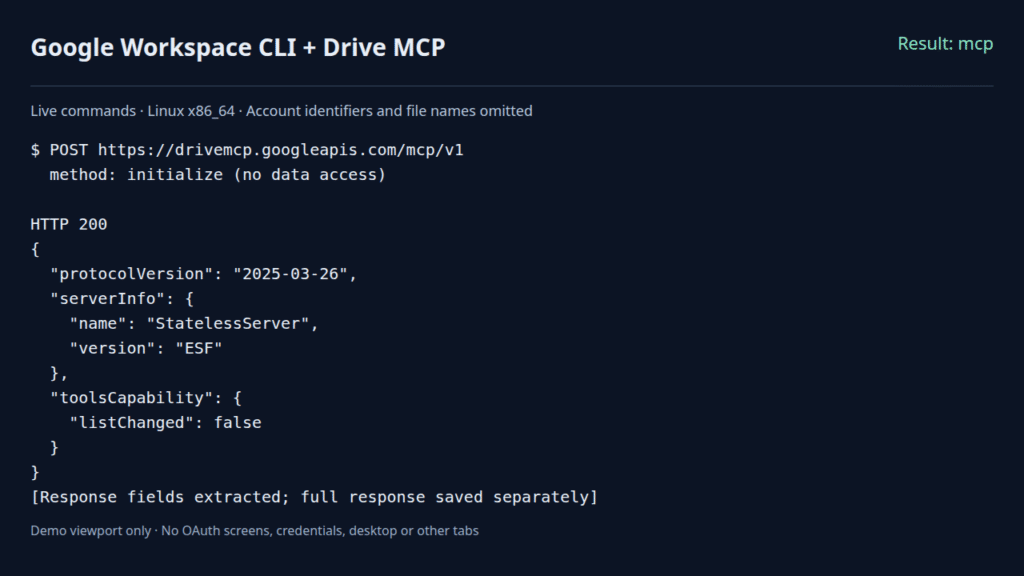
Figure 6. Actual response: HTTP 200, protocol ‘2025-03-26’, tool capability, and server name ‘StatelessServer’.
This probe contains no access token and reads no private data. It demonstrates initialization, not an authenticated data operation. A complete MCP client also manages the protocol lifecycle, OAuth, and tool calls. Here, ‘gwscli’ is the client invoking Drive tools through MCP; curl provides an additional connectivity check.
For a host such as Antigravity, configure the endpoint and an appropriate OAuth client, then authenticate in the host. The following is an instructional configuration, not a second host authenticated during this walkthrough:
{
  "mcpServers": {
    "drive": {
      "serverUrl": "https://drivemcp.googleapis.com/mcp/v1",
      "oauth": {
        "clientId": "YOUR_WEB_CLIENT_ID",
        "clientSecret": "SET_LOCALLY_DO_NOT_PUBLISH"
      }
    }
  }
}
Google’s Antigravity instructions specify the callback ‘https://antigravity.google/oauth-callback’. Use a Web application client for that host setup and keep real credentials out of published examples.
Step 6 — Attempt a practical task: list three recent files
The practical goal is a short morning review list of recently used documents. Request at most three files and exclude content snippets:
./tools/gwscli drive list_recent_files --pageSize=3 --excludeContentSnippetsObserved result in the test account: the request was denied, with exit code 1:
{
  "content": [{"text": "The caller does not have permission", "type": "text"}],
  "isError": true,
  "resultType": "complete"
}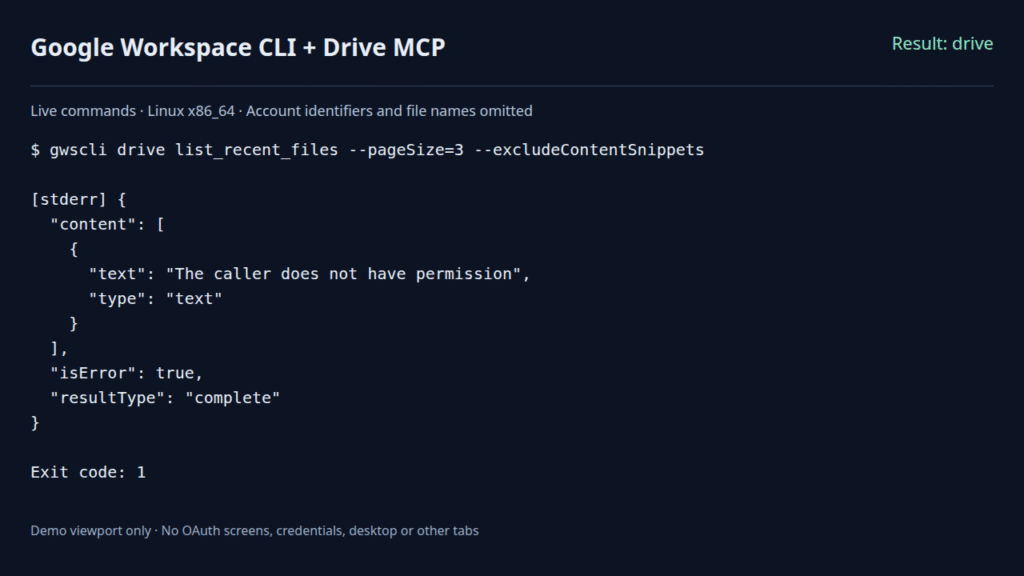
Figure 7. The actual result, without substituting a simulated successful response.
A second read-only query was used to compare behavior:
./tools/gwscli drive search_files \
  --query="owner = 'me'" --pageSize=3 --excludeContentSnippets
It returned the same error. Verified facts include granted Drive scopes, the agent client flag, both enabled Drive services, and successful discovery and initialization. Enabling the APIs again is not an evidence-based fix here. The generic error does not establish a specific root cause, and a successful Drive data operation has not yet been demonstrated.
For this situation, ask the Workspace administrator to inspect API controls and AI agent access, OAuth logs, and policies applying to the account and client. Correlate logs with the request time. Do not broadly relax organizational controls in response to a generic error. After a justified configuration or access change, rerun the same query to verify the result.
A successful response should be inspected for ‘files’; an empty list may be valid. Neither ‘auth status’, tool discovery, nor HTTP 200 from ‘initialize’ proves permission to read Drive data.
Check access with a Workspace administrator
The follow-up run using ‘gwscli’ from ‘PATH’ returned the same error. Admin Console requested an administrator account, and the current account could not open the configuration page. This limits diagnosis; it does not prove an organizational policy caused the failure.
- Open Security → Access and data control → API controls → Manage App Access and locate the demo’s exact OAuth client ID.
- Check app access and the organizational unit applying to the user. Scope any justified change to the demo client, test user/unit, and required OAuth scopes, avoiding organization-wide Trusted access just for a test.
- Inspect Agents → Settings → User review for external agents and Access Evaluation logs around the failed request to identify any blocking rule or approval requirement.
- After addressing the actual cause, rerun step 6 and save the response. Update the article and recording to show success only after a real successful result.
See Google’s administrator documentation for these controls and their required administrator privileges.
Follow-up with a personal account
On November 25, 2026, I revoked the old OAuth credentials and created a separate project without an organization and a new Desktop client using a personal Gmail account. The client is marked as an AI agent, and both Drive API and Drive MCP API are enabled. OAuth completed through the localhost callback, but ‘list_recent_files’ still returned ‘The caller does not have permission’. Reproducing the failure in this separate environment does not support attributing it solely to the previous organization’s policies.
When switching accounts, do not reuse the previous account’s Personal mode client: Google returns ‘403 client_user_mismatch’ because that client is restricted to its creator. Create a client using the demo account, run ‘gwscli auth reset’, configure it with ‘gwscli auth setup –oauth_client_file=./private/personal-client-secret.json’, and sign in again. Keep the credential file private.
The official rollout announcement specifies a two-week rollout for CLI/MCP. Incomplete rollout to this project is therefore a hypothesis to investigate, not a proven cause of the generic Drive error. A cross-check using ‘gwscli tasks list_task_lists’ requires ‘tasks.readonly’; that additional consent was still pending at this update, so no Tasks result is claimed.
How I would use this in daily work
I would start with metadata and project-specific document searches, then read only the relevant files for a morning summary. The CLI makes individual steps easy to inspect and reproduce. MCP is useful when delegating work conversationally through a compatible host.
For email, I would begin with drafts that a person reviews. Spreadsheet changes and sharing updates need a clear target and scope before execution. I have not measured productivity gains or summary accuracy. The observed permission failure illustrates why OAuth consent alone is insufficient to establish an operational workflow.
Security and operational considerations
- Least privilege: request permissions for the intended task. Excluding snippets reduces returned content, not OAuth authority.
- Prompt injection: treat emails and documents as data, not instructions that can redefine the agent’s task. Evaluate Model Armor or appropriate screening.
- Human confirmation: Google describes HITL for sensitive actions. Sending email, changing sharing, and bulk edits were not tested here.
- Cloud governance: Agent Gateway covers identity/IAM, outbound controls, and Model Armor integration. Installing the CLI does not deploy that separate Cloud layer.
- Roadmap versus current behavior: the November 24 announcement labels time-limited approvals and some expanded AI data restrictions as coming soon. They were not verified in this demo.
- Costs and quotas: the CLI has no separate tool fee, but requests are subject to usage tiers and quotas. Google announced billing beginning April 1, 2027; check the quota documentation.
- Policy: Google announced technical enforcement of the AI Tools Addendum beginning February 1, 2027. Review the current terms before production use.
When access is no longer needed, ‘./tools/gwscli auth logout’ revokes the CLI’s cached authorization. Publish only reviewed screenshots, recordings, and logs; filenames and metadata can also reveal internal information.
Investigating the permission error: local evidence and public reports
The most useful outcome of this experiment is a precise separation between installation, authentication, connectivity, and authorization to perform a business operation. These are different checkpoints. A successful checkpoint narrows the investigation, but it does not automatically establish that the next checkpoint will pass. In this case, the executable ran, the user completed OAuth, the CLI discovered Drive tools, and the server accepted an initialization request. The requested document review still failed. Treating those observations separately makes the report more useful than a screenshot showing a green connection indicator alone.
The current evidence supports the description Google Drive MCP rejects the tool operation after successful OAuth. It does not establish a confirmed Google-wide outage, a defect in every client, or a specific missing permission. A rejection can originate from a remote service while still depending on configuration supplied by the caller. For that reason, the phrase “on Google’s side” needs context: it identifies the service returning the refusal, but it does not, by itself, prove a bug in Google’s implementation.
Public report: OpenBot issue 13834
OpenBot issue #13834, opened November 21, describes a ready, signed-in connection that cannot search Drive. It remained open when checked on November 25. A collaborator’s diagnostic response attributes the rejection to Google setup and distinguishes tool discovery from tool execution. This is third-party investigation, not an official Google incident notice. The report predates the November 24 GA announcement, so its preview-era recommendations need current verification.
Public report: OpenCode issue 62625
OpenCode issue #62625, opened November 7, reports the same error after OAuth. It was closed as not planned. A member points toward Google-side requirements, including the agent flag and API enablement; a later bot response still requests diagnostic evidence. The issue therefore supports comparison with our symptom, not a confirmed universal root cause or a released fix. Its Developer Preview advice also predates GA.
What these reports add to this experiment
The two reports are useful because they show that a connection label is an incomplete acceptance test across more than one host. They also provide a better question for troubleshooting: which operation failed after the connection became ready? Our answer is concrete. The CLI attempted ‘list_recent_files’ with a small page size and content snippets excluded, then received an error result. We do not need to infer that operation from a user interface badge, and we do not need to claim that we reproduced either application’s internal token storage behavior.
Our local comparison changes the strength of several hypotheses. The initial failure occurred with an organizational account. A later attempt used a separate project and a personal account, after replacing the creator-restricted OAuth client. Both produced the same generic rejection. This weakens an explanation based only on the previous organization’s administrator policies. It does not prove that the two requests encountered the identical internal rule, because neither error exposes that rule. The next useful evidence would identify the service’s specific rejection reason or show a successful controlled retry after a documented change.
The personal-account diagnostic records the command, capture time, exit code, and sanitized result. It contains no file names, account email, access tokens, or OAuth secrets. The original video execution log remains a separate record of the earlier session. Keeping these records separate prevents a subtle reporting mistake: presenting a screenshot from one account as proof that another account passed the same check.
Evidence ledger and limits
| Check | Actual observation | What it establishes | What it does not establish |
|---|---|---|---|
| Executable | Version command returned successfully | The downloaded CLI can run | Remote data access |
| Shell lookup | Fresh-shell lookup found the installed binary | The PATH handoff was repaired | Correct OAuth identity |
| OAuth | CLI reported granted Drive scopes | A cached authorization exists | Every requested operation is permitted |
| API configuration | Both Drive services appeared enabled | Services were enabled in the inspected project | Every backend policy accepts this client |
| Discovery | Drive commands and response fields were available | Runtime interface discovery works | File searches can execute |
| Initialization | HTTP 200 and MCP server metadata | The endpoint responds to a protocol probe | Authenticated file access |
| Data operation | Error result and exit code 1 | The real task was attempted and rejected | A successful document review |
| Account comparison | Personal environment also rejected the call | The symptom is reproducible beyond the first environment | A unique root cause |
The local error capture contains an MCP error result, not a complete raw HTTP trace. Consequently, this article does not assign an observed HTTP 403 status to that capture. The issue discussions describe 403 behavior in their own investigations; our evidence records only what our command actually exposed. This distinction matters when preparing a support report, because a transport response, a protocol error, and a tool’s application result can be different layers of the same request.
A practical troubleshooting sequence without repeated resets
A useful diagnostic sequence begins with the cheapest explanation and moves toward the service boundary. In the original terminal problem, ‘gwscli’ was not found because the executable was only present in the working directory. The correct fix was installation into a directory on PATH. Changing OAuth scopes would not have affected that problem. Conversely, once the executable is found and reports a remote permission rejection, repeatedly reinstalling the same binary provides little additional information.
For another reader reproducing this guide, I would first record the version, current directory, and resolved executable path. I would then inspect authentication status in the same operating-system session that will run the tool. An editor sandbox, an ordinary terminal, and a remote machine can have different environment variables and configuration visibility. If one environment reports no cached login while another reports granted scopes, establish which environment is authoritative before opening another browser authorization window.
The next check is the relationship between the account, project, and client. The browser’s selected Google account does not automatically replace the CLI’s stored credentials. Likewise, a newly selected Cloud project in the console does not rewrite the client ID already configured in the CLI. In this experiment, replacing the personal-mode client was necessary to resolve the account mismatch, but it did not resolve the later tool rejection. Those are two separate outcomes and should remain separate in a troubleshooting note.
After confirming identity and configuration, inspect the two enabled Drive services and the agent flag. Record the visible state rather than toggling settings speculatively. Then perform one narrowly scoped data operation. A small page size reduces the volume of data that could be returned and makes output easier to review. It is not a substitute for proper authorization, and it does not change the meaning of a permission denial. If the same operation fails again without any configuration change, save the response and stop treating identical retries as new diagnostic evidence.
A second service can sometimes provide a more specific rejection, but it also introduces another authorization dependency. In this investigation, the attempted Tasks comparison first required an additional read scope. That scope had not been granted at the documented checkpoint, so the absence of a valid Tasks token is not evidence that the Tasks backend has the same problem. It would be misleading to turn a failed prerequisite into a confirmed cross-service outage.
For escalation, prepare a compact reproduction packet: CLI version, operating system, affected endpoint, the exact command with safe arguments, timestamp with timezone, client type, whether the agent flag is selected, enabled API names, exit code, and sanitized output. Include a statement that OAuth completed and specify which account category was tested without publishing the address. Describe what changed between attempts. A reviewer should be able to identify the difference between the organizational and personal tests without needing access to credentials or private documents.
I would not publish verbose authentication logs merely because a maintainer asks for debugging information. Review them first for bearer headers, authorization codes, callback query strings, and file content. Where a support channel needs sensitive identifiers, provide them privately through that channel. A public article needs enough detail to reproduce the symptom and assess the conclusion; it does not need the material that would let another person impersonate the application or user.
Designing a useful daily workflow once access is available
The proposed morning review workflow is intentionally small. Its input is a request to identify recent working documents; its output is a short list a person can inspect before beginning the day. The first successful version should simply retrieve recent file metadata and present a few relevant links. It should not immediately read every document, summarize an entire Drive, or send the results to other people. A small workflow gives a clearer answer to whether the integration is useful and makes mistakes easier to diagnose.
After a successful metadata query, I would add a relevance decision. Recently opened documents are not necessarily the documents that require attention. A user may repeatedly open a reference document that needs no action, while a less frequently opened project plan contains a new deadline. The agent should explain the criterion it used, such as the user’s selected project or a stated review period. It should distinguish a retrieved fact from its own assessment of urgency. A confident tone is not a replacement for a supporting document link.
The next stage could read a deliberately selected set of documents and produce a draft summary. Each summary item should link back to the source and indicate whether it reflects explicit text or an inferred follow-up. If a document cannot be read, the workflow should say that its review is incomplete. It should not silently omit the document and present the remaining list as a complete account of the project. This behavior would be part of my acceptance criteria before I relied on the system for recurring work.
A task-management extension could turn reviewed action items into proposed tasks. The important boundary is between proposing a task and creating one. A useful preview would include title, intended list, due date if stated, source document, and the reason the task appears necessary. Dates inferred from phrases such as “next week” need a known timezone and reference date. Duplicate prevention also matters: rerunning the morning workflow should not create another identical task for an item already tracked. These are design proposals; task creation was not executed in this experiment.
For email, my first target would be a draft rather than an automatically sent message. The workflow could collect approved project facts, prepare a short update, and leave recipients and content available for human review. The draft should identify missing information instead of filling gaps with invented status. An eventual send operation would need a separate decision about recipients, attachments, and disclosure. The convenience of operating through one CLI does not remove the difference between reading a document privately and distributing its contents externally.
I would evaluate these workflows using observable measures. Record the number of documents actually reviewed, the proportion of summary statements supported by a source, the number of corrections required, and the time the user spends checking the result. Track failures and incomplete runs as well as successful runs. This experiment has not measured those outcomes, so it does not claim a percentage productivity improvement. The suggested automation opportunities are hypotheses worth testing after access works, not benefits demonstrated by the failed query.
Engineering decisions for a maintainable integration
A production wrapper should keep business intent separate from the command syntax discovered at runtime. The intent may remain “find recently used project documents” even when a parameter or response field changes. Before running a scheduled job, validate the tool description and expected output shape. If required information is missing, fail visibly and request review rather than attempting to infer a new schema from unrelated fields. This is my recommended implementation discipline, not a compatibility guarantee from the CLI.
The first parser should handle the distinction between successful data and an error envelope. A JSON document is not automatically a successful business response. In the captured failure, the response is valid JSON with ‘isError’ set to true. A workflow that merely checks whether JSON parsing succeeded could publish an empty morning report and incorrectly imply that there were no documents to review. Success criteria should include the process exit status, the absence of a tool error, and the presence of the expected data structure.
Pagination is another acceptance concern. The demonstration deliberately requests only three entries; it is not an inventory of the account’s entire Drive. A later application that needs completeness must decide how many pages to retrieve, when to stop, and how to communicate partial coverage. A response with another page token means the caller has more retrieval work if it promises a complete list. It does not mean the current page is invalid. The user-facing wording should match the actual retrieval boundary.
Retries should follow the observed failure category. A transient connection interruption might justify a bounded retry, while a stable authorization denial calls for investigation or a configuration change. Retrying a write without understanding whether the first attempt completed can create duplicate or inconsistent results. For that reason, I would initially automate reads and drafts, retain an execution identifier, and require an explicit recovery decision for ambiguous write outcomes. None of those recovery behaviors was stress-tested in this walkthrough.
Operational ownership should also be explicit. Someone must own the OAuth client, understand which account authorized it, and know how to revoke access. Someone must maintain the workflow’s output contract and review changes after upgrades. If the original creator leaves a team, a personal-mode experiment should not quietly become a permanent production dependency. The small convenience of a quick setup can create maintenance ambiguity unless the eventual deployment has an appropriate identity and access-management plan.
Recording evidence that a reviewer can trust
The video in this article captures a dedicated browser viewport presenting live command results from the local demonstration process. It is not a recording of the whole desktop and is not a native terminal screencast. Each displayed command is executed by the backend of that demonstration page. This description matters because readers should understand both the origin of the output and the presentation layer. A styled output panel can be useful evidence, provided it is accurately labeled and is not used to disguise simulated results.
Some fields are intentionally summarized. The discovery screen lists selected schema fields; the MCP screen displays selected initialization fields. The captions and execution log identify these reductions. The Drive failure is preserved as a failure. For a future successful recording, file names and identifiers would be omitted or replaced with clearly labeled placeholders, and the visible count would come from the actual response. A privacy filter must not alter the success flag or turn an error into an apparently empty dataset.
Screenshots cover installation, client configuration, API enablement, OAuth scope status, discovery, initialization, and the attempted data operation. The recording and screenshots belong to the earlier test session unless otherwise stated. The personal-account follow-up has its own timestamped JSON evidence. This division is particularly important when an article is updated over several troubleshooting sessions: visual consistency alone is not enough to establish that every image represents the latest account or project.
For WordPress publication, upload the referenced images and MP4 to the media library and replace relative paths with their published URLs. Preserve the captions explaining what each screenshot demonstrates. Keep downloadable logs limited to reviewed evidence, rather than uploading the entire working directory. Check the rendered code blocks, tables, image alt text, and video controls on desktop and mobile. The Markdown bundle is a publication source; it has not been published to a WordPress site as part of this task.
Acceptance scenarios for the next successful run
Before calling the integration ready, I would evaluate several distinct outcomes using a small test dataset whose contents the account owner understands. A normal successful response should contain the expected recent files, with the displayed count matching the response and the chosen limit. The reviewer should be able to trace each displayed item to a returned record. If names are hidden for publication, the unredacted review can happen privately; the public evidence should still state how many records were returned and which fields were removed.
An empty successful response needs a different explanation. It may be a legitimate result for a particular query, but it cannot prove that an expected fixture was discovered. If the test account contains a known document that should match, an empty result deserves investigation. I would verify the query and account context before declaring the integration broken or the account empty. The expected result should be specified before the command runs, so that the interpretation is not adjusted afterward merely to make the demonstration pass.
The permission-denied scenario should produce an explicit failed status. A downstream summary must not run on fabricated documents or cached material from an unrelated session. The workflow should preserve a safe diagnostic reference and tell the user that the document review was not completed. This is the scenario actually observed in the article. The existence of a useful error report is valuable for troubleshooting, but it is not equivalent to a completed morning review.
Finally, a repeat run should show that the workflow remains understandable after the initial setup session. The CLI should resolve from an ordinary terminal, authentication should be available in the intended environment, and the evidence should identify the new run rather than silently reusing old screenshots. Only then would I update the practical-task assessment, replace the failure recording with a successful demonstration, and describe the configuration as ready for the narrowly tested use case. These are proposed acceptance checks, not additional tests already passed.
Answers to every requirement in the original brief
1. Summarize the official release specifications and key features
The article identifies the official ‘gwscli’ binary, its relationship to Google’s remote Workspace MCP servers, runtime command discovery, structured results, scoped OAuth, and packaged agent guidance. It also describes enterprise controls separately from local installation, so that a reader does not assume that installing a terminal utility deploys Cloud Agent Gateway or establishes organization-wide policies. Official links are provided where the product capabilities and release status are introduced.
The release date and rollout period are distinct facts: the GA announcement is dated November 24, while the operational availability described in the rollout notice is gradual. The article also separates currently described capabilities from roadmap items and services still marked as previews. The supplied X post was not retrievable in this environment and is not used as independent support for a technical claim. The linked Google documentation supplies the release and setup references that could be checked directly.
Assessment: covered as a documented specification review, with a stated source-access limitation. This is not a certification that every listed capability was exercised. Sending mail, bulk edits, enterprise DLP enforcement, and separate host integrations remain outside the tests performed here.
2. Set up and configure CLI and MCP with actual evidence
The six-step walkthrough documents the Linux binary installation, the subsequent PATH fix, client creation, OAuth, command discovery, and the remote endpoint probe. The real CLI reaches the Google-managed MCP interface; there is no locally deployed Google Drive MCP server. The second account required a new Personal mode client and a new authorization session. That account transition is explained so another reader does not repeat the creator-restricted-client mistake.
Screenshots and the MP4 show actual command outcomes from the original session, while the later personal-account JSON records the follow-up query. The example Antigravity configuration is explicitly illustrative and is not presented as a successfully authenticated second host. Configuration and connectivity therefore have evidence, while complete data access remains a separate failed acceptance check.
Assessment: local setup, OAuth, discovery, and protocol connectivity are demonstrated. The end-to-end integration is partial because the data operation is denied. Reporting this boundary is more accurate than marking the whole system operational merely because initialization returned HTTP 200.
3. Execute at least one practical task and confirm its behavior
The task was to retrieve up to three recent Drive files for a morning document review. The command was executed against a real account, and its observed behavior was a permission rejection with exit code 1. An additional Drive search also failed in the initial environment; the personal-account attempt reproduced the recent-files failure. These are actual executions, not a hypothetical command sequence or a fabricated successful JSON sample.
Assessment: the literal requirement to execute a practical task and report how it behaves is addressed by the failed attempt and evidence. If evaluation requires successful completion of that task, that acceptance criterion remains unmet. The article does not substitute a handshake or a version check for a successful business operation. The next passing result must come from an authorized data call, followed by validation of the response and an updated recording.
4. Share a personal opinion, daily-use opportunities, and limitations
My assessment is that the interface is promising for small, inspectable workflows such as document review, source-linked summaries, draft updates, and proposed task lists. I would adopt it incrementally, beginning with explicit read boundaries and measurable review quality. I would not yet rely on this particular test environment for unattended work, because its basic data operation has not passed.
The main observed limitations are the distinction between connection readiness and usable access, the account binding of Personal mode clients, the need to configure PATH correctly, and a generic permission error that does not identify its underlying policy. The security discussion covers credential handling, content minimization, prompt injection, human review, and operational ownership. Proposed workflows and engineering recommendations are clearly separated from tested functionality.
Assessment: covered through the experience and recommendations above. There is no measured productivity claim and no claim that the tested configuration has passed an enterprise security review. The result is a reproducible setup and failure investigation, with an explicit remaining success criterion for the practical demo.