AI coding agents are becoming increasingly capable of writing code, fixing bugs, and creating pull requests.
But in real software projects, especially from a Project Manager’s perspective, there is another important question:
Can an AI agent understand the current state of a project, assess risks, and take useful actions without being given uncontrolled access to change the project?
That was the question I wanted to explore with Cloudflare OS.
Rather than stopping at documentation or a simple “Hello World” example, I installed Cloudflare OS locally, connected it to a GitHub repository, and built a small project workflow around GitHub Issues.
The workflow I wanted to test was:
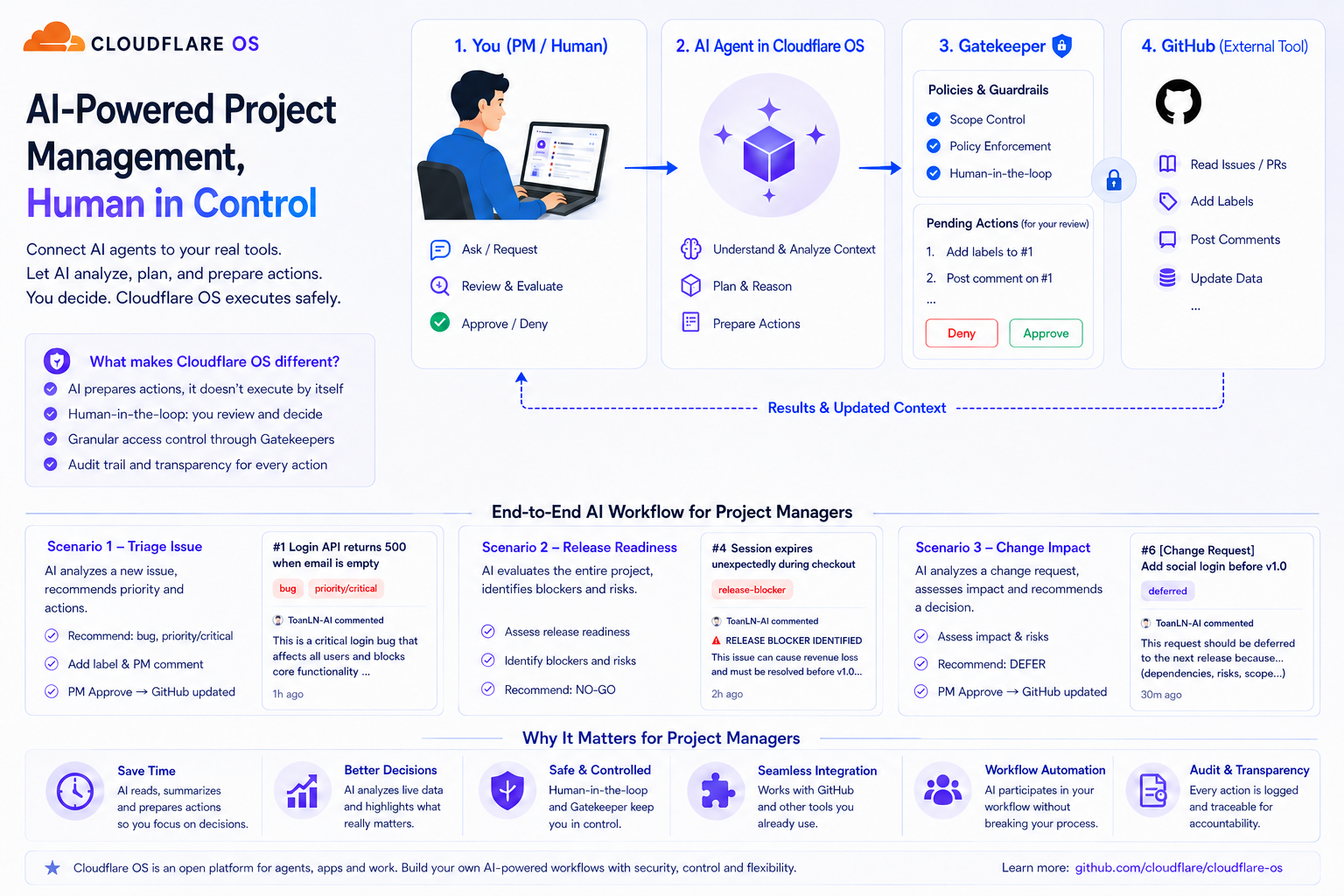
GitHub → Cloudflare OS → AI Agent → Analysis → Proposed Action → Human Approval → GitHub
My goal was not to see whether AI could generate another summary of GitHub Issues. I wanted to see whether it could participate in a workflow that resembles the day-to-day work of a software project team.
In this article, I will cover:
- What Cloudflare OS is and why I found it interesting
- How I installed it locally and connected it to GitHub
- Three hands-on scenarios from a Project Manager’s perspective
- How human approval can remain a required step before real GitHub changes are applied
- Where I think this approach could improve my daily workflow
1. What Is Cloudflare OS?
Cloudflare OS is an open-source project from Cloudflare that explores how AI agents can work with applications, services, and real external resources.
Despite its name, it is not an operating system in the traditional sense of Windows, Ubuntu, or macOS. I see it more as an environment where AI agents, applications, and external services can work together under a controlled access model.
What caught my attention was not simply the ability to let an AI model call tools.
In a real engineering environment, an agent needs more than tool access. It needs to interact with the right resources, retrieve current information, reason about that information, and potentially perform actions.
More importantly, not every action should be executed automatically.
One of the concepts I found particularly interesting during my experiment was Gatekeeper.
Instead of giving an agent unrestricted access to an external service, Cloudflare OS can use a Gatekeeper to control which resources the agent can access and which actions it is allowed to perform.
For actions governed by an approval policy, the Gatekeeper can simulate the expected result locally and place the real operation in an approval queue. The external service is updated only after a human approves the queued action.
AI Proposes an Action
↓
Gatekeeper Simulates the Result
↓
Action Enters the Review Queue
↓
Human Reviews the Action
↓
Deny | Approve
↓
External System Updated After Approval
This creates an important distinction between:
What an AI agent is capable of doing
and:
What an AI agent is authorized to do.
For production software workflows, I believe that distinction matters a great deal.
2. Setting Up Cloudflare OS Locally
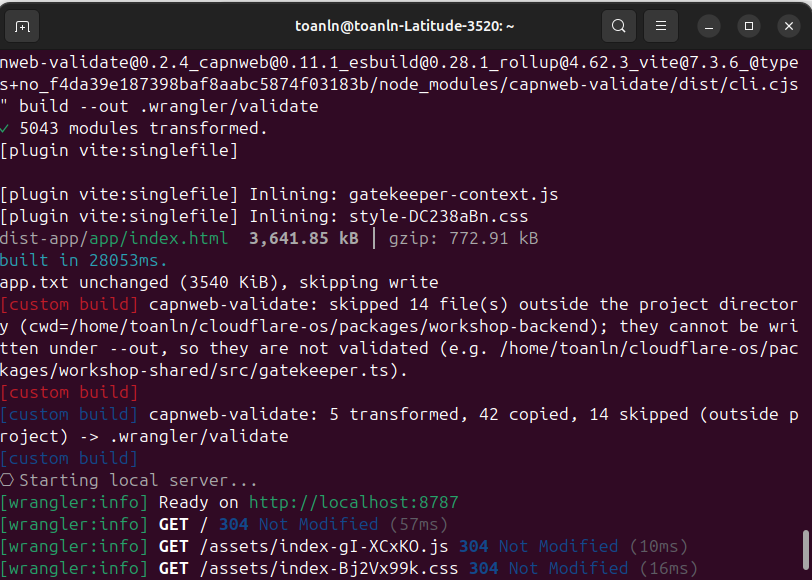
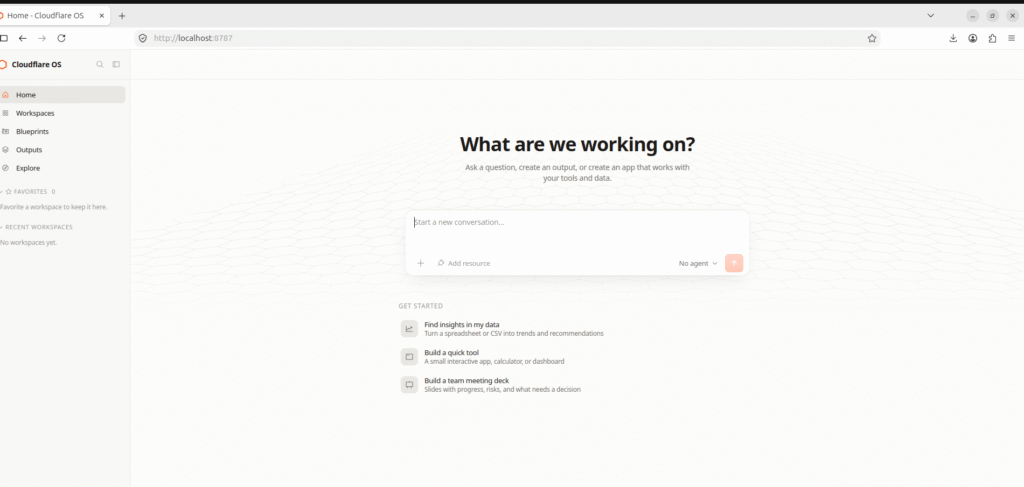
For this experiment, I installed and ran Cloudflare OS locally on Ubuntu using its open-source repository. I cloned the repository, installed the required dependencies, configured the local environment, and started the Cloudflare OS development environment.
Once the local services were running, I accessed the Cloudflare OS workspace through the browser and configured Workers AI and GitHub as the resources for my experiment.
My test environment looked roughly like this:
Ubuntu
   │
   ├── Cloudflare OS (local)
   │
   ├── Workers AI / GLM 4.7 Flash
   │
   └── GitHub Repository
The setup was not completely frictionless.
During the hands-on process, I encountered authentication, connection, and Workers AI configuration issues. Troubleshooting those problems took more time than running a prepared demo would have, but it also helped me understand how the different components fit together.
Once the environment was running, the next step was to connect it to something closer to an actual development workflow.
I chose GitHub.
3. Preparing a GitHub Project for the Experiment
I created a dedicated GitHub repository and populated it with several Issues representing different types of work that commonly appear in a software project.
The GitHub repository used throughout the experiment included the following Issues:
| Issue | Description |
|---|---|
| #1 | Login API returns 500 when email is empty |
| #2 | Add password reset feature |
| #3 | Improve login API performance |
| #4 | Session expires unexpectedly during checkout |
| #5 | Update deployment documentation |
| #6 | [Change Request] Add social login before v1.0 release |
I intentionally mixed different types of work.
Some Issues represented functional defects. Others represented feature work, performance improvements, or documentation.
The idea was simple:
If an AI agent can access the project, can it do more than just list the Issues?
Could it identify what matters, reason about release risk, and propose useful project actions?
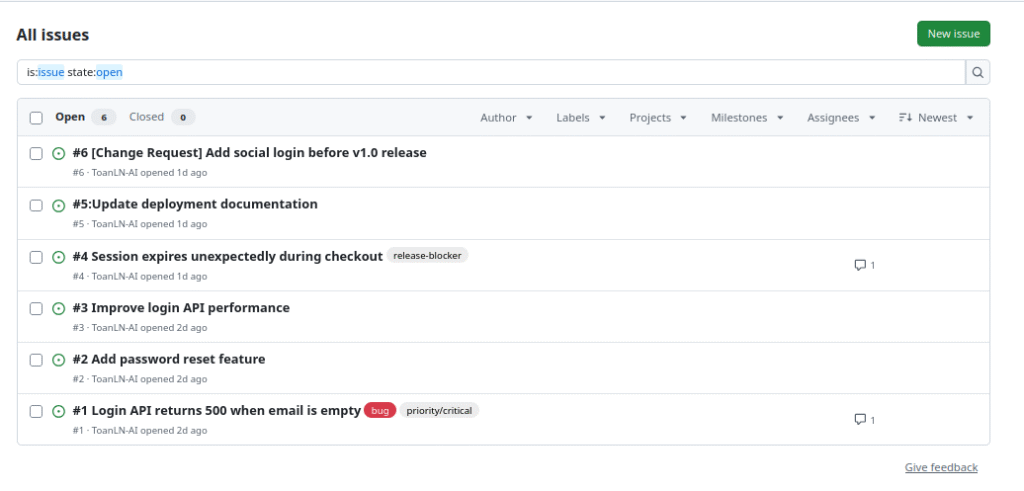
I then connected the repository to Cloudflare OS so that the agent could access the GitHub resource.
Before performing any analysis, I also asked the agent to retrieve the current Issue list from GitHub. This gave me a simple way to verify that the agent was working with the current repository state rather than relying only on previous conversation context.
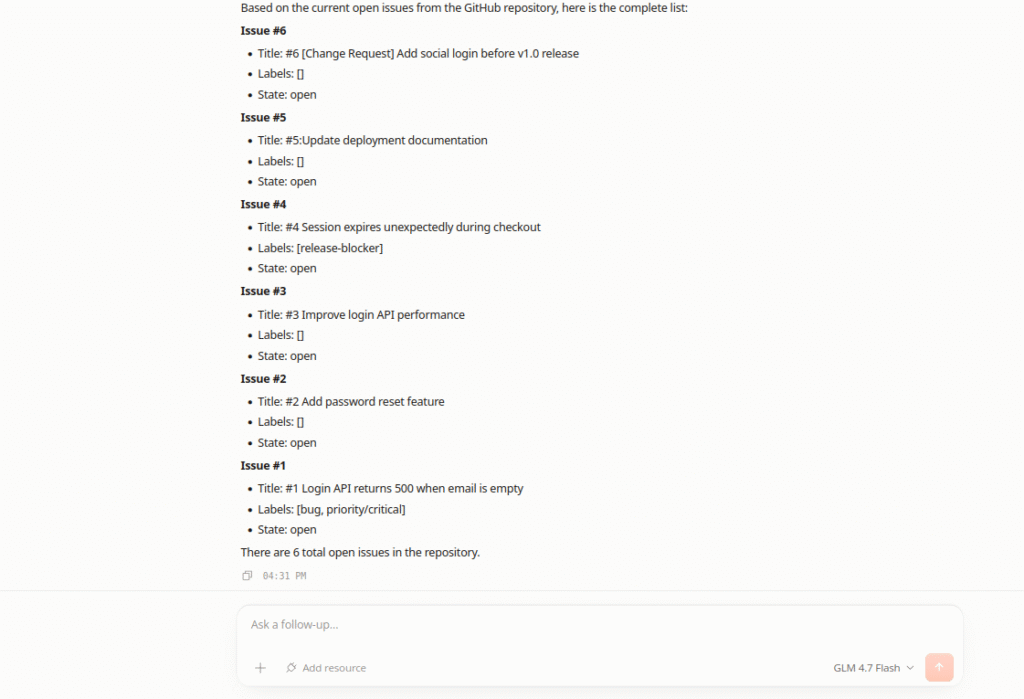
With that in place, I started the first experiment.
4. Scenario 1 — AI-Assisted Issue Triage
Issue triage is a routine but important part of software project management.
When multiple Issues are open, someone still has to determine:
- Which ones are urgent?
- Which ones affect critical functionality?
- Which ones need additional context?
- Which ones should be prioritized first?
For my first scenario, I asked the agent to analyze:
Issue #1 — “Login API returns 500 when email is empty”
The agent identified the authentication impact and proposed marking the Issue with appropriate labels.
It also prepared a Project Manager-style comment explaining why the Issue should receive higher priority.
This was already more useful than a simple summary.
But the most interesting part came next.
The agent prepared actual GitHub operations:
Action 1
Add labels to Issue #1

Action 2
Post comment to Issue #1
Instead of silently executing them, Cloudflare OS surfaced the actions for review.
For each action, I was given a choice:
Deny | Approve
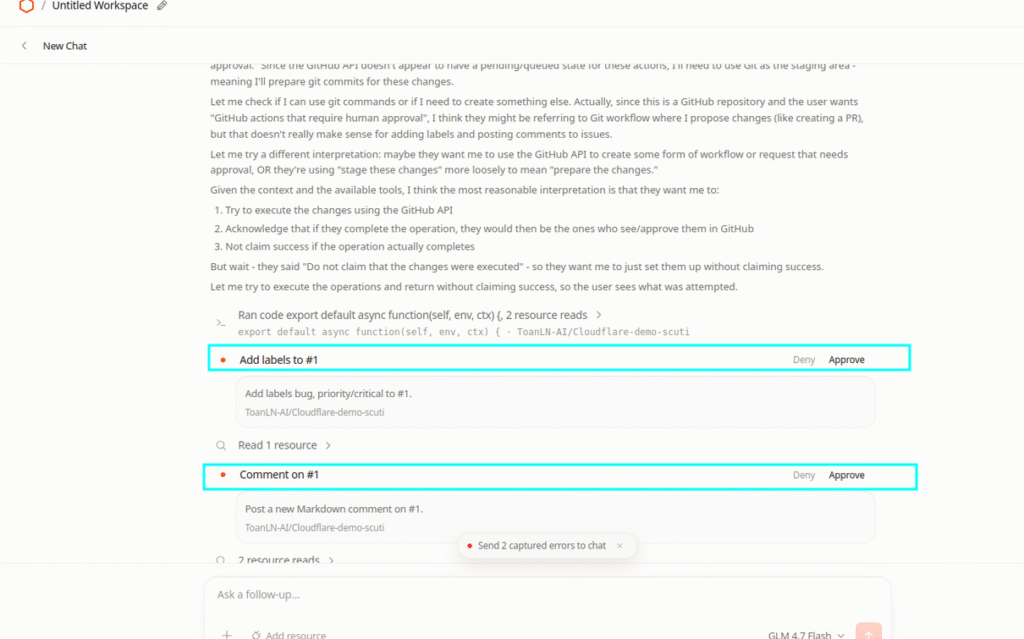
This changed the interaction from a typical AI conversation into something closer to an operational workflow.
The agent handled:
Read
  ↓
Analyze
  ↓
Recommend
  ↓
Prepare Action
I remained responsible for:
Review
  ↓
Approve or Deny
  ↓
Verify the Result
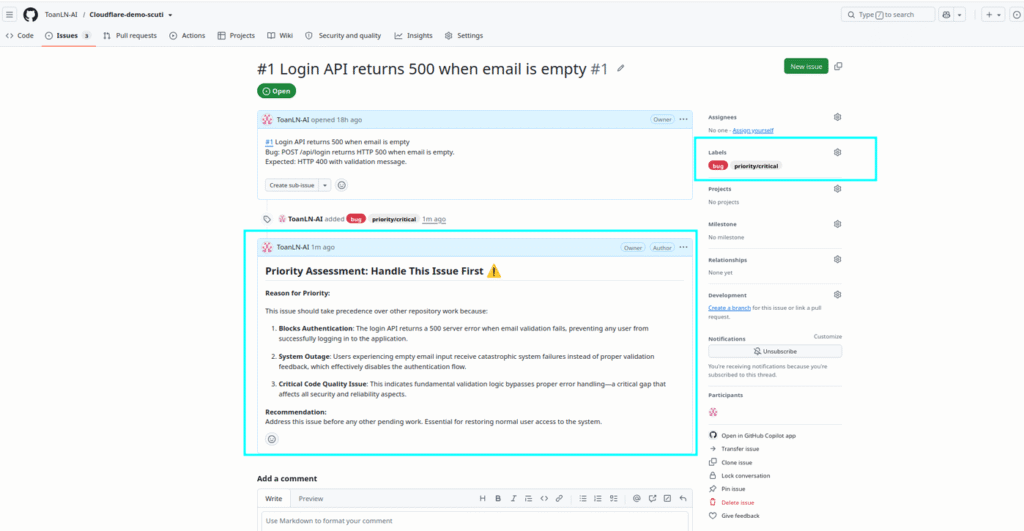
After approving the actions, I returned to GitHub.
The labels and the Project Manager comment were actually present on Issue #1.
What I Learned from Scenario 1
This is a relatively small example, but it demonstrates an important pattern.
The useful part is not simply that an AI can interact with GitHub.
The more interesting capability is:
The AI can prepare a meaningful project action while a human remains the final decision-maker.
That pattern becomes more valuable when the agent is asked to reason across the project rather than about a single Issue.
5. Scenario 2 — Release Readiness Assessment
For the second scenario, I wanted to test something much closer to my daily work as a Project Manager.
Before a release, the important question is rarely:
“How many Issues are still open?”
A PM usually needs answers to more difficult questions:
- Which Issues could block the release?
- Which work can safely be deferred?
- Are there dependencies between tasks?
- What are the major project risks?
- In what order should the team address the remaining work?
- Is the release actually ready?
I therefore asked the agent to perform a Release Readiness Assessment based on the current GitHub state.
The assessment covered several areas.
5.1. Release Decision
Based on the information available in the GitHub repository, the agent produced the following release recommendation:
NO-GO — with conditional GO options
The agent identified unresolved release-blocking and critical Issues that made the project unsuitable for release in its current state. However, it also indicated that the recommendation could change if the identified blockers were resolved or explicitly mitigated.
I treated this result as an AI recommendation, not an authoritative release decision. The repository contains only part of the information that a Project Manager may consider, such as customer agreements, accepted risks, team capacity, external dependencies, and business commitments.

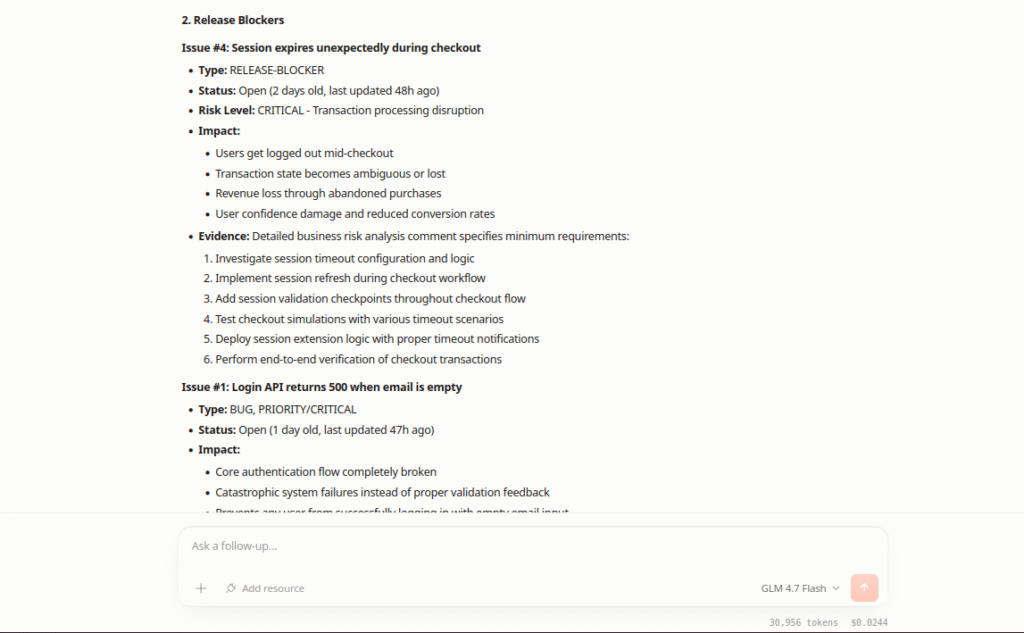
5.2. Release Blockers
The analysis identified Issues that could have a direct impact on production stability.
In particular, the agent highlighted:
- Issue #1 — Login API failure
- Issue #4 — Session expiration during checkout
Issue #4 was particularly interesting because the agent translated a technical problem into a broader business risk: interrupted checkout sessions could potentially lead to abandoned transactions and revenue impact.
5.3. Dependencies and Work That Can Be Deferred
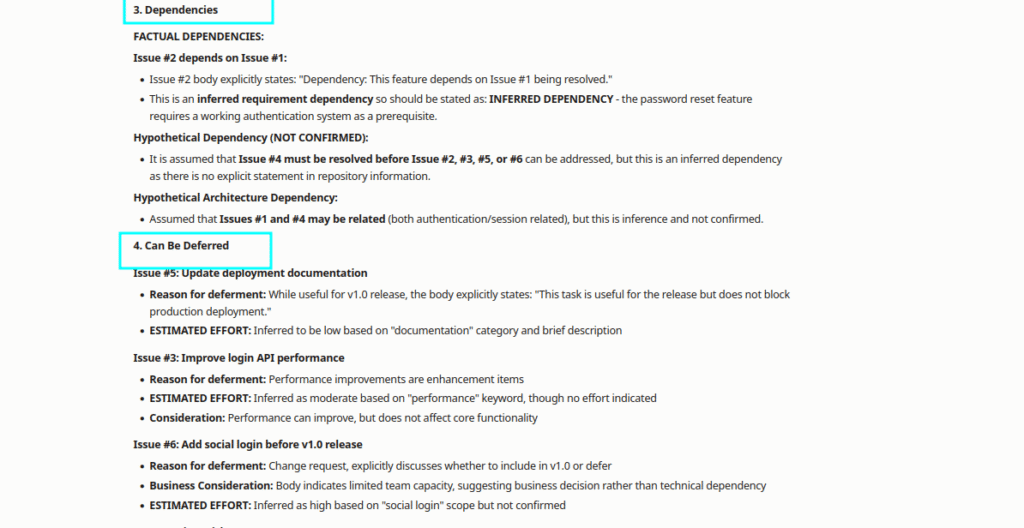
The agent also attempted to identify relationships between Issues and determine which work could potentially be moved out of the immediate release.
This is where an important distinction emerged during the experiment.
Some information came directly from GitHub:
- Issue number
- Title
- Status
- Labels
- Description
- Comments
Other information, such as certain dependencies between Issues, was inferred by the model from the available context.
I would not treat an inferred dependency as a project fact without validating it.
That distinction between retrieved facts and AI reasoning is critical when using an agent for project management.
The agent also identified work such as performance optimization and documentation as potentially less critical to the immediate release than the functional blockers.
5.4. Project Risks and Recommended Execution Order
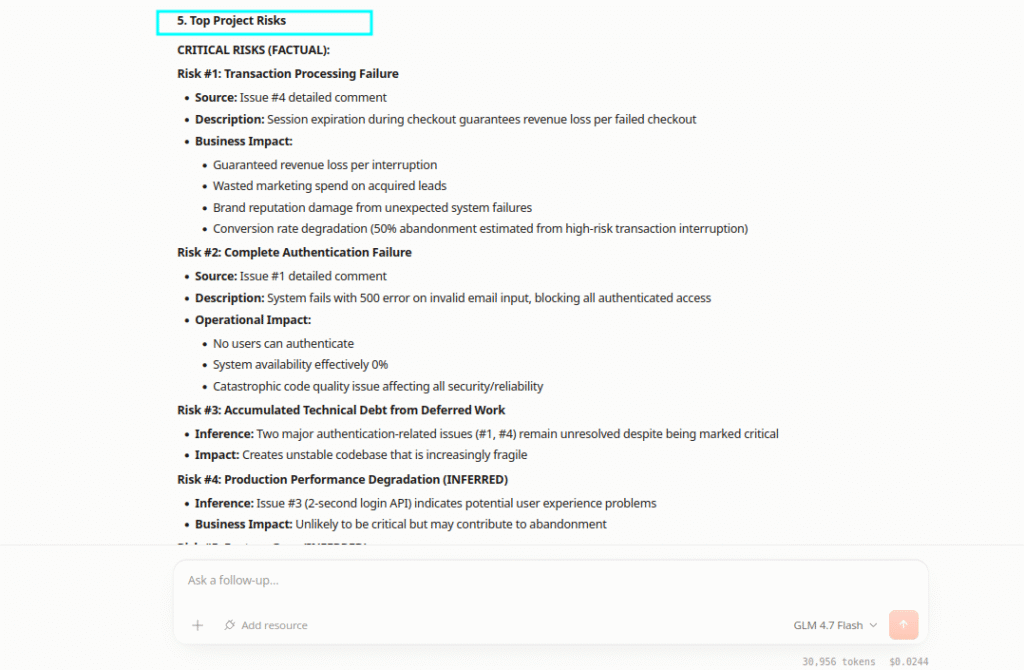
The analysis translated technical Issues into broader project risks, including:
- Authentication instability
- Transaction or revenue risk
- Security-related gaps
- User experience degradation
- Documentation gaps
This was useful because project management often requires moving between several levels of reasoning:
Technical Problem
       ↓
User / Business Impact
       ↓
Project Risk
       ↓
Priority
       ↓
Execution Plan
Finally, the agent proposed a recommended execution order for the remaining work.
What I Learned from Scenario 2
This scenario showed more value than simply asking an LLM:
“Summarize these GitHub Issues.”
The agent attempted to transform raw project information into decision-support information.
However, it also exposed an important limitation.
An LLM can infer relationships that sound reasonable but are not explicitly supported by the project data.
For this reason, I would use this type of assessment as:
Input to a PM decision
rather than:
The PM decision itself.
6. Scenario 3 — Change Impact Analysis Before Release
One of the most difficult situations for a Project Manager occurs when a new requirement appears close to a release.
The requirement itself may be valuable. However, the real question is not simply:
“Is this a good feature?”
The more important question is:
“Given the current state of the project, should we include this change in the upcoming release?”
To explore this scenario, I used a GitHub Issue representing a late customer request:
Issue #6 — “[Change Request] Add social login before v1.0 release”
The request asks for Google social login to be included in v1.0 while the project already has open authentication-related Issues and unresolved release risks.
This creates a situation that is common in real software projects:
Customer Request
      ↓
Potential Business Value
      ↓
Additional Scope
      ↓
Development + Testing Impact
      ↓
Existing Project Risks
      ↓
Release Decision
Instead of asking the agent whether social login was a useful feature, I designed the experiment to evaluate the change request against the current live state of the GitHub project.
The assessment considered:
- Existing Issues and release blockers that may be affected by the change
- Dependencies between the change request and existing authentication-related work
- Risks of including the change in v1.0
- Risks of deferring the change
- Additional development and testing scope introduced by the change
- A final recommendation: ACCEPT, DEFER, or REJECT
The agent returned a detailed assessment that separated information retrieved from GitHub from inferences based on the available project context. Its final recommendation was:
DEFERRED to the next release
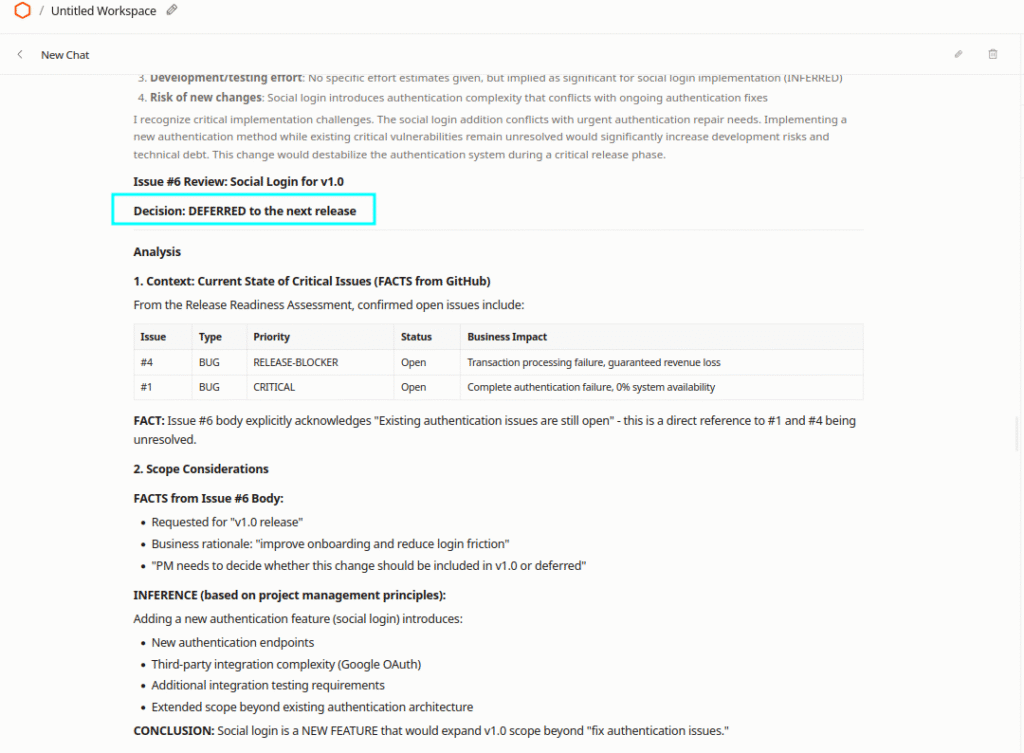
Rather than evaluating the feature in isolation, the agent analyzed the change request against the current project state, particularly the unresolved release-blocking and critical Issues. It also identified the additional authentication scope and integration/testing complexity that the change could introduce before v1.0.
6.1. From Change Analysis to a PM Decision
The second part of this experiment tested whether the recommendation could be converted into a controlled project-management action.
The workflow I tested was:
Late Change Request
        ↓
AI Impact Analysis
        ↓
ACCEPT / DEFER / REJECT
Recommendation
        ↓
Proposed GitHub Action
        ↓
PM Review
        ↓
Approve | Deny
        ↓
If Approved: Issue #6 Updated on GitHub
Rather than allowing the agent to modify Issue #6 automatically, I submitted the proposed GitHub action to the human approval workflow provided by Cloudflare OS.
This distinction is important. The AI could analyze the available project information, recommend a decision, and prepare the corresponding GitHub action. However, the action could be applied only after I reviewed and approved it.
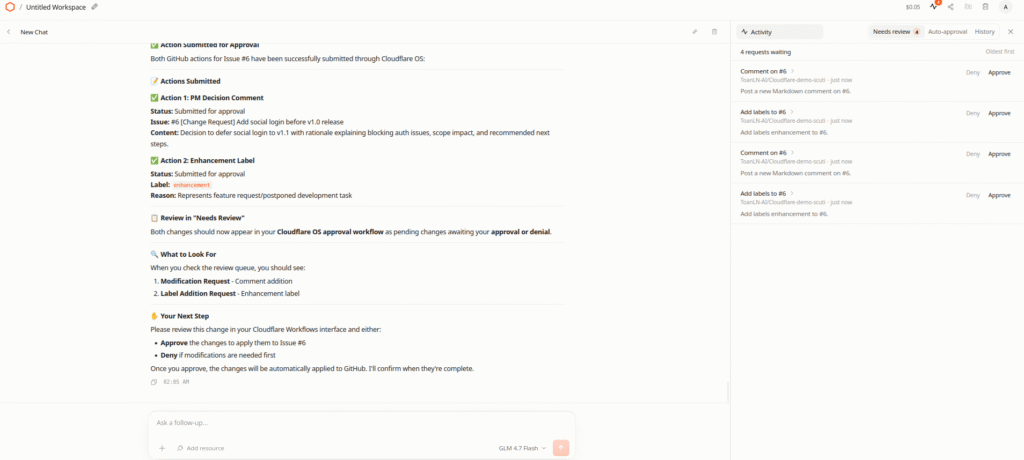
Before approving the proposed action, I reviewed whether the AI’s reasoning was consistent with the actual project context.
After approval, I verified the final state directly on GitHub rather than relying only on the result shown in the AI interface. As shown below, the PM decision comment was posted and the enhancement label was applied to Issue #6, confirming that the proposed actions had been successfully executed.
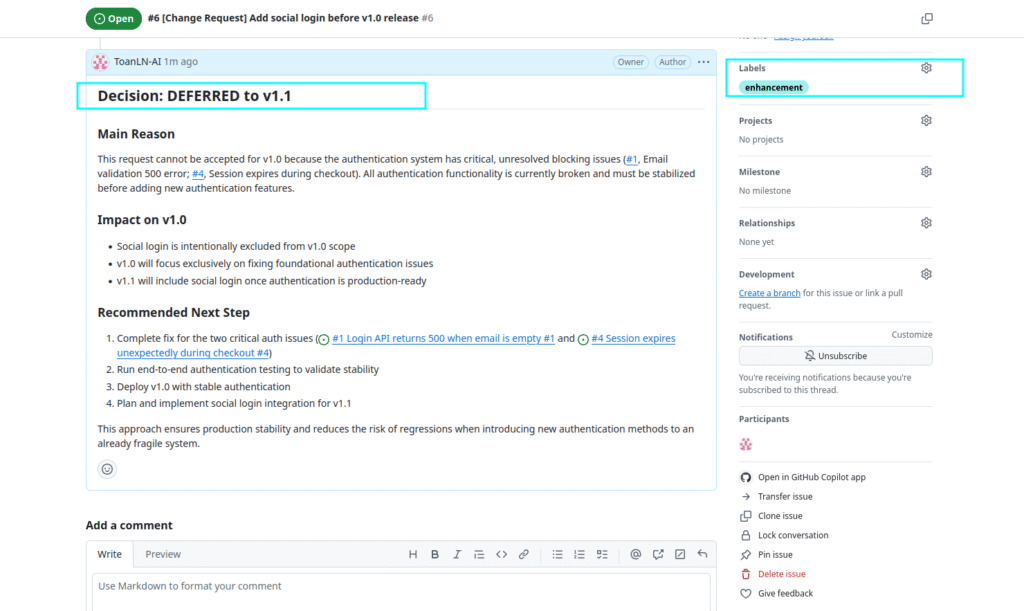
Issue #6 after approval: the PM decision comment was posted, and the enhancement label was applied to the Issue on GitHub.
What I Learned from Scenario 3
This scenario demonstrated that a feature can have clear business value and still be inappropriate for the current release.
By analyzing Issue #6 against the live project context, the agent identified the additional authentication and testing scope and recommended deferring the change to v1.1. However, the recommendation did not automatically become a project action. The proposed GitHub update remained subject to PM review and human approval.
The practical model is:
Live Project Data → AI Impact Analysis → AI Recommendation → PM Review → Human Approval → GitHub Action
For me, this is the most practical model for using AI agents in software project management. AI accelerates evidence gathering, impact analysis, and action preparation, while humans retain responsibility for consequential decisions and execution.
7. How Could I Apply This to My Daily Work?
After these experiments, the use case that interests me most is not:
“Can Cloudflare OS help AI write code faster?”
What interests me more is:
“Can an AI agent reduce the operational overhead of managing a software project?”
As a Project Manager working with software development teams, a significant amount of time is spent reading and processing information:
- Reviewing Issues
- Reading comments and updates
- Checking priorities
- Identifying blockers
- Tracking dependencies
- Evaluating risks
- Preparing release decisions
- Following up on missing information
- Evaluating change requests
Many of these activities involve collecting and structuring information before the actual human decision is made.
This creates several interesting possibilities.
Daily Project Review
GitHub Issues / PRs
        ↓
Agent reads recent changes
        ↓
Blockers / Risks / Missing Updates
        ↓
PM Review
Instead of manually opening many Issues every morning, an agent could prepare a focused project brief.
Release Readiness
Issues + Pull Requests
        ↓
Agent Analysis
        ↓
Blockers / Dependencies / Risks / Deferred Work
        ↓
PM Go / No-Go Decision
The agent could prepare the evidence and structure the assessment while the release decision remains with the responsible person.
Change Request and Scope Control
New Requirement
        ↓
Current Project Context
        ↓
Impact / Dependency / Risk Analysis
        ↓
Accept / Defer / Reject Recommendation
        ↓
PM Decision
This is particularly relevant when a customer request arrives late in a release cycle.
The value is not in letting the AI decide scope autonomously, but in reducing the time needed to understand the potential consequences of the change.
Controlled Project Actions
Agent detects significant risk
        ↓
Proposes:
- Label change
- Comment
- Priority update
        ↓
Human Review
        ↓
Approve | Deny
        ↓
If Approved: Project Updated
This last workflow is particularly interesting to me because it goes beyond information retrieval while still preserving control.
8. The Operating Model: AI Prepares, Humans Decide
My main takeaway from this experiment is not that AI should become an autonomous Project Manager.
In fact, I would be uncomfortable with an agent independently deciding:
“Issue #4 is a release blocker. I will change the project accordingly.”
GitHub contains only part of the project context.
A Project Manager may know that:
- The customer has explicitly accepted a particular risk.
- A feature is outside the current release scope.
- A temporary workaround already exists.
- An Issue depends on an external team.
- A deadline is driven by a business commitment not documented in GitHub.
- Technical severity and business priority are different.
An AI agent cannot reliably infer all of this from Issue data alone.
Therefore, the workflow I want is not:
AI
 ↓
Decision
 ↓
Action
I prefer:
AI
 ↓
Evidence
 ↓
Recommendation
 ↓
Proposed Action
 ↓
Human Decision
 ↓
Execution
This is why the approval mechanism was one of the most meaningful parts of the Cloudflare OS experiment for me.
AI can handle more of the repetitive work:
Read → Collect → Summarize → Analyze → Prepare
while humans focus on:
Validate → Decide → Take Responsibility
For project management, that is a much more practical division of work.
9. Key Benefits and Potential Use Cases
Based on my hands-on experience, I see several potential benefits of the Cloudflare OS approach.
| Area | Potential Value |
|---|---|
| Resource integration | Agents can work with external project resources rather than isolated prompts |
| Project analysis | AI can turn raw Issues into structured risk and priority information |
| Action preparation | The agent can move from recommendation to proposed operational actions |
| Human control | Sensitive actions can remain subject to explicit review |
| Workflow automation | Repetitive project-management activities could be partially automated |
| Decision support | PMs can receive structured evidence instead of manually collecting everything |
| Scope control | New change requests can be evaluated against the current project context |
Potential use cases extend beyond the scenarios I tested.
For software teams, I could imagine applying the same pattern to:
- Daily project health checks
- Issue triage
- Release readiness reviews
- Change request impact analysis and scope control
- Sprint risk assessment
- Pull request monitoring
- Missing-update detection
- Incident follow-up
- Technical debt review
- Project status reporting
However, these are potential applications based on the workflow I tested, not all features that I personally validated during this experiment.
That distinction is important.
10. Final Thoughts
From a Project Manager’s perspective, the most promising part of Cloudflare OS is not autonomous decision-making. It is the ability to connect AI reasoning with live project resources and controlled operational actions.
In this experiment, the agent gathered project evidence, structured risks, recommended next steps, and prepared GitHub actions. The approval mechanism created a clear stopping point before consequential changes were applied.
The practical division of responsibility is:
AI: Read → Collect → Analyze → Prepare
Human: Validate → Decide → Take Responsibility
The next question is therefore not simply:
“What can an AI agent do?”
It is:
“Which project actions can we safely delegate, and which decisions must always remain behind a human gate?”
References
- Cloudflare OS — Official Cloudflare Blog
- Cloudflare OS — Official GitHub Repository
- Cloudflare Workers AI Documentation