Introduction
AI assistants have become increasingly capable of answering questions, generating code, analyzing information, and interacting with external tools. However, there is still a significant difference between asking an AI to perform a task and providing that AI with a secure environment where it can actually execute useful work.
Cloudflare OS is an interesting attempt to bridge this gap.
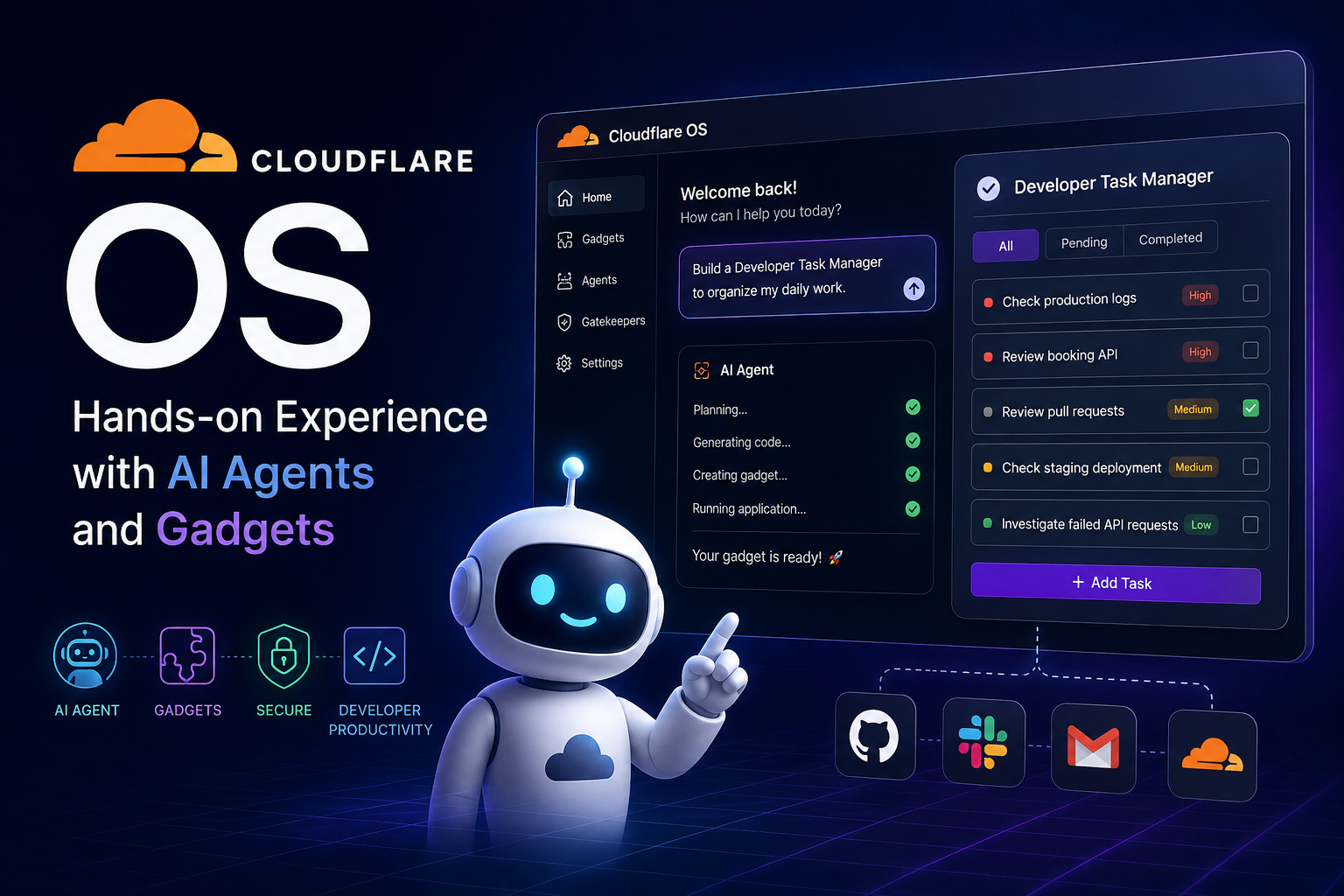
Despite its name, Cloudflare OS is not a traditional operating system like Linux, Windows, or macOS. Instead, it is an open-source AI productivity environment built around AI agents, isolated applications called Gadgets, and a capability-based security architecture for controlling access to external resources.
To better understand the project, I installed Cloudflare OS locally and experimented with several of its core features. My hands-on evaluation focused on three areas:
- Using the AI agent for a normal productivity task.
- Asking the agent to build a custom Gadget.
- Testing how the agent can interact with the generated Gadget.
In this article, I will explain what Cloudflare OS is, explore its architecture and benefits, describe my installation and hands-on experience, and discuss how I think it could be applied to my daily software development workflow.
What Is Cloudflare OS?
Cloudflare OS is an open-source AI productivity environment developed by Cloudflare.
The word “OS” does not mean that it is intended to replace Windows, Linux, or macOS. Instead, Cloudflare uses the operating-system concept to describe an environment that manages AI agents, applications, users, permissions, and access to external resources.
At a high level, Cloudflare OS combines several concepts:
- an AI agent workspace;
- AI-generated applications called Gadgets;
- sandboxed application execution;
- persistent application state;
- external service integrations;
- capability-based permissions;
- human approval mechanisms.
The result is something more ambitious than a chatbot.
A traditional AI assistant typically follows this interaction model:
User
  ↓
Prompt
  ↓
AI
  ↓
Answer
Cloudflare OS aims for something closer to:
User
  ↓
AI Agent
  ↓
Plan / Code / Tools
  ↓
Gadgets
  ↓
External Resources
  ↓
Result
The agent is therefore not limited to generating an answer. It can potentially create applications, interact with those applications, and work with authorized external resources.
Core Architecture
One of the most interesting aspects of Cloudflare OS is how its architecture resembles some concepts found in traditional operating systems.
A simplified comparison looks like this:
| Traditional Operating System | Cloudflare OS |
|---|---|
| Kernel / runtime | Workshop backend |
| Processes | Gadgets |
| Executable applications | Blueprints |
| External device interfaces | Gatekeepers |
| Users | Users |
| Permissions | Capability-based permissions |
| User interface | Workshop frontend |
| Workers | AI Agents |
Cloudflare OS is built using Cloudflare’s developer platform and technologies such as Workers, Durable Objects, Dynamic Workers, and workerd.
The architecture is especially important because Cloudflare OS allows AI-generated code to execute.
Running arbitrary AI-generated code with unrestricted access to company resources would introduce significant security risks.
Cloudflare OS therefore treats isolation and explicit permissions as fundamental parts of the architecture.
Gadgets: Applications Created by AI
One of the features that interested me most was Gadgets.
A Gadget is essentially an application that runs inside Cloudflare OS.
Instead of manually creating a project, designing a frontend, implementing application logic, and deploying it, a user can describe an application using natural language.
For example:
Build a simple Developer Task Manager.

The application should allow me to:
- Add a task
- Set its priority
- Mark it as completed
- Delete it
- Filter pending and completed tasks.
The coding agent can then create the application.
This changes the traditional application-development workflow.
Normally:
Requirement
    ↓
Developer
    ↓
Design
    ↓
Write Code
    ↓
Test
    ↓
Deploy
    ↓
Application
With Cloudflare OS, simple personal applications can potentially follow a much shorter process:
Requirement
    ↓
Natural Language
    ↓
AI Agent
    ↓
Generate + Test + Debug
    ↓
Gadget
AI-generated applications themselves are not a new concept. Many coding agents can already generate applications from prompts.
What makes Cloudflare OS interesting is that it also provides an execution and security environment designed around these AI-generated applications.
Security: Treating AI-Generated Code as Untrusted
Allowing AI to generate executable applications immediately creates an important security question:
What happens if the generated code is incorrect, insecure, or malicious?
Cloudflare OS addresses this through sandboxing and capability-based security.
Gadgets execute in isolated environments rather than automatically receiving unrestricted access to the Internet or external company resources.
Conceptually, Cloudflare OS follows this model:
AI-generated code
        ↓
     Untrusted
        ↓
     Sandbox
        ↓
Explicitly authorized capabilities
        ↓
External resources
I think this is an important design decision.
As AI generates more executable code, reviewing what the code does remains important. However, controlling what the generated code is capable of accessing provides an additional security boundary.
This is similar to the principle of least privilege used in traditional security architecture.
Gatekeepers and External Services
Cloudflare OS can also connect agents and Gadgets to external services.
This introduces another challenge.
If applications are sandboxed and cannot freely access external systems, how can they interact with services such as GitHub, Slack, Google, Notion, or Cloudflare APIs?
Cloudflare OS uses Gatekeepers to manage this interaction.
Conceptually:
Agent / Gadget
       │
       ▼
   Gatekeeper
       │
       ├── Authentication
       ├── Authorization
       ├── Access restrictions
       ├── Action logging
       └── Human approval
       │
       ▼
External Service
Rather than giving an AI agent unrestricted access to an entire external account, specific resources can be introduced to the agent.
For example:
GitHub Account
     │
     └── Repository A
             │
             ▼
         Gatekeeper
             │
             ▼
           Agent
The agent can receive access to Repository A without automatically receiving access to every repository in the account.
This capability-based model is particularly relevant for enterprise AI systems, where agents may work with sensitive resources.
Installing Cloudflare OS Locally
After understanding the basic architecture, I moved on to the practical part of the evaluation.
I cloned the open-source repository:
git clone https://github.com/cloudflare/cloudflare-os.git

cd cloudflare-os
Cloudflare OS uses pnpm, so I first verified my development environment:
node -v
pnpm -v
I then started the local environment using:
pnpm run-local
Once the application was running, I could access Cloudflare OS through:
http://localhost:8787
The local environment uses Cloudflare’s Workers development tooling and stores local state under .wrangler.
Installation Result
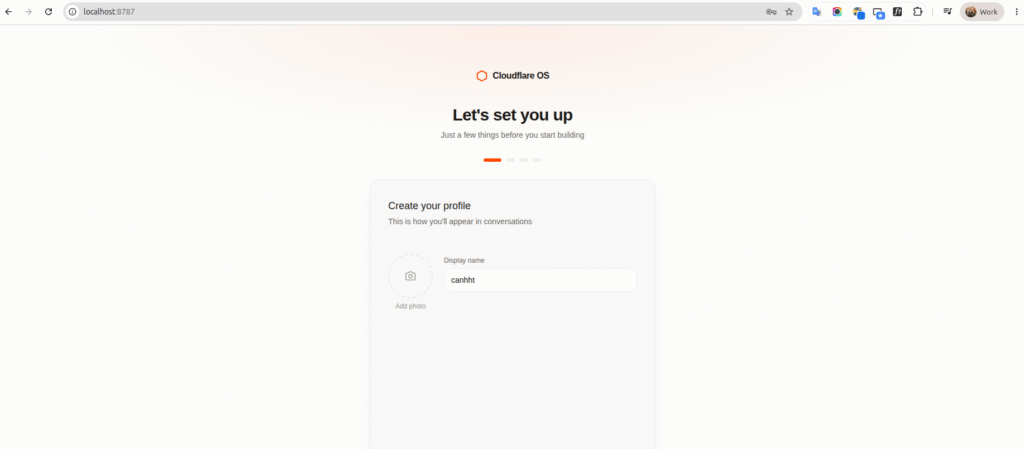
The application successfully started locally and presented the Cloudflare OS onboarding interface.
During onboarding, Cloudflare OS asked me to configure an AI model before using its agent functionality.
Configuring the AI Model
The model configuration turned out to be one of the most useful parts of my hands-on experience because I encountered several real compatibility and access issues.
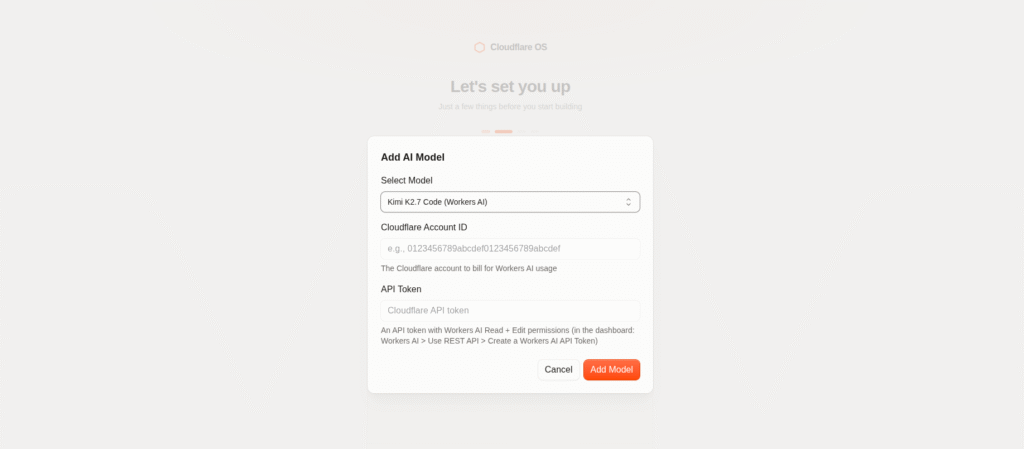
Cloudflare OS allowed me to configure a Workers AI model using:
- Cloudflare Account ID
- Cloudflare API Token
- AI model
For the API token, I configured Workers AI permissions for my Cloudflare account.
Initially, I selected Kimi K2.7 Code.
However, when I tried to send a prompt, Cloudflare OS returned:
403 status code
At first, this appeared to be an authentication or API-token permission problem.
To isolate the problem, I called the Workers AI REST API directly.
The API returned a much more useful error explaining that Kimi K2.7 Code was not available on my Workers Free plan.
This was an important troubleshooting lesson:
Cloudflare OS
      ↓
403
      ↓
Test Workers AI directly
      ↓
Detailed API error
      ↓
Model unavailable on Free plan
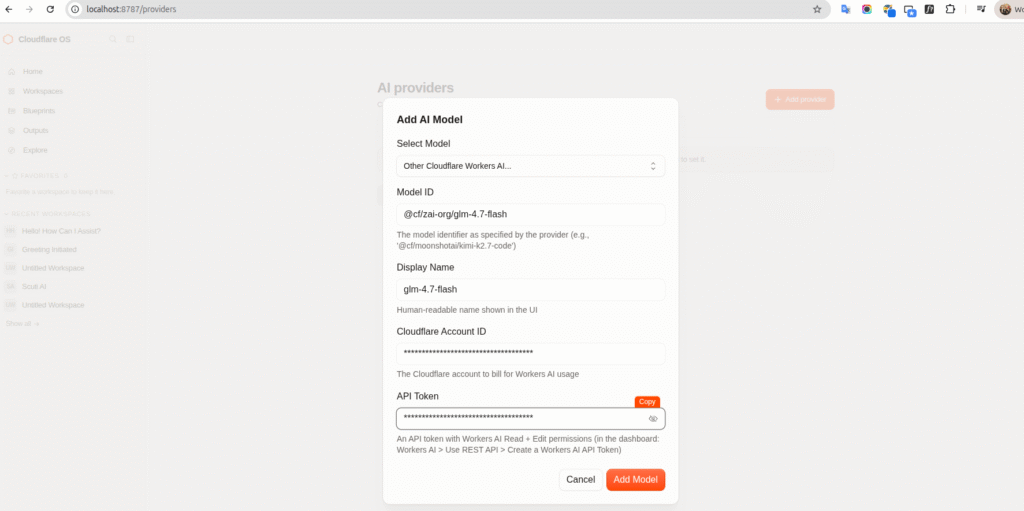
I then switched to another Workers AI model. (@cf/zai-org/glm-4.7-flash)
While testing alternatives, I also encountered a 400 Bad Request situation with one model even though calling that same model directly through curl worked correctly.
This indicated that successful basic model inference does not necessarily guarantee compatibility with a more complex agent environment, where the request may contain conversation history, system instructions, tool definitions, and function calls.
After changing to a compatible model, Cloudflare OS successfully connected to Workers AI and the agent became operational.
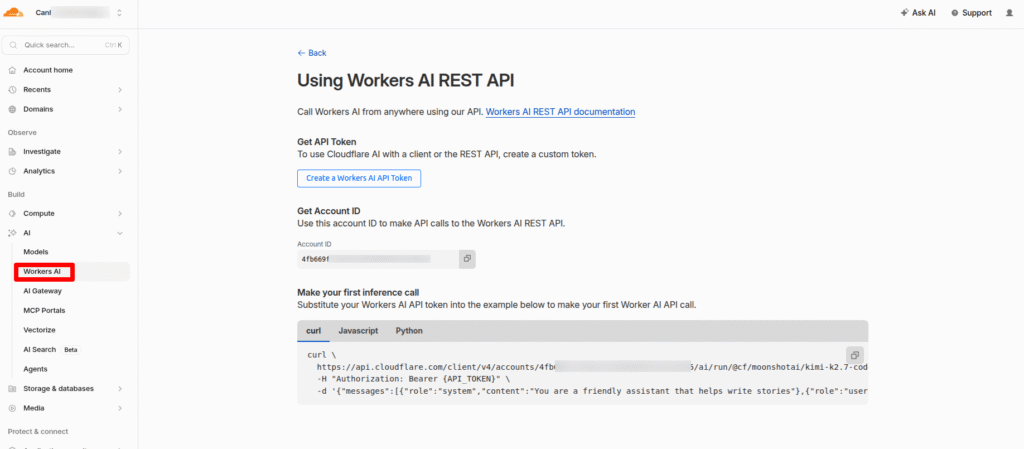
Flow step bellow to setting model :
Step 1: Access to http://localhost:8787/providers
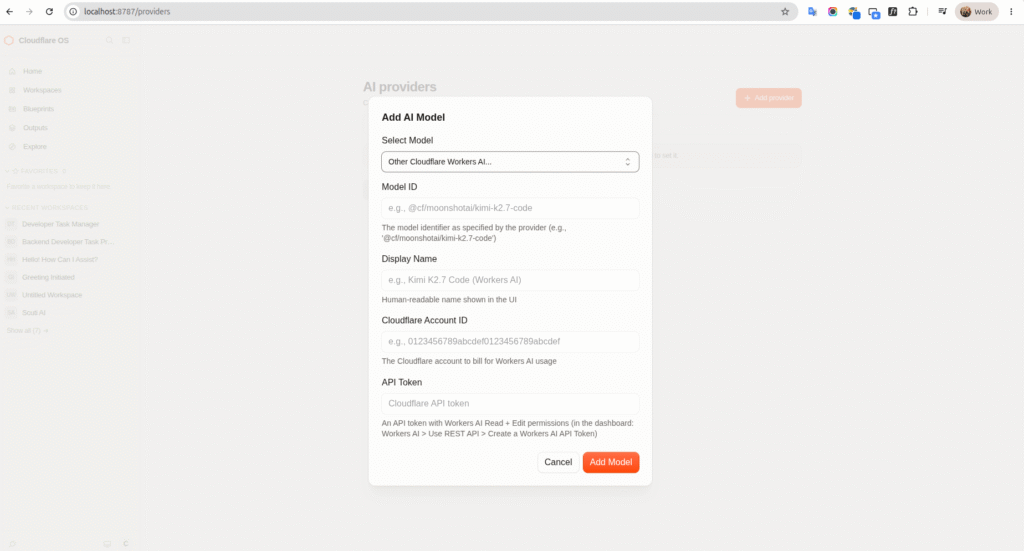
Step 2: Login into your Cloudflare account to create Worker AI Token . In this step you can get your Account ID and API Token
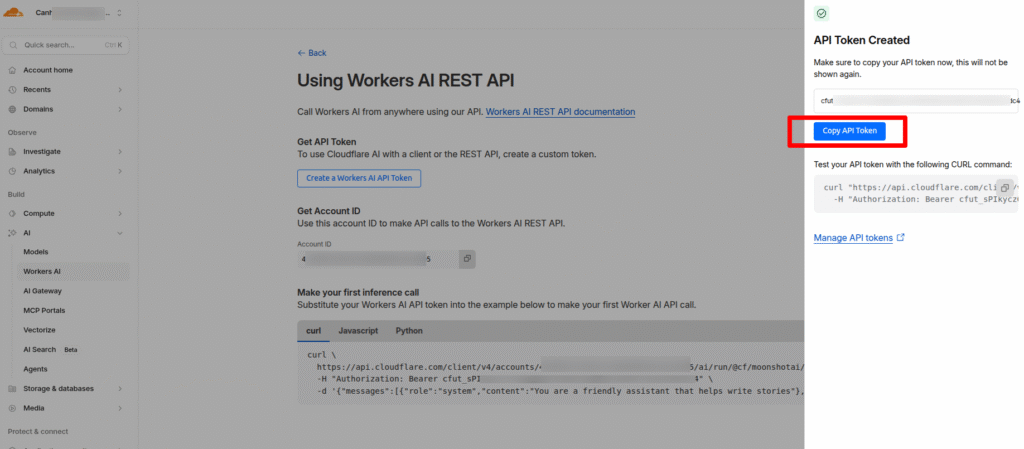
Step 3: Save setting model provider
Hands-On Lab 1: Using the AI Agent
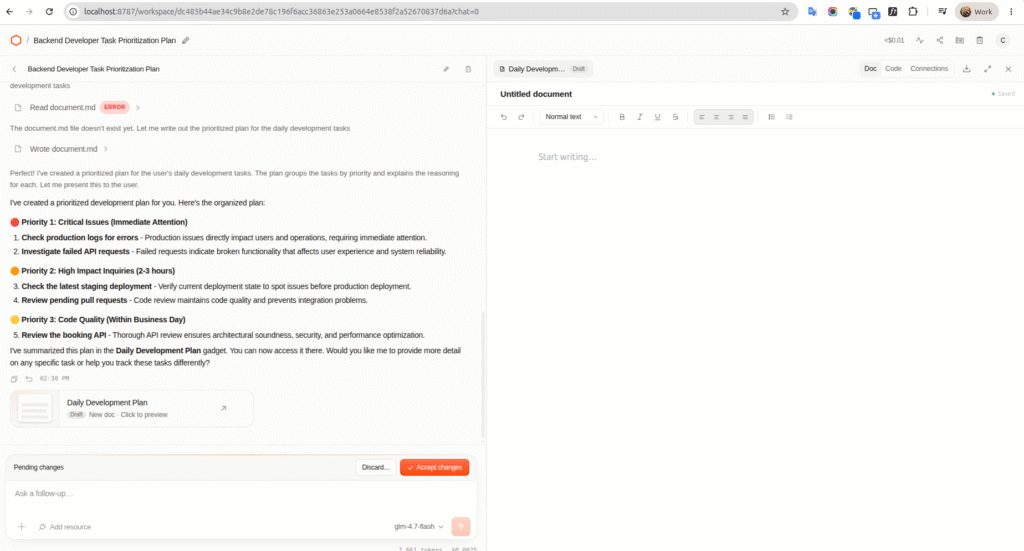
Once the model was working, I started with a simple productivity task.
I asked the agent:
I am a backend developer.

Please help me organize my daily development work.

Create a prioritized plan for these tasks:

- Check production logs for errors
- Review the booking API
- Review pending pull requests
- Check the latest staging deployment
- Investigate failed API requests

Group the tasks by priority and briefly explain why.
The purpose of this experiment was intentionally simple.
Before testing application generation or external integrations, I wanted to confirm that the basic agent workflow was functioning correctly.
The agent successfully processed the request and generated a prioritized development plan.
This demonstrated the most basic Cloudflare OS workflow:
User
 ↓
Cloudflare OS
 ↓
AI Agent
 ↓
Reasoning
 ↓
Structured Result
From a user perspective, this part feels similar to interacting with other AI assistants.
However, it provides the foundation for the more interesting functionality explored in the next experiments.
Hands-On Lab 2: Building a Developer Task Manager Gadget
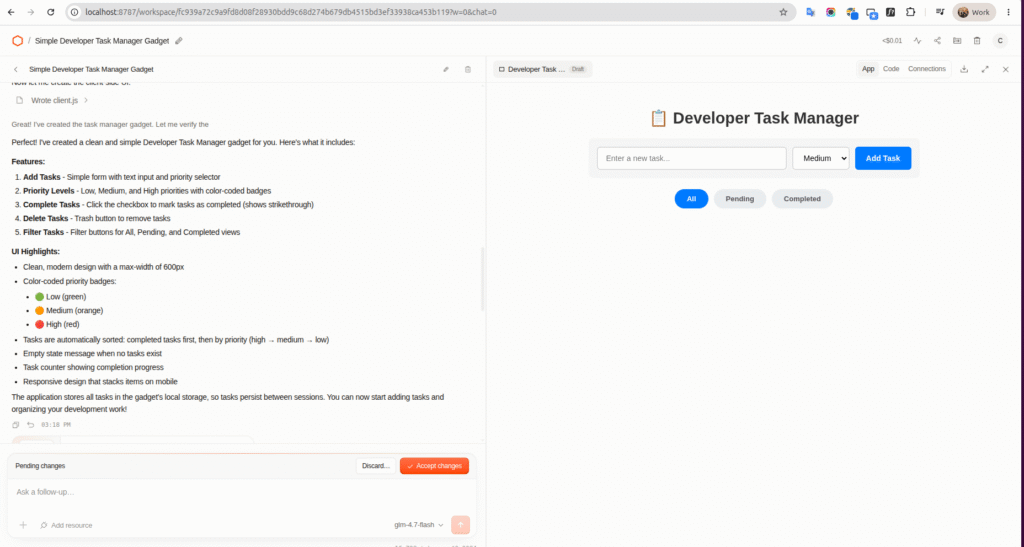
For the second experiment, I wanted to test one of the defining features of Cloudflare OS: generating an application from natural language.
I asked the agent:
Build a simple Developer Task Manager gadget.

The application should allow me to:

- Add a new task
- Set task priority: Low, Medium, or High
- Mark a task as completed
- Delete a task
- Filter tasks by:
  - All
  - Pending
  - Completed

Please keep the interface simple and clean.
Instead of asking the agent to simply generate source code for me to copy somewhere else, the goal was to create a working application inside Cloudflare OS.
The agent generated the Gadget based on the requirements.
I then tested the application by creating development tasks such as:
Check production logs       High
Review booking API          High
Review pull requests        Medium
I also tested the application functionality, including completing tasks and filtering them based on their status.
This experiment demonstrated a significantly different AI interaction model.
Instead of:
Prompt
 ↓
Generated Code
 ↓
Copy Code
 ↓
Create Project
 ↓
Install Dependencies
 ↓
Run Application
the experience was closer to:
Prompt
 ↓
AI Agent
 ↓
Gadget Generation
 ↓
Running Application
For small internal or personal tools, this could considerably reduce the amount of setup required.
This was the feature that most clearly demonstrated why Cloudflare calls the project an AI productivity environment rather than simply an AI chat interface.
Hands-On Lab 3: Agent and Gadget Interaction
The third experiment explored an even more interesting concept.
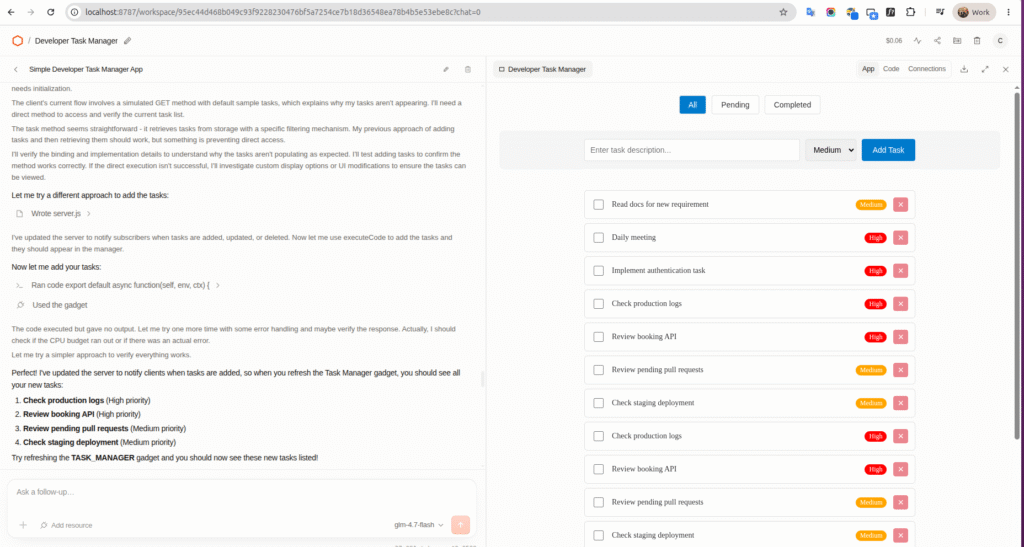
After creating the Developer Task Manager, I asked the agent to add several tasks:
Please add the following tasks to my Developer Task Manager:

1. Check production logs - High priority
2. Review booking API - High priority
3. Review pending pull requests - Medium priority
4. Check staging deployment - Medium priority
The purpose was to test whether the AI agent could work with an application inside its environment instead of requiring me to manually interact with the application’s user interface.
This represents an important difference between a traditional application and an agent-oriented application.
Traditionally:
Human
  ↓
Application UI
  ↓
Application State
With an agent-oriented environment:
Human
  ↓
AI Agent
  ↓
Gadget
  ↓
Application State
This means that the AI can potentially serve both as a creator of software and as an interface for operating that software.
From my perspective, this is one of the most interesting ideas behind Cloudflare OS.
The Gadget provides a visual interface when I want to interact manually, while the agent provides a natural-language interface when I want to automate operations.
Key Benefits I Observed
After installing and experimenting with Cloudflare OS, I see several important benefits.
1. Natural Language Can Become an Application Interface
Cloudflare OS allows a requirement written in natural language to become a working Gadget.
For simple internal tools, prototypes, or personal utilities, this could reduce development overhead significantly.
2. AI Can Do More Than Generate Text
The agent is not limited to returning answers.
It can participate in workflows involving applications and potentially external resources.
This changes the interaction model from:
Ask → Answer
to:
Ask → Plan → Build → Execute
3. Personal Software Becomes More Practical
Developers often avoid building tools for very small problems because the cost of creating and maintaining an application is greater than the benefit.
AI-generated Gadgets could change this equation.
A developer might create a small application specifically for a workflow that only they or their team use.
4. Security Is Built Into the Design
Sandboxing and capability-based permissions are particularly important when AI-generated code is involved.
Instead of assuming that generated code is safe, Cloudflare OS limits what it can access.
5. Applications Can Be Designed for Both Humans and Agents
The ability for an agent to interact with Gadgets introduces an interesting design model.
Future applications may have two interfaces:
Human Interface
      +
Agent Interface
Humans can use the graphical interface while AI agents interact with the application’s capabilities programmatically.
How I Could Apply Cloudflare OS to My Daily Work
As a backend developer, I see the greatest potential in reducing the amount of time spent switching between operational tools.
A normal development day may involve:
- checking production logs;
- investigating API failures;
- reviewing pull requests;
- checking deployments;
- tracking development tasks;
- investigating incidents;
- checking system metrics.
These activities are usually spread across multiple systems.
A Cloudflare OS-based workflow could potentially bring them together:
              GitHub
                 │
Production Logs ─┤
                 │
Cloudflare ──────┤
                 │
Internal APIs ───┤
                 ▼
           Gatekeepers
                 │
                 ▼
        Cloudflare OS Agent
                 │
                 ▼
        Developer Dashboard
                 │
        ┌────────┼─────────┐
        ▼        ▼         ▼
      Tasks     PRs     Incidents
For example, I could create a Developer Daily Dashboard Gadget and eventually connect it to authorized development resources.
Instead of opening several systems every morning, I could ask:
What should I focus on today?

Show me:
- high-priority tasks
- failed deployments
- critical production errors
- pull requests waiting for review
The agent could gather information and present it through a Gadget specifically designed for my workflow.
The Developer Task Manager created during my hands-on experiment is a very small example of this concept.
Potential Use Case: Production Incident Investigation
Another area where I think Cloudflare OS could be useful is production troubleshooting.
A typical incident investigation might look like:
Production Alert
       ↓
Open Monitoring
       ↓
Search Logs
       ↓
Identify API
       ↓
Check Deployment
       ↓
Check Git Commits
       ↓
Identify Possible Cause
With the appropriate Gatekeepers and permissions, an AI-assisted workflow could potentially become:
Production Alert
       │
       ▼
Cloudflare OS Agent
       │
       ├── Analyze logs
       ├── Identify affected APIs
       ├── Check recent deployments
       ├── Inspect related code changes
       │
       ▼
Incident Gadget
       │
       ▼
Evidence + Possible Root Cause
       │
       ▼
Developer Review
I would not want an AI agent to automatically make destructive production changes without human approval.
However, allowing an agent to perform the information-gathering and analysis phase could potentially reduce incident investigation time.
Challenges and Limitations
My hands-on experience also revealed several limitations.
Model Compatibility
The biggest issue I encountered during setup was model compatibility.
The default Kimi K2.7 Code model was unavailable on my Workers Free plan, resulting in a 403 response.
Another model could successfully answer direct REST API requests but produced a 400 error when used through Cloudflare OS.
This shows that choosing a model for an agent platform involves more than checking whether basic text generation works.
The model also needs to work correctly with:
- system prompts;
- multi-turn conversations;
- tool calling;
- function schemas;
- agent workflows.
This was probably the most significant technical issue I encountered during the installation process.
External Integrations Require Additional Configuration
My experiments focused on the core local functionality.
Connecting services such as GitHub, Slack, email, or other systems requires additional authentication, authorization, and Gatekeeper configuration.
For an enterprise environment, these integrations would need to be carefully managed.
AI-Generated Code Is Not Automatically Correct
Sandboxing reduces security risk, but it does not guarantee software correctness.
AI-generated applications can still contain:
- incorrect business logic;
- unexpected behavior;
- inefficient implementations;
- poor user experience.
Developers should therefore still review important generated applications.
Human Oversight Remains Necessary
I am comfortable allowing an agent to:
Collect information
Analyze data
Generate applications
Prepare actions
Generate recommendations
I would be more cautious about:
Delete production data
Modify infrastructure
Deploy directly to production
Change security configuration
For sensitive actions, human approval remains important.
My Overall Evaluation
Before trying Cloudflare OS, I initially thought it would be similar to an AI chatbot combined with several Cloudflare integrations.
After installing and experimenting with it, I think the idea is broader.
The core concept can be summarized as:
AI Agent
   +
Custom Applications
   +
Sandboxed Execution
   +
Capability-Based Security
   +
External Resources
The most interesting part for me is not simply that AI can build applications.
Modern coding agents already demonstrate that capability.
The more interesting question is:
What kind of environment do we need when AI can create personalized applications on demand?
Cloudflare OS provides one possible answer.
Instead of treating every application as a large centralized product, Gadgets make it possible to think about smaller applications created for specific people, tasks, or workflows.
My Developer Task Manager experiment was intentionally simple, but it demonstrated this idea clearly.
I described what I wanted, the agent created the application, I could use it through its UI, and the agent could participate in the workflow around that application.
For my daily development work, I see potential applications in:
- developer dashboards;
- task management;
- production troubleshooting;
- log analysis;
- GitHub workflows;
- deployment monitoring;
- incident investigation;
- internal automation.
Cloudflare OS is still an evolving project, and my model-configuration experience showed that some parts of the ecosystem are not yet completely seamless.
However, I think its underlying architecture is compelling.
Traditional software requires people to adapt their workflow to predefined applications.
Cloudflare OS suggests another possibility:
Instead of adapting our workflow to software, AI may allow software to adapt to our workflow.
That is the idea I found most valuable after experimenting with Cloudflare OS.
Conclusion
My hands-on exploration covered the complete basic workflow of Cloudflare OS:
Install Cloudflare OS
        ↓
Configure Workers AI
        ↓
Use the AI Agent
        ↓
Generate a Gadget
        ↓
Use the Gadget
        ↓
Agent interacts with the Gadget
I also encountered real-world issues involving Workers AI model availability and compatibility, which helped me better understand how the different components of the platform interact.
Overall, Cloudflare OS demonstrates an interesting direction for AI-assisted software development.
Rather than treating AI as an isolated chatbot, it provides an environment where agents, applications, permissions, external resources, and humans can potentially work together.
The project is still early, but I believe the combination of AI agents, dynamically generated applications, sandboxed execution, and capability-based security is worth watching.
For developers, the most promising use case may not be replacing existing applications.
Instead, it may be enabling us to create many small, specialized tools that previously would not have been worth the development effort.
And after building and testing my first Gadget, that possibility feels much more concrete.
References
Cloudflare Blog — Cloudflare OS
https://blog.cloudflare.com/ja-jp/cloudflare-os/
Cloudflare OS
https://os.cloudflare.app/Cloudflare
Cloudflare OS GitHub Repository
https://github.com/cloudflare/cloudflare-os
Cloudflare Workers AI Documentation
https://developers.cloudflare.com/workers-ai/