Introduction
Preparing a proposal for a new client is rarely as simple as opening one document and starting to write.
In reality, valuable information is scattered across multiple files—product specifications, pricing documents, meeting notes, proposal templates, and previous customer success stories. Before writing even the first paragraph, sales teams often spend more time searching for information than actually creating the proposal itself.
Google’s new Google Drive Projects, combined with Ask Gemini, introduces a different approach. Instead of treating documents as isolated files, it allows Gemini to understand an entire project by analyzing all related documents together.
In this investigation, I explored how this cross-file AI synthesis capability can improve proposal creation and whether it can make everyday sales work faster and more accurate.
The Challenge
Imagine receiving a request from a new manufacturing customer interested in an AI-powered document review solution.
To prepare a proposal, I needed information from several different sources:
- Product specifications
- Proposal template
- Meeting notes
- Pricing guide
- Previous customer success stories
Traditionally, this means opening every document, copying key information, comparing details, and manually combining everything into a single proposal.
Besides taking time, this workflow increases the chance of overlooking important customer requirements or using outdated information.
Building a Google Drive Project
To test Google’s new feature, I created a Google Drive Project called:
AI Proposal Demo
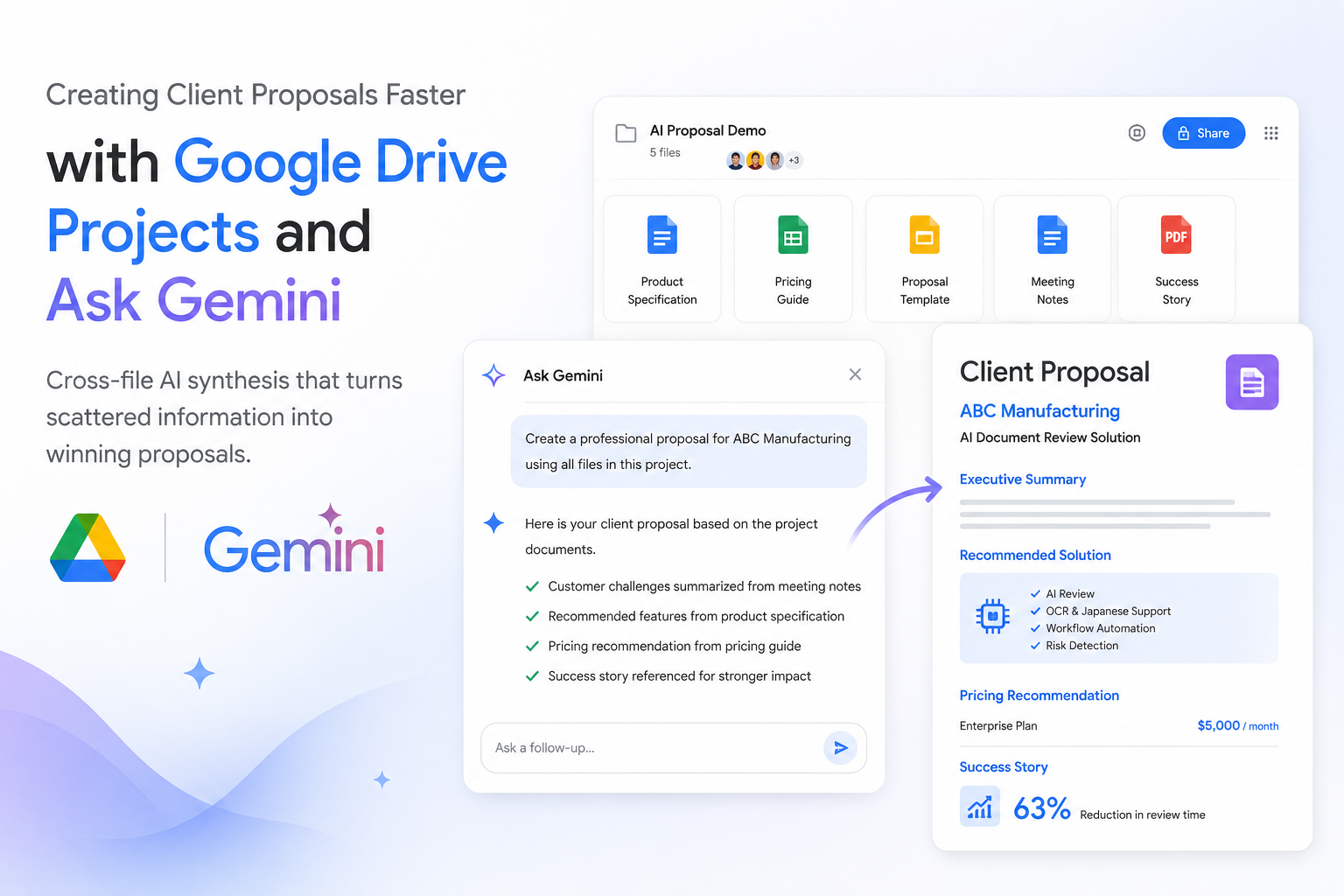
Inside the project, I added five related documents:
- Product Specification
- Proposal Template
- Meeting Notes
- Pricing Guide
- Customer Success Case
Instead of organizing files in different folders, every document now belonged to one project workspace.
This became the knowledge base that Gemini could understand as a complete context rather than individual documents.
Asking Gemini to Create the Proposal
After organizing the documents, I opened Ask Gemini directly inside the project and entered the following prompt:
- Create a proposal draft for a manufacturing client interested in AI document review.
- Use the proposal template.
- Summarize customer requirements from the meeting notes.
- Recommend the most suitable product features.
- Suggest pricing based on the pricing guide.
- Reference previous successful customer implementations.
Rather than asking Gemini to summarize a single document, I asked it to connect information across every file inside the project.
The Results
Gemini generated a structured proposal that included:
- Executive Summary
- Customer Challenges
- Proposed AI Solution
- Recommended Product Features
- Implementation Timeline
- Pricing Recommendation
- Similar Customer Success Story
- Next Steps
What impressed me most was not the quality of the writing itself—it was Gemini’s ability to combine information from different documents into one consistent proposal.
Customer requirements from the meeting notes matched the recommended product features.
Pricing followed the pricing guide.
The proposal structure respected the company’s template.
Relevant success stories were included naturally.
Everything appeared as one coherent document instead of several disconnected summaries.
Why Cross-File AI Synthesis Matters
The biggest value of Google Drive Projects is not document storage.
It is context.
Without a project, Gemini only sees one file at a time.
With a project, Gemini understands relationships between multiple documents.
This makes it possible to:
- connect customer requirements with product capabilities;
- recommend solutions based on previous successful projects;
- maintain consistent terminology;
- reduce repetitive searching and copying;
- generate documents that better reflect the complete business context.
This is a significant improvement over manually switching between multiple browser tabs and documents.
Comparing the Workflow
Traditional Approach
- Search for documents.
- Open each file.
- Read product specifications.
- Review meeting notes.
- Find pricing information.
- Copy important sections.
- Rewrite everything into one proposal.
- Double-check consistency.
Estimated preparation time:
45–60 minutes
Using Google Drive Projects + Ask Gemini
- Open the project.
- Ask Gemini one question.
- Review and refine the generated proposal.
Estimated preparation time:
10–15 minutes
Although human review is still necessary, the initial draft is produced much faster, allowing more time to focus on improving the proposal rather than gathering information.
Real Business Benefits
After completing this experiment, I believe this workflow can be applied well beyond proposal writing.
Sales Teams
- Client proposals
- RFP responses
- Sales presentations
Project Managers
- Weekly project reports
- Risk summaries
- Project kick-off documents
Customer Success Teams
- Quarterly Business Reviews
- Renewal proposals
- Customer onboarding plans
Internal Reporting
- Executive summaries
- Team reports
- Cross-functional documentation
Any process that requires combining information from multiple documents could benefit from this feature.
My Personal Experience
After using Google Drive Projects, I realized the biggest improvement wasn’t that Gemini writes faster—it was that I no longer had to think about where information was stored.
Instead of searching through folders and repeatedly opening documents, I simply organized everything into one project and let Gemini understand the overall context.
The generated proposal already contained most of the information I needed, allowing me to spend my time reviewing and refining rather than collecting data.
For teams that regularly prepare client proposals, reports, or business documents, this feature has the potential to reduce repetitive work while improving document consistency and accuracy.
Final Thoughts
Google Drive Projects changes Google Drive from a file storage platform into a project knowledge workspace.
Combined with Ask Gemini, it introduces a powerful cross-file AI synthesis capability that enables users to generate high-quality business documents based on multiple related files.
For organizations where proposal creation and reporting are part of daily operations, this feature can significantly improve productivity, reduce manual effort, and help teams focus on delivering better outcomes instead of spending valuable time searching for information.
In this investigation, I explored how this cross-file AI synthesis capability can improve proposal creation and whether it can make everyday sales work faster and more accurate.