
1. Overview of Gemini Integration in Gmail (Side Panel)
Gemini is far more than a standalone chatbot; when integrated into the Gmail Side Panel, it becomes an intelligent AI layer that operates seamlessly alongside your workflow.
- Prime Real Estate: Located right on the right side of the Gmail interface (the sparkling star icon), it allows you to interact with AI without switching tabs or leaving your inbox.
- Contextual Awareness: Gemini’s greatest strength here is its ability to “read” the content of the email you are currently viewing or scan through thousands of emails in your inbox to retrieve precise information.
- Advanced Processing Power: Powered by Google’s most sophisticated Large Language Model (LLM)—Gemini 1.5 Pro—it handles vast amounts of data with high accuracy and natural language responses.
- Personalization: Gemini understands your habits and connections within the Google Workspace ecosystem to provide the most relevant assistance.
2. Key Applications of the Gemini Side Panel
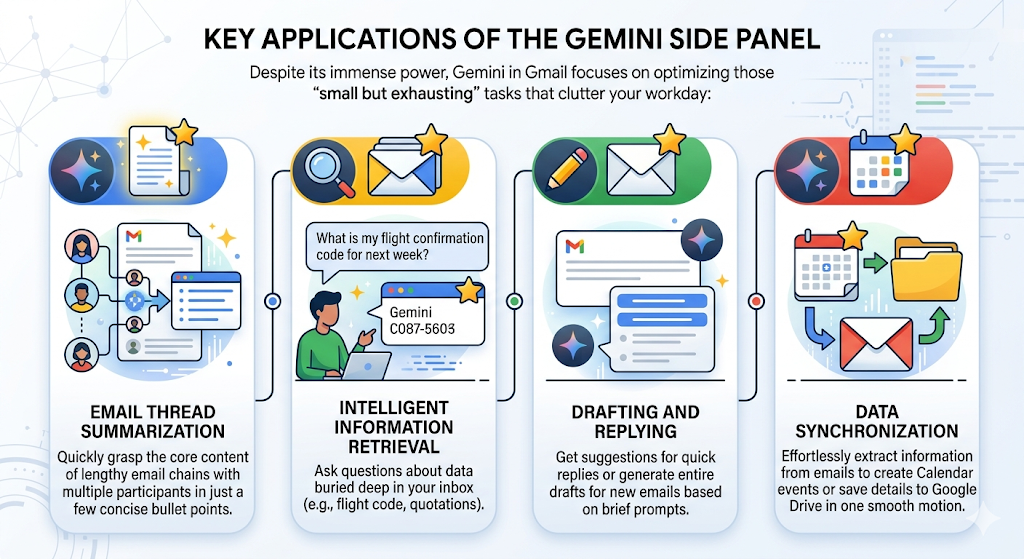
Despite its immense power, Gemini in Gmail focuses on optimizing those “small but exhausting” tasks that clutter your workday:
- Email Thread Summarization: Quickly grasp the core content of lengthy email chains with multiple participants in just a few concise bullet points.
- Intelligent Information Retrieval: Ask questions about data buried deep in your inbox (e.g., “What is my flight confirmation code for next week?” or “Has Company A sent the quotation yet?”).
- Drafting and Replying: Get suggestions for quick replies or generate entire drafts for new emails based on brief prompts.
- Data Synchronization: Effortlessly extract information from emails to create Calendar events or save details to Google Drive in one smooth motion.
3. REAL-WORLD APPLICATION: POST-EXPO WORKFLOW OPTIMIZATION
The Scenario
After attending a major Industrial Expo 2026 in Hanoi, I returned with a massive influx of potential leads and new supplier contacts. Within just a few days post-event, my inbox was flooded with various complex email threads, including:
- Inbound Leads: Emails from potential clients requesting formal quotations, technical specifications, and delivery lead times.
- Supplier Proposals: Emails from vendors providing wholesale pricing, shipping terms, and warranty policies.
- Internal Coordination: Back-and-forth emails with team members to delegate tasks and track project progress.
To manage this overwhelming volume of data efficiently, I utilized Gemini in the Gmail Side Panel to automate information extraction, compare vendors, and streamline my response process.
Task 1: Extract information from email threads
Prompt used:
Extract from emails and attachments:
- delivery date
- delivery location
- price
- requested documents
- next action owner
Result
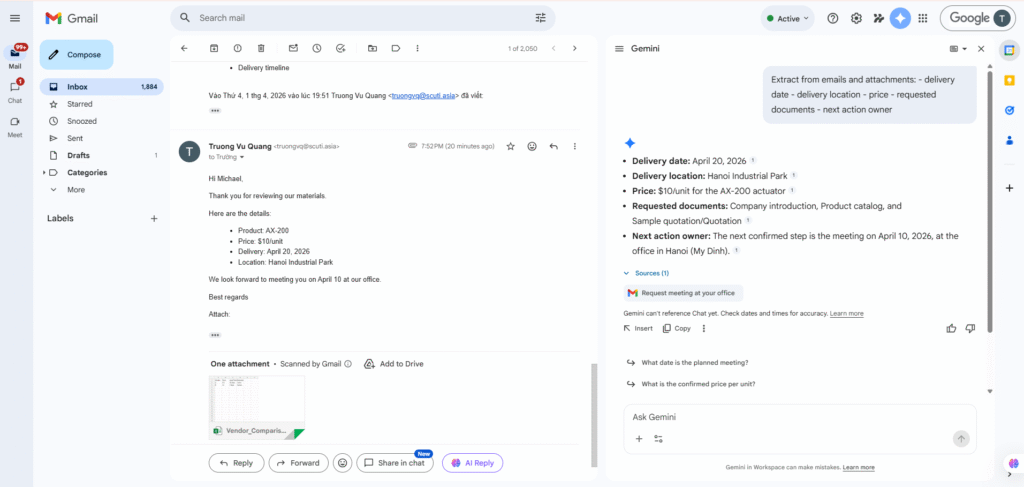
The results show that Gemini was able to:
Accurately extract key information
- Delivery date: April 20, 2026
- Location: Hanoi Industrial Park
- Price: $10/unit
Correctly understand the email context
- Identified the requested documents (catalog, quotation, company introduction)
- Recognized that the next action is a meeting
Task 2: Vendor Comparison (Data Extraction from Multi-Product Email)
Prompt used:
Extract for each product:
- product name
- quantity
- price
- delivery date
- delivery location
- requested documents
Result
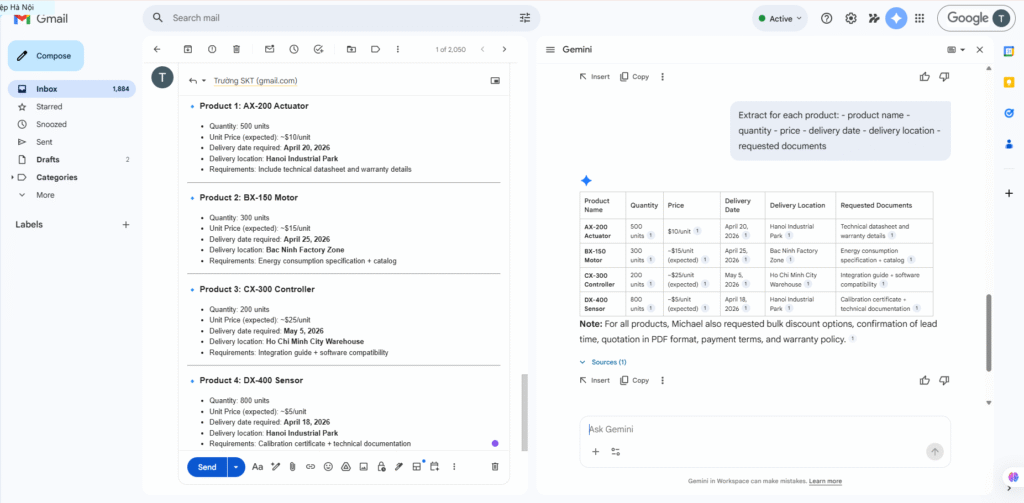
The results show that Gemini was able to:
Correctly identify all four distinct products (AX-200, BX-150, CX-300, DX-400)
Extract all key fields accurately:
- Product Name
- Quantity
- Price
- Delivery Date
- Delivery Location
- Requested Documents
Maintain correct data relationships (no mixing between products)
Understand the structured format of a multi-item email list
Task 3: Automated Email Drafting Based on Next Action
Use Gemini in Gmail to:
- Identify the next action from email threads
- Automatically draft a follow-up / confirmation email
- Ensure the content is based on actual data (no hallucination)
Prompt used
Based on the extracted information from the email threads:- next action: meeting
- date: April 10, 2026
- location: Hanoi (My Dinh office)Draft a follow-up email to confirm the meeting with the client.The email should:
- confirm date and location
- be professional
- include a short agenda
- not add any information that is not in the email threads
Result
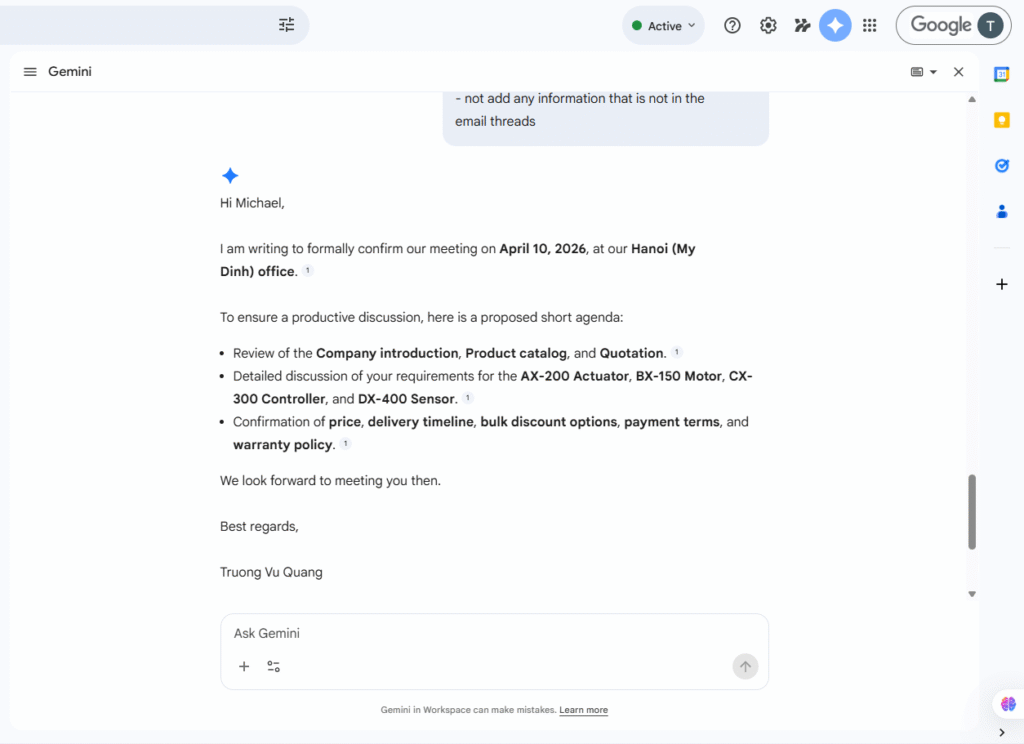
Gemini was able to:
- ✔️ Identify the next action (meeting on April 10, 2026 in Hanoi)
- ✔️ Automatically draft a complete confirmation email
- ✔️ Ensure the content strictly follows the information from the email threads (no inaccuracies)
Limitation
- Gemini cannot automatically send emails; it can only generate a draft
Task 4: Evaluate the ability to access Map and Website links
Prompt used
Access the following links and extract verified information:1. Google Maps link:
- provide the exact address
- provide the location name2. Company website:
- company name
- company description
- main products or services
- location (if mentioned)If you cannot access the link content, clearly state the limitation instead of guessing.
Result
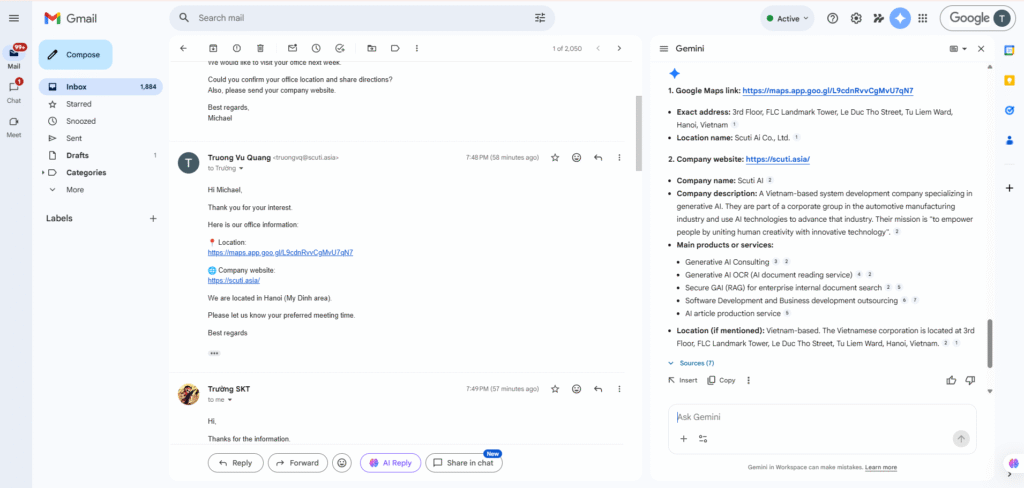
The results show that Gemini was able to:
✔️ Correctly identify the type of links
- Google Maps → company address
- Website → business information
✔️ Extract detailed information
- Exact address: FLC Landmark Tower, Hanoi
- Company name: Scuti AI
- Business field: Generative AI, Software Development
✔️ Summarize website content effectively
- Included company description
- Listed main services
- Identified company mission
This demonstrates that:
Gemini has the ability to aggregate information from multiple sources (map and website) effectively in some cases.
Task 5: Evaluate Gemini’s ability to read email attachments
📌 Prompt used
Compare Vendor A and Vendor B using the attached Vendor_Comparison.xlsx and email content.Extract:
- price
- lead time
- warrantyThen:
1. Present the comparison in a table
2. Analyze pros and cons of each vendor
3. Recommend the better option based on price vs delivery speed vs warranty
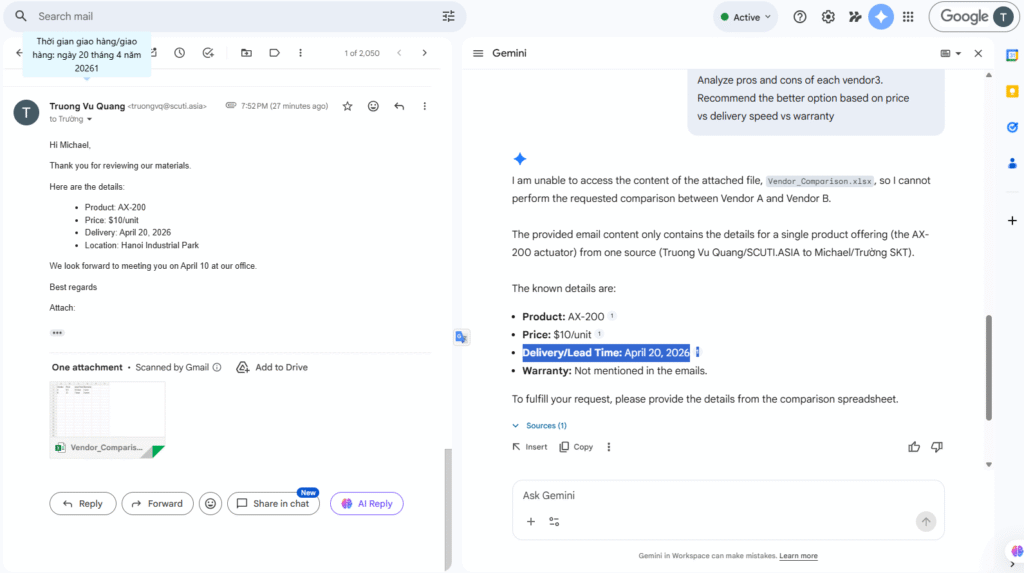
Limitations Identified
- Unable to access the content of the attached Excel file
- Could not extract:
- Price
- Lead time
- Warranty
- Unable to generate a comparison table
This indicates that Gemini’s ability to process email attachments (especially Excel files) is limited and not always reliable.