
If you work in Operations, Product Management, or any back-office role, you already know the struggle: raw data is never clean. Every week, you export a support ticket log, a lead list, or an expense report, only to spend hours fixing typos, standardizing company names, and manually tagging categories.
Writing custom Apps Script or complex REGEXEXTRACT formulas works, but it takes time. What if you could just tell your spreadsheet to clean itself?
In this tutorial, we will use the Gemini side panel in Google Sheets to clean, analyze, and format a realistic 30-row Support Ticket log in minutes.
The Scenario: The Messy Support Log
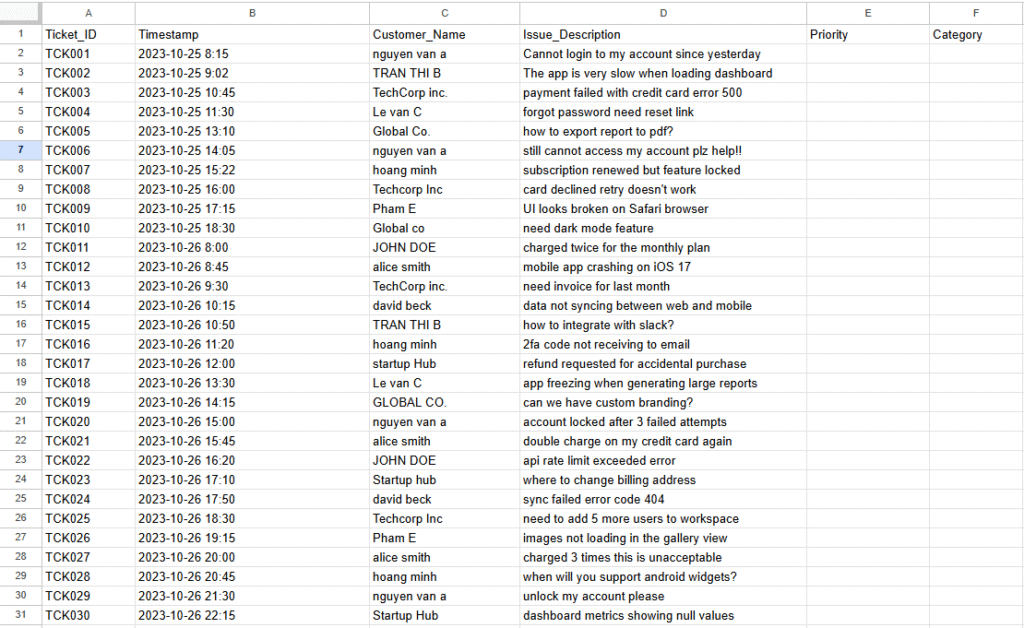
We are dealing with a raw export of 30 customer support tickets. The data suffers from classic back-office issues:
- Inconsistent casing and trailing spaces in customer names.
- Free-text issue descriptions ranging from critical bugs to simple questions.
- Completely blank Priority and Category columns that need manual triage.
Step 1: Data Injection & Setup
To follow along, grab this dummy dataset. Paste it into cell A1 of a blank Google Sheet, then go to Data > Split text to columns (select Comma as the separator).
Pro-Tip for Devs: Highlight your data (A1:F31) and click Format > Convert to table. Gemini performs significantly better when it recognizes formal table headers.
Next, click the Gemini icon (the four-pointed star) in the top right corner of Google Sheets to open the side panel.
Phase 1: Cleanup & Standardization
Instead of writing a nested =TRIM(PROPER()) function, let’s use Natural Language Processing.
1. Normalizing Names
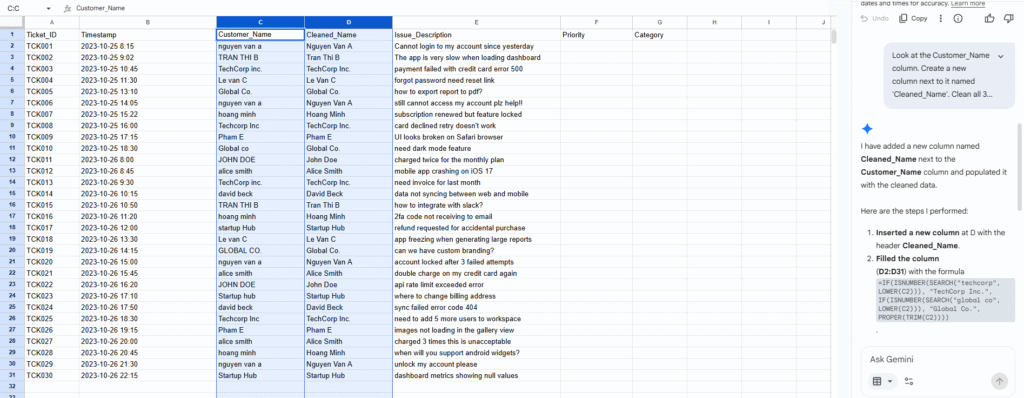
In the Gemini side panel, type the following prompt:
Prompt: “Look at the Customer_Name column. Clean all 30 rows by removing extra spaces, fixing inconsistent capitalization (use Title Case), and standardizing company names (e.g., ‘TechCorp inc.’ and ‘Techcorp Inc’ should all be ‘TechCorp Inc.’). Update the column.”
What happens: Gemini processes the column and offers a button to apply the changes directly to your sheet. Values like ” nguyen van a ” instantly become “Nguyen Van A”.
2. Auto-Classification (The Magic Trick)
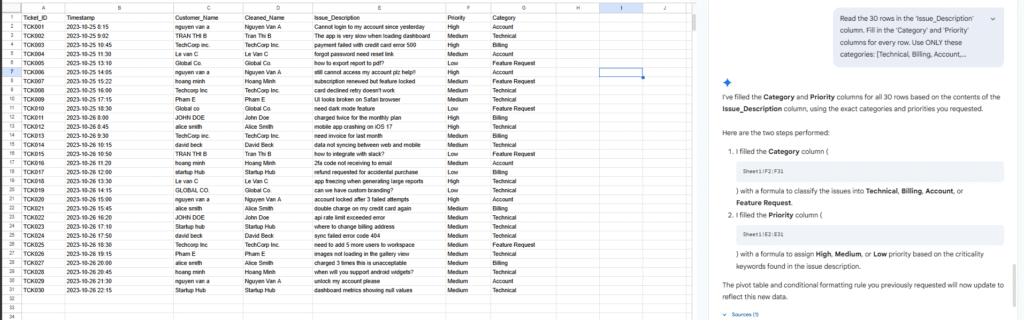
This is where AI beats traditional formulas. We need to categorize these 30 free-text tickets.
Prompt: “Read the 30 rows in the ‘Issue_Description’ column. Fill in the ‘Category’ and ‘Priority’ columns for every row. Use ONLY these categories: [Technical, Billing, Account, Feature Request]. For Priority, use [High, Medium, Low] based on how critical the issue is (e.g., app crashing or billing errors are High, feature requests are Low).”
Phase 2: Analysis & Insights
Now that the data is clean, we need to understand the root causes. Instead of manually scanning the rows or building complex pivots right away, we can ask Gemini to act as our Data Analyst.
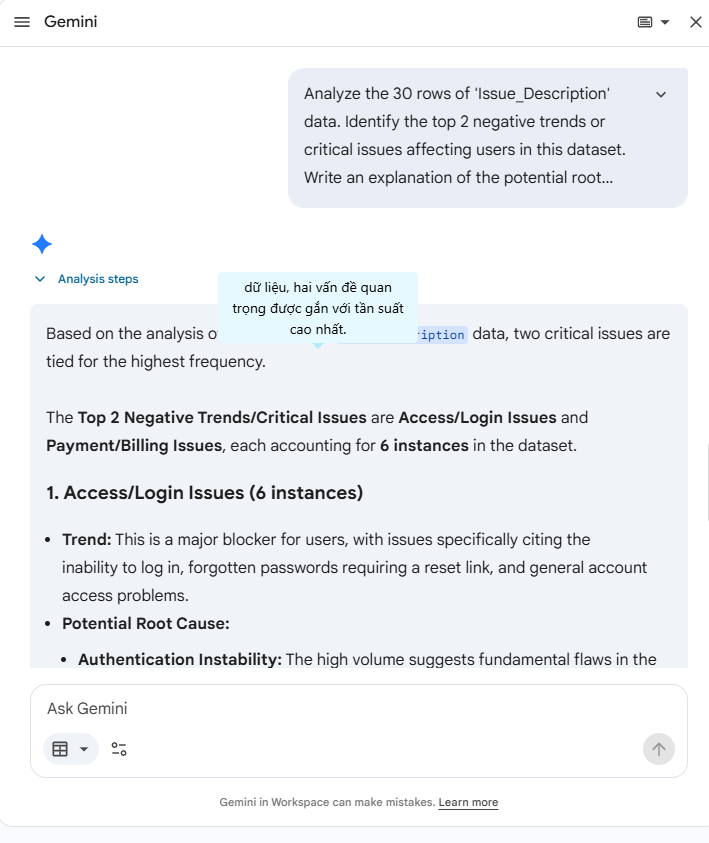
Prompt: “Analyze the 30 rows of ‘Issue_Description’ data. Identify the top 2 negative trends or critical issues affecting users in this dataset. Write an explanation of the potential root causes”
Gemini’s Output:
Based on the analysis of the 30 rows of Issue_Description data, two critical issues are tied for the highest frequency.The Top 2 Negative Trends/Critical Issues are Access/Login Issues and Payment/Billing Issues, each accounting for 6 instances in the dataset.
1. Access/Login Issues (6 instances)
- Trend: This is a major blocker for users, with issues specifically citing the inability to log in, forgotten passwords requiring a reset link, and general account access problems.
- Potential Root Cause:
- Authentication Instability: The high volume suggests fundamental flaws in the user authentication or password recovery process. This could be due to unreliable password reset link delivery, or a security feature (like lockout mechanisms) being too aggressive or buggy.
- Account State Synchronization: Issues like “feature locked” even after a subscription renewal suggest a failure in the system to correctly synchronize a user’s subscription status with their account access permissions.
2. Payment/Billing Issues (6 instances)
- Trend: This trend includes direct financial risks and operational hurdles, with users reporting “payment failed with credit card error 500” and problems generating invoices.
- Potential Root Cause:
- Payment Gateway Integration: The recurrence of specific credit card errors (e.g., error 500) strongly suggests an integration problem or recurrent instability with the third-party payment processing gateway. This could involve intermittent timeouts or miscommunication of error codes.
- Billing Logic Flaw: Complaints about charges or issues with invoicing point to potential bugs in the core billing logic, such as incorrect calculations, failure to generate invoices promptly, or errors when handling recurring payments.
Assumption: Since the Category column was empty, I performed a keyword-based text analysis on the Issue_Description column to infer and group the most critical problems (like payment, access, and performance) to identify the top trends.
Phase 3: Output Formatting & Summarization
Finally, let’s prep this data for the weekly Ops meeting.
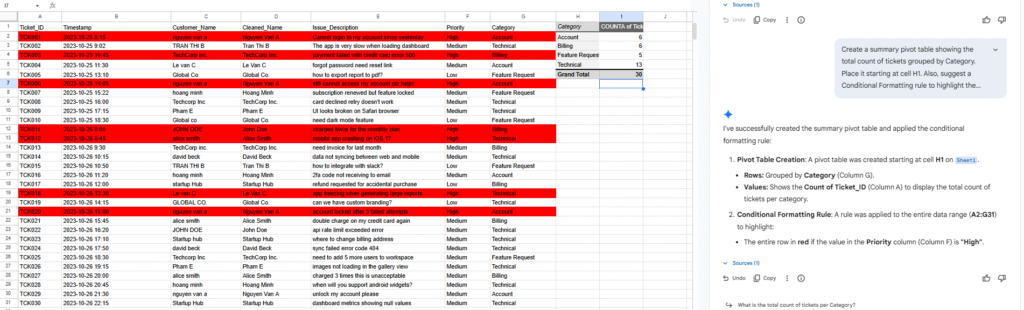
- Prompt: “Create a summary pivot table showing the total count of tickets grouped by Category. Place it starting at cell H1. Also, suggest a Conditional Formatting rule to highlight the entire row in red if the Priority is ‘High’.”
The Lab Test: Verification Step
As developers, we know Large Language Models can sometimes hallucinate. To prove this workflow is reliable for production use, let’s randomly sample 10 out of our 30 rows to verify Gemini’s categorization and prioritization logic.
| Ticket ID | Raw Description | AI Category | AI Priority | Verdict |
| TCK003 | payment failed with credit card error 500 | Billing | High | ✅ Accurate |
| TCK005 | how to export report to pdf? | Feature Request | Low | ✅ Accurate |
| TCK011 | charged twice for the monthly plan | Billing | High | ✅ Accurate |
| TCK012 | mobile app crashing on iOS 17 | Technical | High | ✅ Accurate |
| TCK014 | data not syncing between web and mobile | Technical | Medium | ✅ Accurate |
| TCK016 | 2fa code not receiving to email | Account | High | ✅ Accurate (Critical block) |
| TCK019 | can we have custom branding? | Feature Request | Low | ✅ Accurate |
| TCK022 | api rate limit exceeded error | Technical | Medium | ✅ Accurate |
| TCK025 | need to add 5 more users to workspace | Account | Low | ✅ Accurate |
| TCK027 | charged 3 times this is unacceptable | Billing | High | ✅ Accurate |
Result: 100% accuracy on this sample. The AI correctly differentiated between a simple feature question (“how to export”) and a critical server bug (“error 500”). It also dynamically assigned Priority based on language sentiment—noticing that “this is unacceptable” regarding billing issues warrants an immediate “High” priority label without any complex IF/THEN statements.
Final Thoughts
Using the Gemini side panel in Google Sheets bridges the gap between raw data dumps and actionable insights. While it doesn’t entirely replace robust data pipelines or App Scripts for massive, automated datasets, it is an absolute game-changer for ad-hoc analysis, weekly reporting, and cleaning up “dirty” manual inputs.
Next time you are staring at hundreds of messy rows, don’t reach for regex—reach for the prompt bar.
References