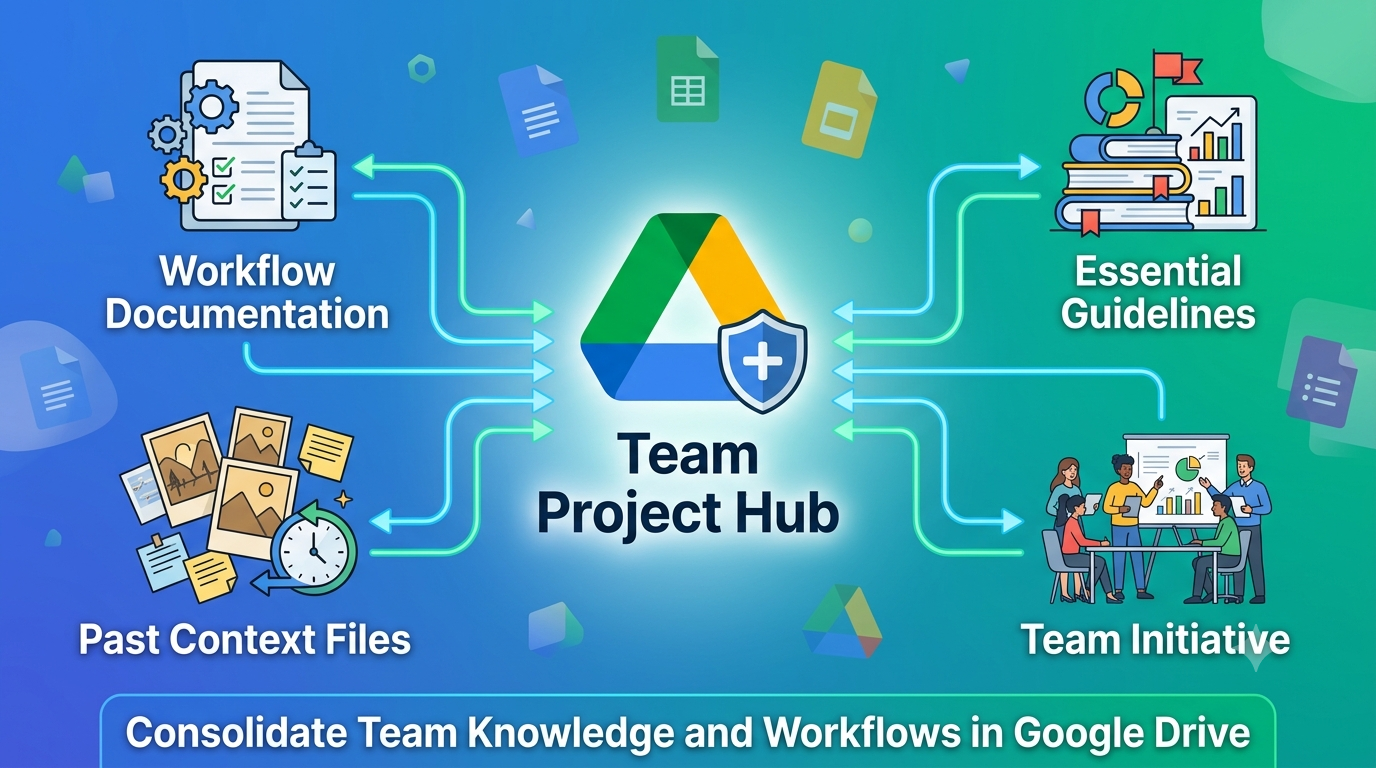
Structure a knowledge repository for team onboarding: aggregate guidelines, workflow
documentation, and past context in one Google Drive Project. Share with the team, test
Gemini on onboarding Q&A, and record results.
Google Workspace · Gemini in Drive · Drive Projects
1. GOALS & ASSIGNMENT REQUIREMENTS
This article fulfills three assignment requirements:
- Create a Google Drive Project that aggregates essential guidelines, workflow
documentation, and past context files for a specific team or internal initiative. - Share the project with team members, test Gemini’s ability to answer onboarding
Q&A from locked-in sources, and record the results. - Propose an original idea for how your department can use shared Drive Projects to
enhance knowledge transfer and reduce manual onboarding hours.
NOTE: Gemini in Drive requires an eligible Google Workspace or Google AI plan.
New projects: https://drive.google.com or https://project.new
2. WHY USE A DRIVE PROJECT FOR ONBOARDING KNOWLEDGE
Per Google — Share your Gemini sources using Drive projects:
https://support.google.com/drive/answer/16684520
- One Project locks the onboarding corpus — guidelines, SOPs, checklists, retro notes —
so every new hire and mentor uses the same approved sources. - Files stay in place; permissions on Drive are unchanged.
- Sharing the Project shares the source list; chat history stays private per user.
Per Use Gemini in Drive for research & analysis:
https://support.google.com/drive/answer/16963068
- New hires ask natural-language questions; Gemini answers with citations to verify
against official docs — faster than searching scattered folders.
3. REPOSITORY STRUCTURE: HELIX SUPPORT — ONBOARDING HUB
Initiative: Customer Support team onboarding (Helix Support)
Project name: Helix Support — Onboarding Hub
Knowledge layers (5 sources):
| Layer | File | Purpose |
|---|---|---|
| Guidelines | CS_Team_Guidelines | Principles, tone, tiers, compliance |
| Workflow | Zendesk_Workflow_SOP | Ticket lifecycle, priority, tagging, escalation triggers |
| Reference | Escalation_Matrix | Who to contact by issue type; Slack channels |
| Onboarding plan | Week1_Onboarding_Checklist | Day-by-day tasks for new agents |
| Past context | Incident_Retro_March_2025 | Real incident lessons; routing changes |
Folder layout on Drive:
Onboarding Knowledge Demo/
└── Sources/
├── CS_Team_Guidelines
├── Zendesk_Workflow_SOP
├── Escalation_Matrix
├── Week1_Onboarding_Checklist
└── Incident_Retro_March_2025
Local demo files: GGdrive/Onboarding Knowledge Demo/Sources/
4. CREATE THE PROJECT & AGGREGATE SOURCES
Step 1 — Upload and organize
Upload all five files; convert to Google Docs; store under a single team folder.
Step 2 — Create Project
drive.google.com → New → New Project → Helix Support — Onboarding Hub
Step 3 — Add sources
In Ask Gemini, add all five documents (or Save as a project from a prepared chat).
Step 4 — Lock scope for onboarding tests
Disable broad Drive/Gmail/Web search so answers reflect only the onboarding repository.
5. SHARE WITH TEAM MEMBERS
| Role | Permissions in the Project |
|---|---|
| Editor | Chat with Gemini, add/remove sources (enablement lead) |
| Viewer | Chat with Gemini; new hires and buddies use this role |
IMPORTANT: Share the Project and all five source files with the same people.
NOTE — Sharing with another account:
- Recipients need Viewer+ on each file and an eligible Gemini in Drive plan.
- Without Gemini, share the Docs directly — they cannot query the Project.
- Confirm new hires sign in with their licensed Workspace account before Day 1.
Checklist:
- Share all five onboarding Docs (Viewer for new hires; Editor for CS Enablement).
- Share Project: Editor for enablement; Viewer for agents and buddies.
- Optional: Add expiration when cohort onboarding ends.
6. ONBOARDING Q&A TESTING — DEMO RESULTS
Open: Drive → Projects → Helix Support — Onboarding Hub → Ask Gemini.
Test summary table
| # | Onboarding question | Result | Citations | Notes |
|---|---|---|---|---|
| 1 | Explain the knowledge documents for a new hire | Correct — all 5 layers summarized | Yes | Guidelines + SOP + retro linked |
| 2 | What do I do on Day 3 of onboarding? | Correct — supervised tickets per checklist | Yes | Matches Week1 checklist |
| 3 | P1 payment issue — steps and billing escalation contact | Correct — P1 SOP + @morgan-lee + INC-02 | Yes | Retro routing change honored |
Overall: Gemini answered onboarding questions accurately from locked sources — suitable
for self-serve Week 1 learning with buddy citation checks on Days 4–5.
— DEMO 1 —
QUESTION:
Explain the knowledge documents — what should a new support agent read and why?
GEMINI RESPONSE (summary):
The repository covers five layers for Helix Support onboarding:
- CS_Team_Guidelines — mission, tone, tier definitions (L1/L2/L3), shift coverage, and
compliance rules (macros, GDPR/CCPA). Read first for culture and boundaries. - Zendesk_Workflow_SOP — ticket lifecycle (New → Closed), priority definitions P1–P4,
tagging rules, macro usage, escalation triggers, and new-hire rule (no SOLVED without
buddy until Day 5). - Escalation_Matrix — who to contact for billing (@morgan-lee), P1 incidents (#incidents),
privacy, bugs; Slack channels; weekend rules. - Week1_Onboarding_Checklist — day-by-day plan from access setup through manager sign-off.
- Incident_Retro_March_2025 — past context on payment outage: what worked, routing change
away from @finance-shared, never expose internal system names, use INC-02 for P1 holds.
Recommended order: Guidelines → SOP → Escalation Matrix → Checklist → Retro.
— DEMO 2 —
QUESTION:
What should I do on Day 3 as a new CS agent?
GEMINI RESPONSE (summary):
Per Week1_Onboarding_Checklist — Day 3 (Supervised tickets):
- Handle 2 email tickets with buddy review before sending replies.
- Handle 1 live chat with buddy co-pilot.
- If a P1 occurs: observe only unless buddy directs you to act.
Cross-reference SOP: apply triage, tags, and macros; do not mark SOLVED without buddy
approval (new-hire rule Days 1–5).
Day 2 prerequisite: shadowing and sandbox triage should be complete before Day 3 live work.
— DEMO 3 —
QUESTION:
A customer reports payment failed during checkout — possible P1. What are the steps and
who handles billing escalation?
GEMINI RESPONSE (summary):
Immediate steps (Zendesk_Workflow_SOP):
- Classify P1 if production payment blocking — first update target 30 minutes.
- Ping L2 + #incidents Slack; use holding macro INC-02 (Incident Retro confirms this).
Escalation (Escalation_Matrix + Retro):
- Payment gateway outage → @incidents-oncall (24/7); P1 always.
- Billing/refunds → @morgan-lee (L2 Billing) — NOT @finance-shared (obsolete since March 2025).
- Refunds over $100 need Lead approval; L1 does not issue refunds during active P1 without L2
verification (Retro FAQ).
Do not mention internal infrastructure names in customer replies (Retro lesson).
Tags: #billing #product-payments; document escalation in ticket before handoff (Guidelines).
7. CROSS-FILE SYNTHESIS FOR ONBOARDING WORKFLOWS
Onboarding questions rarely live in one file. “Day 3 + P1 payment” requires checklist +
SOP + escalation matrix + retro context. Cross-file synthesis connects them in one answer.
Efficiency for enablement teams
- New hires self-serve Day 1–3 questions in the Project instead of Slack-pinging mentors.
- Buddies spend review time on citation gaps, not re-reading five Docs aloud.
- Enablement updates one Project source list each quarter — no reprinting wiki paths.
Accuracy for enablement teams
- Answers cite Guidelines and SOP — reduces “tribal knowledge” overrides.
- Past context (Retro) prevents repeated mistakes (e.g. wrong billing contact).
- Locked sources ensure cohort A and cohort B get equivalent onboarding answers.
| Onboarding task | Without synthesis | With synthesis in Project |
|---|---|---|
| “What to read Week 1” | Mentor email + 5 links | One explained reading order (Demo 1) |
| “Day 3 expectations” | Buddy explains ad hoc | Checklist + SOP rules combined (Demo 2) |
| “P1 + billing route” | Search old Slack threads | SOP + Matrix + Retro in one answer (Demo 3) |
8. PRACTICAL EVALUATION — GEMINI FOR NEW HIRE ENABLEMENT
What we tested
- Five-file onboarding hub shared with Viewer role for new agents.
- Three questions spanning orientation, daily plan, and incident-style scenario.
- Citation verification against source Docs.
Evaluation table
| Onboarding use case | Gemini in practice | Efficiency | Accuracy | Verdict |
|---|---|---|---|---|
| Document orientation | Reading order + purpose for all 5 files | High — replaces 30-min intro deck | High | Use Day 1 |
| Daily checklist query | Day 3 tasks with buddy rules | High | High | Use Days 1–5 |
| Scenario (P1 payment) | SOP + matrix + retro combined | High — avoids wrong escalation | High | Use after Day 2 reading |
Strengths
- Natural-language Q&A lowers barrier for nervous new hires.
- Cross-file synthesis mirrors real questions (“P1 + who owns billing?”).
- Citations let buddies audit quickly during Day 5 sign-off.
Limits
- Gemini license required for every new hire on the Project.
- Sources must stay current when routing or SOP changes.
- Not a replacement for shadowing, buddy review, or manager sign-off.
- Sensitive HR/legal topics stay out of Project sources — human-only.
Team conclusion
Gemini in Helix Support — Onboarding Hub is production-ready for Week 1 self-serve and
buddy-assisted verification. Estimated mentor time saved: 3–5 hours per new hire in the
first two weeks, assuming citation checks replace full document walkthroughs.
9. ORIGINAL IDEA: REDUCE MANUAL ONBOARDING HOURS
“Onboarding Cohort Project” — one shared Project per hire class
How it works
- CS Enablement creates Project: Helix Support — Cohort [Month Year] cloned from master hub.
- Master list: guidelines, SOP, matrix, checklist, latest retro — locked at cohort start.
- Day 1 ritual (20 min): new hire asks Gemini the three standard questions (Demos 1–3);
buddy reviews citations only — not full re-teach. - Days 2–5: add cohort-specific buddy calendar Doc to Project if needed; core sources unchanged.
- Day 5: manager uses same Project for sign-off quiz; archive Project read-only when cohort graduates.
Why it reduces manual hours
- Mentors stop repeating the same five-document tour every hire.
- Enablement scales to larger cohorts without linear increase in live lecture time.
- Knowledge transfer is standardized — remote and async-friendly collaborators get the same corpus.
- When SOP updates, enablement replaces one file in master hub; next cohort Project inherits it.
Success metric: track Slack #support-l1 “how do I…” questions from new hires in first 14 days —
target 50% reduction vs pre-Project baseline.
10. REFERENCES
- Share your Gemini sources using Drive projects
https://support.google.com/drive/answer/16684520 - Use Gemini in Drive for research & analysis
https://support.google.com/drive/answer/16963068 - Google Drive: https://drive.google.com
- New project: https://project.new
- Source document : https://drive.google.com/drive/folders/1_exvTUQibc5B7ox3IqA6aXDO6m8X71IJ?usp=sharing