Introduction to Stitch
Stitch (also known as Google Stitch) is an AI-powered UI/UX design tool from Google Labs. Built on the foundation of Galileo AI, which Google acquired, it enables users to transform text ideas, sketch images, or even voice inputs into professional mobile and web interfaces in just seconds to minutes — with no coding or advanced design skills required.
The design community has hailed Stitch as a potential “Figma killer” thanks to its lightning-fast performance and exceptional ability to understand project context. If you’re new to the tool, check out basic usage guides in this article before diving deeper:
This article focuses exclusively on Stitch’s newest features, particularly the major update recently released by Google.
Introduction to Stitch’s New Features
On March 18, 2026, Google officially launched its biggest update yet for Stitch, named “vibe design”. This release fundamentally transforms the UI/UX design workflow and has been praised by the international and Vietnamese design communities as a true game-changer.
The “vibe design” update introduces five standout enhancements announced by Google Labs via its official X account :
Voice Input (Preview Mode)
Speak directly to Stitch to design hands-free. For example:
“Create a fitness web app with tabs: Home, Profile, Workout Schedule, and Progress Tracking. Use a modern and clean design.”
Powered by Gemini, it offers real-time feedback like having a design partner beside you.
To use the Voice Input feature, click the button as shown in the image above on the screen.
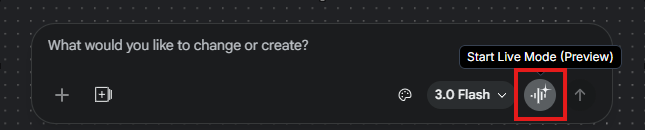
An AI assistant will appear, allowing you to design hands-free using natural voice commands, with customizable voice options.You can simply speak your request, and the assistant will handle it for you instead of typing text.
Smarter Design Agent
The AI now fully understands the entire project context (brief, edit history, design rules). It proactively suggests improvements, makes edits, and strictly adheres to your requirements — moving far beyond generating isolated UI elements.
Next, I used Design Agent to improve the UI without losing the original layout.
🧾 Prompt
Improve the UI by adding modern cards, better spacing, and optimize for mobile view
Actual Results
- Added mobile layouts → UI now displays correctly on mobile devices
- Existing tabs and layouts were not reset → navigation, Home, and Profile remain intact
- The improvements were applied clearly:
- Modern cards for each section
- Proper spacing between elements
- Responsive layout for both mobile and desktop
Thanks to the Smarter Design Agent, refining the UI became fast and smooth, without having to manually adjust each element.
AI-Native Infinite Canvas
An unlimited workspace that seamlessly supports text, images, and code on the same screen. Sketch, edit, and prototype without switching tabs or tools. Mobile and desktop screens can coexist effortlessly in one canvas.
As shown in the video, after adding more screens for mobile,
- Added multiple screens → Home, Profile, Workout Schedule, and Progress Analytics all coexist on the canvas
- Canvas is unlimited → you can zoom out or move screens far apart without cutting or losing any layout
- Easy to observe the full app flow → allows checking multi-screen, mobile, and desktop layouts at the same time
Agent Manager + Multi-Idea Workflow with Instant Prototypes
The Agent Manager lets you run multiple design directions in parallel (multi-idea / multi-branch) without losing context — similar to Git branching, but for design. Once screens are ready, simply hit Play. Stitch automatically connects them into interactive flows, generates Instant Prototypes (clickable previews), auto-creates the next logical screen based on clicks, and supports multi-device testing. This “game-changer” feature accelerates idea exploration and real-flow validation in seconds.
Key Features in the Prototype Screen
- Direct Editing
- You can edit text, buttons, and labels on each screen
- Create Links Between Screens
- Click a button → link to another screen
- Create an interactive flow that behaves like a real app
- AI-Powered Changes
- Edit layout, style, or text using AI
When you click the play button, Stitch allows you to create interactive flows between screens and edit directly.

Design Systems & DESIGN.md
Design Systems are a collection of rules, components, and style guides that ensure consistency across the entire product. In Stitch, you can use DESIGN.md to define this system directly within your project.
Define the Design System using markdown (DESIGN.md)
- Specify fonts, colors, spacing, button styles, component rules, etc.
- Easy to import/export → keeps the system synchronized with other tools
Automatically apply to the project
- Stitch reads the DESIGN.md file → applies the style rules across all screens
- Maintains consistency throughout the UI
Click Modify → Design Systems
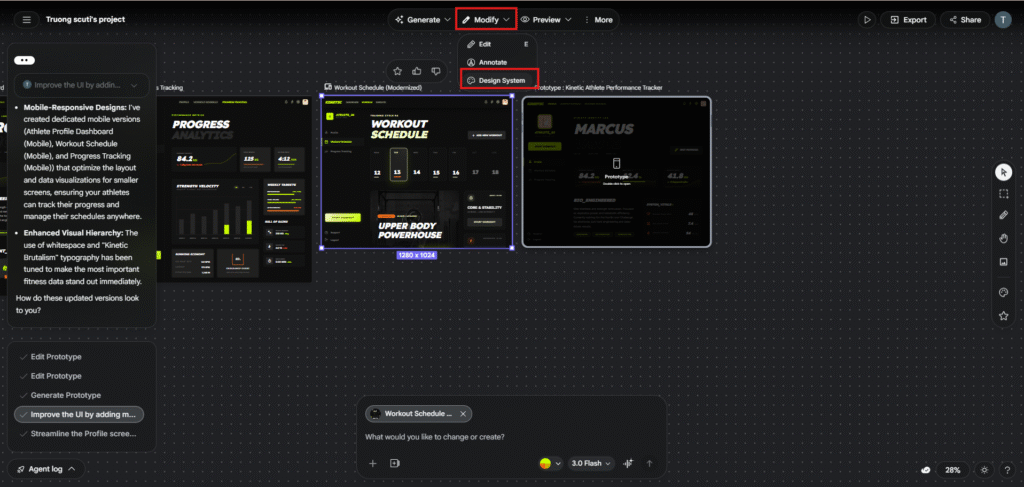
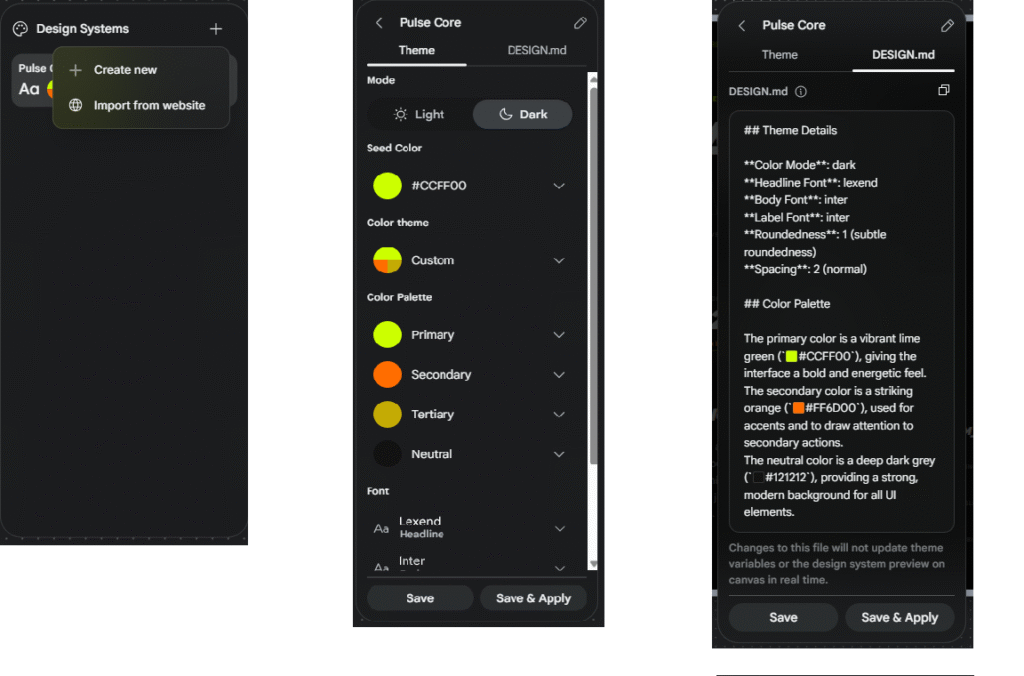
Import from Website This is a very powerful feature in Stitch:
- Allows you to enter the URL of any website → Stitch automatically analyzes it and extracts the key design elements:
- Colors
- Fonts
- Components / basic layout
- Result → generates a reusable Design System immediately
Edit and Apply DESIGN.md
- You can modify colors in the theme or directly in DESIGN.md
- Click Apply → Stitch applies the changes across the entire project
- This DESIGN.md file can be used to create new screens with the same format/style → maintaining consistency throughout the UI
Evaluating the new features of the stick
The new features of Google Stitch represent a significant step forward in UI/UX design:
- Voice Input – designing by voice significantly reduces the time needed to enter commands. You simply speak the prompt, and the UI is generated immediately. This is perfect for quick brainstorming or creating a prototype in just a few minutes.
- Smarter Design Agent – the AI understands the entire project context, preserves the existing layout, and proactively suggests improvements. This saves time refining the UI and reduces errors from manual editing.
- Infinite Canvas – provides an unlimited workspace, managing multiple screens simultaneously. It is very useful for multi-screen apps or complex workflows, making it easier to observe the entire flow.
- Agent Manager + Interactive Prototypes – create multiple versions, link screens, edit using AI, and test interactive flows directly on the canvas. This is an excellent way to validate UX without writing any code.
- DESIGN.md & Figma Export – standardizes design system management and exports fully editable layers to Figma, allowing design and development teams to stay synchronized and maintain consistency.