
1. Executive Summary
Agent Teams is an experimental Claude Code feature that lets you coordinate multiple Claude Code sessions working in parallel as a team. One session acts as the team lead, assigning work and synthesizing results; teammates are independent Claude Code sessions, each with its own context window, able to message each other directly and self-coordinate via a shared task list. Unlike Subagents (which run in the same session and only report back to the main agent), Agent Teams let you interact directly with individual teammates without going through the lead.
Agent Teams work best when parallel exploration adds real value: multi-perspective research/review, new feature development (each teammate owns a piece), debugging with competing hypotheses, or changes spanning frontend, backend, and tests. The feature is disabled by default and has some limitations around session resumption, task coordination, and shutdown.
2. Main Features and Benefits
2.1. Architecture
- Team lead: The main session that creates the team, spawns teammates, and coordinates work.
- Teammates: Independent Claude Code sessions, each working on assigned tasks.
- Task list: Shared list of work items; teammates self-claim or the lead assigns.
- Mailbox: Messaging system between agents.
2.2. Benefits
- Peer-to-peer communication: Teammates message each other directly, not only via the lead.
- Self-coordination: Shared task list; dependencies unblock automatically when dependent tasks complete.
- Direct interaction: You can select a teammate and send commands directly (Shift+Up/Down in in-process mode).
- Plan approval: You can require teammates to submit a plan first; the lead approves before implementation.
- Delegate mode: The lead only coordinates, does not implement, avoiding the lead doing work instead of teammates.
- Display modes: In-process (any terminal) or split panes (tmux / iTerm2) to see multiple teammates’ output at once.
- Hooks: TeammateIdle, TaskCompleted to enforce quality gates (feedback, block completion if criteria not met).
3. Agent Teams vs Subagents
| Aspect | Subagents | Agent Teams |
|---|---|---|
| Context | Own context window; results return to caller | Own context window; fully independent |
| Communication | Reports results back to main agent only | Teammates message each other directly |
| Coordination | Main agent manages all work | Shared task list, self-coordination |
| Best for | Focused tasks where only the result matters | Complex work requiring discussion and collaboration |
| Token cost | Lower: results summarized back to main context | Higher: each teammate is a separate Claude instance |
Use Subagents when you need a quick, focused worker: research a question, verify a claim, review a file. The subagent does the work and returns a summary.
Use Agent Teams when teammates need to share findings, challenge each other, and coordinate on their own. Examples: research with competing hypotheses, parallel code review (security / performance / test coverage), new feature development (each teammate owns a module).
Transition: If you run parallel subagents and hit context limits, or subagents need to communicate with each other, Agent Teams is the logical next step.
4. Setup and How It Works in Your Environment
4.1. Enable Agent Teams
Agent Teams are disabled by default. Enable by setting CLAUDE_CODE_EXPERIMENTAL_AGENT_TEAMS=1:
- settings.json (Claude Code): {“env”: {“CLAUDE_CODE_EXPERIMENTAL_AGENT_TEAMS”: “1”}}
- Shell: export CLAUDE_CODE_EXPERIMENTAL_AGENT_TEAMS=1 (Linux/macOS) or set CLAUDE_CODE_EXPERIMENTAL_AGENT_TEAMS=1 (Windows CMD)
4.2. Run Your First Team
Describe the task and team structure in natural language. Example:
I'm designing an English center management system (courses, students, teachers).
Create an agent team to explore this from different angles: one teammate on UX/user flow,
one on technical architecture, one playing devil's advocate.
Claude creates the team, spawns teammates, and coordinates based on your prompt. The lead displays the teammate list and tasks; use Shift+Up/Down to select a teammate and message directly.
4.3. Display Mode
- In-process: All teammates run in your main terminal. Works in any terminal.
- Split panes: Each teammate gets its own pane. Requires tmux or iTerm2 (it2 CLI). Default “auto”: use split if already in tmux, otherwise in-process.
To force in-process: {“teammateMode”: “in-process”} in settings.json or claude –teammate-mode in-process.
4.4. Team & Task Storage
- Team config: ~/.claude/teams/{team-name}/config.json
- Task list: ~/.claude/tasks/{team-name}/
4.5. Limitations
- No session resumption for in-process teammates with /resume, /rewind.
- Task status can lag; teammates sometimes fail to mark complete, blocking dependent tasks.
- One team per session; must cleanup before starting a new team.
- Teammates cannot spawn teams or other teammates; only the lead manages the team.
- Lead is fixed; cannot promote a teammate to lead.
- Split panes require tmux or iTerm2; not supported in VS Code integrated terminal, Windows Terminal, Ghostty.
5. How to Use in Your Projects
5.1. Good Use Cases
- Parallel code review: 3 reviewers – security, performance, test coverage – each with a different lens, lead synthesizes.
- Debug with competing hypotheses: Multiple teammates investigate different theories, debate to narrow down, find root cause faster.
- New feature / module: Each teammate owns a piece (frontend, backend, tests) to avoid file conflicts.
- Large refactor: Break refactor into independent tasks, each teammate owns a set of files.
5.2. Recommendations
- Start with research/review: If new to Agent Teams, start with PR review, library research, or bug investigation instead of coding. These have clear boundaries and fewer file conflicts.
- Avoid editing the same file: Assign work so each teammate owns a distinct set of files to prevent overwrites.
- Plan approval for risky tasks: For large refactors or auth/DB changes, require teammates to submit a plan first; lead approves before implementation.
- Delegate mode when needed: If the lead tends to implement instead of waiting for teammates, enable delegate mode (Shift+Tab) to force the lead to only coordinate.
- Manage cost: Agent Teams use more tokens than a single session. Use for tasks that truly benefit from parallel exploration; routine tasks are better with a single session or Subagents.
6. Practical guide
The demo illustrates the flow: enable Agent Teams → create team → view task list → select teammate → message directly → shutdown request from team-lead.
Figure 1: Enable Agent Teams
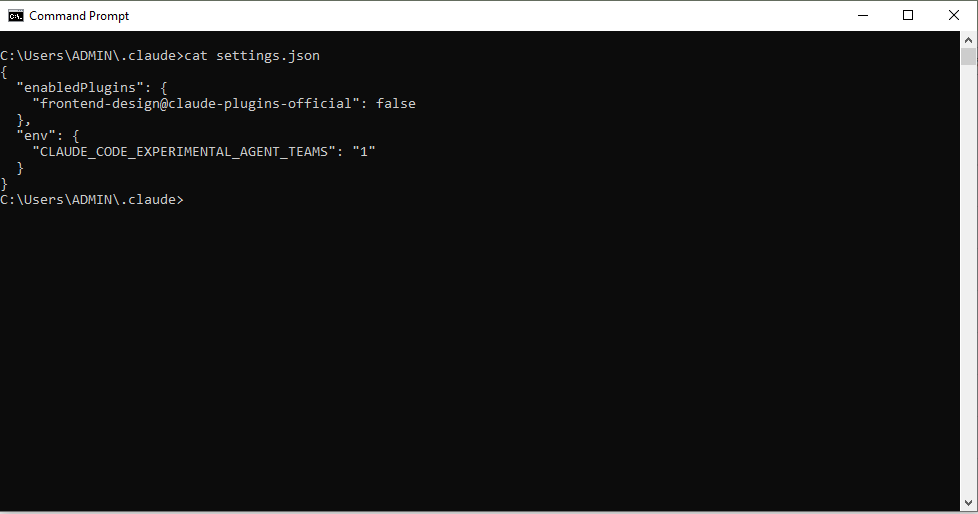
Add CLAUDE_CODE_EXPERIMENTAL_AGENT_TEAMS=1 to settings.json or environment variables.
Figure 2: Start Claude Code
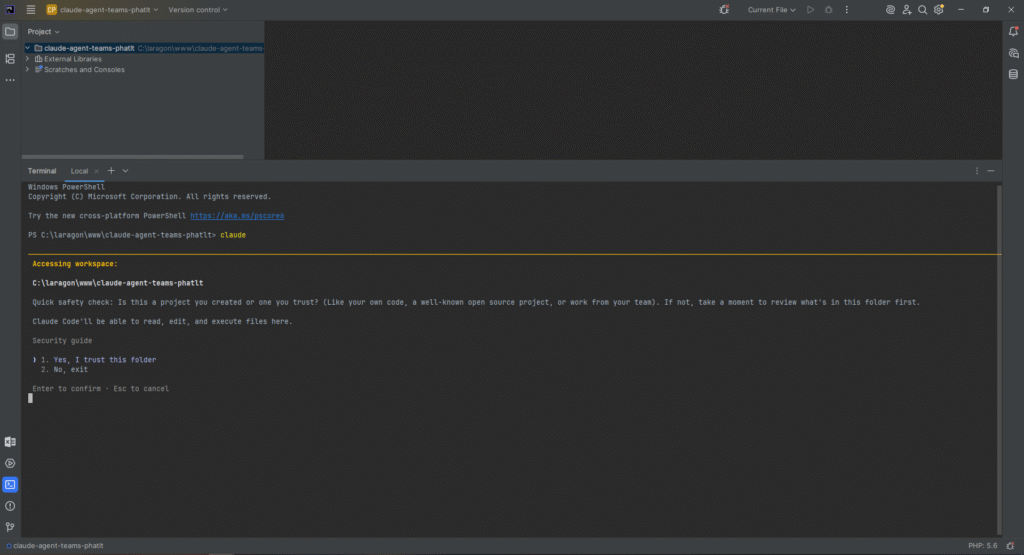
Run Claude Code in the project folder, ready to accept prompts.
Figure 3: Prompt to create agent team
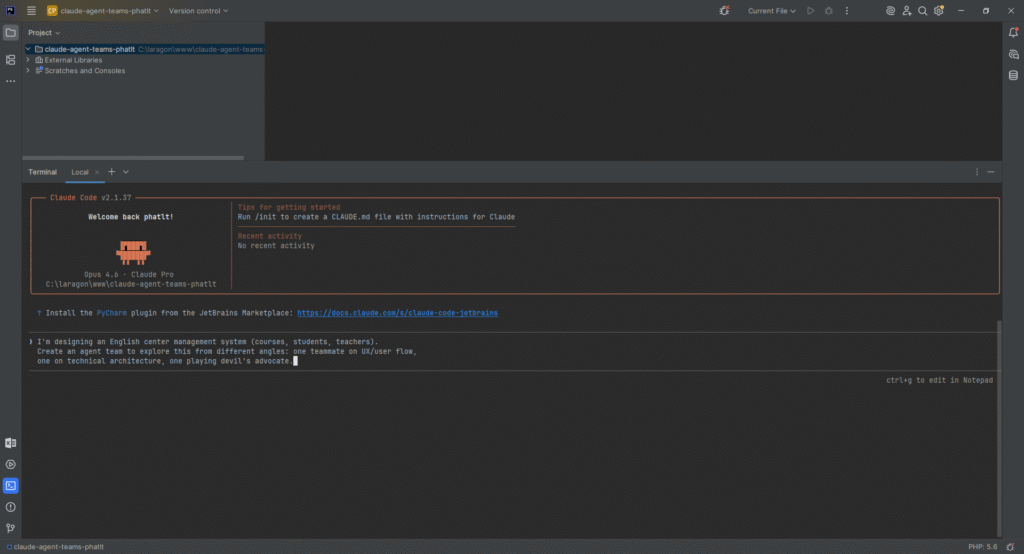
Send a prompt describing the task and team structure (e.g. 3 teammates – UX, architecture, devil’s advocate).
Figure 4: Lead spawns teammates
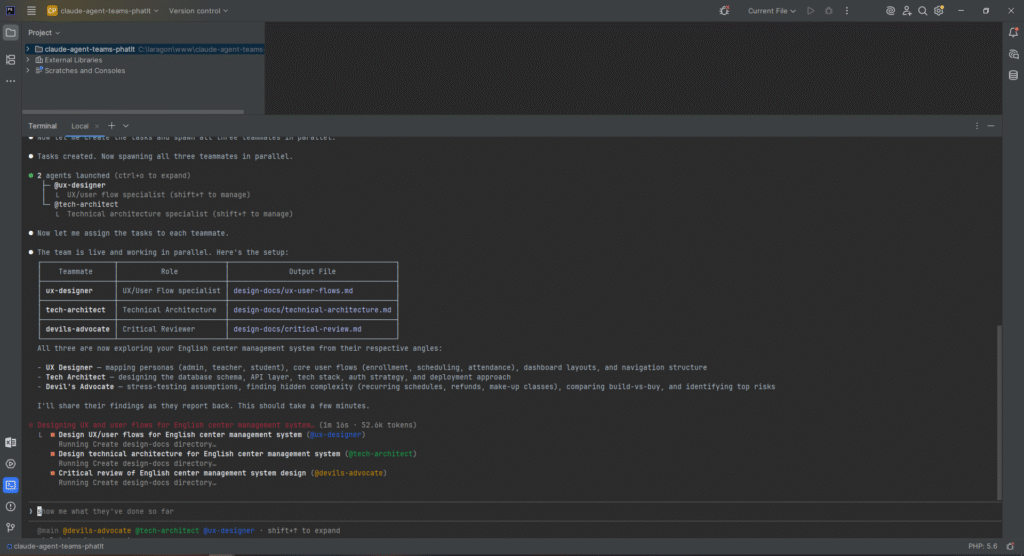
The lead creates the team, spawns teammates, and displays the list.
Figure 5: Task list (Ctrl+T)
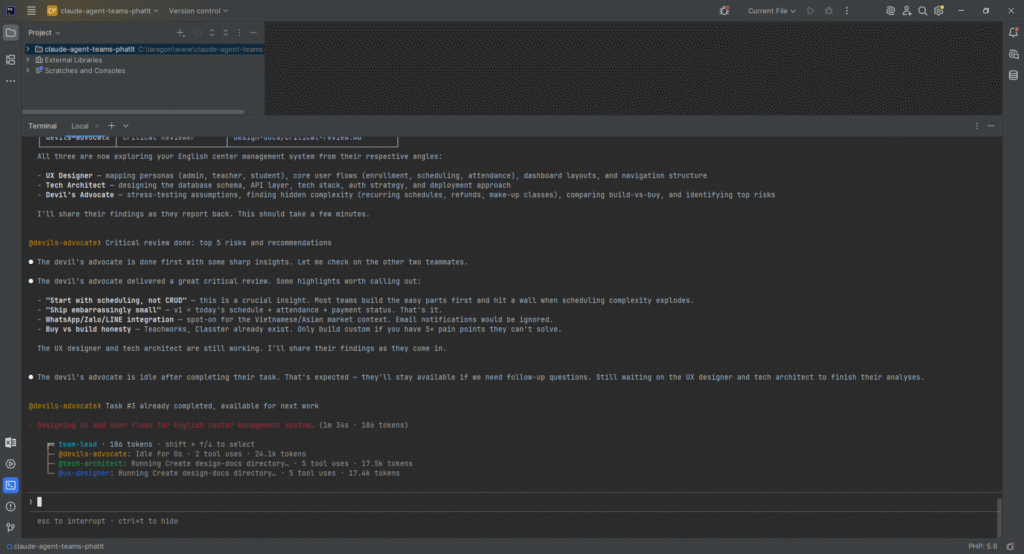
Shared task list coordinates work between teammates.
Figure 6: Select teammate (Shift+Up/Down)
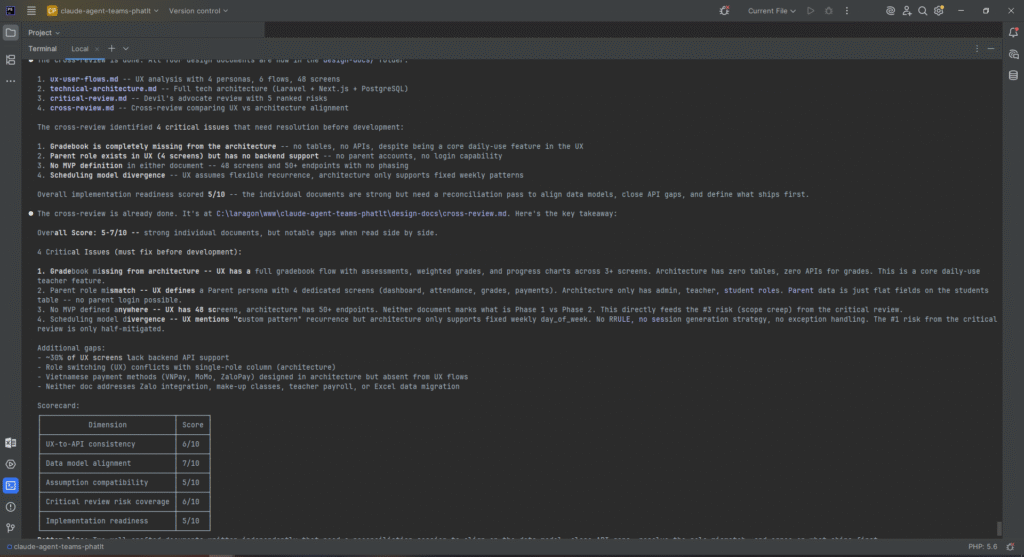
Select a teammate to view and interact directly in in-process mode.
Figure 7: Message teammate directly
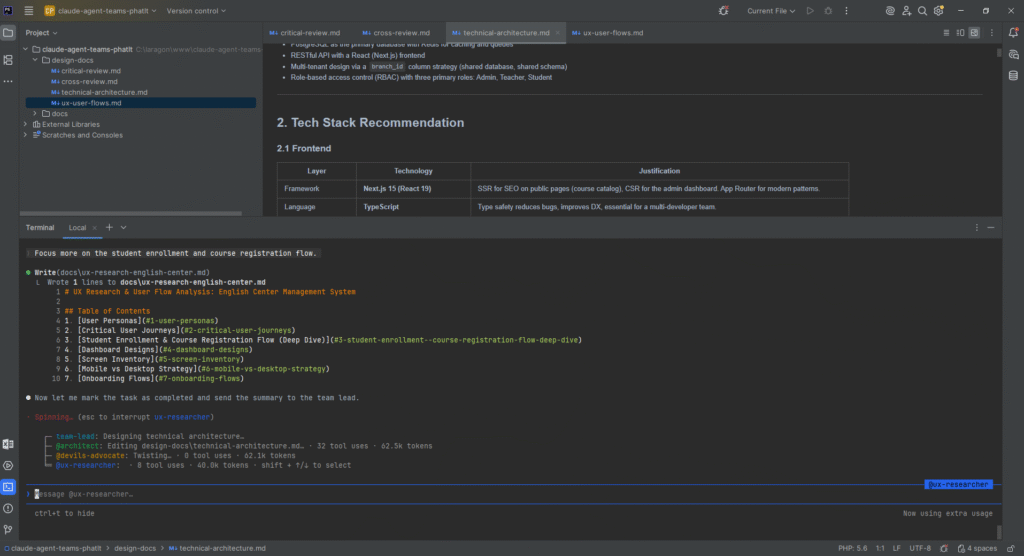
Send a message directly to a teammate without going through the lead.
Figure 8: Shutdown request from team-lead
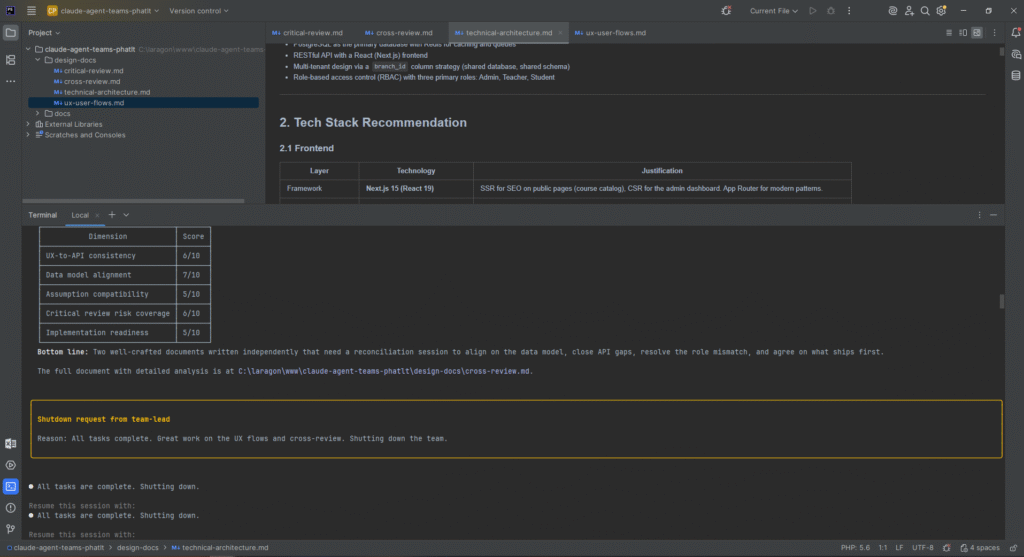
When all tasks complete, the lead sends a shutdown request (e.g. “Shutdown request from team-lead – Reason: All tasks complete…”). Teammates receive the notification and stop.
7. Conclusion
Agent Teams is a powerful feature for coordinating multiple Claude Code sessions in parallel, with a team lead, shared task list, and peer-to-peer communication between teammates. Strengths: ideal for parallel research (multiple perspectives at once), multi-criteria code review (security, performance, test coverage), debugging with competing hypotheses, and new feature development (each teammate owns a module).
Versus Subagents: use Subagents when you need a quick, focused worker that returns a summary; use Agent Teams when teammates need to share findings, challenge each other, and self-coordinate. Token cost is higher but the value is justified for complex problems.
Note: Agent Teams is experimental; you must enable CLAUDE_CODE_EXPERIMENTAL_AGENT_TEAMS=1 and accept limitations (session resumption, task status lag, split panes only supported with tmux/iTerm2 on some OSes). Start with research/review tasks, avoid editing the same files, and monitor progress for best results.
The demo above illustrates the basic flow from enabling the feature → creating a team → viewing the task list → selecting a teammate → messaging directly → shutdown. You can apply this to projects such as English center management, new architecture design, or large PR reviews.